Open Source Alternatives
  • Alternatives
  • Categories
    Categories by size882 projects
    • Developer Tools461
    • AI & Machine Learning404
    • Web Development196
    • Business & Productivity191
    • Communication & Collaboration126
    • Security & Monitoring126
    • IT Management123
    • Product & Project Management106
    • Cloud & Hosting105
    • Data & Analytics104
    Browse all 21 categoriesLLMOps & AI Tooling, Design & Creative and 9 more
  • Blog
  • Advertise
SearchNotion, Slack, password manager.../
Submit
Open Source Alternatives
  • Alternatives
    • Developer Tools461
    • AI & Machine Learning404
    • Web Development196
    • Business & Productivity191
    • Communication & Collaboration126
    • Security & Monitoring126
    • Browse all 21 categories
  • Blog
  • Advertise
Submit your project

New open source projects by email

The projects we add and every new guide. Free, unsubscribe any time.

Open Source Alternatives LogoOpen Source Alternatives

Handpicked Open Source Alternatives to Paid Softwares

Product

  • Categories
  • Tag
  • Advertise

Resources

  • Blog
  • Collection
  • Submit

Company

  • Privacy Policy
  • Terms of Service
  • Refund Policy
  • Sitemap

Alternatives

  • Claude Code
  • Jira
  • Notion
  • Slack
  • Linear
  • Wispr Flow
  • All alternatives
© 2026 Open Source Alternatives. All rights reserved.
Open SourceAlternatives
Home/Categories/Security & Monitoring/Statlite
icon of Statlite

Statlite

  • 177 stars
  • MIT
  • Active this week
  • Last commit 1 day ago

Last verified Oct 22, 2026

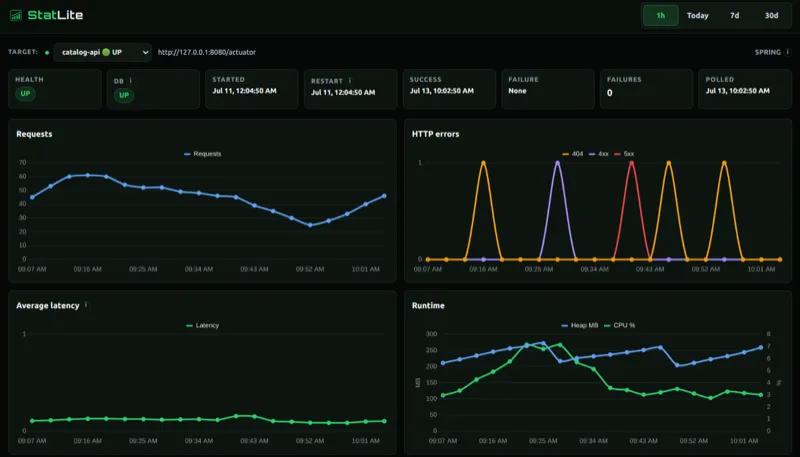
Monitor Spring Boot, Quarkus, and Micronaut apps from a self-hosted Go binary with SQLite history and built-in charts, no Prometheus stack needed.

Visit websiteGitHub177 starsDeploy on Hostinger
image of Statlite
TL;DR

Statlite is a self-hosted monitoring dashboard for Spring Boot, Quarkus, and Micronaut applications, designed for small VPS deployments where a full Prometheus and Grafana stack is more than needed. It runs as a single Go binary under 15 MiB idle, stores metric history in a local SQLite file, and serves a dashboard at port 9090 with no external service required. MIT licensed and free to self-host, it suits solo developers and small teams who already have Actuator or Micrometer metrics available and want application and host metrics visibility without the operational overhead of a full observability stack.

Read the full breakdownHide the full breakdownWho it is for, how it works, trade-offs, the quick start and the FAQ
who it's for

Who Statlite is for#

Solo developers monitoring a Spring Boot service on a VPS

A single developer running one or two Spring Boot services on a 1 GB VPS gets health, traffic, latency, and JVM charts without deploying additional infrastructure. The `inspect --create-config` command detects Actuator endpoints and writes the configuration file automatically.

Skip if:

If your Spring Boot application needs distributed tracing, log aggregation, or alerting to an on-call system, StatLite does not cover those needs.

Small teams running Quarkus or Micronaut services

Teams using Quarkus or Micronaut Micrometer get a focused application dashboard without adding Prometheus and Grafana to their infrastructure. Historical charts for request traffic, latency, CPU, and heap are available from existing endpoint configuration with no additional scrape setup.

Skip if:

Teams running more than a handful of services or requiring per-service alerting will find StatLite's fixed scope too narrow.

Developers adding observability to FastAPI, Express, or Django apps

FastAPI, Express, Django, Go net/http, and Gin applications can expose the StatLite Metrics v1 endpoint using the provided integration guides. StatLite then polls and charts those metrics alongside any JVM targets in the same dashboard with a single binary and configuration file.

Skip if:

If you need arbitrary custom metrics beyond the fixed StatLite Metrics v1 schema, a Prometheus-based setup is more appropriate.

Teams monitoring server resource headroom before scaling

StatLite's self-monitoring target collects CPU, memory, and filesystem capacity from the server it runs on. Teams on a tight VPS allocation can watch whether the host is approaching resource limits before the application is affected, without deploying a separate infrastructure monitoring agent.

Skip if:

If you need multi-server infrastructure monitoring or host metrics across many machines, a dedicated infrastructure monitoring tool is more appropriate.

the problem

The problem it solves#

Spring Boot Actuator and Micrometer expose detailed operational data through HTTP endpoints, but raw metric endpoints are not a usable monitoring dashboard. The conventional path is to deploy Prometheus to scrape those endpoints and Grafana to display them, adding two additional services, a time-series database schema, scrape configuration, and ongoing infrastructure maintenance just to answer whether an application is healthy and how much traffic it is handling.

For developers running one or two services on a 512 MB or 1 GB VPS, that stack is disproportionate to the problem. The alternative of paying for a commercial monitoring service adds per-host subscription costs to a project that may handle modest traffic and has no need for fleet-scale alerting, distributed tracing, or log aggregation.

how Statlite solves it

How it solves it#

Spring Boot Actuator Integration

StatLite polls Spring Boot Actuator endpoints for health, traffic, latency, JVM metrics, CPU, and memory without application code changes. The `inspect` command auto-detects available endpoints and writes a target configuration file from a running application's URL, selecting a compatible Micrometer Prometheus endpoint or Actuator JSON automatically.

SQLite-Backed Metric History

All metrics are stored in a local SQLite file on the same server. The dashboard renders historical charts for traffic, latency, CPU, memory, and restart events without any external time-series database. Metric history stays on your own server with no data sent to a third-party service.

Quarkus and Micronaut Support

StatLite collects request, latency, CPU, heap, process, and restart metrics from Quarkus Micrometer and Micronaut Micrometer endpoints natively. SmallRye Health and management health are optional capabilities when the application publishes them. Neither framework requires application code changes beyond standard metrics configuration.

Single Go Binary

StatLite ships as one statically compiled Go binary under 15 MiB idle. There is no JVM runtime, no external database server, and no secondary process to manage. A single YAML configuration file defines the server listen address, SQLite path, polling interval, and one or more application targets.

StatLite Metrics v1 for Non-JVM Frameworks

Applications in any language can expose a fixed JSON endpoint that StatLite polls. Integration guides are provided for FastAPI, Express, Django, Go net/http, and Gin using copyable helpers that add no third-party dependencies to the application. Those helpers make no outbound requests and send no telemetry to PVR Labs.

Host Metrics via Self-Monitoring

StatLite can report its own host's CPU, memory, and filesystem capacity. Spring targets optionally collect host metrics for a remote application's server environment. A dedicated `statlite-self` target provides visibility into the server where StatLite runs alongside application-level metrics.

strengths · trade-offs

Strengths and trade-offs#

Strengths

  • No External Infrastructure RequiredStatLite bundles its own history store and chart rendering. A complete monitoring setup needs only one binary and one YAML configuration file. The Prometheus and Grafana approach adds two additional services, a time-series database, and scrape configuration that StatLite handles internally with its SQLite store and built-in dashboard.
  • MIT License, No Per-Host FeesStatLite is MIT licensed and free to run on any server. There are no subscription tiers, no per-host charges, and no usage limits. Commercial monitoring services like Datadog and New Relic charge monthly per monitored host regardless of traffic volume; StatLite charges nothing beyond the server time the binary uses.
  • Built for Resource-Constrained ServersThe binary uses about 15 MiB idle. Low memory, CPU, disk, and operational overhead are documented product constraints, not afterthoughts. The project includes published benchmarks comparing StatLite alongside Spring Boot and Quarkus targets on 512 MB and 1 GB VMs.
  • Zero Code Changes for JVM FrameworksSpring Boot, Quarkus, and Micronaut applications need no source code modifications. StatLite works directly against existing Actuator and Micrometer endpoints. The `inspect` command generates a working target configuration from a running application's URL in one step, writing a YAML file only when the path does not already exist.

Trade-offs

  • -No Built-In AuthenticationStatLite has no built-in dashboard or API authentication. The README explicitly flags this and recommends running it on a private or protected network, not exposed to the public internet. Remote access requires a reverse proxy that handles authentication or SSH tunneling; there is no configuration option for adding a login.
  • -Scoped to Small Deployments OnlyStatLite is designed for one to a few services on a small server. The README names its non-targets explicitly: large fleets, Kubernetes-first infrastructure, arbitrary metrics and dashboards, logs, traces, distributed storage, and complex alerting. Teams whose needs grow beyond a handful of services will migrate to a broader observability tool.
  • -Fixed Metric Schema, No Arbitrary Custom MetricsStatLite collects a predefined set of application and host metrics. Unlike Prometheus, which accepts arbitrary metric exposition, the dashboard only shows the concepts its integration targets support. Non-JVM applications can add the StatLite Metrics v1 endpoint, but that endpoint only carries the fixed v1 schema.
versus alternatives

Statlite vs alternatives#

StatLite vs Datadog

Datadog and StatLite both collect application health, traffic, latency, and host metrics for JVM services. The key difference is deployment model and scale target. Datadog is a commercial SaaS platform designed for multi-service fleet monitoring across large teams; StatLite is a self-hosted binary for one to a few services on a small server.

FeatureStatLiteDatadog
LicenseMITProprietary
DeploymentSelf-hosted binaryManaged SaaS + agent
PricingFreePer-host per month
Metric storageLocal SQLiteDatadog cloud
Spring Boot supportVia Actuator endpointsVia APM agent
AuthenticationNone built-inFull IAM and RBAC

StatLite is the better choice when you need health, traffic, and JVM metrics visible on a small VPS with no per-host subscription and no data leaving your server. Datadog is appropriate when you need fleet-scale monitoring, log aggregation, distributed tracing, alerting pipelines, or cross-team dashboards that StatLite does not cover.

StatLite vs New Relic

New Relic offers a similarly broad feature set with a free tier, but it is a managed SaaS platform with a proprietary agent. All metric data is sent to New Relic's cloud infrastructure, which is a privacy consideration for applications handling sensitive traffic.

FeatureStatLiteNew Relic
LicenseMITProprietary
DeploymentSelf-hosted binaryManaged SaaS + agent
Data residencyLocal serverNew Relic cloud
PricingFreeFree tier, then per-ingest
Spring Boot supportVia Actuator endpointsVia APM agent

For developers who want all metric history on their own server without a SaaS account, StatLite is the practical choice. New Relic's free tier is worth considering when you need distributed traces, error analytics, or browser monitoring that fall outside StatLite's intentional scope.

install · quick start

Quick start#

bash
Install StatLite with the install script, Homebrew, or Docker.
```bash
curl -fsSL https://raw.githubusercontent.com/PVRLabs/statlite/main/install.sh | sh
brew install pvrlabs/tap/statlite
docker run --rm -p 127.0.0.1:9090:9090 docker.io/pvrlabs/statlite:latest
```
tech stack · detected from GitHub

What it's built on#

Languages
GoJavaScriptPython
Frameworks
DjangoExpressFastAPI
Databases
SQLite
frequently asked

FAQ#

Does StatLite require Prometheus or Grafana to run?

No. StatLite stores all metric history in a local SQLite file and renders its own dashboard. Prometheus and Grafana are not required and are not dependencies. If you already run a Prometheus and Grafana stack, you do not need StatLite alongside it.

Does StatLite support Quarkus and Micronaut, or only Spring Boot?

StatLite natively supports Spring Boot Actuator, Quarkus Micrometer, and Micronaut Micrometer with no application code changes required beyond standard metrics configuration. Applications in other languages and frameworks, including FastAPI, Express, Django, and Go, can add support through the StatLite Metrics v1 endpoint using the provided integration guides.

Is there built-in authentication for the StatLite dashboard?

No. StatLite has no built-in dashboard or API authentication. The project documentation recommends running it on a private or protected network only. Remote access should go through a reverse proxy that handles authentication, or via SSH port forwarding. The README flags this explicitly under server and access guidance.

What is the minimum server size StatLite can run on?

StatLite uses about 15 MiB idle and is built for resource-constrained servers. The project documentation includes benchmarks comparing StatLite running alongside Spring Boot and Quarkus targets on a 512 MB VM. Low memory, CPU, disk, and operational overhead are documented product constraints.

Is StatLite suitable for monitoring a large number of services?

StatLite is intentionally designed for one to a few services on a small server. The README explicitly lists large fleets, Kubernetes-first infrastructure, distributed storage, logs, traces, and complex alerting as scenarios StatLite is not built for. For those cases, a broader observability tool such as Prometheus with Grafana, or a commercial platform, is the appropriate choice.

also worth a look

Similar open-source tools#

Oxynote

Alternative toNotion

Technical wiki with live metrics, draft reviews, and real-time editing

  • 244 GitHub stars
  • Apache-2.0Licence Apache-2.0

Bifrost

Alternative toPortkey

Open-source AI gateway with 23+ providers, failover, and MCP support.

  • 8,975 GitHub stars
  • Apache-2.0Licence Apache-2.0

Keda

Alternative toKedify

Event-driven Kubernetes autoscaling with 70+ scalers and scale to zero

  • 10,646 GitHub stars
  • Apache-2.0Licence Apache-2.0

ship-safe

Alternative toSnyk

Security scanner for AI agents, MCP servers, and LLM codebases.

  • 861 GitHub stars
  • MITLicence MIT

Sentry

Alternative toRollbar

Real-time error tracking with performance monitoring and traces

  • 2,216 GitHub stars
  • MITLicence MIT

ProjectDiscovery

Alternative toQualys

Open source security tools for finding vulnerabilities at scale

  • 32,167 GitHub stars
  • MITLicence MIT
by category

Open source tools in these categories#

126

Security & Monitoring

REA (Reverse Engineer Anything), RustDesk, Uptime Kuma
87

DevOps & CI/CD

Nvm, Uptime Kuma, Netdata
462

Developer Tools

superpowers, REA (Reverse Engineer Anything), Skills for Real Engineers
Hostinger

Run Statlite on your own server

Self-host Statlite on a Hostinger VPS.

Deploy on Hostinger

Featured

rakazo

Alternative toGrok Bot

AI teammates you own: your keys, your model, your machine.

  • 4,904 GitHub stars
  • Apache-2.0Licence Apache-2.0
  • #AI Agents

Inbox Zero

Alternative toSuperhuman

AI email assistant that drafts replies and clears your inbox

  • 12,712 GitHub stars
  • AGPL-3.0Licence AGPL-3.0
  • #Email

Omnara

Alternative toCClaude Managed Agents

Open-source agent deployment API. Self-host or use Omnara Cloud.

  • 2,957 GitHub stars
  • Apache-2.0Licence Apache-2.0
  • #AI Agents
Feature your project

New open source projects by email

The projects we add and every new guide. Free, unsubscribe any time.

Find open source alternatives to paid software

/
  • Claude Code to OpenCode
  • Jira to Windshift
  • Notion to AppFlowy
  • Slack to Mattermost
  • Linear to GitLab
  • Wispr Flow to Handy
  • CapCut to Concat
  • Grok Bot to rakazo
  • Superhuman to Inbox Zero
  • Airtable to AITable
  • Muse to OpenClaw
  • GitHub Copilot to Cline
  • Datadog to Netdata
  • Microsoft Teams to Rocket.Chat
  • Pinecone to Qdrant
  • Zapier to n8n
  • Devin AI to OpenHands
  • Firebase to Supabase
  • 1Password to KeePassXC
  • Confluence to Docmost
  • Contentful to Strapi
  • Adobe Premiere Pro to Shotcut
  • ChatGPT to AnythingLLM
  • LangSmith to Langfuse
  • Claude Code to OpenCode
  • Jira to Windshift
  • Notion to AppFlowy
  • Slack to Mattermost
  • Linear to GitLab
  • Wispr Flow to Handy
  • CapCut to Concat
  • Grok Bot to rakazo
  • Superhuman to Inbox Zero
  • Airtable to AITable
  • Muse to OpenClaw
  • GitHub Copilot to Cline
  • Datadog to Netdata
  • Microsoft Teams to Rocket.Chat
  • Pinecone to Qdrant
  • Zapier to n8n
  • Devin AI to OpenHands
  • Firebase to Supabase
  • 1Password to KeePassXC
  • Confluence to Docmost
  • Contentful to Strapi
  • Adobe Premiere Pro to Shotcut
  • ChatGPT to AnythingLLM
  • LangSmith to Langfuse