Open-source alternatives guide
Best Open Source CapCut Alternatives
By SurajReviewed Verified
The best open source alternative to CapCut is Concat because it covers what CapCut moved behind Pro, with auto-captions, background removal, and text-to-speech all running locally on your own hardware under AGPL-3.0, and I think it is the pick for most people leaving. Android builds are available. These open source CapCut alternatives range from a browser-first editor that matches CapCut's feel to desktop timeline editors with built-in caption tools. The reasons people leave come down to AI features locked behind Pro and data collected before you choose to save or publish.
The 5 tools below are ranked by fit for the reader leaving CapCut, not by plan tier. The first question is what you need the replacement to do: cover the AI features locally on Android, match CapCut's feel in a browser, or handle a desktop timeline with captions.
TL;DR
- Concat: auto-captions, text-to-speech, background removal, and Android support, all running locally under AGPL-3.0, with no watermark and no account required
- OpenCut: a free and open source video editor for web, desktop, and mobile, MIT-licensed, for anyone leaving CapCut who wants a familiar feel and a browser-first workflow
- Shotcut: a free, open source, cross-platform desktop editor for Windows, Mac, and Linux, GPLv3, with built-in speech-to-subtitle conversion
Overview
What CapCut is and what it costs
CapCut is an all-in-one video editor developed by ByteDance, first introduced as JianYing in 2019 and later rebranded for global users. It runs on mobile, desktop, and web, and has been downloaded more than 1 billion times.
The free version includes basic editing tools: cutting, trimming, merging, and splitting, plus filters, transitions, effects, text, stickers, and basic audio editing. CapCut's documented features also include trimming, splitting, speed adjustment from 0.1x to 100x, keyframe animation, chroma key, multi-track timeline, and video stabilization, as well as AI-powered tools including auto captions, text-to-speech in multiple languages, and background removal.
What the free version no longer includes is cloud storage. CapCut discontinued free cloud storage as of August 2024; saving or backing up projects online now requires a paid plan. The free version also has limited access to premium templates, advanced effects, fonts, music tracks, and advanced AI tools including motion tracking and auto caption generation, which are exclusive to Pro users.
On the App Store, CapCut's Standard Monthly Subscription costs $9.99 per month. The Pro Monthly Subscription costs $19.99 per month. The Yearly Subscription costs $89.99 per year on the App Store, and CapCut's own pricing page lists the Pro yearly plan at $179.99 per year.
A team plan starts at approximately $24.99 per month. Prices vary by region, platform, taxes, and promotional discounts.
CapCut Pro unlocks advanced text templates, video effects, body effects, and filters. Two of CapCut's own pages give different Pro cloud storage figures: one states approximately 1024 GB and another states 100 GB; check CapCut's current help page to confirm which applies to the plan you are considering. Cancellations take effect from the following month, not the current one.
Pain points
Why people leave CapCut
The practical reasons teams compare CapCut with open-source alternatives before they migrate.
First, features have moved to Pro. The free version's limited access to advanced AI tools, including the auto caption generator and motion tracking, pushes creators who relied on those tools toward a paid plan or an alternative. A reader on the App Store put it directly: "STOP MAKING EVERYTHING PRO" and named smooth slow-motion as the feature that moved behind the paywall (App Store, Pizza4U&Me, 09/04/2024).
Second, CapCut's privacy policy documents that it may collect user content including photos, images, audio recordings, and videos, including content captured before a user chooses to save or publish. It also states that it shares user data with corporate group affiliates and may share data for cross-context behavioral advertising, though it says it does not sell personal information for money. CapCut is operated in the US by TikTok USDS Joint Venture LLC.
At a glance
Quick comparison
| Name | License | Best For |
|---|---|---|
| Concat | AGPL-3.0 | Local background removal, auto-captions, and Android support |
| OpenCut | MIT | The browser-and-desktop pick for CapCut's familiar feel |
| Shotcut | GPL-3.0 | Desktop timeline editor with built-in Whisper captions |
| Kdenlive | GPL-3.0 | KDE editor with 2 speech-to-text engine options and colour grading |
| OpenShot | GPL-3.0 | Beginner-friendly desktop editor with no watermark |
License
Proprietary (ByteDance)
AGPL-3.0 (Concat), MIT (OpenCut), GPL-3.0 (Shotcut), GPL-3.0 (Kdenlive), GPL-3.0 (OpenShot)
Runs on
iOS, Android, Windows, macOS, Web
Concat: macOS, Windows, Linux, Android; OpenCut: web today (the classic editor); Shotcut, Kdenlive, OpenShot: desktop
Auto-captions
Cloud-processed, Pro for advanced features
Concat: local Whisper; Shotcut: speech-to-subtitle; Kdenlive: VOSK or Whisper; OpenCut: auto-transcription; OpenShot: not listed in its feature list
Price
Free tier limited; Pro $19.99/month
All 5 are free with no paid plan
Data privacy
May collect content before save or publish
Concat and OpenCut state that editing and processing stay on your device; check each desktop editor's privacy page before you rely on it
Editorial ranking
5 Best Open Source CapCut Alternatives (Ranked)

- 9.4K stars
- AGPL-3.0
- Active this week
- Last commit 3 days ago
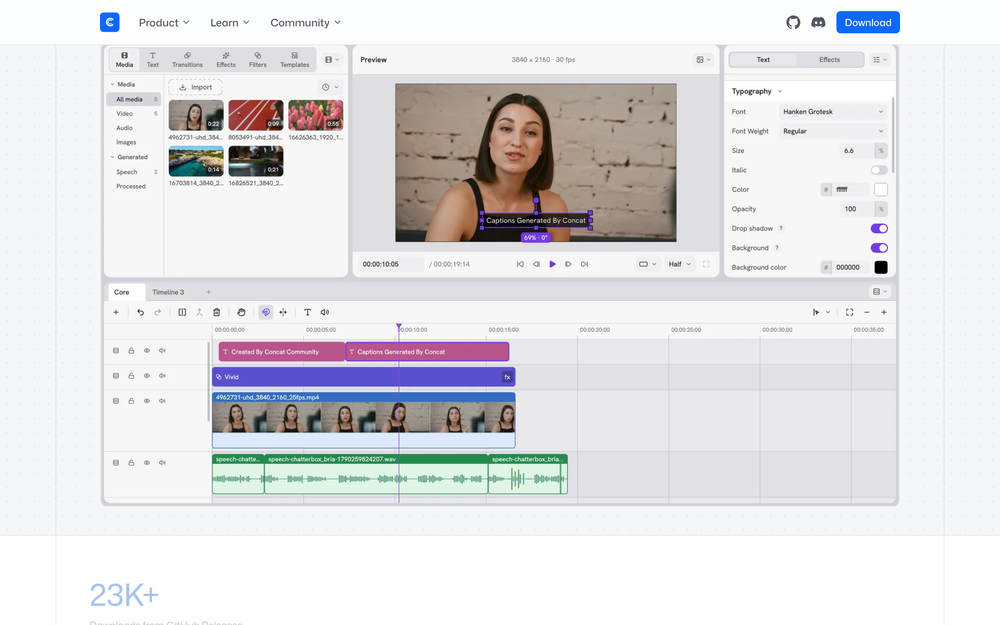
Auto-captions, text-to-speech, background removal, keyframe animation, effects and titles, multi-track cutting, and 4K export: Concat covers what people actually open CapCut for, with everything running locally on a native Rust engine and footage never leaving the user's disk. It is the pick for creators who need AI features running on their own hardware with no upload. Android builds are available, and the same project files work across macOS, Windows, Linux, and Android.
Read moreShow lessKey Features · Pros · Cons · License & Hosting · Best For
Key Features
- Auto-captions via local Whisper transcription with captions placed and styled directly on the timeline
- Text-to-speech and voice cloning with free local voices or any voice from a few seconds of a recording
- Background removal running offline after a one-time model download from Settings
- 170+ effects, filters, transitions, and text animations, GPU-rendered and live in the preview
- Keyframe animation for position, scale, rotation, opacity, volume, and effect parameters with a curve editor built in
- Export in H.264, HEVC, and AV1 up to 4K 60fps with 10-bit color; also scriptable via JSON-RPC, gRPC, and MCP API plus a CLI
Pros
- No watermark, no account requirement, no subscription, and no upload; the AI models download once and run offline after that
- Android builds are available; iOS and iPadOS are supported via sideloading in beta, not on the App Store
- Installing every optional model comes to about 3.4 GB total; 500 MB covers the app and the smallest caption model, so the minimum footprint is low
- Runs on any 64-bit processor from 2013 or later with 4 GB of RAM and 500 MB of storage; no GPU required at minimum spec
Cons
- AGPL-3.0-or-later brings copyleft obligations for any product built on Concat's engine; a plugin exception covers independent API modules, and a commercial license is available via the licence page in the repository
- iOS and iPadOS support is sideload-only beta, not an App Store release
- The highest-quality voice model is slower and larger; lighter voice options are available with different quality tradeoffs
License & Hosting
- License: AGPL-3.0-or-later with a plugin exception for independent API modules; commercial licensing available via Concat's licence page
- Where it runs: macOS, Windows, Linux, and Android; footage and AI models stay on the user's machine; iOS and iPadOS via sideloading (beta)
- Setup: download from GitHub Releases or the Concat home page; Linux packages as AppImage, .deb, .rpm for x86_64 and ARM64, plus an Arch package; same project files across all platforms
- Costs: nothing; no paid plan; optional model downloads are free and run offline
Best For
I'd pick Concat for anyone who needs auto-captions, background removal, or text-to-speech locally on Android, and for whom the AGPL license is not a problem. Check the AGPL terms before embedding Concat in a commercial product; if that is your situation, contact the address on the licence page for a commercial license. Skip Concat and use OpenCut if you want the most permissive license for commercial embedding without that step.

- 95.4K stars
- MIT
- Active this month
- Last commit 28 days ago
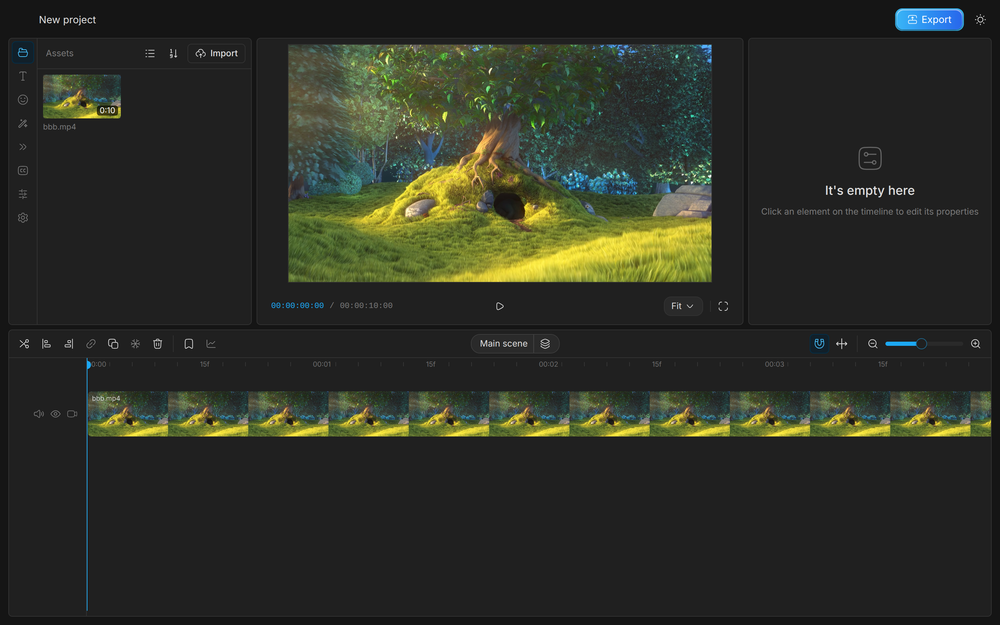
OpenCut is a free and open source video editor for web, desktop, and mobile under an MIT License. The classic codebase was archived on May 17, 2026, and the rewrite is in progress but not yet released; what runs at opencut.app today is the classic version. The MIT license and no-account design make it the easiest to recommend for individual and commercial use.
Read moreShow lessKey Features · Pros · Cons · License & Hosting · Best For
Key Features
- Simple but powerful video editor that works on any platform, with support for custom canvas sizes, over 1,000 fonts, and masks added in version 0.3.0 (released 2026-04-15)
- Auto-transcription with the option to import transcript files to generate captions instead of running auto-transcription
- Keyframe animation with a graph editor for bezier curves and copy-paste between elements
- Speed controls, volume controls, preview zoom, canvas backgrounds, and stickers
- The rewrite plans to add a Rust core for desktop, mobile, and browser from one codebase, an Editor API, first-class plugins, an MCP server for AI agents, headless mode, and a scripting tab
Pros
- MIT License permits commercial use, modification, distribution, and private use with no liability or warranty; the most permissive licence on this list
- Over 1,000 fonts and custom canvas sizes mean less friction on layout work that CapCut handles with templates
- The classic codebase's sponsors include Vercel and fal.ai; the rewrite README names fal.ai
Cons
- The classic codebase is archived and no longer maintained; the rewrite is not yet accepting outside contributions while the architecture is being designed
- The rewrite's planned features (Rust core, plugin API, MCP server) are not yet shipped
- The classic codebase requires Bun to run locally, with Docker and Docker Compose optional but recommended for the local database and Redis; this is more setup than opening a browser tab
License & Hosting
- License: MIT License; commercial use, modification, and distribution are all permitted with no restrictions beyond attribution
- Where it runs: web, desktop, and mobile; the rewrite targets all 3 from one codebase; the classic version's local setup uses Docker and Docker Compose, which are optional, for the local database and Redis
- Setup: open opencut.app in a browser; the classic codebase requires Bun to build locally, with Docker and Docker Compose optional for the local database and Redis
- Costs: nothing; no paid plan
Best For
I'd start here for anyone leaving CapCut who wants a familiar feel and is comfortable with a tool whose full rewrite is still in progress. The MIT license makes it the easiest to recommend for individual and commercial use alike. If you need background removal, text-to-speech, or Android editing, check Concat's feature set to see whether it covers what you need.

- 15.5K stars
- GPL-3.0
- Active this week
- Last commit 1 day ago
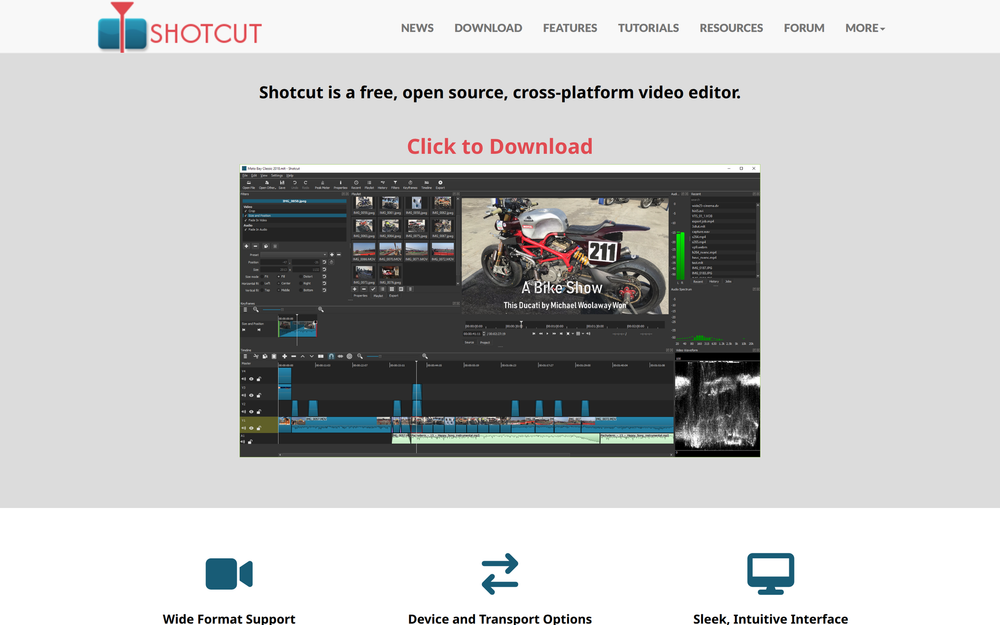
Speech-to-subtitle conversion is built into Shotcut, which means creators leaving CapCut for a desktop timeline do not need a separate caption tool. It is free, open source, and cross-platform for Windows, Mac, and Linux, distributed under GPL-3.0, with copyright and trademark held by Meltytech, LLC and Dan Dennedy as lead developer. Shotcut's 25.07 release note added a Whisper.cpp model downloader to the Speech to Text dialog. It supports hundreds of audio and video formats via FFmpeg with no import required, native timeline editing, and built-in speech-to-subtitle conversion.
Read moreShow lessKey Features · Pros · Cons · License & Hosting · Best For
Key Features
- Speech-to-subtitle conversion built in
- Multitrack timeline with thumbnails, waveforms, keyframes for filter parameters, and easing functions for keyframes
- Resolutions up to 4K and 8K, HDR10 (PQ) and HLG HDR, tone mapping from HDR to SDR, and 10-bit video end-to-end
- Object motion tracking, speed ramping for audio and video clips, and time remapping
- Hardware acceleration for encoding and decoding, plus low-resolution proxy editing to improve speed of seeking and reduce scaling demands
- Runs as a portable app from an external drive with no install required; new versions released approximately every 2 months
Pros
- GPL-3.0 and free with no paid tier; the current version is 26.9.27
- No import step required; native timeline editing with hundreds of FFmpeg-supported formats means footage drops straight in
- Available on Linux as a portable tar, AppImage, or snap; genuinely portable without a full install
Cons
- The UI takes more learning than CapCut's; the layout is a traditional desktop NLE, not a mobile-first card editor
- Desktop only; no mobile builds listed on the Shotcut download page
- The key dependencies include MLT, Qt 6 (6.4 minimum), FFmpeg, Frei0r, and SDL; building from source requires these
License & Hosting
- License: GPL-3.0; source is fully open, modify and redistribute with the same license
- Where it runs: desktop on Windows, Mac, and Linux; can run from an external drive with no install
- Setup: download the portable tar or AppImage from the Shotcut site; Linux snap available via
snap install shotcut --classic; key dependencies include MLT, Qt 6 (6.4 minimum), FFmpeg, Frei0r, and SDL - Costs: nothing; no paid plan
Best For
I'd choose Shotcut when you want a capable desktop timeline editor with captions built in and are comfortable learning a traditional desktop timeline interface. Skip Shotcut and use Concat if you edit on Android or need background removal.

- 5.9K stars
- GPL-3.0
- Active this week
- Last commit 1 day ago
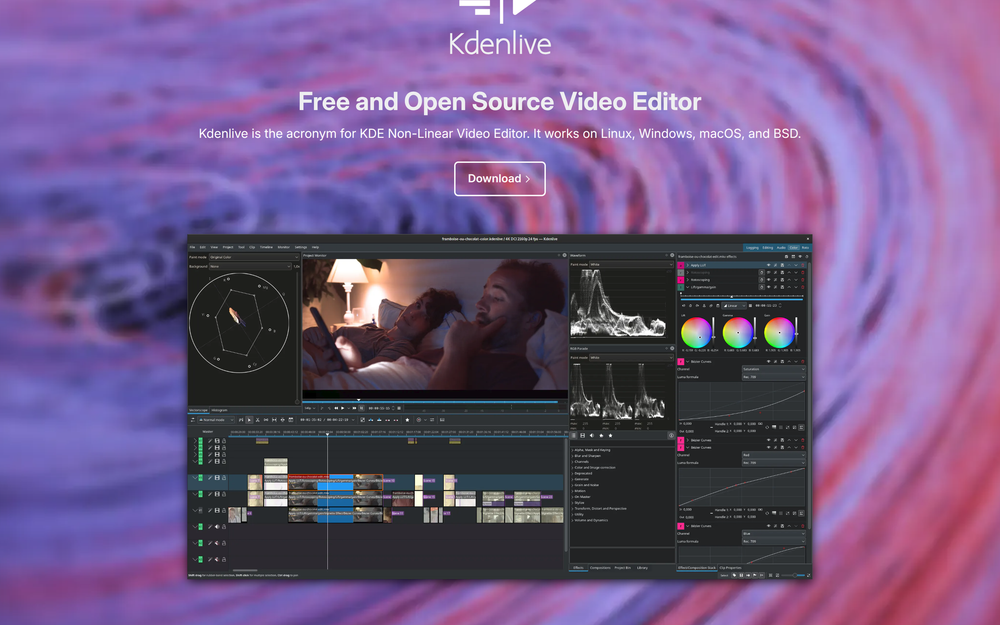
Kdenlive is a free and open source video editor from the KDE Community, developed by a mostly volunteer team and licensed under GPL-3.0. It runs on Linux, Windows, macOS, and BSD, and its speech-to-text feature supports both the VOSK and Whisper engines for speech recognition, giving you a choice of caption engine. The latest stable release is version 26.08.1, released on 11 September 2026.
Read moreShow lessKey Features · Pros · Cons · License & Hosting · Best For
Key Features
- Speech-to-text with both VOSK and Whisper engine options; creates subtitles automatically or generates transcripts for adding clips to the timeline based on spoken content
- Multicam editing, 3-point editing, nested sequences, and markers, with automatic backups
- Color grading tools including LUT support, basic color correction, and analysis tools: histogram, vectorscope, RGB parade, and waveform
- Hundreds of audio and video effects with keyframe support, plus transitions and compositions
- Audio mixers, built-in voiceover recording, and an audio spectrum display
- Proxies for smooth playback on low-end systems; footage ingested in almost any audio or video format
Pros
- Choosing between VOSK and Whisper lets you use a different speech recognition engine for different purposes
- Color grading tools with LUT support and scopes add grading capability beyond a basic cut-and-caption workflow
Cons
- The SeamlessM4T translation option downloads a 9 GB model on first use and can occupy 100% RAM, 100% CPU, and 100% disk access during translation; that is a significant hardware requirement
- Desktop only; no mobile builds listed on the Kdenlive download page
License & Hosting
- License: GPL-3.0; fully open source, maintained by the KDE Community
- Where it runs: desktop on Linux, Windows, macOS, and BSD; stable Flatpak via Flathub
- Setup: download from the Kdenlive site or Flathub; written in C++ using MLT, Qt and KDE Frameworks 6, frei0r for video effects, and LADSPA for audio effects; speech models are installed via the Speech to Text configuration, and the 9 GB SeamlessM4T translation model downloads when translation is first run
- Costs: nothing; no paid plan; the 9 GB SeamlessM4T translation model is optional and free but large
Best For
I'd pick Kdenlive when color grading with scopes and multicam editing are part of the workflow, or when you want to choose between VOSK and Whisper for speech recognition. If you are coming straight from CapCut and want a simpler desktop editor, compare Shotcut and OpenShot; Kdenlive is worth the extra complexity when the color grading tools matter.

- 6.7K stars
- GPL-3.0
- Active this week
- Last commit 2 days ago
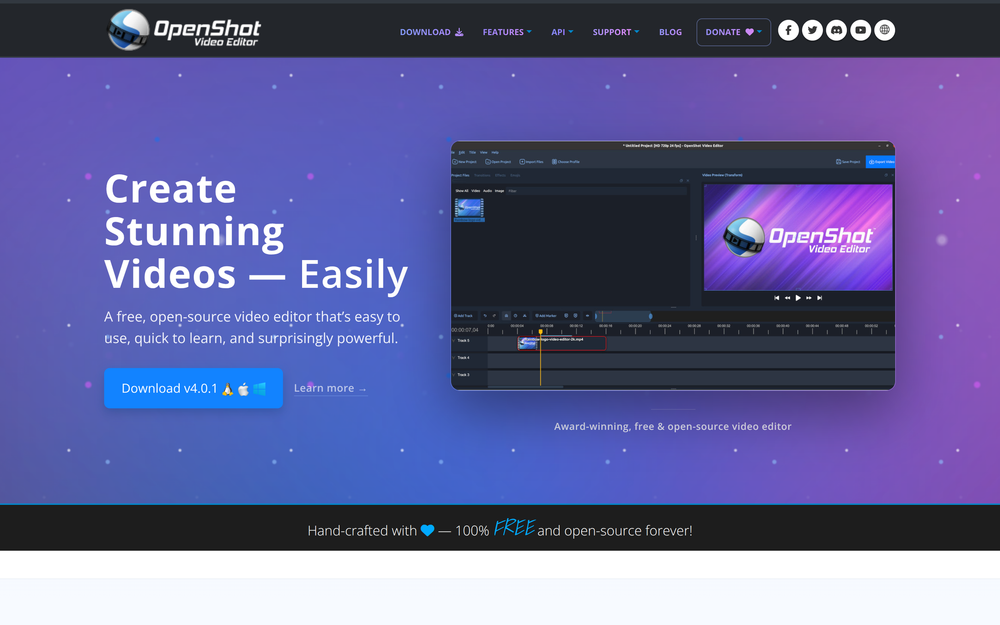
For someone coming from CapCut who wants the simplest desktop start with no watermark and a wide transition library, OpenShot is the place to begin. It is a free, open source video editor for Linux, Mac, and Windows, published by OpenShot Studios, LLC, under GPL-3.0, with unlimited tracks, more than 400 transition patterns, and no subscriptions or project limits.
Read moreShow lessKey Features · Pros · Cons · License & Hosting · Best For
Key Features
- Unlimited tracks for video, audio, and images with snapping, waveforms, and frame-accurate controls
- More than 400 transition patterns and more than 40 editable vector title templates, plus animated titles rendered via Blender
- Color grading with color wheels, curves, LUTs, histograms, waveforms, vectorscopes, and RGB parade scopes
- Keyframe animation of position, scale, rotation, opacity, volume, and effect settings with linear, constant, or Bezier interpolation
- Video effects including lens flares, chroma key, blur, and brightness, with interactive video masks for subject selection
- Screen, webcam, and microphone recording, with each recording placed on its own timeline track; import and export of EDL and XML formats
Pros
- No watermark, no project limits, no subscription; the GPL-3.0 license is fully open source
- More than 400 transitions and 40 vector title templates included
- Project files can move between Linux, macOS, and Windows
- Screen and webcam recording built in, so capture and edit stay in one tool
Cons
- OpenShot's feature list has no auto-captions; use Concat or Shotcut if you need them
- Desktop only; no mobile builds listed on the OpenShot download page
- macOS download is a 64-bit Intel installer; check the OpenShot download page for current Apple Silicon availability
- Programmed in Python 3; if you run it from source you need PyQt or PySide, libopenshot, libopenshot-audio, and FFmpeg or Libav, while the installers are the easier route
License & Hosting
- License: GPL-3.0; the openshot-qt repository is fully open source
- Where it runs: desktop on Linux, Mac, and Windows; Linux available as AppImage or via the Snap Store
- Setup: download the installer from the OpenShot site; Linux as AppImage or snap; dependencies include Python 3, PyQt or PySide (Qt5 or Qt6), libopenshot, libopenshot-audio, and FFmpeg or Libav
- Costs: nothing; no paid plan
Best For
I'd start here when you want the simplest desktop editor with no watermark and a wide selection of transitions and titles. The unlimited tracks and 400+ transitions make it a capable starting point for someone new to desktop editing coming from CapCut's mobile app. OpenShot's feature list has no auto-captions; if generating captions from speech is a requirement, Concat or Shotcut cover it.
Decision framework
How to choose
Use this section to narrow the CapCut replacement by team size, hosting model, license, and migration difficulty.
The deciding question is which part of CapCut's feature set you most need to keep.
If you edit on a phone or tablet, Concat documents Android builds for phones and tablets. Its auto-captions, TTS, and background removal all run locally with no upload.
If you edit in a browser and want a familiar feel, start with OpenCut. The MIT license has no commercial restrictions, and the privacy-first design is a natural match for someone leaving CapCut's web editor.
If you edit on a desktop and need captions without a separate tool, Shotcut has speech-to-subtitle built in.
The exception: CapCut Pro makes sense when you need the full AI feature suite, including auto captions, background removal, text-to-speech in multiple languages, motion tracking, optical flow slow-motion, and 4K 60fps export, all synced across mobile and desktop in one account. If you are comfortable with ByteDance's terms and data collection practices, and the Pro plan at $19.99 per month fits your budget, staying with CapCut Pro is a reasonable choice.
Complete directory list
All alternatives to CapCut


Alternative to Adobe Premiere Pro
Open source video editor for native timeline workflows on desktop
- 15,459 GitHub stars
- Licence GPL-3.0


Migration
Migration notes for leaving CapCut
Export everything before you cancel Pro. CapCut's cloud storage is a paid feature; the free tier discontinued cloud storage as of August 2024. CapCut's Terms of Service state that cloud space storage capacity is suspended automatically when the subscription expires and advise users to transfer and back up content, including video drafts, photos, stickers and other materials, before the service plan expires. Two of CapCut's own pages give different Pro storage figures: one states approximately 1024 GB and another states 100 GB; check CapCut's current help page before cancelling so you know what you are working with. Download all exported videos and raw source media first.
Check whether your replacement tool can open CapCut projects before you rely on it; the dependable route is the exported video plus your raw footage. CapCut's Terms of Service forbid copying, modifying, or reverse engineering its code. What moves reliably is the exported video and whatever raw footage you imported into CapCut in the first place.
Plan to re-edit any project you need to continue from the exported media, not from the original project files. Start with the project you use most: rebuild its timeline in the replacement tool, set up the captions or effects you relied on, and export a short test clip to confirm the quality matches what you had. That single rebuild tells you whether the new tool covers your workflow before you commit to moving everything.
A staged move works better than a clean break. Keep CapCut installed for any project with a deadline, finish and export those, and start new projects in the replacement tool. Once the new tool handles your recurring edits, cancel the Pro plan and clean up the cloud storage before it suspends.
FAQ
CapCut alternatives FAQ
Is CapCut open source?
No. CapCut is a video editor and video maker developed by ByteDance, the parent company of TikTok. ByteDance first released it as JianYing in 2019, then rebranded it for global users as CapCut. CapCut's Terms of Service forbid copying, modifying, or reverse engineering its code.
Which of these alternatives runs on Android or iPhone?
Concat documents builds for macOS, Windows, Linux, and Android, with the same project files across platforms. iOS and iPadOS are supported via sideloading in beta; Concat is not on the App Store. OpenCut targets web, desktop, and mobile. Shotcut, Kdenlive, and OpenShot list desktop builds only on their download pages; desktop only, no mobile builds listed for those 3 tools.
What is the OpenCut rewrite and is it ready?
The OpenCut classic editor at opencut.app is what runs today. The classic codebase was archived on May 17, 2026, and is no longer maintained. The active rewrite is at the opencut-app/opencut repository and is in progress but not yet released; the repository is not yet accepting outside contributions while the architecture is being designed. The Rust core, plugin API, and MCP server are plans for the rewrite, not yet shipped.
Which alternatives include auto-captions?
Concat generates captions via local Whisper transcription; users pick a model size, in English-only or multilingual variants, and get styled captions on the timeline. Shotcut can convert spoken word to subtitle text using its built-in speech-to-subtitles feature. Kdenlive supports automatic subtitle transcription using either the VOSK engine or the Whisper engine, configurable in the Speech to Text settings. OpenCut supports auto-transcription and also allows importing transcript files to generate captions instead of running transcription. OpenShot's feature list has no auto-captions; use Concat or Shotcut if you need them.
When does CapCut Pro still make sense?
CapCut Pro is the right call when you need AI features including auto captions, text-to-speech in multiple languages, and background removal available across mobile and desktop in one account, and you are comfortable with ByteDance's terms and the price.
By category
Open source tools in these categories


Design & Creative
ComfyUI, Excalidraw, Godot Engine460


Developer Tools
REA (Reverse Engineer Anything), superpowers, Skills for Real Engineers191


Business & Productivity
OpenClaw, Excalidraw, RustDesk126


Communication & Collaboration
freeCodeCamp, iptv, Excalidraw35


No-Code & Low-Code
n8n, dify, Langflow196
Web Development
superpowers, freeCodeCamp, Skills for Real EngineersKeep reading