

Open-source alternatives guide
Best Open Source Superhuman Alternatives
By SurajReviewed Verified
Superhuman sells speed and inbox zero, addressing two real problems: slow triage and an inbox that never empties. Less email beats a faster client: a smaller inbox clears faster than a fast interface on a full one.
The best open source alternative to Superhuman is Inbox Zero because it reduces inbox volume before you open the app. An AGPL-3.0 AI assistant that works on top of your existing Gmail or Outlook account, it applies your rules automatically and handles routine messages in the background.
Below Inbox Zero are six keyboard-first clients for people who want speed in a tighter scope: a fast desktop app, a terminal client, webmail you self-host, a full team workspace, or something in between. I have ranked them by how fast and keyboard-friendly they feel in daily use.
TL;DR
- Inbox Zero: The sharpest answer to inbox overload. An AI assistant on top of your existing Gmail or Outlook that applies your rules automatically, 24/7, with no client switch required.
- Macro Mail: Best all-in-one client drop-in. Keyboard-first triage with chat, tasks, and AI agents in one workspace you can self-host.
- Mailspring: Best fast desktop swap. Unified inbox, free at its core, with keyboard shortcuts and snooze on a trial basis in the free tier.
Pain points
Why people leave Superhuman
The practical reasons teams compare Superhuman with open-source alternatives before they migrate.
The subscription adds up fast. Starter is $30 per user each month; Business is $40; and there is no free tier. For a team of five, that is $150 a month before you send a single message. Every open source alternative here costs less or nothing.
Keyboard speed does not reduce inbox volume. Superhuman makes triage faster, but the inbox fills at the same rate. If the pile is the actual problem, processing it faster leaves the pile intact. You clear the morning batch and more arrives by afternoon.
The code is proprietary, and mail content flows through Superhuman's servers for its AI features to work. If you want an auditable codebase or prefer that your mail not pass through a vendor's cloud, that is a hard constraint Superhuman cannot meet.
Provider coverage is narrow too: Gmail and Outlook only. If you run your own mail server or want to move off Google entirely, Superhuman is not an option at all.
At a glance
Quick comparison
| Name | License | Best For |
|---|---|---|
| Inbox Zero | AGPL-3.0 | AI assistant that cuts inbox volume by automating email triage |
| Macro Mail | AGPL-3.0 | Fast keyboard triage with chat, tasks, and agents attached |
| Mailspring | GPL-3.0 | Fast desktop drop-in with a unified inbox |
| Thunderbird | MPL-2.0 | Proven, extensible desktop email client |
| NeoMutt | GPL-2.0 | Keyboard-first terminal triage |
| Cypht | LGPL-2.1 | Self-hosted unified webmail |
| UnInbox | AGPL-3.0 | Modern collaborative email for teams with shared inboxes |
Pricing model
Paid only: $30/user Starter, $40 Business, no free tier
Every alternative is free at its core or costs less. Inbox Zero Starter is $20/user/month on the hosted plan; individuals and teams under five can self-host free. Mailspring, Thunderbird, NeoMutt, and Cypht are free to run. Macro Mail and UnInbox offer free self-hosting under AGPL-3.0.
License
Proprietary, closed source
All seven are open source: Inbox Zero AGPL-3.0 (with additional commercial terms for business use at 5+), Mailspring GPL-3.0, Thunderbird MPL-2.0, NeoMutt GPL-2.0, Cypht LGPL-2.1, Macro Mail AGPL-3.0, and UnInbox AGPL-3.0 core.
Hosting
Vendor cloud only, no self-hosting
Inbox Zero runs hosted or self-hosted (server + LLM key required). Mailspring and Thunderbird are desktop apps. NeoMutt runs in a terminal. Cypht and UnInbox self-host as webmail and team email. Macro Mail self-hosts under AGPL-3.0.
Email providers
Gmail and Outlook only
Inbox Zero also requires Gmail or Outlook (adds AI on top, no custom IMAP). Five of the six email clients connect to any IMAP or SMTP account; Macro Mail currently supports Gmail with Outlook and custom IMAP coming soon, so you are not locked to two providers long-term.
Inbox volume reduction
None; triage is manual, speed is the differentiator
Inbox Zero is built for this: AI rules, bulk unsubscriber, and cold email blocker reduce inbox volume automatically. The email clients do not offer automated volume reduction.
Keyboard-first triage
Yes, 100+ shortcuts, a core strength
NeoMutt is fully keyboard-driven (terminal only). Macro Mail and Mailspring offer fast shortcuts. Thunderbird's keys are configurable. Inbox Zero does not replace the client, so keyboard feel depends on which client you pair it with.
Editorial ranking
7 Best Open Source Superhuman Alternatives (Ranked)

- 12.7K stars
- AGPL-3.0
- Active this week
- Last commit 1 day ago

Inbox Zero is not an email client. It is an AI assistant that runs on top of your existing Gmail, Google Workspace, or Outlook account and reduces what lands in your inbox before you open it. Instead of making triage faster, Inbox Zero makes the pile smaller.
Read moreShow lessKey Features · Pros · Cons · License & Hosting · Best For
Set rules in plain English and the AI runs them 24/7. 12,000 GitHub stars and active daily commits put it among the most-watched open source email tools on the platform.
Key Features
- AI Rules: plain-English instructions the assistant runs on every incoming message, 24/7, no coding required.
- Bulk Unsubscriber: review and clear hundreds of newsletter subscriptions in a single session.
- Cold Email Blocker: identifies and blocks cold outreach automatically.
- Reply Zero: surfaces emails that need a response and tracks threads waiting on replies.
- Meeting Briefs: pulls email and calendar context before a meeting.
- Smart Filing: saves attachments automatically to Google Drive or OneDrive.
- Slack and Telegram access: check and act on your inbox from a messaging app.
Pros
- Volume drops before triage: The AI processes incoming messages automatically, so the inbox is already trimmed when you sit down.
- Works with your existing account: no migration, no new email address; connects to Gmail or Outlook over OAuth without replacing anything.
- Auditable codebase: AGPL-3.0 source on GitHub, SOC 2 Type 2 certified, and publicly documented not to train on your email data.
Cons
- Gmail and Outlook only: custom IMAP or SMTP accounts are not supported, so it does not work if you run your own mail server.
- Not a client replacement: Inbox Zero adds AI automation to an existing account but does not replace the email client you read and compose in.
- Business self-hosting has a threshold: the repository's additional terms require an enterprise license for organizations with five or more business users.
License & Hosting
- License: AGPL-3.0 with additional commercial terms from Inbox Zero Inc.; the code is public and auditable, but business self-hosting for five or more employees requires an enterprise license.
- Where it runs: hosted service at getinboxzero.com, or self-hosted on your own server using Docker and PostgreSQL; a running server is required.
- Setup:
npx @inbox-zero/cli setupfor self-hosting; requires Docker, PostgreSQL, Node.js v24+, and your own LLM API key. - Costs: hosted Starter at $20/month per user; Plus at $35/month; Professional at $50/month. Self-hosting under five business users is free at the license level, but you pay for your own VPS (~$10-40/month) plus LLM API usage.
Best For
Professionals and small teams whose real problem is inbox volume, not keyboard speed. If you want AI to handle the noise and routine replies while you keep using Gmail or Outlook as your reading client, I'd start here.

- 4.8K stars
- AGPL-3.0
- Active this week
- Last commit 1 day ago
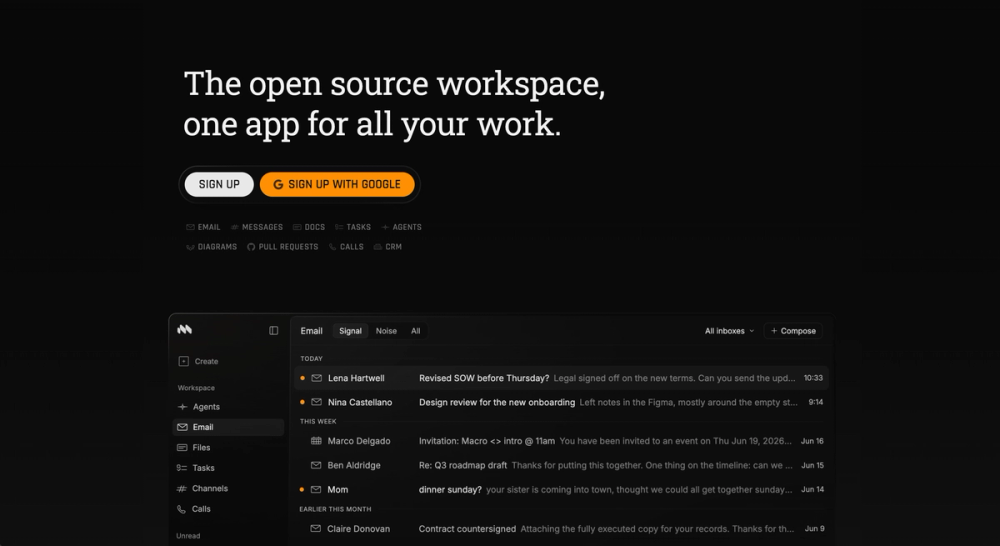
Macro Mail rebuilds the inbox so email sits with the tasks, chats, and agents around it, while staying fast for people who live in their inbox.
Read moreShow lessKey Features · Pros · Cons · License & Hosting · Best For
Key Features
- One triage list: multiple accounts in a single inbox, with chat, tasks, docs, and pull requests beside the mail.
- Keyboard-first triage: j, k, and e move you through the inbox, so a heavy morning never needs the mouse.
- Signal before noise: ranking pushes the messages that matter up, and quick search covers backfilled mail.
- Replies in your voice: drafts are built from your prior threads with that recipient rather than from templates, and send only when you say so.
- Agents on a schedule: summarize the inbox daily, fire custom notifications, or clear it on a schedule.
- Split-screen compose: triage and draft in one view; the inbox stays visible while you write.
Pros
- Context travels with the mail: @mention docs, people, and tasks in a thread, and share the thread so a teammate gets the whole picture.
- Triage and compose in one view: split screen keeps inbox context without switching windows, so you never lose your place mid-reply.
Cons
- Gmail first: Google Workspace connects in about thirty seconds, but Outlook and custom IMAP or SMTP are still listed as coming soon.
- Free plan caps accounts: two connected accounts, with storage and AI limits, until you move to the paid seat.
License & Hosting
- License: AGPL-3.0; fully open source with no closed core; the entire product is available in the public repository.
- Where it runs: Self-hosted on your own server; the Enterprise tier adds a managed self-host deployment with SSO, HIPAA, and FedRAMP support.
- Setup: Follow Macro's self-hosting guide in the project repository; the Enterprise tier includes deployment support from the Macro team.
- Costs: Free to self-host under AGPL-3.0. Enterprise managed self-hosting is paid; contact Macro for pricing.
Best For
Teams who find standard email clients cut off from the rest of their work and want fast triage in one place. I'd pick it over a pure email client when the workflow spans more than just mail. Not the right pick if you only need a personal email client and prefer not to self-host.

- 17.9K stars
- GPL-3.0
- Active this week
- Last commit 1 day ago
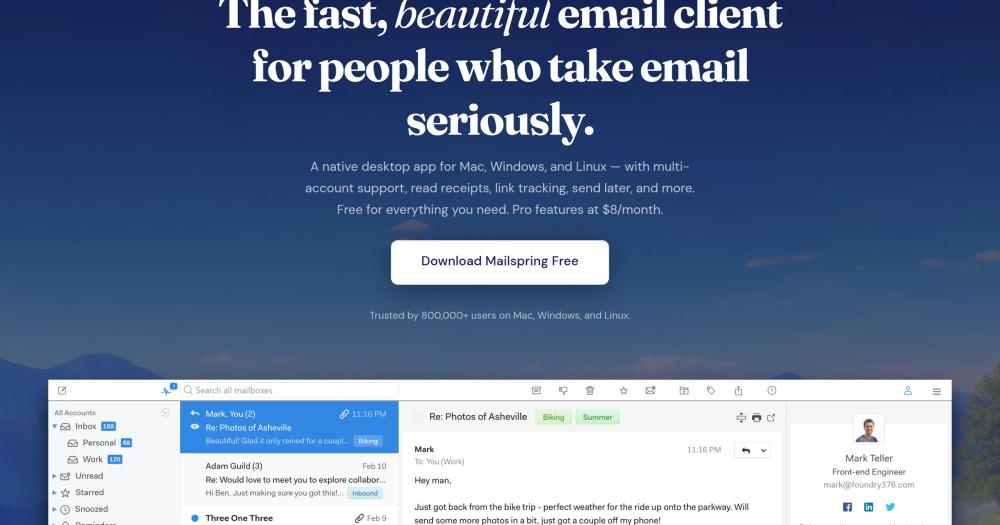
Mailspring is the closest thing to a drop-in for a Superhuman user who wants a polished desktop app they can actually own. It is fast, keyboard-friendly, and free at its core.
Read moreShow lessKey Features · Pros · Cons · License & Hosting · Best For
Key Features
- Unified inbox: read every Gmail, Outlook, iCloud, and IMAP account in one view.
- Keyboard shortcuts: move through mail, archive, and reply without leaving the keyboard.
- Snooze and Send Later: push messages out of view and schedule sends. The free tier allows a few trial uses per week; unlimited use requires Mailspring Pro.
- Mail rules: automate filing for incoming messages. Canned-reply templates are a Mailspring Pro feature.
- Runs everywhere: native desktop builds for macOS, Windows, and Linux.
Pros
- Free and open source: the full client is GPL-3.0, so the core costs nothing per seat.
- Familiar and fast: a modern interface that feels close to Superhuman without the subscription.
Cons
- Pro features use Mailspring's cloud: read receipts and reminders route metadata through their servers, though your email itself syncs locally.
- Many features sit behind Pro: read receipts, link tracking, mailbox analytics, unlimited snooze and send later, follow-up reminders, and templates all require Mailspring Pro.
License & Hosting
- License: GPL-3.0; the full client is open source with no core behind a paywall.
- Where it runs: Desktop app on macOS, Windows, and Linux; no server required; it connects directly to your IMAP and SMTP accounts.
- Setup: Download the installer from getmailspring.com; point it at your Gmail, Outlook, iCloud, or IMAP account; setup takes under five minutes.
- Costs: The core client is free. Mailspring Pro (optional) adds read receipts, reminders, templates, and link tracking at $8 per month.
Best For
Individuals and small teams who want Superhuman's fast, keyboard-driven desktop feel without per-seat pricing. I'd reach for it first among the graphical clients here. Its Linux support makes it one of the few polished clients available across macOS, Windows, and Linux, and a strong pick for anyone comfortable with cloud-backed sync for metadata rather than full self-hosting.

- 210 stars
- MPL-2.0
- Active this week
- Last commit 1 day ago
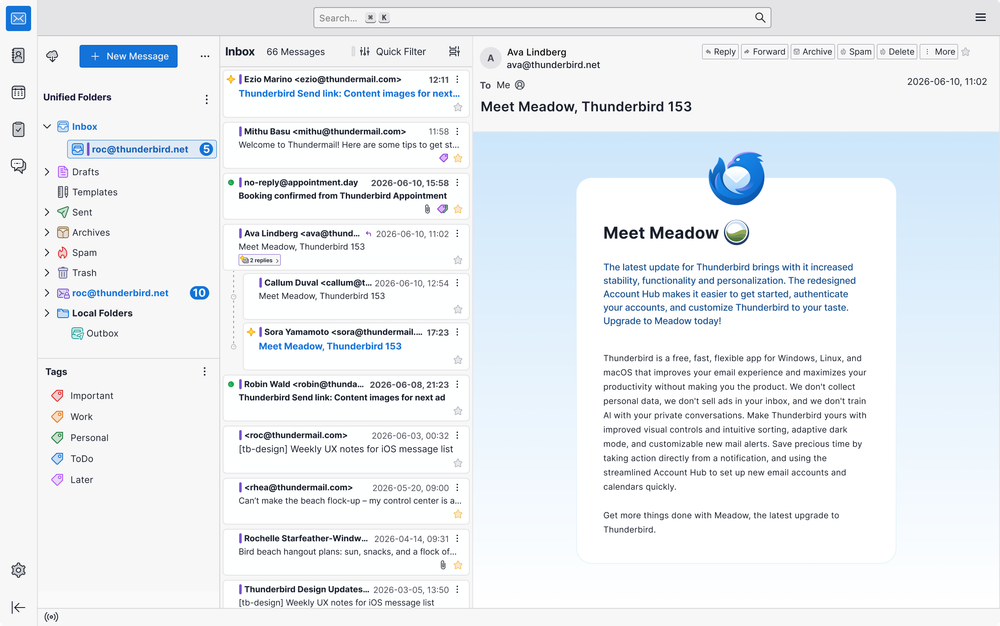
Thunderbird is the long-running, community-funded desktop email client, and the safest open source home for someone leaving a paid client. It trades minimalism for depth and control.
Read moreShow lessKey Features · Pros · Cons · License & Hosting · Best For
Key Features
- Multiple accounts, unified folders: manage every mailbox in one place across Gmail, Outlook, and any IMAP or POP host.
- Quick filter and saved search: narrow a busy inbox fast, with filters that sort and file mail automatically.
- OpenPGP and S/MIME: end-to-end encryption and signing are built in, no add-on required.
- Built-in calendar and contacts: scheduling and address book live alongside mail.
- Add-ons and configurable shortcuts: extend the client and remap keys to your own workflow.
Pros
- Fully free and self-directed: no subscription, no seat count, funded by donations rather than per-user billing.
- Data stays local: mail lives on your machine, not a vendor's speed-optimized cloud.
Cons
- Heavier than Superhuman: the default interface is dense and not tuned for minimal, rapid triage.
- Keyboard-first takes setup: fast keyboard flows are possible but need configuration rather than shipping by default.
License & Hosting
- License: MPL-2.0; maintained by MZLA under the Mozilla umbrella, fully open source.
- Where it runs: Desktop app on Windows, macOS, and Linux; no server required; connects directly to your IMAP, POP3, and Exchange accounts.
- Setup: Download from thunderbird.net; add your mail accounts; the built-in calendar and contacts are included with no extra install step.
- Costs: Free to download and use, funded by user donations. An optional Thunderbird Pro subscription ($6/month, currently in beta) adds hosted services (Thundermail, Appointment, Send).
Best For
Professionals who want a proven, private, self-directed desktop client and are happy to invest a little setup time shaping it into a fast workflow. I'd start here for anyone leaving a paid client who wants a stable, proven foundation without the complexity of a terminal setup. Not the right pick if you need a shared team inbox or browser-based webmail. The optional Thunderbird Pro subscription adds hosted calendar and email if your team needs them.

- 3.9K stars
- GPL-2.0
- Active this week
- Last commit 3 days ago
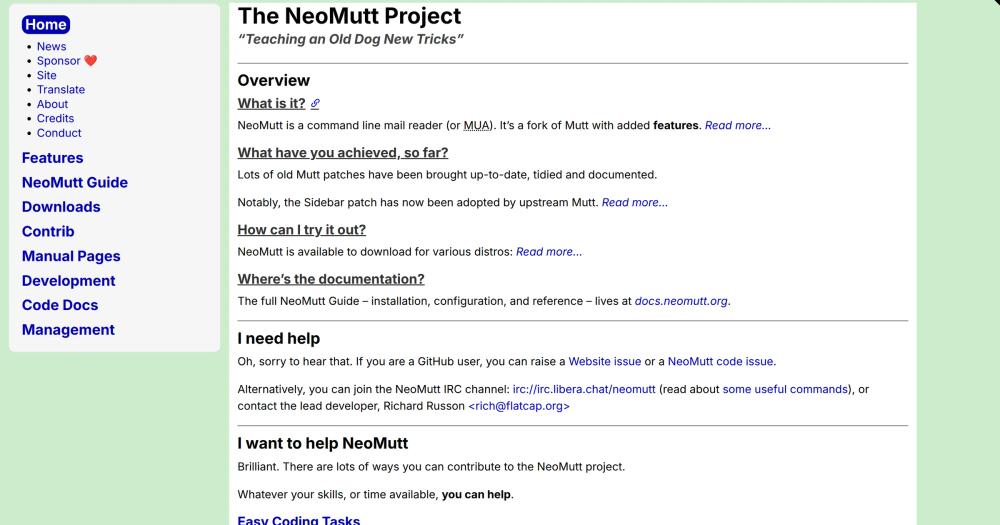
NeoMutt is the most keyboard-first option here. It is a terminal email client, so every action is a keystroke and the mouse never enters the picture. If you want maximum triage speed and you already live in a shell, nothing in this list goes further.
Read moreShow lessKey Features · Pros · Cons · License & Hosting · Best For
Superhuman is fast because the interface is stripped down and the shortcuts are everywhere. NeoMutt is fast for the same reason, but taken further. There is no GUI overhead, no Electron wrapper, no cloud sync between keystrokes. Your fingers move, the mail moves.
Key Features
- Fully keyboard-driven: read, thread, tag, and reply entirely from the keyboard, with bindings you control and document in a plain text config file.
- Sidebar and threading: navigate folders in a sidebar and follow conversations as threads without losing your place.
- Broad protocol support: connect over IMAP, POP3, and NNTP against any mail host, including a server you run yourself.
- Notmuch search: fast local full-text search across large archives, with no third-party index required.
- PGP and S/MIME: encryption and signing are first-class, built into the client.
Pros
- Extreme speed on the keyboard: for heavy inbox users who know the shortcuts, terminal triage can outpace any graphical client.
- Free, open, and self-run: GPL-2.0, pointed at your own servers, with no cloud in the middle and no telemetry.
- Runs anywhere: macOS, Linux, and any Unix-like system with a package manager.
Cons
- Terminal-only: there is no graphical interface, which suits developers but is a real barrier for anyone not already comfortable in a shell.
- Setup is hands-on: configuration is text-file driven, IMAP and OAuth setup take effort, and initial tuning can take an afternoon.
License & Hosting
- License: GPL-2.0; community-maintained continuation of Mutt, fully open source.
- Where it runs: Terminal app on macOS and Linux; no server required on your side; it connects to your own IMAP and SMTP accounts directly from your machine.
- Setup: Install via your package manager (
brew install neomuttorapt install neomutt); configure~/.neomuttrcwith your account credentials and IMAP settings; Gmail and Outlook accounts require OAuth2 setup via a helper script. - Costs: Free. There is no paid tier and no hosted service.
Best For
Developers and power users who want Superhuman-level keyboard speed, live in the terminal already, and value complete control over how their mail is fetched and stored. I'd reach for NeoMutt if you are already comfortable in a shell and want maximum triage speed. I would not start here if you have never used a terminal email client.

- 1.8K stars
- LGPL-2.1
- Active this week
- Last commit 5 days ago
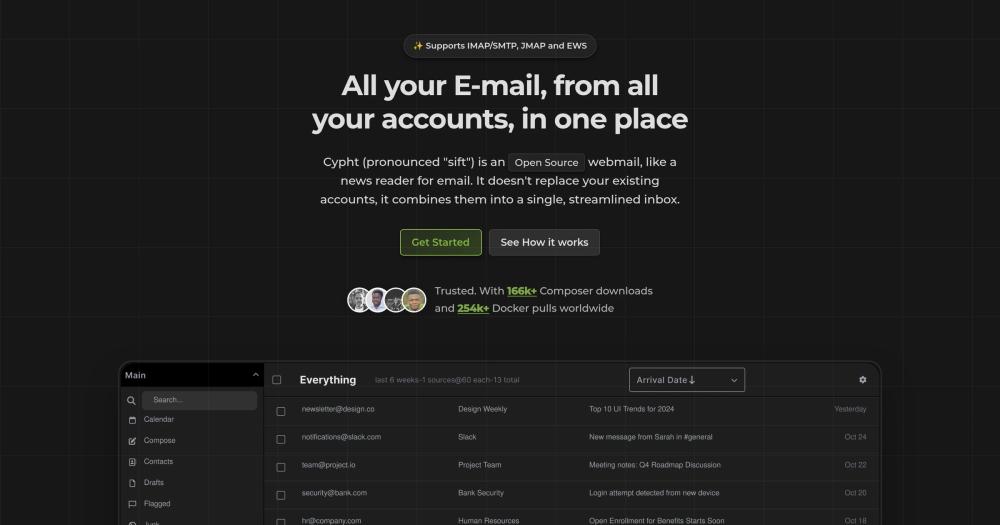
Cypht takes a different angle on the Superhuman problem: instead of a desktop app, it is a lightweight self-hosted webmail that pulls all your accounts into one browser tab.
Read moreShow lessKey Features · Pros · Cons · License & Hosting · Best For
Key Features
- Unified multi-account inbox: combine several IMAP, JMAP, and Exchange accounts into a single reading view.
- Keyboard shortcuts: move and act on mail quickly without the mouse.
- Broad protocol support: IMAP, SMTP, JMAP, and EWS are all supported.
- Built-in RSS reader: follow feeds next to your mail.
- Plugin modules: enable only the features you want, keeping the install lean.
Pros
- Self-hosted and private: you run it on your own server, so mail and metadata never touch a vendor cloud. That is a meaningful difference from Superhuman, whose AI features require mail to flow through their servers.
- Lightweight: a small PHP application that installs cleanly with Docker and does not need a powerful machine to run well.
Cons
- Webmail, not speed-tuned: it is functional and quick to load, but not engineered for Superhuman-style rapid keyboard triage.
- You maintain it: self-hosting means you handle updates, backups, and uptime.
License & Hosting
- License: LGPL-2.1; fully open source with no hosted service required.
- Where it runs: Self-hosted on your own server; Docker is the easiest deployment path, and nothing runs on a third-party service.
- Setup: Pull the official Docker image and run
docker compose up; configure your mail accounts through the settings panel after first login. - Costs: Free. Your only cost is the server you run it on; there is no paid tier and no hosted cloud service.
Best For
Teams and individuals who want one unified, private inbox across several accounts, prefer a browser to a desktop app, and are willing to self-host for full data ownership. I'd pick Cypht for small organisations that already run their own server stack and want to add webmail without a heavyweight desktop client or a paid vendor-hosted service. Not the right pick if you do not self-host or if you need shared team email addresses.

- 1.8K stars
- AGPL-3.0
- Updated this year
- Last commit 252 days ago
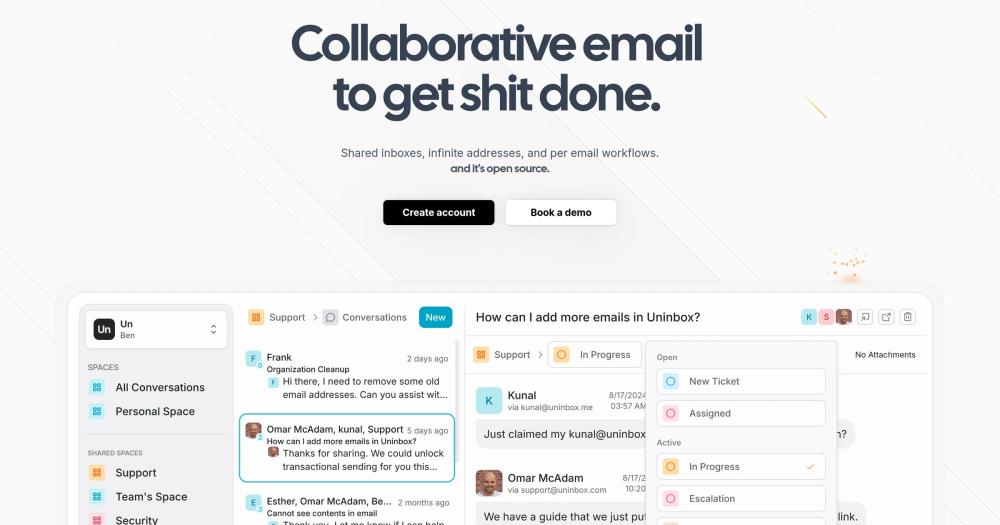
UnInbox reimagines email as something a team does together, not a private pile each person triages alone. It is the modern, open alternative for shared inboxes.
Read moreShow lessKey Features · Pros · Cons · License & Hosting · Best For
Key Features
- Shared inboxes: reply from shared addresses like support@ or sales@, so a whole team works one queue.
- Conversation comments: discuss a thread internally and assign it, with no forwarding chains or BCCs.
- Workflow statuses: mark where each conversation stands so everyone sees what is handled and what is still open.
- Infinite addresses: spin up admin@, billing@, and more under your own domain.
- Modern interface: a conversation-style client built for keyboard use and quick replies.
Pros
- Built for teams: collaboration is native, not bolted on, which Superhuman does not offer.
- Open and self-hostable: an AGPL-3.0 core you can run yourself, so shared mail stays on your own servers.
Cons
- Self-host with caution: the public GitHub repository has had no commits since February 2026; verify project momentum before committing to a self-hosted deployment. The hosted product remains live.
- Team-first, not solo-speed: one person chasing raw triage speed will find Superhuman or Mailspring more tuned for that.
License & Hosting
- License: AGPL-3.0 for the core; enterprise features use a separate commercial licence.
- Where it runs: Self-hosted on your own server using the AGPL build, or via UnInbox's managed hosted service.
- Setup: Follow the self-hosting guide in the UnInbox GitHub repository to configure your own instance.
- Costs: Free to self-host the AGPL build. The hosted service and enterprise features are paid; see the UnInbox website for pricing.
Best For
Teams and professionals who share email for support, sales, or operations and want a modern, collaborative, self-hostable inbox rather than a client tuned for one person's triage speed. I'd reach for UnInbox when shared team email is the primary use case: support@, sales@, and the like. I would not pick it for a solo user who just wants a faster personal inbox.
Decision framework
How to choose
Use this section to narrow the Superhuman replacement by team size, hosting model, license, and migration difficulty.
Start by deciding what is actually slowing you down.
If the problem is inbox volume and noise, I'd start with Inbox Zero. You connect it to your existing Gmail or Outlook account, write your rules in plain English, and let it clear out cold email, old newsletters, and routine messages automatically. The monthly cost is $20 per user on the hosted plan, or free to self-host for individuals and teams under five people.
If the problem is keyboard speed in the client itself, the six client alternatives below Inbox Zero are worth considering. I'd start with Mailspring: the closest drop-in for a Superhuman user who wants a polished desktop app, fast and keyboard-friendly and free at its core on every desktop platform. I'd pick Thunderbird instead if you want the most proven, configurable option and are willing to spend setup time shaping it into a quick workflow.
NeoMutt goes further on keyboard speed than any graphical client. It runs entirely in the terminal, every action is a keystroke, and it connects straight to your own IMAP server. The trade is comfort: it suits people who already live in a shell.
If data ownership matters most, self-host. Cypht gives you unified, private webmail across several accounts that never touches a vendor cloud.
Macro Mail sits at the intersection. It keeps Superhuman's keyboard-first triage and adds chat, tasks, and AI agents in one workspace you can self-host. If you want to change both the client and the workflow, it is the strongest pick for teams.
If you are not sure where to start, go with Inbox Zero on top of Gmail or Outlook, then decide whether you also want to change the client. If the pile is the problem, a faster client will not fix it.
Complete directory list
All alternatives to Superhuman

Alternative to Superhuman
Fast open source desktop email client
- 17,934 GitHub stars
- Licence GPL-3.0

Inbox Zero
FeaturedAlternative toSuperhuman
AI email assistant that drafts replies and clears your inbox
- 12,712 GitHub stars
- Licence AGPL-3.0

Alternative toSuperhuman
Self-hosted email client with AI agent on Cloudflare Workers
- 8,127 GitHub stars
- Licence Apache-2.0

Alternative to Notion
The open source workspace, one app for all your work.
- 4,782 GitHub stars
- Licence AGPL-3.0

Alternative toSuperhuman
Open source keyboard-first terminal email client
- 3,854 GitHub stars
- Licence GPL-2.0

Alternative toSuperhuman
Open source self-hosted webmail aggregator
- 1,768 GitHub stars
- Licence LGPL-2.1


Alternative toSuperhuman
Free, extensible open source desktop email client
- 210 GitHub stars
- Licence MPL-2.0
Migration
Migration notes for leaving Superhuman
If Inbox Zero is your answer, the migration is almost nothing: connect it to your existing Gmail or Google Workspace account with an OAuth approval, write your first rules, and let it run. No new email address, no IMAP setup, no change to the client you already use. Superhuman's shortcuts and snippets are not replaced, but the inbox clears before you need them, and your Superhuman subscription can be cancelled the same day.
For people switching to a different email client, leaving Superhuman is still easier than most tool changes, because Superhuman never owned your mail. It connects only to Gmail and Outlook, so your messages already live in Google or Microsoft. Switching clients means pointing a new one at the same accounts over IMAP, then turning Superhuman off.
Start by listing what you actually use inside Superhuman: Split Inbox, snippets, AI writing, read receipts, and your keyboard muscle memory. Those are Superhuman features, not mail data, so plan to recreate them rather than export them. Snippets become templates in Mailspring (a Mailspring Pro subscription is required) or macros in NeoMutt. Split Inbox becomes filters and saved searches. Read receipts move to Mailspring Pro or drop away, which is a privacy win for most teams.
Connecting the alternatives is straightforward. Mailspring and Thunderbird add Gmail or Outlook accounts through a normal sign-in and sync over IMAP. NeoMutt connects to the same IMAP and SMTP servers via a config file, but Gmail and Outlook accounts require OAuth2 setup through an external helper script (oauth2.py for Gmail, mutt_oauth2.py for Outlook) or an app password. Cypht runs on your own server and aggregates the accounts in a browser. Macro Mail brings those accounts into its unified workspace alongside chat and tasks.
Watch a few gotchas. Gmail labels map to folders differently in each client, so expect to tidy filing once. Calendar and contacts are separate in some clients, unlike Superhuman's bundled view. And per-account rate limits mean the first full sync of a large mailbox can take time.
I'd take a staged approach: run the new client or Inbox Zero next to Superhuman for a week, rebuild your shortcuts and templates, then cancel the subscription once the new workflow feels fast.
FAQ
Superhuman alternatives FAQ
What is the best open source alternative to Superhuman?
I'd start with Inbox Zero (AGPL-3.0) if your real problem is inbox volume. It runs on top of your existing Gmail or Outlook account, applies AI rules automatically, and handles routine messages automatically. For a keyboard-first client drop-in, I'd pick Macro Mail: it matches Superhuman's speed and adds chat, tasks, and AI agents in one self-hostable workspace.
What does Inbox Zero do differently from a faster email client?
Inbox Zero is not an email client. It is an AI assistant that runs alongside your existing Gmail or Outlook account and reduces what lands in your inbox. You configure rules: block cold email, draft replies in your voice, and bulk-unsubscribe from newsletters. The AI executes them automatically, 24/7. The other alternatives here are email clients that speed up how you work through messages; Inbox Zero reduces how many you have to handle.
Is there a free open source alternative to Superhuman?
Yes. Thunderbird, NeoMutt, and Cypht are fully free. Mailspring is free at its core with an optional paid Pro tier. Inbox Zero can be self-hosted free for individuals and teams under five business users (you pay for hosting and an LLM API key). Macro Mail is free to self-host under AGPL-3.0. None of them charge the per-seat subscription Superhuman requires.
Can Macro Mail be self-hosted?
Yes. Macro Mail is open source under AGPL-3.0, so you can run it on your own servers with full control over your mail data and the workspace around it. The Enterprise tier adds managed self-hosting with SSO, HIPAA, and FedRAMP support for teams that need compliance guarantees. Superhuman, as a closed-source cloud product, cannot be self-hosted at all; your mail flows through their servers.
How hard is it to migrate from Superhuman?
If you are adding Inbox Zero: almost no migration at all, since it connects to your existing Gmail or Outlook account and you cancel Superhuman the same week. If you are switching to a different email client like Mailspring or Thunderbird, it is straightforward: Superhuman only connects to Gmail and Outlook, so your mail already lives there. You point the new client at the same IMAP account. You will need to rebuild snippets, filters, and keyboard shortcuts, but no mail data has to be exported.
Which alternative is the most keyboard-first, like Superhuman?
I'd pick NeoMutt for maximum keyboard speed: it runs entirely in the terminal with no mouse at all and connects directly to your own IMAP server. Macro Mail and Mailspring also offer fast keyboard shortcuts in a graphical interface if you prefer a familiar desktop feel. Inbox Zero does not replace the client, so keyboard feel depends on which reading app you pair it with.
Can I use these alternatives for business email?
Yes. Mailspring (GPL-3.0), Thunderbird (MPL-2.0), NeoMutt (GPL-2.0), Cypht (LGPL-2.1), and Macro Mail (AGPL-3.0) all permit business use without restriction. Inbox Zero's AGPL-3.0 build is free for teams under five business users; organizations with five or more employees need an enterprise license from Inbox Zero Inc. before deploying it for business purposes. Teams with compliance requirements can self-host Cypht or Macro Mail on their own infrastructure.
By category


