Open Source Alternatives
  • Alternatives
  • Categories
    Categories by size881 projects
    • Developer Tools460
    • AI & Machine Learning404
    • Web Development196
    • Business & Productivity191
    • Communication & Collaboration126
    • Security & Monitoring126
    • IT Management123
    • Product & Project Management106
    • Cloud & Hosting104
    • Data & Analytics104
    Browse all 21 categoriesLLMOps & AI Tooling, Design & Creative and 9 more
  • Blog
  • Advertise
SearchNotion, Slack, password manager.../
Submit
Open Source Alternatives
  • Alternatives
    • Developer Tools460
    • AI & Machine Learning404
    • Web Development196
    • Business & Productivity191
    • Communication & Collaboration126
    • Security & Monitoring126
    • Browse all 21 categories
  • Blog
  • Advertise
Submit your project

New open source projects by email

The projects we add and every new guide. Free, unsubscribe any time.

Open Source Alternatives LogoOpen Source Alternatives

Handpicked Open Source Alternatives to Paid Softwares

Product

  • Categories
  • Tag
  • Advertise

Resources

  • Blog
  • Collection
  • Submit

Company

  • Privacy Policy
  • Terms of Service
  • Refund Policy
  • Sitemap

Alternatives

  • Claude Code
  • Jira
  • Notion
  • Slack
  • Linear
  • Wispr Flow
  • All alternatives
© 2026 Open Source Alternatives. All rights reserved.
Open SourceAlternatives
Home/Categories/Business & Productivity/Macro
Macro logo

Macro

Open source alternative to Notion, Linear, Slack, Superhuman and HubSpot

  • 4.8K stars
  • AGPL-3.0
  • Active this week
  • Last commit 1 day ago

Last verified Oct 20, 2026

Run email, chat, docs, tasks, calls, and AI agents in one open source workspace, so your team self-hosts a single app instead of juggling separate tools.

Visit websiteGitHub4.8K stars
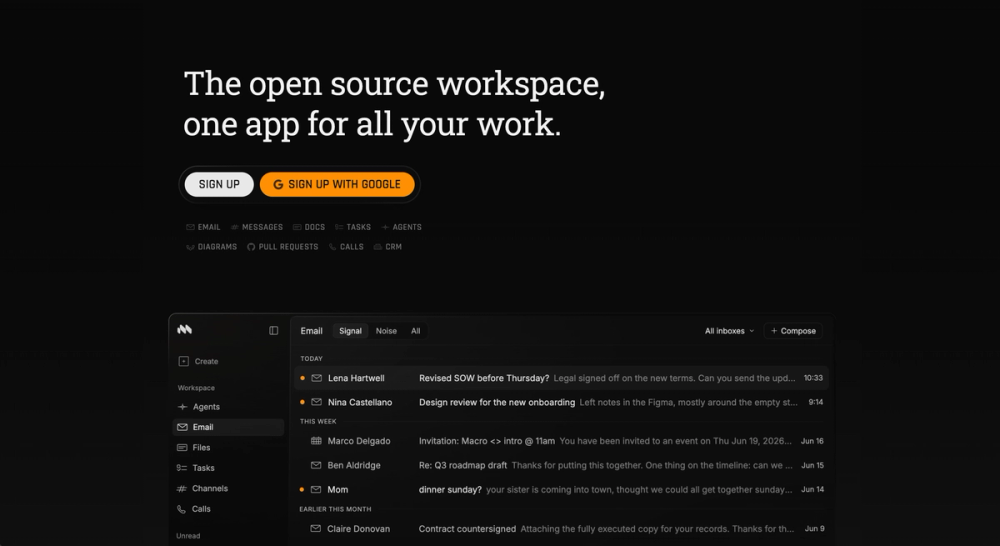
Macro unified workspace interface
TL;DR

Macro is an open-source, AI-native workspace that unifies email, chat, docs, tasks, canvas, calls, and CRM in one keyboard-first app. It replaces the usual stack of Slack, Notion, Linear, Superhuman, and HubSpot by feeding every message, doc, task, and call transcript into one shared AI memory layer your agents can act on. Licensed under AGPLv3 and SOC 2 Type II certified, it targets startup and product teams who want their tools, and their AI context, in a single place.

Read the full breakdownHide the full breakdownWho it is for, how it works, trade-offs and the FAQ
who it's for

Who Macro is for#

Startup teams consolidating their whole stack

A small, fast-moving team can run chat, docs, tasks, email, and a light CRM in one app instead of paying for and wiring together five SaaS tools. Keyboard-first navigation and shared memory suit teams who live in their tools all day.

Skip if:

You already have deep, customized workflows in best-of-breed tools and the migration cost outweighs the consolidation benefit.

Engineering teams tying discussion to code

Teams that want tasks, channel discussion, and GitHub pull requests linked in one place get automatic status updates as branches and PRs move. Agents can read the linked context and act, which fits engineering orgs already using MCP clients like Claude Code.

Skip if:

Your workflow centers on a mature issue tracker with heavy integrations you cannot replace yet.

Teams that want self-hostable, open workspace software

Organizations that need to own their workspace data and avoid closed SaaS lock-in can adopt an AGPLv3 product they are allowed to self-host and audit. This suits privacy-conscious and compliance-driven teams evaluating open alternatives to Notion and Slack.

Skip if:

You need a turnkey self-hosted deployment today, since the documented self-host path is still developer-oriented and not one-click.

the problem

The problem it solves#

Most teams run their day across five or six disconnected tools: Slack for chat, Notion for docs, Linear for tasks, a separate email client, and a CRM nobody keeps current. Context is scattered across all of them, so the full picture of a project only exists in someone's head, and the AI assistants bolted onto each app can only see their own silo.

That fragmentation has a real cost. You pay per-seat for each tool, you lose time switching and copying context between them, and onboarding a teammate or an AI agent means granting access to a dozen systems that share no memory. When an agent can read your chat history but not the linked doc, task, or call, it cannot actually act on your behalf.

how Macro solves it

How it solves it#

Unified inbox split into Signal and Noise

Emails, channel messages, task assignments, @mentions, and agent responses all land in one inbox instead of five separate apps. Macro sorts them into Signal and Noise so important items surface first, replacing the endless-scroll model of Slack plus a standalone email client.

Shared team-level AI memory

Agents remember what the whole team is doing across email, messages, tasks, docs, and calls, not just your own chat history. This unified memory is refreshed nightly, so an agent answers questions and takes action with the same context a senior teammate would have.

Bidirectional @linking across every object

@mention a doc in a message and both sides know about each other, turning the workspace into a web of context you can navigate in either direction. People, docs, tasks, channels, and calls link automatically, so nothing is stranded in a single tool.

CRDT-based collaborative docs

Documents are markdown-native, real-time, and built on CRDTs, with version history and live agent cursors. Unlike Notion's proprietary block store, the docs are open-format and designed for agents to read and edit alongside humans.

Tasks linked to GitHub pull requests

Create a task from any chat message in a single keystroke, then link it to GitHub so branches and PRs move task status automatically. Pull requests are embeddable in channels and available to agents, closing the loop between discussion and code.

Recorded, transcribed calls in team memory

Calls are recorded, transcribed, and AI-summarized by default, then logged straight into the shared memory layer. A decision made on a call stays queryable later by both teammates and agents, without manual note-taking.

strengths · trade-offs

Strengths and trade-offs#

Strengths

  • Fully open source under AGPLv3, not open coreMacro is licensed under AGPLv3 with the whole product in the open, explicitly not open core. You can read the source and self-host it under the AGPL, unlike Slack, Notion, or Linear, which are closed SaaS with no source access and no self-host option.
  • One app replaces five per-seat subscriptionsEmail, chat, docs, tasks, calls, and CRM live in one product, so a team can drop separate Slack, Notion, Linear, Superhuman, and HubSpot seats. Consolidation cuts per-seat cost and removes the integration glue normally needed to sync those tools.
  • AI agents act with full cross-tool contextBecause messages, docs, tasks, and transcripts share one memory layer, agents are MCP-compatible and can take action with the same context you see. Assistants bolted onto single-purpose tools only ever see one silo of that data.
  • Enterprise-grade security postureMacro is SOC 2 Type II certified and ISO 27001 aligned, with zero data retention from its model providers and no training on customer data. That is a stronger stated posture than many young open source projects offer.

Trade-offs

  • -Self-hosting is licensed but lightly documentedAGPLv3 permits self-hosting, but the repository ships no one-command install. Getting started means signing up for the hosted cloud, and running your own instance requires building the Cargo and Bun monorepo from RUNNING_LOCALLY.md. Teams wanting turnkey self-hosting today will find the cloud product far easier than the DIY path.
  • -Very young project backed by a single startupMacro launched in late 2025 and is built by an a16z-funded company in NYC, not a broad community. Stars and contributors are still modest, so long-term stability, third-party plugins, and community support are less proven than in mature tools like Notion or Slack.
  • -Cloud-first with model-provider dependenciesThe AI features assume connected model providers and a nightly-refreshed memory service, so the fullest experience is the managed cloud rather than an air-gapped self-host. Organizations with strict on-prem or offline requirements should validate what the self-hosted build supports before committing.
versus alternatives

Macro vs alternatives#

Macro vs the Notion, Slack, and Linear stack

Most teams assemble their workspace from separate tools. Macro's pitch is that one open source app can do the job of all of them, with a shared AI memory the individual tools cannot offer.

  • Docs (vs Notion): Both give you collaborative, block-style docs. Macro's are markdown-native and built on CRDTs with live agent cursors, and the whole app is AGPLv3 open source and self-hostable. Notion remains a closed SaaS with a larger template and integration ecosystem and a more polished editor.
  • Chat (vs Slack): Macro splits messaging into Signal and Noise with a real inbox instead of endless scroll, and every @mention is permission-scoped to a channel. Slack has a far deeper app directory and a huge installed base, which matters if your workflows depend on existing Slack integrations.
  • Tasks (vs Linear): Macro creates tasks from chat in one keystroke and links them bidirectionally to GitHub pull requests. Linear is more mature as a dedicated issue tracker, with established triage, cycles, and roadmap features.

Macro Mail vs Superhuman

Superhuman, sold today as Superhuman Mail following Grammarly's rebrand to Superhuman, runs as a layer on top of Gmail or Outlook: you pay roughly $25-30 per user per month for a faster interface over an inbox you already own. Macro Mail is a standalone client, AGPLv3 licensed, self-hostable on your own infrastructure, and available on a free tier.

The core feature set overlaps significantly. Both offer AI triage, a split inbox, keyboard-first navigation, and auto-tagging. Macro adds team-shared email threads and @-linking emails directly to docs, tasks, and contacts inside the same workspace. That integration is unavailable in Superhuman Mail, which is a single-purpose email client.

Superhuman still leads on refinement and ease of use. It has years of polish behind it, a large tested user base, and no infrastructure to manage. If your team is already on Gmail and has no objection to the per-seat cost, Superhuman is still the more mature choice.

Macro Mail is the stronger pick when you want email native to a broader workspace, when the per-seat subscription cost is a constraint, or when self-hosting and data ownership are requirements the paid tool cannot meet.

When the paid tools are still the better fit

If your team depends on a specific integration, a mature workflow, or a turnkey self-hosted deployment today, the incumbent tools are lower risk. Macro is a very young, a16z-funded project, so its ecosystem and self-host tooling are still early. Choose Macro when consolidating your stack into one open, self-hostable app with cross-tool AI context outweighs the maturity of best-of-breed point tools.

tech stack · detected from GitHub

What it's built on#

Languages
RustTypeScript
frequently asked

FAQ#

Is Macro really open source?

Yes. Macro is licensed under the GNU Affero General Public License v3.0 (AGPLv3), and the company states the entire product is open source, not open core. You can read the source, self-host it under the AGPL, or contact them for a different license to build on top of it.

Can I self-host Macro?

Yes, self-hosting is permitted under AGPLv3. In practice the repository is a Cargo and Bun monorepo you build from source (see RUNNING_LOCALLY.md), and there is no single-command installer yet. Most users start with the hosted cloud, and the docs FAQ covers what self-hosting involves.

What tools does Macro replace?

Macro is designed to replace a stack of Slack for chat, Notion for docs, Linear for tasks, Superhuman or Gmail for email, and HubSpot for CRM with one workspace. It also adds canvas, calls, file storage, and AI agents that share memory across all of those surfaces.

How does Macro's AI differ from AI features in Notion or Slack?

Macro feeds email, messages, tasks, docs, and call transcripts into one shared, nightly-refreshed memory layer, and its agents are MCP-compatible and can take action. Assistants inside single-purpose tools typically see only that tool's data, so they cannot act across your full workspace context.

Is Macro secure enough for company data?

Macro is SOC 2 Type II certified and ISO 27001 aligned, with zero data retention from its model providers and no training on customer data. It also runs a security bounty program; report issues to [email protected].

Looking for more

Other ways to replace Notion, Linear, Slack, Superhuman and HubSpot#

Buzz

Featuredfor Slack

Self-hosted team chat where people and AI agents work together

36,174 GitHub starsVisit

AppFlowy

#1 in the Notion guide

Full Notion replacement for small teams

77,613 GitHub stars

AFFiNE

#2 in the Notion guide

Docs, whiteboards, and databases in one workspace

73,684 GitHub stars

Outline

#3 in the Notion guide

Polished team wiki and internal knowledge base

40,988 GitHub stars
All 21 Notion alternatives9 open source Notion alternatives, ranked
by category

Open source tools in these categories#

191

Business & Productivity

OpenClaw, Excalidraw, RustDesk

Featured

Inbox Zero

Alternative toSuperhuman

AI email assistant that drafts replies and clears your inbox

  • 12,712 GitHub stars
  • AGPL-3.0Licence AGPL-3.0
  • #Email

rakazo

Alternative toGrok Bot

AI teammates you own: your keys, your model, your machine.

  • 4,904 GitHub stars
  • Apache-2.0Licence Apache-2.0
  • #AI Agents

Omnara

Alternative toCClaude Managed Agents

Open-source agent deployment API. Self-host or use Omnara Cloud.

  • 2,957 GitHub stars
  • Apache-2.0Licence Apache-2.0
  • #AI Agents
Feature your project

New open source projects by email

The projects we add and every new guide. Free, unsubscribe any time.

Find open source alternatives to paid software

/
  • Claude Code to OpenCode
  • Jira to Windshift
  • Notion to AppFlowy
  • Slack to Mattermost
  • Linear to GitLab
  • Wispr Flow to Handy
  • CapCut to Concat
  • Grok Bot to rakazo
  • Superhuman to Inbox Zero
  • Airtable to AITable
  • Muse to OpenClaw
  • GitHub Copilot to Cline
  • Datadog to Netdata
  • Microsoft Teams to Rocket.Chat
  • Pinecone to Qdrant
  • Zapier to n8n
  • Devin AI to OpenHands
  • Firebase to Supabase
  • 1Password to KeePassXC
  • Confluence to Docmost
  • Contentful to Strapi
  • Adobe Premiere Pro to Shotcut
  • ChatGPT to AnythingLLM
  • LangSmith to Langfuse
  • Claude Code to OpenCode
  • Jira to Windshift
  • Notion to AppFlowy
  • Slack to Mattermost
  • Linear to GitLab
  • Wispr Flow to Handy
  • CapCut to Concat
  • Grok Bot to rakazo
  • Superhuman to Inbox Zero
  • Airtable to AITable
  • Muse to OpenClaw
  • GitHub Copilot to Cline
  • Datadog to Netdata
  • Microsoft Teams to Rocket.Chat
  • Pinecone to Qdrant
  • Zapier to n8n
  • Devin AI to OpenHands
  • Firebase to Supabase
  • 1Password to KeePassXC
  • Confluence to Docmost
  • Contentful to Strapi
  • Adobe Premiere Pro to Shotcut
  • ChatGPT to AnythingLLM
  • LangSmith to Langfuse