
Open Source Alternatives
  • Alternatives
  • Categories
    Categories by size881 projects
    • Developer Tools460
    • AI & Machine Learning404
    • Web Development196
    • Business & Productivity191
    • Communication & Collaboration126
    • Security & Monitoring126
    • IT Management123
    • Product & Project Management106
    • Cloud & Hosting104
    • Data & Analytics104
    Browse all 21 categoriesLLMOps & AI Tooling, Design & Creative and 9 more
  • Blog
  • Advertise
SearchNotion, Slack, password manager.../
Submit
Open Source Alternatives
  • Alternatives
    • Developer Tools460
    • AI & Machine Learning404
    • Web Development196
    • Business & Productivity191
    • Communication & Collaboration126
    • Security & Monitoring126
    • Browse all 21 categories
  • Blog
  • Advertise
Submit your project

New open source projects by email

The projects we add and every new guide. Free, unsubscribe any time.

Open Source Alternatives LogoOpen Source Alternatives

Handpicked Open Source Alternatives to Paid Softwares

Product

  • Categories
  • Tag
  • Advertise

Resources

  • Blog
  • Collection
  • Submit

Company

  • Privacy Policy
  • Terms of Service
  • Refund Policy
  • Sitemap

Alternatives

  • Claude Code
  • Jira
  • Notion
  • Slack
  • Linear
  • Wispr Flow
  • All alternatives
© 2026 Open Source Alternatives. All rights reserved.
Open SourceAlternatives
Home/Categories/Developer Tools/Shotcut
icon of Shotcut

Shotcut

Open source alternative to Adobe Premiere Pro, Final Cut Pro, DaVinci Resolve Studio and CapCut

  • 15.5K stars
  • GPL-3.0
  • Active this week
  • Last commit 1 day ago

Last verified Oct 21, 2026

Edit video projects on Linux, macOS, and Windows with a free open source editor built for native timelines, precise trimming, and reliable exports.

Visit websiteGitHub15.5K stars
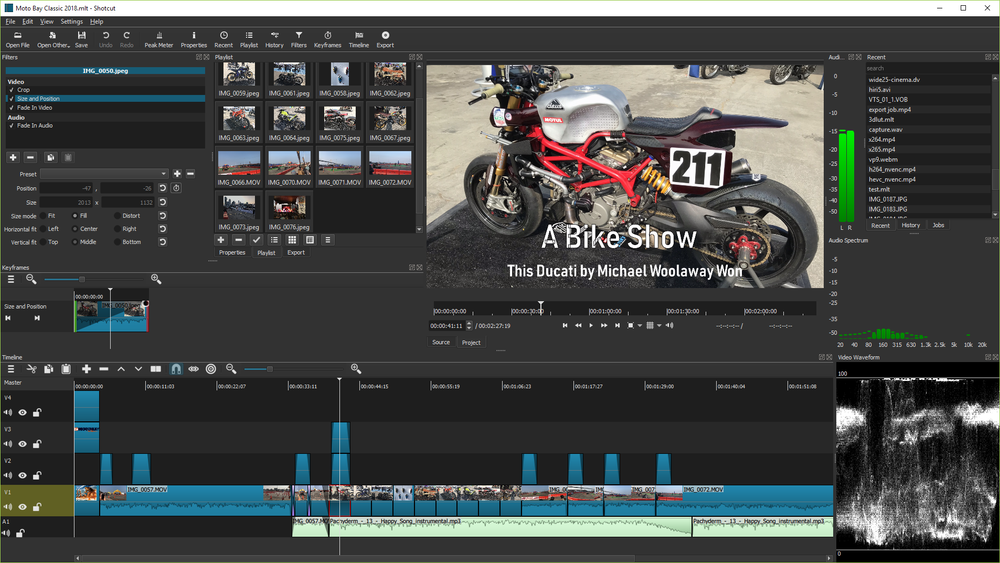
image of Shotcut
TL;DR

Shotcut is a GPL-3.0 cross-platform desktop video editor built on Qt and MLT. It replaces Adobe Premiere Pro, Final Cut Pro, and DaVinci Resolve Studio for creators who need native timeline editing, broad format support, and local file control without subscription licensing.

Read the full breakdownHide the full breakdownWho it is for, how it works, trade-offs and the FAQ
who it's for

Who Shotcut is for#

Educators and students editing videos

Shotcut gives classrooms and students a free editor for tutorials, presentations, and media projects across common desktop systems.

Skip if:

Use a commercial suite if the course requires professional color, motion graphics, or industry-standard workflows.

Small teams producing product clips

Teams can edit demos, webinars, social clips, and training videos locally without adding another subscription. Broad format support helps with mixed screen recordings and camera footage.

Skip if:

Skip it if your team needs cloud review, shared media libraries, or advanced multi-editor collaboration.

the problem

The problem it solves#

Video editing tools can become expensive and hardware-specific, especially for students, educators, nonprofits, and small teams. Proprietary suites also tie projects to vendor ecosystems, cloud accounts, and paid upgrade paths.\u000A\u000AMany creators only need reliable trimming, filters, audio editing, color controls, and export across common formats. Paying for a full commercial suite is hard to justify when editing is frequent but not the organization's core business.

how Shotcut solves it

How it solves it#

Cross-platform desktop editing

Shotcut runs on Linux, macOS, and Windows, giving mixed teams a common editor. Local desktop editing keeps source footage and project files under the creator's control.

Broad format support through MLT

Shotcut builds on the MLT multimedia framework and FFmpeg ecosystem for wide media format support. This reduces transcoding work for common camera and screen-recording files.

Timeline filters and exports

Users can trim clips, layer audio and video, apply filters, adjust color, and export finished videos from one timeline. It covers common tutorial, social, and education editing workflows.

strengths · trade-offs

Strengths and trade-offs#

Strengths

  • No subscription for local editingShotcut gives creators a capable local editor without monthly licensing. That matters for schools, nonprofits, hobbyists, and small teams with occasional video production needs.
  • Works across major desktop systemsCross-platform support helps teams with mixed workstations. A creator can edit on Linux without moving to a proprietary macOS or Windows-only workflow.

Trade-offs

  • -Less polished collaboration ecosystemShotcut does not match Premiere Pro or DaVinci Resolve Studio for team collaboration, advanced color workflows, motion graphics ecosystems, or studio pipeline integrations.
  • -Desktop app, not hosted workflowShotcut keeps editing local. Teams that need browser-based review, cloud asset management, and shared project collaboration will need additional tools.
versus alternatives

Shotcut vs alternatives#

Shotcut vs Adobe Premiere Pro\u000A\u000AShotcut and Adobe Premiere Pro both edit video, but Shotcut is a free local desktop editor while Premiere Pro is a proprietary subscription product within Adobe's creative ecosystem.\u000A\u000A| Criterion | Shotcut | Adobe Premiere Pro |\u000A| --- | --- | --- |\u000A| License | GPL-3.0 | Proprietary subscription |\u000A| Hosting | Local desktop app | Local desktop app with Adobe cloud ecosystem |\u000A| Best fit | Cost-conscious local editing | Professional studio and collaboration workflows |\u000A| Platforms | Linux, macOS, Windows | macOS and Windows |\u000A\u000AShotcut is the better choice when creators need capable local editing without subscription cost. Premiere Pro is still better when teams depend on Adobe integrations, professional collaboration, and advanced post-production workflows.

tech stack · detected from GitHub

What it's built on#

Languages
C++JavaScript
Frameworks
MLT Framework
frequently asked

FAQ#

Is Shotcut free and open source?

Yes. Shotcut is GPL-3.0 licensed and free to use. It is a desktop video editor available across major operating systems.

Can Shotcut replace Adobe Premiere Pro?

Shotcut can replace Premiere Pro for many basic and intermediate local editing workflows. Premiere Pro remains stronger for professional collaboration, motion graphics integrations, and studio pipelines.

Who is Shotcut best for?

Shotcut is best for creators, educators, nonprofits, and small teams that need capable local video editing without subscription costs.

Looking for more

Other ways to replace Adobe Premiere Pro, Final Cut Pro, DaVinci Resolve Studio and CapCut#

Concat

#1 in the CapCut guide

Local background removal, auto-captions, and Android support

9,417 GitHub stars

OpenCut

#2 in the CapCut guide

The browser-and-desktop pick for CapCut's familiar feel

95,414 GitHub stars

Kdenlive

#4 in the CapCut guide

KDE editor with 2 speech-to-text engine options and colour grading

5,907 GitHub stars

OpenShot

#5 in the CapCut guide

Beginner-friendly desktop editor with no watermark

6,663 GitHub stars
All 7 CapCut alternatives5 open source CapCut alternatives, ranked
by category

Open source tools in these categories#

460

Developer Tools

REA (Reverse Engineer Anything), superpowers, Skills for Real Engineers
97

Design & Creative

ComfyUI, Excalidraw, Godot Engine

Featured

Inbox Zero

Alternative toSuperhuman

AI email assistant that drafts replies and clears your inbox

  • 12,712 GitHub stars
  • AGPL-3.0Licence AGPL-3.0
  • #Email

Omnara

Alternative toCClaude Managed Agents

Open-source agent deployment API. Self-host or use Omnara Cloud.

  • 2,957 GitHub stars
  • Apache-2.0Licence Apache-2.0
  • #AI Agents

rakazo

Alternative toGrok Bot

AI teammates you own: your keys, your model, your machine.

  • 4,904 GitHub stars
  • Apache-2.0Licence Apache-2.0
  • #AI Agents
Feature your project

New open source projects by email

The projects we add and every new guide. Free, unsubscribe any time.

Find open source alternatives to paid software

/
  • Claude Code to OpenCode
  • Jira to Windshift
  • Notion to AppFlowy
  • Slack to Mattermost
  • Linear to GitLab
  • Wispr Flow to Handy
  • CapCut to Concat
  • Grok Bot to rakazo
  • Superhuman to Inbox Zero
  • Airtable to AITable
  • Muse to OpenClaw
  • GitHub Copilot to Cline
  • Datadog to Netdata
  • Microsoft Teams to Rocket.Chat
  • Pinecone to Qdrant
  • Zapier to n8n
  • Devin AI to OpenHands
  • Firebase to Supabase
  • 1Password to KeePassXC
  • Confluence to Docmost
  • Contentful to Strapi
  • Adobe Premiere Pro to Shotcut
  • ChatGPT to AnythingLLM
  • LangSmith to Langfuse
  • Claude Code to OpenCode
  • Jira to Windshift
  • Notion to AppFlowy
  • Slack to Mattermost
  • Linear to GitLab
  • Wispr Flow to Handy
  • CapCut to Concat
  • Grok Bot to rakazo
  • Superhuman to Inbox Zero
  • Airtable to AITable
  • Muse to OpenClaw
  • GitHub Copilot to Cline
  • Datadog to Netdata
  • Microsoft Teams to Rocket.Chat
  • Pinecone to Qdrant
  • Zapier to n8n
  • Devin AI to OpenHands
  • Firebase to Supabase
  • 1Password to KeePassXC
  • Confluence to Docmost
  • Contentful to Strapi
  • Adobe Premiere Pro to Shotcut
  • ChatGPT to AnythingLLM
  • LangSmith to Langfuse