Open Source Alternatives
  • Alternatives
  • Categories
    Categories by size882 projects
    • Developer Tools461
    • AI & Machine Learning404
    • Web Development196
    • Business & Productivity191
    • Communication & Collaboration126
    • Security & Monitoring126
    • IT Management123
    • Product & Project Management106
    • Cloud & Hosting105
    • Data & Analytics104
    Browse all 21 categoriesLLMOps & AI Tooling, Design & Creative and 9 more
  • Blog
  • Advertise
SearchNotion, Slack, password manager.../
Submit
Open Source Alternatives
  • Alternatives
    • Developer Tools461
    • AI & Machine Learning404
    • Web Development196
    • Business & Productivity191
    • Communication & Collaboration126
    • Security & Monitoring126
    • Browse all 21 categories
  • Blog
  • Advertise
Submit your project

New open source projects by email

The projects we add and every new guide. Free, unsubscribe any time.

Open Source Alternatives LogoOpen Source Alternatives

Handpicked Open Source Alternatives to Paid Softwares

Product

  • Categories
  • Tag
  • Advertise

Resources

  • Blog
  • Collection
  • Submit

Company

  • Privacy Policy
  • Terms of Service
  • Refund Policy
  • Sitemap

Alternatives

  • Claude Code
  • Jira
  • Notion
  • Slack
  • Linear
  • Wispr Flow
  • All alternatives
© 2026 Open Source Alternatives. All rights reserved.
Open SourceAlternatives
Home/Categories/Developer Tools/Oxynote
icon of Oxynote

Oxynote

Open source alternative to Notion and Confluence

  • 244 stars
  • Apache-2.0
  • Active this week
  • Last commit 1 day ago

Last verified Oct 21, 2026

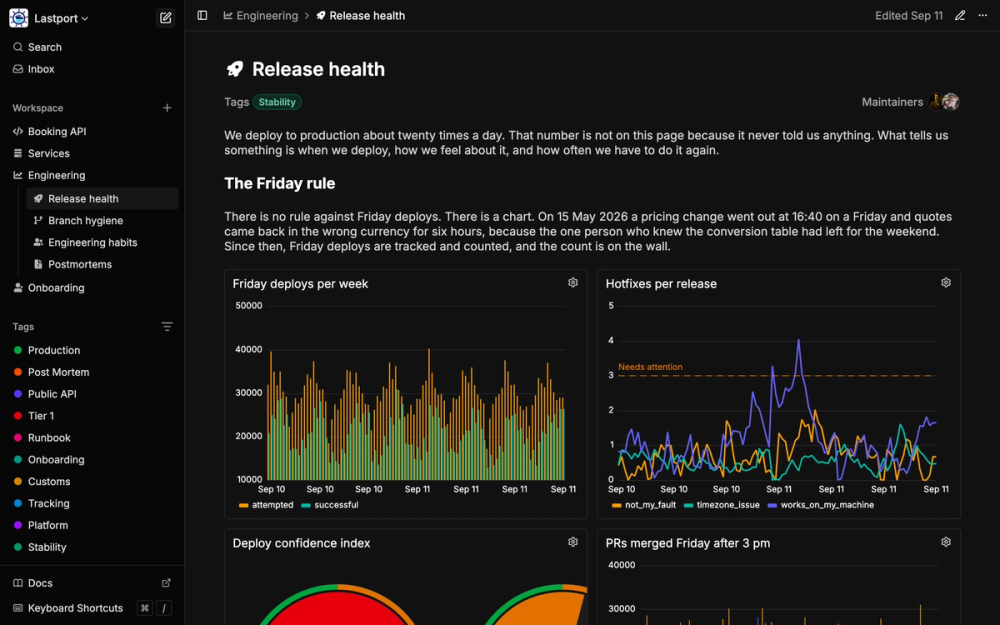
Build a self-hosted technical wiki where live Prometheus and SQL charts run inline, docs get reviewed like pull requests, and teams edit in real time.

Visit websiteGitHub244 starsDeploy on Hostinger
image of Oxynote
TL;DR

Oxynote is a self-hosted technical wiki that runs live Prometheus and SQL metric charts inline with the documentation explaining them. It replaces Notion and Confluence for teams that need observability data and internal docs in one place, with a pull-request-style review flow that covers chart and prose changes together. Apache 2.0 licensed, deployed as a single Docker container. Best for platform and infrastructure teams writing runbooks and API documentation alongside the metrics those systems emit.

Read the full breakdownHide the full breakdownWho it is for, how it works, trade-offs, the quick start and the FAQ
who it's for

Who Oxynote is for#

Platform teams documenting the services they operate

Platform or infrastructure teams that own a fleet of services need runbooks, deployment notes, and health dashboards in one place. Oxynote lets them embed the Prometheus metrics for a service on the same page as the runbook describing what to do when those metrics cross a threshold. Changes to the runbook go through the same review flow as changes to the chart configuration.

Skip if:

If your team does not run Prometheus or a SQL-queryable metrics store, Oxynote's core differentiation over a plain wiki is not available. A standard Notion or Confluence workspace is simpler for pure text documentation without live data.

Backend engineers writing internal API documentation

Backend engineers who want Stripe-style split docs for internal services can use Oxynote's Split Documentation block to show request parameters and a live latency chart side by side. The result updates in real time as the service runs, so the documentation reflects actual behavior rather than a manually maintained description.

Skip if:

If your internal APIs are already documented with a dedicated generator like Swagger UI or Redoc, adding Oxynote as a second documentation system adds coordination overhead. Oxynote fits best when the team wants API docs and operational context together.

Engineering teams building AI agent workflows

MCP-compatible agents such as Claude Code or Codex can connect to Oxynote over OAuth and query both the wiki pages and the metric data directly. Teams building incident-response agents or automated operations workflows can point those agents at an Oxynote workspace for a single interface over both the wiki content and live metric data.

Skip if:

If your agents do not support MCP or you are not building any agentic workflows yet, this integration provides no immediate value. Evaluate Oxynote on its wiki and metrics features alone.

the problem

The problem it solves#

Monitoring and documentation live in separate tools, and they drift apart. In most engineering teams, Grafana holds the dashboards, Notion or Confluence holds the runbooks, and neither is aware of the other. When a chart changes, the explanation does not update. When a threshold moves, the reason does not move with it. During an incident, the engineer on call must switch between tabs to connect a spike to its meaning.

The same problem runs through internal API documentation. Service endpoints change, request and response fields get added or removed, but the documentation lives somewhere else and catches up only when someone has time to update it. Runbooks describing admin commands and server procedures accumulate in wikis nobody trusts because nobody can tell whether the doc reflects what is deployed now or what was deployed a year ago.

how Oxynote solves it

How it solves it#

Inline Prometheus and SQL metric charts

A Live Metrics block runs a Prometheus query, a PostgreSQL query, a MySQL query, or a MariaDB query and renders the result as a time series, bar chart, or gauge directly inside the page. Multiple blocks side by side form a metric grid, which works like a Grafana dashboard embedded inside a document, with the explanation, thresholds, and runbook instructions surrounding the charts.

Draft, diff, and approval review flow

Any page can be set to require a review before changes land. Every edit opens a draft branch; the diff view shows renamed endpoints, reworded sentences, and changed chart queries together in one red-and-green view. Reviewers approve, the draft merges to main, and main can be protected to prevent direct edits. The flow treats documentation changes the same way pull requests treat code changes.

Real-time collaborative editing

Multiple people can edit the same page at the same time. You see who is on the page, which block they are holding, and where they are typing, with no overwrite conflicts. Comments attach to a specific word, to a line inside a Mermaid diagram's source, or to a whole chart, and they carry replies and can be resolved when the change lands. Every mention and reply arrives in an inbox.

Freshness hooks for tracked dependencies

A block or a whole page can track an external dependency, such as a GitHub file, a container image, a web URL, or a date. When that dependency changes, the assigned maintainers get a reminder. Doc rot changes from a passive problem into an active signal. When you deploy a new image version, the pages that reference it notify the people responsible for keeping them current.

Built-in AI assistant with MCP access

Rubber Duck, the built-in assistant, reads and edits pages and runs the same Prometheus and SQL queries the metric blocks run. You choose the model: Anthropic, OpenAI, Google, OpenRouter, or a local model through Ollama. MCP-compatible clients such as Claude Code and Codex connect to Oxynote over OAuth and can read pages, edit them, and run metric queries, the same capabilities available to Rubber Duck.

Split API documentation blocks

A Split Documentation block puts request parameters or response fields on the left and the live endpoint, example curl commands, and a latency chart on the right, similar to how Stripe presents its API documentation. Internal service documentation built this way shows the schema and the live behavior on one page without a separate documentation generator or spec-to-HTML pipeline.

strengths · trade-offs

Strengths and trade-offs#

Strengths

  • Docs and charts change together, reviewed togetherBecause metrics and documentation live in the same page, a draft branch carries both through one diff and one approval. Grafana and Notion as separate tools each keep their own history, so there is no way to review a chart change and its documentation update as one commit. Oxynote's review flow treats the metric query and the prose around it as one atomic change.
  • Apache 2.0 license, no per-seat feesApache 2.0 allows running Oxynote on commercial infrastructure, modifying the source, and redistributing it without licensing fees. There are no per-seat or per-editor charges for the self-hosted version. Notion and Confluence both charge per seat for team access; a growing engineering team on Oxynote pays once for the server.
  • Single Docker container, no external database requiredThe quick-start is one docker run command with a data volume mount. Oxynote stores its own data without requiring a separately provisioned database. For teams that want a self-hosted wiki without a Postgres or MySQL prerequisite, setup reduces to the time it takes to pull the image and start the container.
  • AI agent access over MCPMCP-compatible clients such as Claude Code and Codex connect to Oxynote over OAuth and can read pages, edit them, and run metric queries. An agent responding to an alert can read the relevant runbook and query the Prometheus data for that service without switching tools, since both the documentation and the metric queries live in the same workspace.

Trade-offs

  • -No hosted service availableOxynote is self-hosted only. There is no managed cloud option, so every team that wants to use it needs to run and maintain the container themselves. This rules out teams without infrastructure to host another service or those that require a vendor-managed SaaS option.
  • -Logs and alerting not yet supportedThe live metrics layer currently covers Prometheus and SQL. Log ingestion and alert management are not yet implemented, as the project FAQ states directly. Teams that need a unified view of metrics, logs, and alerts in the same wiki page will need to use Grafana or another tool alongside Oxynote for those parts.
  • -Early-stage project with limited production track recordOxynote was created in August 2026 and had 214 stars and 65 open issues at the time of writing. Teams with low tolerance for bugs or breaking changes should evaluate carefully, follow releases closely, and maintain their own backups of the data volume.
versus alternatives

Oxynote vs alternatives#

Oxynote vs Notion

Oxynote and Notion overlap on structured docs, real-time editing, and a block-based page editor. The key difference is that Notion is a general-purpose workspace with no native metric charts, while Oxynote embeds live Prometheus and SQL data directly into pages.

FeatureOxynoteNotion
LicenseApache 2.0Proprietary
Self-hostingYes (Docker)No
Live metric chartsPrometheus, SQLNo
Draft/diff review flowYesNo
MCP agent accessYes (OAuth)No
PricingFree self-hostedPer-seat subscription

Oxynote is the better choice for engineering teams that need runbooks, API docs, and system metrics in one place with a review flow that treats chart and prose changes together. Notion's embedded Grafana panels require users to be signed into Grafana to render and do not travel through Notion's version history as a unified change. For general knowledge management, marketing wikis, or company handbooks that do not touch operational metrics, Notion is more mature, has a wider range of integrations, and offers a hosted service with no infrastructure requirements.

Oxynote vs Confluence

Confluence is Atlassian's wiki, widely used in engineering organizations alongside Jira. Like Notion, it has no native metric chart capability; Grafana or Datadog data reaches it only through embeds or third-party plugins, each with its own authentication and rendering constraints.

FeatureOxynoteConfluence
LicenseApache 2.0Proprietary
Self-hostingYes (Docker)Cloud or Data Center (paid)
Live metric chartsPrometheus, SQLNo native; third-party plugins
Draft/diff reviewYes, built-inPage versioning only
Per-seat pricingNone (self-hosted)Per-user licensing
MCP agent accessYes (OAuth)No

Oxynote is the better choice for teams that want a self-hosted wiki with zero per-seat cost and native metric charts. Confluence is the better choice for large organizations that need deep Jira integration, an established approval workflow, a mature plugin ecosystem, and enterprise support contracts. The comparison is not primarily about features but about deployment model; Confluence Data Center requires significant infrastructure and licensing overhead, while Oxynote is one container.

install · quick start

Quick start#

bash
Oxynote runs as a single Docker container with a persistent data volume.
```bash
docker run -d --name oxynote \
  -p 8080:8080 \
  -v oxynote_data:/oxynote/data \
  ghcr.io/oxynote/oxynote:latest
```
tech stack · detected from GitHub

What it's built on#

Languages
GoTypeScript
Frameworks
Nuxt
Databases
PostgreSQL
Cache
Redis
Tooling
esbuild
frequently asked

FAQ#

Does Oxynote replace Grafana?

Not yet fully. Oxynote covers metric charts and dashboard-style grids from Prometheus and SQL. Logs and alerting are not yet implemented, as the project FAQ states directly. For teams that primarily need a place to explain their metrics alongside the metrics themselves, Oxynote is a practical choice over Grafana plus a separate wiki. Teams that rely on Grafana's log ingestion, alert routing, or plugin ecosystem still need Grafana for those parts.

What data sources does Oxynote support for live metrics?

Prometheus for time series metrics, and SQL-based sources including PostgreSQL, MySQL, and MariaDB. Each Live Metrics block is configured with one or more queries against these sources. Additional data sources are not documented in the current README.

Does Oxynote require an external database to run?

No. The quick-start is a single Docker container with a volume mount for data. The README shows this as the complete setup without any separately provisioned database. For teams that want a self-hosted wiki without a Postgres or MySQL prerequisite, this reduces setup to pulling the image and running the container.

What is Oxynote's license?

Apache 2.0, a permissive license that allows running Oxynote on commercial infrastructure, modifying the source, and redistributing it without per-seat fees or commercial use restrictions. No additional terms extend or restrict the Apache 2.0 grant.

Can AI agents like Claude Code connect to Oxynote to read pages and run queries?

Yes. Oxynote exposes its tools over the Model Context Protocol. MCP-compatible clients including Claude Code and Codex connect via OAuth and can read pages, edit them, and run metric queries, the same capabilities available to the built-in Rubber Duck assistant. Teams building incident-response agents or automated operations workflows can point those agents at an Oxynote workspace.

Looking for more

Other ways to replace Notion and Confluence#

AppFlowy

#1 in the Notion guide

Full Notion replacement for small teams

77,613 GitHub stars

AFFiNE

#2 in the Notion guide

Docs, whiteboards, and databases in one workspace

73,684 GitHub stars

Outline

#3 in the Notion guide

Polished team wiki and internal knowledge base

40,988 GitHub stars

Macro Docs

#4 in the Notion guide

Markdown-native docs that agents and teammates edit together

4,782 GitHub stars
All 21 Notion alternatives9 open source Notion alternatives, ranked
by category

Open source tools in these categories#

461

Developer Tools

REA (Reverse Engineer Anything), superpowers, Skills for Real Engineers
86

DevOps & CI/CD

Nvm, Uptime Kuma, Netdata
126

Security & Monitoring

RustDesk, REA (Reverse Engineer Anything), Uptime Kuma
126

Communication & Collaboration

freeCodeCamp, iptv, Excalidraw
191

Business & Productivity

OpenClaw, Excalidraw, RustDesk
Hostinger

Run Oxynote on your own server

Self-host Oxynote on a Hostinger VPS.

Deploy on Hostinger

Featured

Omnara

Alternative toCClaude Managed Agents

Open-source agent deployment API. Self-host or use Omnara Cloud.

  • 2,957 GitHub stars
  • Apache-2.0Licence Apache-2.0
  • #AI Agents

rakazo

Alternative toGrok Bot

AI teammates you own: your keys, your model, your machine.

  • 4,904 GitHub stars
  • Apache-2.0Licence Apache-2.0
  • #AI Agents

Inbox Zero

Alternative toSuperhuman

AI email assistant that drafts replies and clears your inbox

  • 12,712 GitHub stars
  • AGPL-3.0Licence AGPL-3.0
  • #Email
Feature your project

New open source projects by email

The projects we add and every new guide. Free, unsubscribe any time.

Find open source alternatives to paid software

/
  • Claude Code to OpenCode
  • Jira to Windshift
  • Notion to AppFlowy
  • Slack to Mattermost
  • Linear to GitLab
  • Wispr Flow to Handy
  • CapCut to Concat
  • Grok Bot to rakazo
  • Superhuman to Inbox Zero
  • Airtable to AITable
  • Muse to OpenClaw
  • GitHub Copilot to Cline
  • Datadog to Netdata
  • Microsoft Teams to Rocket.Chat
  • Pinecone to Qdrant
  • Zapier to n8n
  • Devin AI to OpenHands
  • Firebase to Supabase
  • 1Password to KeePassXC
  • Confluence to Docmost
  • Contentful to Strapi
  • Adobe Premiere Pro to Shotcut
  • ChatGPT to AnythingLLM
  • LangSmith to Langfuse
  • Claude Code to OpenCode
  • Jira to Windshift
  • Notion to AppFlowy
  • Slack to Mattermost
  • Linear to GitLab
  • Wispr Flow to Handy
  • CapCut to Concat
  • Grok Bot to rakazo
  • Superhuman to Inbox Zero
  • Airtable to AITable
  • Muse to OpenClaw
  • GitHub Copilot to Cline
  • Datadog to Netdata
  • Microsoft Teams to Rocket.Chat
  • Pinecone to Qdrant
  • Zapier to n8n
  • Devin AI to OpenHands
  • Firebase to Supabase
  • 1Password to KeePassXC
  • Confluence to Docmost
  • Contentful to Strapi
  • Adobe Premiere Pro to Shotcut
  • ChatGPT to AnythingLLM
  • LangSmith to Langfuse