Open Source Alternatives
  • Alternatives
  • Categories
    Categories by size881 projects
    • Developer Tools460
    • AI & Machine Learning404
    • Web Development196
    • Business & Productivity191
    • Communication & Collaboration126
    • Security & Monitoring126
    • IT Management123
    • Product & Project Management106
    • Cloud & Hosting104
    • Data & Analytics104
    Browse all 21 categoriesLLMOps & AI Tooling, Design & Creative and 9 more
  • Blog
  • Advertise
SearchNotion, Slack, password manager.../
Submit
Open Source Alternatives
  • Alternatives
    • Developer Tools460
    • AI & Machine Learning404
    • Web Development196
    • Business & Productivity191
    • Communication & Collaboration126
    • Security & Monitoring126
    • Browse all 21 categories
  • Blog
  • Advertise
Submit your project

New open source projects by email

The projects we add and every new guide. Free, unsubscribe any time.

Open Source Alternatives LogoOpen Source Alternatives

Handpicked Open Source Alternatives to Paid Softwares

Product

  • Categories
  • Tag
  • Advertise

Resources

  • Blog
  • Collection
  • Submit

Company

  • Privacy Policy
  • Terms of Service
  • Refund Policy
  • Sitemap

Alternatives

  • Claude Code
  • Jira
  • Notion
  • Slack
  • Linear
  • Wispr Flow
  • All alternatives
© 2026 Open Source Alternatives. All rights reserved.
Open SourceAlternatives
Home/Categories/IT Management/Spotifast
icon of Spotifast

Spotifast

Open source alternative to Spotify Premium

  • 8.5K stars
  • MIT
  • Active this week
  • Last commit 2 days ago

Last verified Oct 19, 2026

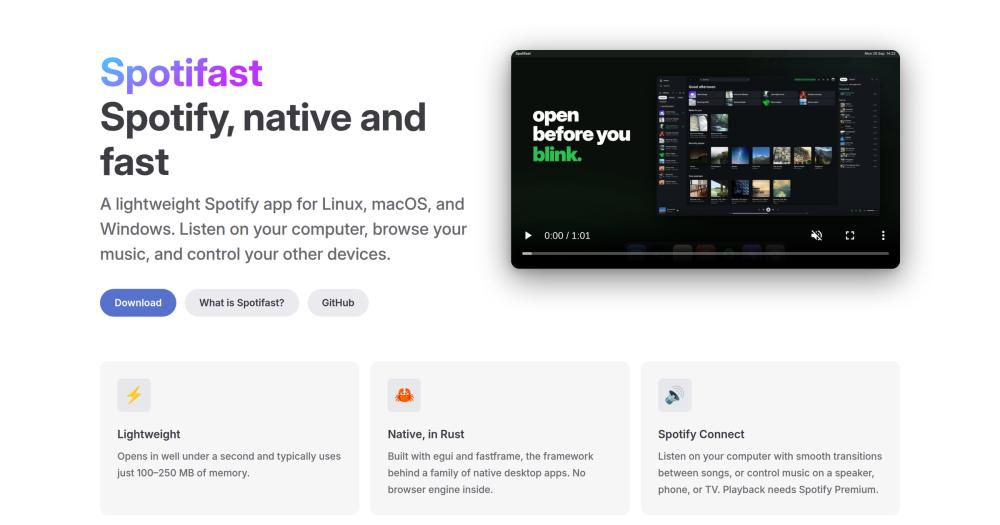
Run your Spotify library from a native Rust client for Linux, macOS, and Windows, with no browser engine and under 250 MB of RAM.

Visit websiteGitHub8.5K stars
Image for Spotifast
TL;DR

Spotifast is a native Rust desktop client for Spotify that replaces the Electron-based official app on Linux, macOS, and Windows. It starts in well under a second and typically uses 100 to 250 MB of RAM, compared to the several hundred megabytes the official Electron client consumes. Playback requires a Spotify Premium account; free accounts can browse and search. MIT licensed and available via Homebrew, the AUR, Flatpak, and AppImage.

Read the full breakdownHide the full breakdownWho it is for, how it works, trade-offs, the quick start and the FAQ
who it's for

Who Spotifast is for#

Linux desktop users replacing the Electron Spotify client

The official Spotify app on Linux has a history of rendering glitches, tray icon issues, and input lag tied to its Electron base. Spotifast installs via Flatpak, AppImage, AUR, or Nix, integrates with MPRIS for media keys and desktop controls, and stores credentials in the OS keychain.

Skip if:

If you rely on social listening features like Group Sessions or Spotify-exclusive Canvas animated covers, Spotifast does not document those capabilities.

macOS users who want a lighter music client

Install via Homebrew with a single command and get a native binary that opens faster and uses less RAM than the Electron Spotify app. Light, dark, and system-matched themes integrate with macOS appearance settings.

Skip if:

If the official Spotify macOS app already performs well on your machine and memory overhead is not a concern, the migration effort is unlikely to pay off.

Developers on memory-constrained machines

At 100-250 MB of RAM, Spotifast frees the headroom that the official Electron client consumed. It runs alongside IDEs and build tools without competing for the same memory budget, which matters most on machines with 8 GB or less.

Skip if:

If your machine has 16 GB or more of RAM and the official client already launches quickly, the performance difference is unlikely to be noticeable in practice.

Winamp fans and music visualizer users

Spotifast ships a full Winamp 2 mini-player with .wsz skin support, an equalizer, and animated sound displays, alongside MilkDrop music visualizations with more than 10,000 presets. These features are not present in the official Spotify desktop app.

Skip if:

If you have no interest in the Winamp mini-player or MilkDrop visuals, the main Spotifast interface covers library, playback, and Connect without requiring those modes.

the problem

The problem it solves#

The official Spotify desktop app runs on Electron, which bundles a Chromium browser engine. On most machines this means the app takes several seconds to open and keeps several hundred megabytes of RAM allocated to play audio. On Linux, Electron-based apps have well-documented tray, input, and rendering issues that the official Spotify client has never fully resolved.

This overhead matters on machines where memory is tight. A music player that consumes the same resources as an active browser tab is a friction point that compounds over a workday, especially when running IDEs, build tools, or virtual machines alongside it.

how Spotifast solves it

How it solves it#

Library and playlist browsing

Browse Liked Songs, playlists, albums, artists, and podcasts from your Spotify library. Search the full Spotify catalogue and edit playlists you own directly in the app, without switching to a browser or the official client.

Spotify Connect device control

Play music on your desktop or control playback on any connected Spotify device, including Google Cast speakers and speaker groups, from the device menu in the player bar. Your computer appears as a named Spotify Connect device called Spotifast.

Themes and localisation

Choose from light, dark, system-matched, or custom color themes. On Omarchy-based Linux setups, the theme follows your desktop automatically. The interface ships with complete Spanish, Turkish, and Ukrainian translations built into the binary.

Desktop controls and tray support

Full keyboard shortcut and media key integration across platforms. On supported desktops, Spotifast can minimize to the system tray and keep music running in the background. Linux desktop integration runs via MPRIS.

Winamp mini player

A Winamp 2-style mini player with .wsz skin support, an equalizer, a playlist view, and animated sound displays. Toggle between the main player and the mini player with Ctrl+M on Linux and Windows, or Cmd+Shift+M on macOS. Multiple window sizes are supported.

MilkDrop music visualizer

Displays music-reactive visuals in a separate window or fullscreen mode, with more than 10,000 presets downloaded on first run. Available on Linux, macOS, and Windows Intel/AMD builds. Not included in the Windows on ARM download.

strengths · trade-offs

Strengths and trade-offs#

Strengths

  • No browser engine overheadSpotifast compiles to a native Rust binary on each platform, skipping the Chromium runtime the official Spotify Electron app bundles. It runs in under 250 MB of RAM and starts in well under one second, versus the higher memory footprint and slower cold start of the Electron client.
  • MIT licensed with active developmentMIT license lets you run, modify, and distribute Spotifast without restriction, including for internal commercial use. The project has 7,747 GitHub stars and 399 forks. Created in August 2026, it received its most recent push on October 13 2026, indicating active maintenance.
  • Cross-platform from a single Rust codebaseLinux, macOS, and Windows support ships from one codebase. Linux coverage includes Flatpak, AppImage, Nix, and AUR packages alongside the default binary, making it available on distributions that have no official Spotify package.
  • Spotify Connect with Google Cast supportSpotify Connect works across the full range of connected devices, including Google Cast speakers and groups, from the same interface used for local playback. No phone required to switch devices mid-session.

Trade-offs

  • -Playback requires Spotify PremiumFree Spotify accounts can sign in, browse playlists, and search the catalogue, but cannot play music through Spotifast. Playback uses librespot, which is bound by the same restrictions Spotify enforces on its Connect protocol. A Premium subscription is required before any audio plays.
  • -124 open issues as of listing dateThe GitHub tracker shows 124 open issues at the time of this listing. Given 7,747 stars and active development on a recently released project, this is expected volume, but some reported bugs may affect specific desktop environments, window managers, or hardware configurations.
  • -MilkDrop absent from Windows ARM buildsThe MilkDrop visualizer is included in Linux, macOS, and Windows Intel/AMD builds but is not present in the Windows on ARM download. Windows ARM users lose this feature with no workaround within Spotifast.
versus alternatives

Spotifast vs alternatives#

Spotifast vs Spotify Official Desktop App

Both apps connect to the same Spotify service and require a Premium subscription for playback. The choice is about the client application, not the subscription itself. Spotifast is a lightweight native Rust binary; the official Spotify app runs on Electron with a bundled Chromium engine.

FeatureSpotifastSpotify Official
LicenseMIT (open source)Proprietary
TechnologyRust + eguiElectron/Chromium
Memory (typical)100-250 MBHigher (Chromium embedded)
Startup timeUnder 1 secondSlower (Electron cold start)
Linux packagesFlatpak, AppImage, AUR, NixOfficial .deb/.rpm
Winamp playerYes (.wsz skins)No
MilkDrop visualsYes (Linux/macOS/Win x86)No
Spotify ConnectYesYes
Premium required for playbackYesYes

Spotifast has a clear advantage in startup speed and memory footprint. Both clients support Spotify Connect and can control playback on remote speakers, including Google Cast groups, from the same interface.

The official Spotify app includes Group Sessions, social listening, and Spotify-exclusive Canvas animated covers that Spotifast does not document as supported. For users whose workflow depends on those features, the official client is the better choice. For Linux users who encounter rendering or tray issues with the Electron client, or for anyone running memory-constrained machines, Spotifast offers a native MIT-licensed alternative with active development.

install · quick start

Quick start#

bash
Spotifast installs from a package manager on most platforms; Windows and other Linux options are on the download page.

```bash
# macOS
brew install --cask crmne/tap/spotifast

# Arch Linux
yay -S spotifast-bin
```
tech stack · detected from GitHub

What it's built on#

Languages
PythonRust
frequently asked

FAQ#

Does Spotifast require a Spotify Premium subscription?

Playback requires Spotify Premium. Free accounts can sign in, browse playlists, albums, and artists, and search the Spotify catalogue, but cannot play music through Spotifast. This is a librespot limitation that applies to all third-party Spotify clients using the Connect protocol. A Premium subscription is required before any audio will play.

Will my Spotify account get banned for using Spotifast?

Spotifast connects to Spotify using librespot, which communicates via the Spotify Connect protocol. It is not a scraper and does not modify the official app. The project is not affiliated with Spotify AB. Spotifast's documentation covers account risk in detail at spotifast.rocks/what-is-spotifast/#will-my-spotify-account-get-banned; reading that page before using the app is advisable.

How does Spotifast differ from the official Spotify desktop app?

Spotifast is a native Rust binary that skips Electron and the Chromium browser engine the official app carries. It starts in well under a second and uses 100-250 MB of RAM. The official app includes some features such as Group Sessions that Spotifast does not document as supported.

Which Linux distributions does Spotifast support?

Spotifast supports Arch Linux via the AUR (yay -S spotifast-bin) and other Linux distributions via Flatpak, AppImage, and Nix packages. The project's download page at spotifast.rocks/download/ lists all options. MPRIS integration is included for media key and desktop control support across window managers.

What is the Winamp mini player in Spotifast?

Spotifast includes a Winamp 2-style mini player with support for .wsz skin files, an equalizer, a playlist view, and animated sound displays. Toggle it from the main player with Ctrl+M on Linux and Windows, or Cmd+Shift+M on macOS. The mini player supports multiple window sizes. A dedicated guide is available at spotifast.rocks/winamp/.

also worth a look

Similar open-source tools#

Buzz

Featured

Alternative toSlack

Self-hosted team chat where people and AI agents work together

  • 36,174 GitHub stars
  • Apache-2.0Licence Apache-2.0

Mole

Alternative toCleanMyMac X

Mac cleaner, app uninstaller, disk analyzer, and system monitor

  • 72,205 GitHub stars
  • GPL-3.0Licence GPL-3.0

Homeio

Alternative toUnraid

Browser desktop for your self-hosted home server

  • 90 GitHub stars
  • AGPL-3.0Licence AGPL-3.0

Pulse

InSecurity & Monitoring

Read-only Windows diagnostics with a local AI assistant.

  • 368 GitHub stars
  • MITLicence MIT

Paymenter

Alternative toWHMCS

Self-hosted billing for hosting providers, MIT licensed

  • 2,770 GitHub stars
  • MITLicence MIT

3x Ui

Alternative toOpenVPN Access Server

Web panel for Xray-core with per-client and multi-node controls

  • 48,290 GitHub stars
  • GPL-3.0Licence GPL-3.0
by category

Open source tools in these categories#

123

IT Management

RustDesk, Immich, Stirling PDF

Featured

Inbox Zero

Alternative toSuperhuman

AI email assistant that drafts replies and clears your inbox

  • 12,712 GitHub stars
  • AGPL-3.0Licence AGPL-3.0
  • #Email

Omnara

Alternative toCClaude Managed Agents

Open-source agent deployment API. Self-host or use Omnara Cloud.

  • 2,957 GitHub stars
  • Apache-2.0Licence Apache-2.0
  • #AI Agents

rakazo

Alternative toGrok Bot

AI teammates you own: your keys, your model, your machine.

  • 4,904 GitHub stars
  • Apache-2.0Licence Apache-2.0
  • #AI Agents
Feature your project

New open source projects by email

The projects we add and every new guide. Free, unsubscribe any time.

Find open source alternatives to paid software

/
  • Claude Code to OpenCode
  • Jira to Windshift
  • Notion to AppFlowy
  • Slack to Mattermost
  • Linear to GitLab
  • Wispr Flow to Handy
  • CapCut to Concat
  • Grok Bot to rakazo
  • Superhuman to Inbox Zero
  • Airtable to AITable
  • Muse to OpenClaw
  • GitHub Copilot to Cline
  • Datadog to Netdata
  • Microsoft Teams to Rocket.Chat
  • Pinecone to Qdrant
  • Zapier to n8n
  • Devin AI to OpenHands
  • Firebase to Supabase
  • 1Password to KeePassXC
  • Confluence to Docmost
  • Contentful to Strapi
  • Adobe Premiere Pro to Shotcut
  • ChatGPT to AnythingLLM
  • LangSmith to Langfuse
  • Claude Code to OpenCode
  • Jira to Windshift
  • Notion to AppFlowy
  • Slack to Mattermost
  • Linear to GitLab
  • Wispr Flow to Handy
  • CapCut to Concat
  • Grok Bot to rakazo
  • Superhuman to Inbox Zero
  • Airtable to AITable
  • Muse to OpenClaw
  • GitHub Copilot to Cline
  • Datadog to Netdata
  • Microsoft Teams to Rocket.Chat
  • Pinecone to Qdrant
  • Zapier to n8n
  • Devin AI to OpenHands
  • Firebase to Supabase
  • 1Password to KeePassXC
  • Confluence to Docmost
  • Contentful to Strapi
  • Adobe Premiere Pro to Shotcut
  • ChatGPT to AnythingLLM
  • LangSmith to Langfuse