Open Source Alternatives
  • Alternatives
  • Categories
    Categories by size881 projects
    • Developer Tools460
    • AI & Machine Learning404
    • Web Development196
    • Business & Productivity191
    • Communication & Collaboration126
    • Security & Monitoring126
    • IT Management123
    • Product & Project Management106
    • Cloud & Hosting104
    • Data & Analytics104
    Browse all 21 categoriesLLMOps & AI Tooling, Design & Creative and 9 more
  • Blog
  • Advertise
SearchNotion, Slack, password manager.../
Submit
Open Source Alternatives
  • Alternatives
    • Developer Tools460
    • AI & Machine Learning404
    • Web Development196
    • Business & Productivity191
    • Communication & Collaboration126
    • Security & Monitoring126
    • Browse all 21 categories
  • Blog
  • Advertise
Submit your project

New open source projects by email

The projects we add and every new guide. Free, unsubscribe any time.

Open Source Alternatives LogoOpen Source Alternatives

Handpicked Open Source Alternatives to Paid Softwares

Product

  • Categories
  • Tag
  • Advertise

Resources

  • Blog
  • Collection
  • Submit

Company

  • Privacy Policy
  • Terms of Service
  • Refund Policy
  • Sitemap

Alternatives

  • Claude Code
  • Jira
  • Notion
  • Slack
  • Linear
  • Wispr Flow
  • All alternatives
© 2026 Open Source Alternatives. All rights reserved.
Open SourceAlternatives
Home/Categories/Developer Tools/Mole
icon of Mole

Mole

Open source alternative to CleanMyMac X, Cleaner One Pro, CleanMyMac, DaisyDisk and iStat Menus

  • 72.2K stars
  • GPL-3.0
  • Active this week
  • Last commit 1 day ago

Last verified Oct 22, 2026

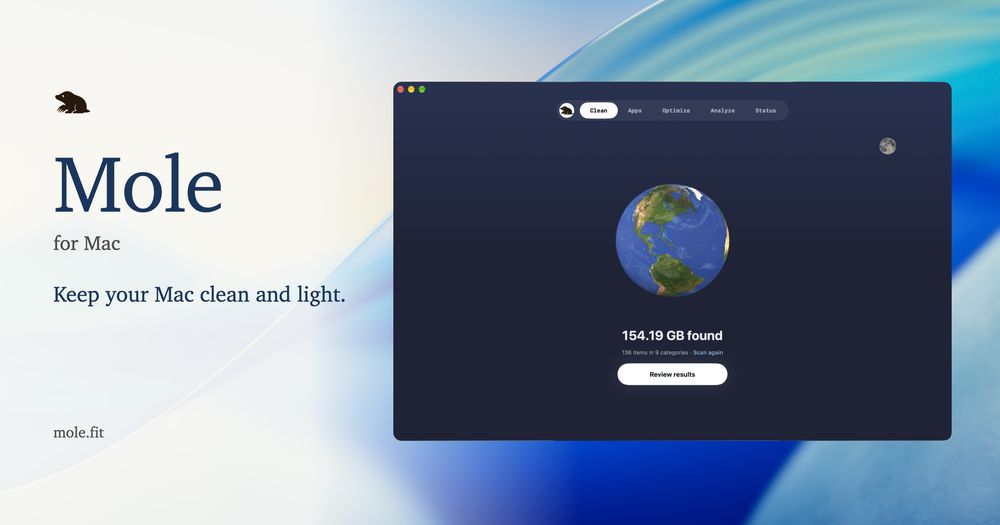
Manage Mac disk space, caches, and system health with a free GPL-3.0 CLI that replaces CleanMyMac X, DaisyDisk, and iStat Menus.

Visit websiteGitHub72.2K stars
image of Mole
TL;DR

Mole is an open source Mac maintenance CLI that replaces CleanMyMac X, DaisyDisk, and iStat Menus in one tool. It deep-cleans caches and AI tool sessions, uninstalls apps with their leftovers reviewed before deletion, optimizes macOS services, visualizes disk usage, and shows live system stats. The CLI is GPL-3.0 licensed and free; install it with `brew install tw93/tap/mole`. A paid native Mac app ($19 one-time) adds a graphical interface and a tested leftover database for 800+ apps. Best for Mac developers accumulating AI tool caches who want to reclaim disk space without a subscription.

Read the full breakdownHide the full breakdownWho it is for, how it works, trade-offs, the quick start and the FAQ
who it's for

Who Mole is for#

Mac developers working daily with AI coding tools

Mole's Moon module groups Claude Code, Codex, and Cursor caches, old sessions, and unused worktrees for separate review. Running `mo clean` after a heavy coding week typically frees 10 to 40GB of data that standard system cleaners miss. The `--dry-run` flag lets you preview everything before deleting a single file.

Skip if:

You are not using AI coding tools and your development caches are small. A focused script is simpler to maintain if your cleanup needs are narrow.

Individual Mac users paying for CleanMyMac X or DaisyDisk

Mole covers cleaning, uninstalling, disk analysis, and system monitoring in one free CLI. Installing Mole via Homebrew and running `mo clean` delivers the same core workflow as CleanMyMac X at no ongoing cost.

Skip if:

You need a fully graphical, no-terminal experience. The paid Mole native app ($19 one-time) is a better fit, or a GUI-first tool like CleanMyMac X.

Power users managing disk space on 512GB or smaller SSDs

512GB Mac SSDs fill fast with browser caches, Xcode build artifacts, and AI model files. `mo analyze` shows the largest folders in a navigable tree. `mo slim` strips Intel binary slices from universal apps on Apple Silicon Macs, reclaiming space that accumulates from apps you will never run on Intel hardware.

Skip if:

You have 2TB or more of storage and disk pressure is not a recurring issue.

Developers automating Mac maintenance with scripts or agents

Every command outputs JSON: `mo status --json`, `mo analyze --json`, `mo uninstall --list`, and `mo history --json`. This makes Mole easy to script into cron jobs or AI agent workflows. An agent can run `mo clean --dry-run` on a schedule and surface the review output for your approval.

Skip if:

You are looking for Mac MDM or fleet management across multiple machines. Mole operates on a single machine and has no remote management features.

the problem

The problem it solves#

Mac disk space gets consumed faster than most users realize. Every app you install scatters LaunchAgents, preferences, caches, and support files across the Library folder. Browser caches, npm packages, and Xcode build artifacts pile up across directories most users never find. Dragging an app to Trash leaves all that metadata behind.

For developers working with AI tools, the challenge compounds quickly. Claude Code, Codex, and Cursor generate session directories, model caches, and old worktrees that no standard system cleaner knows about. A single week of heavy AI coding can produce 10 to 40GB of data you will never use again.

Paid tools like CleanMyMac X charge a recurring subscription to address problems that should not require one. DaisyDisk charges separately for disk visualization. iStat Menus charges separately for system monitoring. You end up paying for three or four apps to cover what should be one workflow.

how Mole solves it

How it solves it#

AI Tool Cache Cleanup

Specifically targets caches, sessions, and worktrees from Claude Code, Codex, and Cursor. Groups these in a dedicated Moon module, separate from standard system caches. Old Codex sessions and unused Claude Code worktrees are reviewed one by one before deletion. Caches are pre-selected for removal; session files and tools are left to your judgment.

App Uninstaller with Leftover Review

Removes installed apps together with their LaunchAgents, preferences, and support files. Shows the full list of associated files before anything is deleted, with personal data kept by default. Mole's leftover database covers 800+ tested Mac apps. Deletions go to Trash by default; `mo uninstall --permanent` skips Trash when you are confident.

Live System Status Monitor

Displays real-time CPU, memory, GPU, disk I/O, network traffic, temperature, and fan metrics in the terminal. Shows a health score (0 to 100) combining CPU, memory, disk, thermals, and battery state. Battery status covers your Mac, a paired iPhone or iPad, and Bluetooth accessories. `mo status --json` outputs a one-time snapshot for scripting.

Disk Usage Analyzer

Opens an interactive terminal disk explorer showing a bar-chart breakdown of your largest folders. Navigate with arrow keys, drill into any folder, filter, multi-select, and move items to Trash. External drives are skipped from the default overview but inspectable with `mo analyze /Volumes`. System folders are view-only.

Dry-Run Mode for Every Destructive Command

Every destructive command supports `--dry-run`: preview exactly what will be removed before deleting a file. Add `--debug` for detailed logs. Whitelist mode (`mo clean --whitelist`) lets you permanently protect specific caches or folders across all future cleanup runs.

strengths · trade-offs

Strengths and trade-offs#

Strengths

  • Active Development, Minimal Open IssuesThe repo has 72,206 GitHub stars and only 6 open issues as of this writing, an exceptionally low ratio for a project at this scale. The last push was 2026-10-21. Nine README translations (English, Chinese, Japanese, Korean, German, French, Ukrainian, Russian, Traditional Chinese) point to a global user base actively reviewing and reporting bugs.
  • Free CLI with No Recurring CostThe full five-function CLI is GPL-3.0 and free to run on any macOS 12+ Mac. CleanMyMac X and DaisyDisk both charge annual subscriptions or one-time purchases for the same core functions. You pay nothing after `brew install tw93/tap/mole`, and there is no feature gating in the free CLI tier.
  • Files Never Leave Your MacEvery scan and cleanup runs locally with no data uploaded. No account is required for the CLI, and no network connection is used during cleanup operations. Cleanup history is recorded locally to `~/Library/Logs/mole/operations.log` and reviewable with `mo history`. `MO_NO_OPLOG=1` disables logging entirely.
  • Developer-Aware CleanupMole knows about npm, pnpm, uv, Homebrew, Xcode, and AI coding tools out of the box. Most Mac cleaners treat developer build caches as unrecognized files. Mole groups them by source, presents them for review separately, and reports the total freed per category after each run.

Trade-offs

  • -No Graphical Interface in the Free TierThe free, open source CLI has no GUI. Users who want a graphical interface need either the paid native Mac app ($19 one-time at mole.fit, macOS 14+) or a GUI-first tool like CleanMyMac X. The CLI learning curve is minimal for terminal-comfortable users but a real barrier for those who do not run commands regularly.
  • -GPL-3.0 License Limits RedistributionThe CLI is GPL-3.0: you can run it, modify it, and redistribute it freely, but modified versions must also be distributed under GPL-3.0. This matters if you are packaging Mole as part of a commercial product or managed service that distributes the tool to third parties. Most individual and team self-use cases are unaffected.
  • -macOS 12 or Newer RequiredThe CLI requires macOS 12 (Monterey) or newer. The native Mac app requires macOS 14 (Sonoma). Intel and Apple Silicon are both supported. Machines running macOS 11 or older cannot install via Homebrew and must use the script installer, which may have limited compatibility on older operating system versions.
versus alternatives

Mole vs alternatives#

Mole vs CleanMyMac X

CleanMyMac X is the most widely used paid Mac maintenance app. Both tools cover the same five functions: cache cleanup, app uninstalling with leftover detection, system optimization, disk analysis, and live monitoring.

FeatureMole CLICleanMyMac X
LicenseGPL-3.0 (free)Proprietary
CostFree CLI; $19 native appSubscription or one-time purchase
Account requiredNoYes
AI tool cleanupYes (Claude Code, Codex, Cursor)No dedicated AI tool support
InterfaceTerminal (free); GUI ($19)Full GUI included
macOS requirementmacOS 12+macOS 13+ (varies)

Mole is the better choice when you work from the terminal, want to avoid a recurring subscription, or need dedicated cleanup for AI coding tool caches. CleanMyMac X is the better fit for non-technical users who need a graphical interface and do not want to learn terminal commands.

Mole vs DaisyDisk

DaisyDisk specializes in disk visualization. Mole's mo analyze covers the same territory, showing your largest files and folders in a navigable bar-chart with the ability to move items to Trash.

FeatureMole (mo analyze)DaisyDisk
LicenseGPL-3.0 (free)Proprietary ($9.99 one-time)
VisualizationTerminal bar-chartGraphical sunburst chart
Drill-down navigationYes (keyboard)Yes (mouse)
Move to TrashYesYes
External drivesYes (mo analyze /Volumes)Yes

DaisyDisk's sunburst chart is more intuitive for an occasional deep dive. Mole is the better choice if you run disk analysis as part of a regular cleanup workflow, prefer keyboard navigation, or want to combine disk analysis with cache cleanup in one session.

Mole vs iStat Menus

iStat Menus lives in the menu bar and shows CPU, memory, disk, network, temperature, and battery stats. Mole's mo status covers the same metrics in a terminal dashboard, with optional menu bar display for chosen metrics.

FeatureMole (mo status)iStat Menus
LicenseGPL-3.0 (free)Proprietary ($9.99 one-time)
Menu bar displaySelected metrics onlyFull customizable widgets
JSON outputYesNo
Battery accessoriesMac, iPhone, iPad, BluetoothMac, Bluetooth

iStat Menus is the better choice for users who want persistent, detailed menu bar monitoring with historical graphs and a polished graphical experience. Mole's status module fits developers who want scriptable JSON output and already use Mole for cleanup.

install · quick start

Quick start#

bash
Install on macOS 12 or newer via Homebrew, or use the script installer if Homebrew is unavailable.
```bash
brew install tw93/tap/mole
curl -fsSL https://raw.githubusercontent.com/tw93/mole/main/install.sh | bash
```
tech stack · detected from GitHub

What it's built on#

Languages
GoPythonSwift
frequently asked

FAQ#

Is the Mole CLI free to use?

Yes. The CLI is GPL-3.0 licensed and free to run on any macOS 12+ Mac. Every function (clean, uninstall, optimize, analyze, status) is included at no cost. Install it with brew install tw93/tap/mole. The native Mac app with a graphical interface is a separate $19 one-time purchase at mole.fit.

How is Mole different from CleanMyMac X?

Mole covers the same five core workflows (cache cleanup, uninstalling, optimization, disk analysis, system monitoring) through a free CLI, while CleanMyMac X charges a subscription. Mole also adds dedicated AI tool cleanup for Claude Code, Codex, and Cursor sessions. CleanMyMac X is the better fit for users who need a fully graphical experience and do not want to use the terminal.

Does Mole upload my files or data anywhere?

No. Scans and cleanup run entirely on your Mac and no data is uploaded. The CLI requires no account and no network connection for any cleanup operation. Activity is logged locally to ~/Library/Logs/mole/operations.log; review it with mo history or disable logging with MO_NO_OPLOG=1.

What macOS versions does Mole support?

The CLI supports macOS 12 (Monterey) and newer on both Intel and Apple Silicon. The native Mac app requires macOS 14 (Sonoma) or newer. If Homebrew does not support your macOS version, use the script installer: curl -fsSL https://raw.githubusercontent.com/tw93/mole/main/install.sh | bash.

Can I preview what Mole will delete before running cleanup?

Yes. Every destructive command supports --dry-run. Run mo clean --dry-run to see exactly what would be removed without deleting any files. Add --debug for detailed logs. You can whitelist specific caches permanently with mo clean --whitelist, and the whitelist is checked before every run.

also worth a look

Similar open-source tools#

Cleaner

Alternative toCleanMyMac

Mac disk cleaner that shows every item before it removes anything.

  • 2 GitHub stars
  • MITLicence MIT

chippytea

Alternative toCleanMyMac

Free up Mac disk space with no account and no telemetry.

  • 234 GitHub stars
  • MITLicence MIT

Vorssaint Utils

Alternative toiStat Menus

One menu bar icon replacing a dozen paid macOS apps

  • 28,363 GitHub stars
  • GPL-3.0Licence GPL-3.0

Blitzclean

Alternative toCleanMyMac

macOS menu-bar monitor and storage cleaner for developers

  • 256 GitHub stars
  • MITLicence MIT

airstats

Alternative toiStat Menus

Sixteen macOS metrics in your menu bar at 0.046% CPU

  • 458 GitHub stars
  • MITLicence MIT

FckSignups

InCustomer Support

Open-source tools that work instantly, no signup required

  • 4,511 GitHub stars
  • GPL-3.0Licence GPL-3.0
by category

Open source tools in these categories#

460

Developer Tools

REA (Reverse Engineer Anything), superpowers, Skills for Real Engineers
123

IT Management

RustDesk, Immich, Stirling PDF
191

Business & Productivity

OpenClaw, Excalidraw, RustDesk

Featured

rakazo

Alternative toGrok Bot

AI teammates you own: your keys, your model, your machine.

  • 4,904 GitHub stars
  • Apache-2.0Licence Apache-2.0
  • #AI Agents

Omnara

Alternative toCClaude Managed Agents

Open-source agent deployment API. Self-host or use Omnara Cloud.

  • 2,957 GitHub stars
  • Apache-2.0Licence Apache-2.0
  • #AI Agents

Inbox Zero

Alternative toSuperhuman

AI email assistant that drafts replies and clears your inbox

  • 12,712 GitHub stars
  • AGPL-3.0Licence AGPL-3.0
  • #Email
Feature your project

New open source projects by email

The projects we add and every new guide. Free, unsubscribe any time.

Find open source alternatives to paid software

/
  • Claude Code to OpenCode
  • Jira to Windshift
  • Notion to AppFlowy
  • Slack to Mattermost
  • Linear to GitLab
  • Wispr Flow to Handy
  • CapCut to Concat
  • Grok Bot to rakazo
  • Superhuman to Inbox Zero
  • Airtable to AITable
  • Muse to OpenClaw
  • GitHub Copilot to Cline
  • Datadog to Netdata
  • Microsoft Teams to Rocket.Chat
  • Pinecone to Qdrant
  • Zapier to n8n
  • Devin AI to OpenHands
  • Firebase to Supabase
  • 1Password to KeePassXC
  • Confluence to Docmost
  • Contentful to Strapi
  • Adobe Premiere Pro to Shotcut
  • ChatGPT to AnythingLLM
  • LangSmith to Langfuse
  • Claude Code to OpenCode
  • Jira to Windshift
  • Notion to AppFlowy
  • Slack to Mattermost
  • Linear to GitLab
  • Wispr Flow to Handy
  • CapCut to Concat
  • Grok Bot to rakazo
  • Superhuman to Inbox Zero
  • Airtable to AITable
  • Muse to OpenClaw
  • GitHub Copilot to Cline
  • Datadog to Netdata
  • Microsoft Teams to Rocket.Chat
  • Pinecone to Qdrant
  • Zapier to n8n
  • Devin AI to OpenHands
  • Firebase to Supabase
  • 1Password to KeePassXC
  • Confluence to Docmost
  • Contentful to Strapi
  • Adobe Premiere Pro to Shotcut
  • ChatGPT to AnythingLLM
  • LangSmith to Langfuse