Open Source Alternatives
  • Alternatives
  • Categories
    Categories by size882 projects
    • Developer Tools461
    • AI & Machine Learning404
    • Web Development196
    • Business & Productivity191
    • Communication & Collaboration126
    • Security & Monitoring126
    • IT Management123
    • Product & Project Management106
    • Cloud & Hosting105
    • Data & Analytics104
    Browse all 21 categoriesLLMOps & AI Tooling, Design & Creative and 9 more
  • Blog
  • Advertise
SearchNotion, Slack, password manager.../
Submit
Open Source Alternatives
  • Alternatives
    • Developer Tools461
    • AI & Machine Learning404
    • Web Development196
    • Business & Productivity191
    • Communication & Collaboration126
    • Security & Monitoring126
    • Browse all 21 categories
  • Blog
  • Advertise
Submit your project

New open source projects by email

The projects we add and every new guide. Free, unsubscribe any time.

Open Source Alternatives LogoOpen Source Alternatives

Handpicked Open Source Alternatives to Paid Softwares

Product

  • Categories
  • Tag
  • Advertise

Resources

  • Blog
  • Collection
  • Submit

Company

  • Privacy Policy
  • Terms of Service
  • Refund Policy
  • Sitemap

Alternatives

  • Claude Code
  • Jira
  • Notion
  • Slack
  • Linear
  • Wispr Flow
  • All alternatives
© 2026 Open Source Alternatives. All rights reserved.
Open SourceAlternatives
Home/Categories/IT Management/airstats
icon of airstats

airstats

Open source alternative to iStat Menus, Pulse System Monitor, MacPulse and MenuBarMonitor

  • 458 stars
  • MIT
  • Active this week
  • Last commit 6 days ago

Last verified Oct 20, 2026

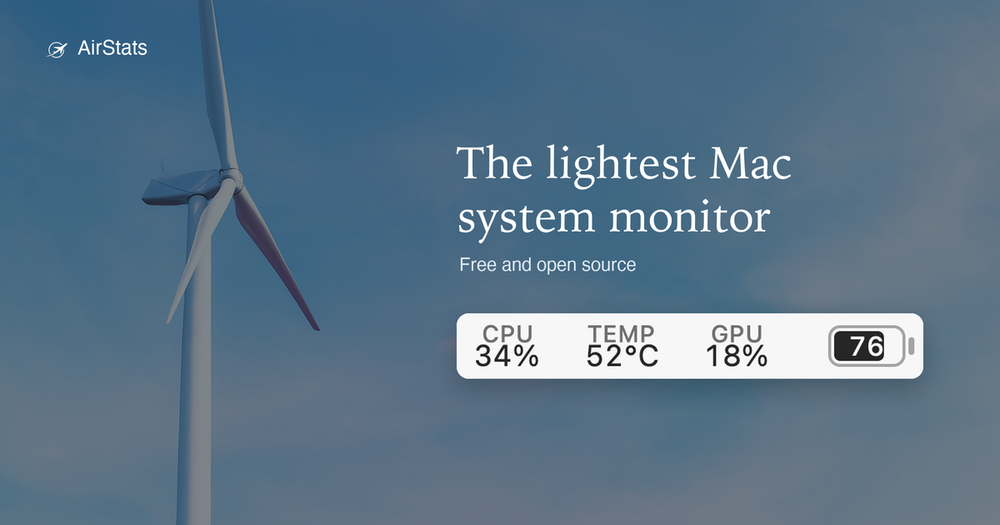
Monitor sixteen macOS system metrics from the menu bar with 0.046% idle CPU. MIT licensed, Apple silicon only, no account or paid tier.

Visit websiteGitHub458 stars
image of airstats
TL;DR

airstats is a menu bar system monitor for macOS that shows sixteen metrics (CPU, memory, GPU, network, disk, battery, temperature, and more) at 0.046% idle CPU. It replaces paid tools like iStat Menus and Pulse System Monitor, running as a single 8.9 MB process with no helper, no account, and no paid tier. MIT licensed, Apple silicon only, requires macOS 14 or later.

Read the full breakdownHide the full breakdownWho it is for, how it works, trade-offs, the quick start and the FAQ
who it's for

Who airstats is for#

Developers on Apple silicon monitoring their own build machines

AirStats shows CPU, memory, GPU, network, and disk metrics without adding meaningful overhead to the machine being profiled. At 0.046% idle CPU, the monitor itself does not register in the metrics it reports.

Skip if:

You are on an Intel Mac or macOS 13 or earlier. AirStats is Apple silicon only and requires macOS 14.

Users replacing iStat Menus to avoid the purchase cost

iStat Menus is a paid application. AirStats covers the same core system metrics (CPU, memory, GPU, network, disk, battery, temperature) with no purchase required, no subscription, and full MIT source access.

Skip if:

You rely on iStat Menus features beyond system metrics: weather, moon phase, calendar events, or stock tickers. AirStats does not include those.

Power users who want desktop-pinned metric visibility

The desktop widget pins selected metrics to the screen with a color per module. Keyboard shortcuts open the panel or widget without touching the mouse. Threshold alerts fire a macOS notification when a metric crosses a limit you set.

Skip if:

You want historical time-series graphs or chart overlays. AirStats is a status-item monitor and does not include graphing in the current release.

the problem

The problem it solves#

A menu bar monitor runs all day, every day. Most tools in this space cost CPU and memory to tell you about CPU and memory. In a published benchmark on the same Mac, same sampling window, and same command, iStat Menus idles at 0.116% CPU and holds 64 MB of resident memory; Stats reaches 1.931% CPU and 145 MB. For users who want continuous system visibility, the standard tradeoff has been accepting that overhead or paying for a polished commercial app.

The harder version of this problem is a laptop on battery. A monitor that consumes CPU to report CPU usage is a feedback loop you cannot close. The situation worsens with helper processes and launch agents that persist after the main app quits, adding overhead that does not appear in any status bar readout.

how airstats solves it

How it solves it#

Sixteen menu bar metrics

Shows CPU, memory, GPU, network, disk, battery, temperature, process, and host metrics in the macOS menu bar. You can display two metrics or all sixteen. Each metric can be colored individually or left monochrome for a minimal look.

Drop-down panel with per-core detail

Clicking the status item opens a panel with per-core CPU load, memory pressure, GPU stats, network activity, disk I/O, battery status, temperature readings, and top processes. No separate window is required.

Desktop widget

Pins selected metrics to the desktop as a persistent widget with a color per metric. Designed for users who want the data always in view without opening the panel. Can be used alongside the menu bar display or independently.

Threshold alerts

Sends a macOS notification when any monitored metric crosses a configured threshold. Covers CPU load, memory pressure, temperature, and other tracked values, letting you catch runaway processes or thermal events without keeping the panel open.

Single-process, no background agents

Runs as one process with no helper and no launch agent. Quitting the app leaves nothing running. This is part of what makes the 0.046% idle CPU figure valid: there is no daemon to count separately. Reads the system through Mach, IOKit, sysctl, and CoreWLAN.

strengths · trade-offs

Strengths and trade-offs#

Strengths

  • 0.046% idle CPU, benchmarked against iStat Menus and StatsOn the same Mac, same sampling window, and same command, AirStats measured 0.046% idle CPU. iStat Menus measured 0.116% and Stats measured 1.931%. The benchmark methodology is published on the AirStats website, including the parts that do not flatter AirStats.
  • 8.9 MB installed, 11 MB resident memoryThe installed footprint is 8.9 MB, compared to 17 MB for Stats and 163 MB for iStat Menus in the same test. At runtime it holds 11 MB of resident memory versus 64 MB for iStat Menus and 145 MB for Stats. The small footprint comes from targeting Apple silicon only and running without a Dock icon or helper process.
  • MIT licensed with no account and no paid tierThere is no account to create, no trial to expire, and no paid tier. The source code is MIT licensed, including the benchmark scripts behind the comparison numbers on the website. You can fork, modify, and redistribute it without restriction.
  • Signed and notarized, opens without security warningsThe distributed binary is signed with a Developer ID certificate and Apple's notarization ticket is stapled to the DMG. macOS opens it without a security warning. You can also build from source with Xcode 16 using the provided build script.

Trade-offs

  • -Apple silicon only, no Intel Mac supportAirStats targets arm64 only. Intel Macs are not supported, and there is no documented roadmap for Intel support. Users on Intel hardware need a different monitor.
  • -Requires macOS 14 Sonoma or laterThe minimum OS requirement is macOS 14. Macs running Ventura (13) or earlier cannot run AirStats. This limits use on older machines that may still be in active service.
  • -Early-stage project, small contributor baseCreated in August 2026, AirStats has 107 stars and 6 forks. While active development is clear from the recent push history, the project lacks the long track record and wider contributor base of established tools like iStat Menus. Edge-case handling and bug coverage may be thinner than in more mature software.
versus alternatives

airstats vs alternatives#

AirStats vs iStat Menus

iStat Menus is the most widely used paid menu bar monitor for macOS. Both tools show CPU, memory, GPU, network, disk, battery, and temperature metrics in the menu bar and in a drop-down panel.

FeatureAirStatsiStat Menus
LicenseMIT (open source)Proprietary
PriceFreePaid (one-time purchase)
Idle CPU0.046%0.116%
Resident memory11 MB64 MB
Installed size8.9 MB163 MB
Intel Mac supportNoYes
macOS minimum14Earlier versions

AirStats is the better choice for Apple silicon users who want the lowest resource overhead and do not need iStat Menus extras. The benchmark numbers are from the same Mac, same sampling window, and same command, with methodology published on the AirStats website.

iStat Menus is the better choice when you need Intel Mac support, a longer track record, broader features (weather, moon phase, calendar, stocks), or professional support.

AirStats vs Pulse System Monitor and MacPulse

Pulse System Monitor and MacPulse are paid alternatives in the same menu bar monitor category. AirStats differs from both in that it is MIT licensed with no purchase required and publishes its resource usage benchmarks against named competitors. Paid tools in this category may include historical graphing and broader sensor integrations that AirStats does not currently provide, making them a better fit for users who need those capabilities.

install · quick start

Quick start#

bash
Install AirStats via Homebrew cask or by downloading the signed DMG from airstats.app.
```bash
brew install --cask byrencheema/tap/airstats
```
tech stack · detected from GitHub

What it's built on#

Languages
PythonSwift
frequently asked

FAQ#

Is AirStats free to use?

Yes. There is no account, no trial, and no paid tier. AirStats is MIT licensed and free to download and use. The only cost is the hardware it runs on.

Does AirStats work on Intel Macs?

No. The current build targets Apple silicon only (arm64). This is a documented limitation: the developer notes that targeting Apple silicon is part of why the binary is 8.9 MB. Intel support is not currently on the roadmap.

Does AirStats send any data over the network?

No, by default. The only optional network call is a public IP lookup, which ships disabled. All metrics are read directly from the local machine. AirStats checks for updates once a week via Sparkle but installs nothing without your approval.

How does AirStats compare to iStat Menus?

Both show system metrics in the macOS menu bar. AirStats benchmarks at 0.046% idle CPU and 11 MB of resident memory; iStat Menus measured 0.116% CPU and 64 MB in the same test. iStat Menus is a paid application with a broader feature set including weather, calendar, moon phase, and stocks. AirStats is free, MIT licensed, and focused on low-overhead system metrics. iStat Menus also supports Intel Macs; AirStats does not.

How do I install AirStats?

Download the signed DMG from airstats.app and drag the app to Applications, or install via Homebrew: brew install --cask byrencheema/tap/airstats. The app self-updates through Sparkle and prompts you before installing any update. Building from source requires Xcode 16 and the Swift 6 toolchain.

also worth a look

Similar open-source tools#

Mole

Alternative toCleanMyMac X

Mac cleaner, app uninstaller, disk analyzer, and system monitor

  • 72,205 GitHub stars
  • GPL-3.0Licence GPL-3.0

Vorssaint Utils

Alternative toiStat Menus

One menu bar icon replacing a dozen paid macOS apps

  • 28,363 GitHub stars
  • GPL-3.0Licence GPL-3.0

Pulse

InSecurity & Monitoring

Read-only Windows diagnostics with a local AI assistant.

  • 368 GitHub stars
  • MITLicence MIT

Xray-core

Alternative toAstrill VPN

Open source proxy core with XTLS, VLESS, and REALITY protocols

  • 42,209 GitHub stars
  • MPL-2.0Licence MPL-2.0

Obtainium

InIT Management

Android app updates direct from GitHub and F-Droid

  • 20,630 GitHub stars
  • GPL-3.0Licence GPL-3.0

mvt

Alternative toiVerify

Mobile forensics toolkit for detecting spyware on Android and iOS

  • 15,490 GitHub stars
  • CustomLicence MVT License 1.1
by category

Open source tools in these categories#

123

IT Management

RustDesk, Immich, Stirling PDF
126

Security & Monitoring

REA (Reverse Engineer Anything), RustDesk, Uptime Kuma
463

Developer Tools

superpowers, REA (Reverse Engineer Anything), Skills for Real Engineers

Featured

Inbox Zero

Alternative toSuperhuman

AI email assistant that drafts replies and clears your inbox

  • 12,712 GitHub stars
  • AGPL-3.0Licence AGPL-3.0
  • #Email

Omnara

Alternative toCClaude Managed Agents

Open-source agent deployment API. Self-host or use Omnara Cloud.

  • 2,957 GitHub stars
  • Apache-2.0Licence Apache-2.0
  • #AI Agents

rakazo

Alternative toGrok Bot

AI teammates you own: your keys, your model, your machine.

  • 4,904 GitHub stars
  • Apache-2.0Licence Apache-2.0
  • #AI Agents
Feature your project

New open source projects by email

The projects we add and every new guide. Free, unsubscribe any time.

Find open source alternatives to paid software

/
  • Claude Code to OpenCode
  • Jira to Windshift
  • Notion to AppFlowy
  • Slack to Mattermost
  • Linear to GitLab
  • Wispr Flow to Handy
  • CapCut to Concat
  • Grok Bot to rakazo
  • Superhuman to Inbox Zero
  • Airtable to AITable
  • Muse to OpenClaw
  • GitHub Copilot to Cline
  • Datadog to Netdata
  • Microsoft Teams to Rocket.Chat
  • Pinecone to Qdrant
  • Zapier to n8n
  • Devin AI to OpenHands
  • Firebase to Supabase
  • 1Password to KeePassXC
  • Confluence to Docmost
  • Contentful to Strapi
  • Adobe Premiere Pro to Shotcut
  • ChatGPT to AnythingLLM
  • LangSmith to Langfuse
  • Claude Code to OpenCode
  • Jira to Windshift
  • Notion to AppFlowy
  • Slack to Mattermost
  • Linear to GitLab
  • Wispr Flow to Handy
  • CapCut to Concat
  • Grok Bot to rakazo
  • Superhuman to Inbox Zero
  • Airtable to AITable
  • Muse to OpenClaw
  • GitHub Copilot to Cline
  • Datadog to Netdata
  • Microsoft Teams to Rocket.Chat
  • Pinecone to Qdrant
  • Zapier to n8n
  • Devin AI to OpenHands
  • Firebase to Supabase
  • 1Password to KeePassXC
  • Confluence to Docmost
  • Contentful to Strapi
  • Adobe Premiere Pro to Shotcut
  • ChatGPT to AnythingLLM
  • LangSmith to Langfuse