Open Source Alternatives
  • Alternatives
  • Categories
    Categories by size882 projects
    • Developer Tools461
    • AI & Machine Learning404
    • Web Development196
    • Business & Productivity191
    • Communication & Collaboration126
    • Security & Monitoring126
    • IT Management123
    • Product & Project Management106
    • Cloud & Hosting105
    • Data & Analytics104
    Browse all 21 categoriesLLMOps & AI Tooling, Design & Creative and 9 more
  • Blog
  • Advertise
SearchNotion, Slack, password manager.../
Submit
Open Source Alternatives
  • Alternatives
    • Developer Tools461
    • AI & Machine Learning404
    • Web Development196
    • Business & Productivity191
    • Communication & Collaboration126
    • Security & Monitoring126
    • Browse all 21 categories
  • Blog
  • Advertise
Submit your project

New open source projects by email

The projects we add and every new guide. Free, unsubscribe any time.

Open Source Alternatives LogoOpen Source Alternatives

Handpicked Open Source Alternatives to Paid Softwares

Product

  • Categories
  • Tag
  • Advertise

Resources

  • Blog
  • Collection
  • Submit

Company

  • Privacy Policy
  • Terms of Service
  • Refund Policy
  • Sitemap

Alternatives

  • Claude Code
  • Jira
  • Notion
  • Slack
  • Linear
  • Wispr Flow
  • All alternatives
© 2026 Open Source Alternatives. All rights reserved.
Open SourceAlternatives
Home/Categories/AI & Machine Learning/presenton
icon of presenton

presenton

Open source alternative to Gamma, Beautiful.ai, Presentations.ai and Plus AI

  • 11.2K stars
  • Apache-2.0
  • Active this week
  • Last commit 3 days ago

Last verified Oct 20, 2026

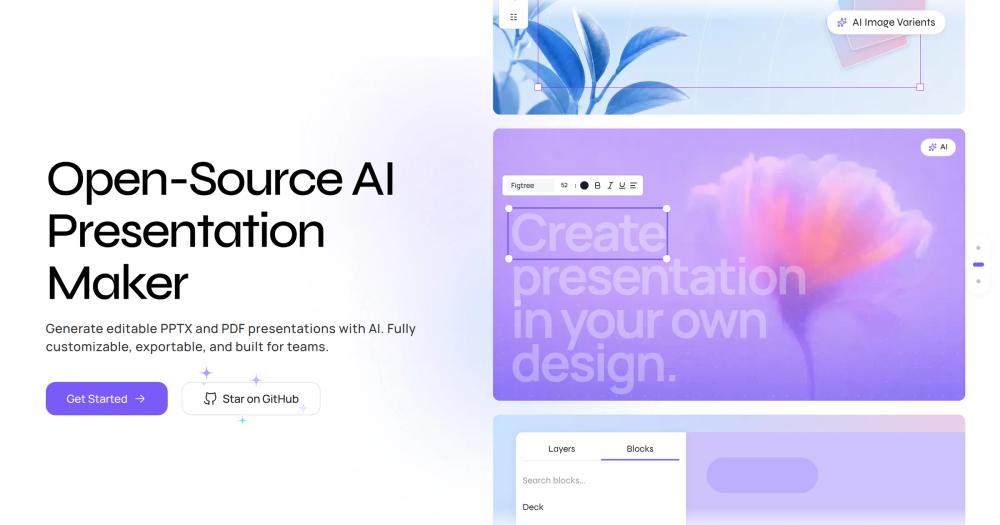
Generate AI-powered presentation decks from prompts or documents; export to fully editable PPTX or PDF with self-hosting via Docker or desktop app.

Visit websiteGitHub11.2K starsDeploy on Hostinger
image of presenton
TL;DR

presenton is an open-source AI presentation generator that turns prompts or uploaded documents into fully editable PPTX or PDF decks. It replaces paid subscription tools like Gamma and Beautiful.ai, giving you a self-hosted path with bring-your-own-key LLM support so you control costs and data. Licensed Apache-2.0 and deployable via Docker or as a native desktop app, it also ships a REST API and MCP server for automating slide generation in code pipelines. Best for technical teams, developers building presentation automation, and organizations with data-sovereignty requirements.

Read the full breakdownHide the full breakdownWho it is for, how it works, trade-offs, the quick start and the FAQ
who it's for

Who presenton is for#

Developers automating report or pitch deck generation

Presenton's REST API and MCP server let you generate a presentation from a prompt or document in a single call. Useful for automating recurring reports such as weekly business updates and data summaries, or feeding generated decks into a larger AI agent workflow.

Skip if:

If you only need occasional, manually created presentations, the API overhead is unnecessary. A direct UI tool is faster for one-off work.

Teams with document-sensitivity requirements

Organizations that cannot send internal documents to third-party cloud services can run Presenton entirely on-premises. Files uploaded for slide generation stay within the private network, and LLM traffic can be routed to an on-prem model via Ollama.

Skip if:

If your documents have no confidentiality requirements and your team prefers a polished no-setup browser tool, Gamma or Beautiful.ai are faster to get started with.

Individuals wanting AI slides without a subscription

The desktop app runs locally on macOS, Windows, or Linux. With a ChatGPT sign-in or a personal Gemini key, you can generate fully editable PPTX decks from prompts without paying a monthly presentation tool subscription.

Skip if:

If you prefer a zero-install browser experience and do not mind a monthly cost, managed cloud tools like Gamma offer a more polished UI with no server to manage.

Enterprise teams needing SSO and audit controls

The enterprise deployment adds Kubernetes Helm charts, OIDC and SCIM provisioning, centralized audit logs, and an admin console for organizations that require identity provider integration and access logging across all presentation generation activity.

Skip if:

The enterprise tier is unnecessary for teams under 10 people or without formal SSO requirements. The Docker deployment with the built-in admin panel covers small and medium teams adequately.

the problem

The problem it solves#

AI presentation tools have become subscription-dependent services that store your documents on their infrastructure and use a fixed AI model you cannot swap. The monthly cost for tools like Gamma or Beautiful.ai adds up for teams, and for organizations with document sensitivity requirements, sending internal content to a third-party cloud service requires security review or is outright prohibited.

The harder problem is model opacity. When the paid service changes its underlying model, your output changes with it. Teams that relied on consistent output for templated report generation or pitch deck workflows have no way to pin a version or reproduce a result. API access in these tools, if available at all, typically comes at a premium tier with per-call pricing that makes automated slide generation expensive at any meaningful scale.

how presenton solves it

How it solves it#

Bring-Your-Own-Key LLM support

Connects to OpenAI, Google Gemini, Vertex AI, Azure OpenAI, AWS Bedrock, Anthropic, DeepSeek, Fireworks, Together AI, LM Studio, or any OpenAI-compatible endpoint. Ollama integration lets you run local open-source models with no external API calls. You pay the LLM provider directly at API rates, with no Presenton markup or minimum.

Fully editable PPTX export

Every generated deck exports as a standard PowerPoint file you can open in Microsoft Office, Google Slides, or LibreOffice. Slide elements retain their object structure, so you can edit text, images, and charts without converting from a proprietary format.

Built-in presentation API and MCP server

Presenton ships an HTTP API and a Model Context Protocol server for generating presentations programmatically. Teams can trigger slide generation from scripts, CI pipelines, or AI agents without touching the UI. The MCP server makes Presenton a first-class target in multi-agent AI workflows.

Multiple deployment modes

Run as a Docker container via one command on Linux or macOS, install the Electron desktop app on Windows, macOS, or Linux, or deploy to Railway or DigitalOcean via one-click buttons. GPU support is available for Docker when running local models. Air-gapped deployments disable the community gallery via a single environment variable.

Custom templates from existing PowerPoint files

Upload any .pptx file and Presenton converts it into a reusable AI-ready template, preserving your branding and slide layouts. HTML and Tailwind CSS templates are also supported for teams that prefer code-defined designs. Built-in templates cover pitch decks, business reports, executive updates, and educational presentations.

Multi-user workspaces with admin panel

Each user gets a private workspace, and the built-in admin panel manages accounts centrally. The enterprise tier extends this with Kubernetes deployment via Helm charts, SSO through OIDC and SCIM provisioning, and audit logs for compliance-sensitive organizations.

strengths · trade-offs

Strengths and trade-offs#

Strengths

  • Apache-2.0 license with no commercial restrictionApache-2.0 lets you run Presenton internally, build products on top of it, and redistribute modified versions without commercial restriction. Unlike tools with source-available or fair-code licenses, the full codebase is inspectable and forkable without usage conditions.
  • Documents stay on your infrastructureThe Docker deployment runs entirely server-side. Files you upload for analysis and slides you generate never leave your network, which matters for teams handling NDAs, financial data, or internal strategy documents that cannot go to a third-party cloud.
  • No per-seat or per-generation pricingYou run the server once and pay only for the underlying LLM API calls at the provider's rates. Compared to Gamma's per-seat subscription or Presentations.ai's credit system, the economics favor any team generating more than a few decks per week.
  • Active development with strong tractionThe repository reached over 10,000 GitHub stars and 1,600+ forks within roughly a year of launch, with the last commit pushed within days of this writing. Active contributor engagement at this scale is uncommon for a tool under two years old.

Trade-offs

  • -LLM API key required for slide generationPresenton generates presentations using a configured LLM provider. You must supply an API key for OpenAI, Gemini, or another supported service, or run a local model via Ollama. The desktop app supports ChatGPT sign-in as a shortcut, but a completely key-free cloud-generation path is not available in the self-hosted version.
  • -Self-hosting requires server setupThe Docker path is a single command, but running Presenton for a team means managing a container, a persistent storage volume, and optionally a reverse proxy for HTTPS. The enterprise Helm chart deployment expects Kubernetes familiarity. Users expecting a zero-config install will find this less immediate than browser-based tools like Gamma.
  • -Output quality depends on your LLM choiceSlide content quality varies with the model you configure. Smaller local models via Ollama produce less polished output than GPT-4 or Gemini. Teams that prioritize the best generation quality still need a paid LLM API account, which partially offsets cost savings versus a managed presentation tool.
versus alternatives

presenton vs alternatives#

Presenton vs Gamma

Gamma is the most widely used AI presentation tool and the primary comparison point for Presenton. Both convert prompts and documents into slide decks, but they operate at opposite ends of the deployment model. Gamma runs as a managed cloud service with no self-hosting path; Presenton is open-source and designed to run on your own infrastructure with the LLM provider of your choice.

FeaturePresentonGamma
LicenseApache-2.0Proprietary
Self-hostingYes (Docker, desktop app)No
LLM providerYour choice (BYOK)Gamma's fixed model
ExportPPTX, PDFPPTX, PDF
APIREST + MCP serverLimited integrations
PricingServer + LLM API feesPer-seat subscription

Presenton is the better choice when your team needs data control, API automation, or cost predictability at scale. Gamma is still the right pick for users who want a polished zero-setup browser experience with no server to manage; its design output tends to be more visually refined out of the box because the generation pipeline is tuned for you.

Presenton vs Beautiful.ai

Beautiful.ai focuses on design-intelligent presentations that auto-adjust layouts as you edit content. The overlap with Presenton is narrower: Beautiful.ai is primarily an editing tool with AI assist, while Presenton is primarily a generation tool.

FeaturePresentonBeautiful.ai
LicenseApache-2.0Proprietary
Self-hostingYesNo
Core strengthAI generation from promptsSmart template design
ExportPPTX, PDFPPTX
PricingSelf-host + BYOKPer-seat subscription

Presenton is better when you need to generate a full deck from a prompt or document and want control over the generation pipeline. Beautiful.ai is better when you are building presentations manually and want a layout engine that keeps slides visually consistent without manual adjustment.

Presenton vs Plus AI and Presentations.ai

Plus AI and Presentations.ai are Google Slides and PowerPoint add-ins that bring AI generation directly into your existing editing tools. If your team's workflow is centered on Google Workspace, these tools fit more naturally than Presenton's PPTX export path. Presenton is the better fit when you need self-hosting, REST API access, or the flexibility to run with your own LLM rather than the provider the add-in uses.

install · quick start

Quick start#

bash
Self-hosting deploys Presenton via Docker with persistent app data stored in a local volume.
```bash
docker run -it --name presenton -p 5001:80 -v "./app_data:/app_data" ghcr.io/presenton/presenton:latest
```
tech stack · detected from GitHub

What it's built on#

Languages
JavaScriptPythonTypeScript
Frameworks
FastAPINext.jsReact
Tooling
esbuild
frequently asked

FAQ#

Is Presenton free to use?

The self-hosted version is Apache-2.0 licensed and free to run on your own infrastructure. You pay only for LLM API calls to whichever provider you configure (OpenAI, Gemini, Anthropic, etc.); Presenton does not mark those up. A cloud-hosted option is available at presenton.ai with its own pricing.

Which LLM providers does Presenton support?

Presenton supports OpenAI, Google Gemini, Vertex AI, Azure OpenAI, AWS Bedrock, Anthropic Claude, DeepSeek, Fireworks, Together AI, LM Studio, Ollama, and any OpenAI-compatible endpoint. Ollama integration lets you run local open-source models with no external API calls, which is useful for fully air-gapped or privacy-first deployments.

Can Presenton generate presentations from existing documents?

Yes. You can upload a document and Presenton uses it as source material for the generated deck. It also accepts existing .pptx files as custom templates, converting your slide design into an AI-ready format while preserving your branding and layouts.

How does Presenton compare to Gamma?

Both tools generate AI presentations from prompts, but Presenton is self-hosted and open-source while Gamma is a proprietary cloud service. Presenton requires you to supply an LLM API key and manage deployment; Gamma works in the browser with no setup. Presenton suits teams needing data control or API access; Gamma is faster for individual users who want a zero-setup experience.

Does Presenton work offline?

The desktop app works offline when configured with a local Ollama model, with all processing staying on your device. Cloud LLM providers such as OpenAI and Gemini require outbound internet for their API calls. The self-hosted Docker deployment handles its own infrastructure but still needs outbound access when using remote LLM providers.

also worth a look

Similar open-source tools#

Upscayl

Alternative toTopaz Labs Gigapixel AI

Free open source AI image upscaler for Mac, Linux, and Windows

  • 50,790 GitHub stars
  • AGPL-3.0Licence AGPL-3.0

God's Eye View

Featured

Alternative toFFlightradar24

Real-time global intelligence on a 3D globe

  • 58,501 GitHub stars
  • CustomLicence MIT with third-party data restrictions

OpenClaw

Featured

Alternative toMuse

Self-hosted AI assistant for WhatsApp, Telegram, and more

  • 392,969 GitHub stars
  • MITLicence MIT

Inbox Zero

Featured

Alternative toSuperhuman

AI email assistant that drafts replies and clears your inbox

  • 12,712 GitHub stars
  • AGPL-3.0Licence AGPL-3.0

rakazo

Featured

Alternative toGrok Bot

AI teammates you own: your keys, your model, your machine.

  • 4,904 GitHub stars
  • Apache-2.0Licence Apache-2.0

paperclip

Featured

Alternative toGrok Bot

Self-hosted AI agent management with org charts and budgets

  • 105,118 GitHub stars
  • MITLicence MIT
by category

Open source tools in these categories#

404

AI & Machine Learning

freeCodeCamp, OpenClaw, REA (Reverse Engineer Anything)
98

Design & Creative

ComfyUI, Excalidraw, Godot Engine
191

Business & Productivity

OpenClaw, Excalidraw, RustDesk
Hostinger

Run presenton on your own server

Self-host presenton on a Hostinger VPS.

Deploy on Hostinger

Featured

rakazo

Alternative toGrok Bot

AI teammates you own: your keys, your model, your machine.

  • 4,904 GitHub stars
  • Apache-2.0Licence Apache-2.0
  • #AI Agents

Inbox Zero

Alternative toSuperhuman

AI email assistant that drafts replies and clears your inbox

  • 12,712 GitHub stars
  • AGPL-3.0Licence AGPL-3.0
  • #Email

Omnara

Alternative toCClaude Managed Agents

Open-source agent deployment API. Self-host or use Omnara Cloud.

  • 2,957 GitHub stars
  • Apache-2.0Licence Apache-2.0
  • #AI Agents
Feature your project

New open source projects by email

The projects we add and every new guide. Free, unsubscribe any time.

Find open source alternatives to paid software

/
  • Claude Code to OpenCode
  • Jira to Windshift
  • Notion to AppFlowy
  • Slack to Mattermost
  • Linear to GitLab
  • Wispr Flow to Handy
  • CapCut to Concat
  • Grok Bot to rakazo
  • Superhuman to Inbox Zero
  • Airtable to AITable
  • Muse to OpenClaw
  • GitHub Copilot to Cline
  • Datadog to Netdata
  • Microsoft Teams to Rocket.Chat
  • Pinecone to Qdrant
  • Zapier to n8n
  • Devin AI to OpenHands
  • Firebase to Supabase
  • 1Password to KeePassXC
  • Confluence to Docmost
  • Contentful to Strapi
  • Adobe Premiere Pro to Shotcut
  • ChatGPT to AnythingLLM
  • LangSmith to Langfuse
  • Claude Code to OpenCode
  • Jira to Windshift
  • Notion to AppFlowy
  • Slack to Mattermost
  • Linear to GitLab
  • Wispr Flow to Handy
  • CapCut to Concat
  • Grok Bot to rakazo
  • Superhuman to Inbox Zero
  • Airtable to AITable
  • Muse to OpenClaw
  • GitHub Copilot to Cline
  • Datadog to Netdata
  • Microsoft Teams to Rocket.Chat
  • Pinecone to Qdrant
  • Zapier to n8n
  • Devin AI to OpenHands
  • Firebase to Supabase
  • 1Password to KeePassXC
  • Confluence to Docmost
  • Contentful to Strapi
  • Adobe Premiere Pro to Shotcut
  • ChatGPT to AnythingLLM
  • LangSmith to Langfuse