

Small engineering team workspace
Use Orgnise when a small team wants internal docs, project notes, and task context in one self-hosted application with inspectable code.
Last verified
Build a self-hosted workspace for wikis, docs, and project tasks. AGPL-3.0, Next.js, and MongoDB; best for small teams.
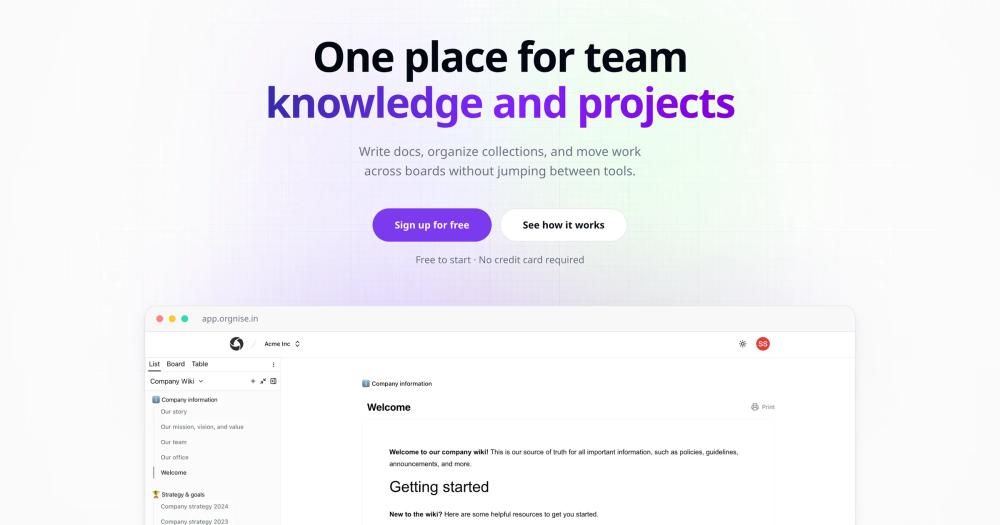
Use Orgnise when a small team wants internal docs, project notes, and task context in one self-hosted application with inspectable code.
Use Orgnise when the main goal is moving operational knowledge out of proprietary workspaces while keeping a familiar docs-and-tasks workflow.
Small teams often split project context across docs, task trackers, and chat threads because all-in-one SaaS workspaces become expensive or restrictive as headcount grows. That creates duplicated updates, stale knowledge, and a dependency on a vendor-controlled workspace for operational history. Orgnise addresses that gap with a self-hosted knowledge and project workspace, giving teams a place to keep documentation and lightweight task tracking together while retaining control over hosting, data access, and the application code.
Orgnise gives teams a shared place for documentation, policies, use-case notes, and internal knowledge pages instead of scattering context across chat and separate wiki tools.
Teams can track lightweight project work inside the same workspace where they store background context, which reduces the handoff cost between docs and execution.
The public AGPL-3.0 codebase uses Next.js, TypeScript, Tailwind CSS, Shadcn, and MongoDB, so Node-oriented teams can inspect and operate the application themselves.
Orgnise is an open-source self-hosted alternative to Notion, Confluence, and Coda for managing team knowledge, docs, and project tasks.
vs Notion: Notion is a popular cloud-only workspace that stores all content on its own servers, with free-tier limits on page history and guest access. Orgnise offers comparable docs, wikis, and task boards but runs entirely on your own infrastructure. No data leaves your environment and no per-seat caps apply beyond your own hosting costs. Teams with data-residency requirements or tight budgets benefit most from the self-hosted approach.
vs Confluence: Confluence uses per-seat SaaS pricing and integrates tightly with the Atlassian ecosystem, making it expensive to use without Jira. Orgnise runs independently with no required ecosystem lock-in. For small-to-mid teams looking to escape compounding seat-based licensing costs, Orgnise provides a leaner knowledge and task workspace at infrastructure cost only.
vs Coda: Coda combines documents and spreadsheets into interactive docs with pricing tied to doc makers, meaning users who create content. It is SaaS-only with no self-hosting path. Orgnise takes a more structured workspace approach focused on organized knowledge and tasks, and can be deployed on any cloud or server without vendor dependency or usage-based pricing.
Yes. Orgnise is published on GitHub under the AGPL-3.0 license, which means teams can inspect, self-host, and modify the code under copyleft terms.
Orgnise is best for small teams that want self-hosted documentation, wikis, and lightweight project tracking in one workspace. It is less suitable for teams that need a mature integration marketplace or advanced Notion-style databases.
Orgnise gives teams more hosting and data control than Notion, but Notion has stronger collaboration polish, templates, mobile apps, and integrations. Choose Orgnise when ownership matters more than SaaS convenience.
#1 in the Notion guide
Full Notion replacement for small teams
#2 in the Notion guide
Docs, whiteboards, and databases in one workspace
#3 in the Notion guide
Polished team wiki and internal knowledge base
#4 in the Notion guide
Markdown-native docs that agents and teammates edit together
Run Orgnise on your own server
Self-host Orgnise on a Hostinger VPS.
Deploy on HostingerFeatured

Alternative to Grok Bot
AI teammates you own: your keys, your model, your machine.

Alternative to Superhuman
AI email assistant that drafts replies and clears your inbox

Alternative toClaude Managed Agents
Open-source agent deployment API. Self-host or use Omnara Cloud.
The projects we add and every new guide. Free, unsubscribe any time.
 Claude Code to
  OpenCode
 Jira to
  Windshift
 Notion to
  AppFlowy
 Slack to
  Mattermost
 Linear to
  GitLab
 Wispr Flow to
  Handy
Handy CapCut to
  Concat
 Grok Bot to
  rakazo
 Superhuman to
  Inbox Zero
 Airtable to
  AITable
 Muse to
  OpenClaw
 GitHub Copilot to
  Cline
Cline Datadog to
  Netdata
 Microsoft Teams to
  Rocket.Chat
 Pinecone to
  Qdrant
 Zapier to
  n8n
n8n Devin AI to
  OpenHands
 Firebase to
  Supabase
 1Password to
  KeePassXCConfluence to
  Docmost
 Contentful to
  Strapi
 Adobe Premiere Pro to
  Shotcut
 ChatGPT to
  AnythingLLM
 LangSmith to
  Langfuse


