Open Source Alternatives
  • Alternatives
  • Categories
    Categories by size904 projects
    • Developer Tools471
    • AI & Machine Learning407
    • Web Development198
    • Business & Productivity195
    • Security & Monitoring131
    • Communication & Collaboration128
    • IT Management126
    • Cloud & Hosting109
    • Product & Project Management106
    • Data & Analytics105
    Browse all 21 categoriesDesign & Creative, LLMOps & AI Tooling and 9 more
  • Blog
  • Advertise
SearchNotion, Slack, password manager.../
Submit
Open Source Alternatives
  • Alternatives
    • Developer Tools471
    • AI & Machine Learning407
    • Web Development198
    • Business & Productivity195
    • Security & Monitoring131
    • Communication & Collaboration128
    • Browse all 21 categories
  • Blog
  • Advertise
Submit your project

New open source projects by email

The projects we add and every new guide. Free, unsubscribe any time.

Open Source Alternatives LogoOpen Source Alternatives

Handpicked Open Source Alternatives to Paid Softwares

Product

  • Categories
  • Tag
  • Advertise

Resources

  • Blog
  • Collection
  • Submit

Company

  • Privacy Policy
  • Terms of Service
  • Refund Policy
  • Sitemap

Alternatives

  • Claude Code
  • Jira
  • Notion
  • Slack
  • Linear
  • Wispr Flow
  • All alternatives
© 2026 Open Source Alternatives. All rights reserved.
Open SourceAlternatives
Home/Categories/Cloud & Hosting/openship
icon of openship

openship

Open source alternative to Heroku, Render, DigitalOcean App Platform and Vercel

  • 14.9K stars
  • Apache-2.0
  • Active this week
  • Last commit 2 days ago

Last verified Oct 20, 2026

Deploy applications with built-in CI/CD from a self-hosted platform. Push code, get automatic builds, routing, and free SSL on your infrastructure.

Visit websiteGitHub14.9K stars1-click deploy on Hostinger
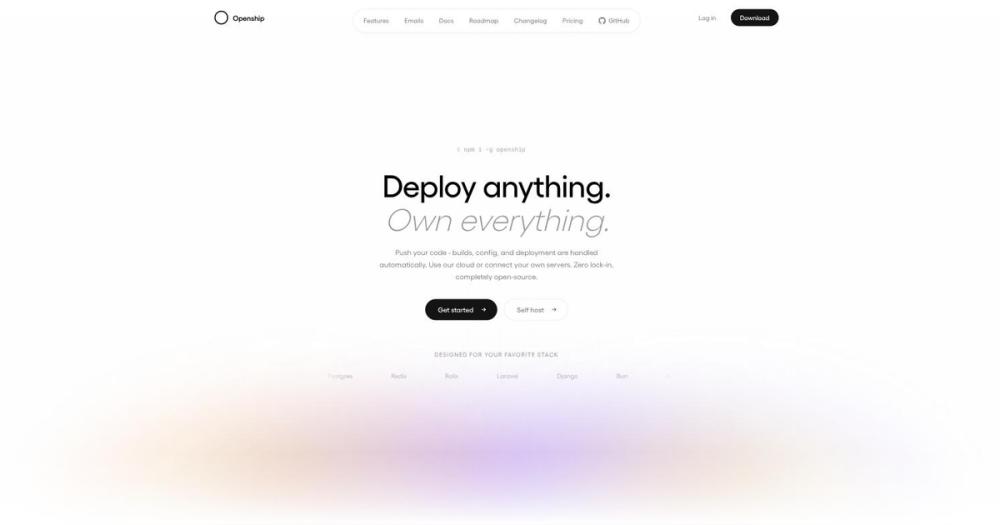
image of openship
TL;DR

openship is a self-hosted deployment platform with built-in CI/CD that replaces Vercel, Netlify, and similar managed services. It auto-detects your stack (Node, Python, Go, Rust, Docker), builds on push, ships over SSH, and handles routing with free Let's Encrypt SSL. Apache-2.0 licensed with desktop app, self-hosted server, and cloud options. Best for developers and teams who want push-to-deploy workflows on their own infrastructure without vendor lock-in or recurring per-seat fees.

Read the full breakdownHide the full breakdownWho it is for, how it works, trade-offs, the quick start and the FAQ
who it's for

Who openship is for#

Solo developers deploying side projects

The desktop app gives you Vercel-like push-to-deploy on a single VPS without maintaining an always-on control plane. Connect your Hetzner or DigitalOcean server over SSH, point at a GitHub repo or local folder, and deploy. One-click rollbacks and automatic SSL without the $20/month Vercel hobby plan lock-in.

Skip if:

You need team collaboration or push-to-deploy from GitHub webhooks. The desktop app control plane runs only while open, so webhook-triggered deploys require the self-hosted server.

Small teams migrating from Vercel or Netlify

Self-host Openship on a Linux VPS to retain the same developer experience (git push, preview environments, instant rollbacks) while moving workloads off managed platforms. GitHub webhooks trigger builds on every push, and the web dashboard gives the whole team deploy access. Switching from a $50-$100/month Vercel team plan to a $20/month VPS eliminates recurring vendor fees.

Skip if:

Your team depends on Vercel-specific features like Edge Middleware, ISR with stale-while-revalidate, or serverless functions with sub-10ms cold starts. Openship deploys containers, not serverless functions.

Engineering teams requiring data sovereignty

Run Openship on your own infrastructure to keep code, builds, and production workloads on servers you control. The Apache-2.0 license means no vendor call-home, no usage tracking you cannot disable, and no feature gates you cannot fork around. Best for regulated industries or teams with strict data residency requirements.

Skip if:

You do not have the in-house ops capacity to maintain a self-hosted deployment platform. Managed platforms handle security patches, database upgrades, and edge network uptime for you. Self-hosting trades convenience for control.

the problem

The problem it solves#

Deploying modern applications means choosing between managed platforms with vendor lock-in or self-hosting everything from scratch. Managed services like Vercel, Netlify, and Render handle builds, SSL, and routing automatically, but charge per-seat or per-build and keep your workloads on their infrastructure. You gain convenience but lose control over hosting costs, data location, and migration flexibility. A single pricing change or feature removal forces a full platform migration.

Self-hosting with Docker Compose or Kubernetes gives you ownership, but you build the CI/CD pipeline yourself: GitHub webhooks, build runners, image registries, reverse proxy configuration, and SSL certificate renewal. For small teams, maintaining this stack is a second full-time job. Most developers want the push-to-deploy experience of managed platforms without surrendering control over where their code runs.

how openship solves it

How it solves it#

Auto-detected stack support

Openship reads your package.json, framework config, lockfiles, and docker-compose.yml to detect the stack, package manager, build commands, and port automatically. Supports Node, Python, Go, Rust, PHP, Ruby, Java, .NET, Docker, and monorepos with zero config files required. An openship.json file overrides the detection if you need manual control.

Push-to-deploy with GitHub webhooks

Every push to the tracked branch triggers a rebuild and redeploy via GitHub webhooks. The platform rebuilds only the services a monorepo push actually touched, reducing build time for large codebases. Preview environments for pull requests are supported, with auto-teardown on merge.

Automatic domains and SSL

The OpenResty edge layer terminates your custom domains with automatic Let's Encrypt certificates using HTTP-01 challenge. Supports unlimited apex and subdomains, wildcard certificates, and auto-renewal. Because routing and TLS happen after the app is up, a DNS or cert hiccup surfaces as an action required notice without failing the deploy or taking your app down.

Immutable deploys with one-click rollbacks

Every deploy produces an immutable, versioned artifact that stays warm. Rolling back to any previous version happens in one click with no rebuild, no waiting, and no lost state. The swap happens with zero downtime using blue-green deployment.

Built-in services and databases

Openship includes managed Postgres (versions 14-17), Redis, MongoDB, MySQL, S3-compatible object storage, and a mail server with SPF/DKIM/DMARC auto-configuration. Services join your app on an isolated private network with no exposed ports. Daily backups, point-in-time recovery, and scheduled upgrades are built in.

Desktop app, CLI, and MCP support

Drive deploys from a native Mac/Windows/Linux desktop app, a CLI (openship deploy), the web dashboard, or an AI agent over MCP. The desktop app runs the control plane locally only while open, with no always-on server required until you need team access or push-to-deploy. MCP server support lets Claude, Cursor, or any MCP client trigger deploys.

strengths · trade-offs

Strengths and trade-offs#

Strengths

  • Apache-2.0 license with full self-hostingThe entire platform is Apache-2.0 licensed, meaning you can run it on your infrastructure, modify it, and use it commercially with no restrictions. Unlike Vercel or Netlify (managed-only with no self-hosted option), Openship gives you the same push-to-deploy experience on a $10/month VPS. If the project direction changes, you can fork it.
  • No agent or daemon on production serversOpenship builds images on the orchestrator (your machine or the control plane), not on your production server. The built artifact streams over plain SSH and starts as a container. Nothing is installed on your production box beyond SSH access. This keeps production servers focused on serving traffic, not compiling code.
  • Desktop app for solo developersThe desktop app runs the control plane on your local machine only while the app is open. No always-on server to maintain, no dashboard to secure, no public endpoint to expose. You only need a self-hosted server install once you want push-to-deploy, team access, or to host apps on that box.
  • Built-in mail serverOpenship includes a real mail server with outbound relay through Amazon SES or any SMTP provider. One-click setup configures SPF, DKIM, DMARC, and reverse DNS for unlimited sending domains. No per-message billing from Resend, SendGrid, or Postmark. Every mailbox, message, and byte stays on your server.

Trade-offs

  • -Self-hosting requires a Linux serverThe full stack (hosting apps on the same box with automatic domains and SSL) requires Linux with Docker. Compose mode only works on Linux because it uses host networking for the OpenResty edge on ports 80 and 443. macOS and Windows can run bare mode (control plane only, deploying out to a Linux server via SSH), but cannot host apps locally.
  • -Desktop app runs control plane only while openThe desktop app is ideal for solo use, but the control plane runs only while the app is open. If you close it, you lose deploy access until you reopen it. For always-on access, push-to-deploy from GitHub webhooks, or team collaboration, you need to self-host the server with openship up on an always-on box.
  • -145 open issues on a 5-month-old projectThe repo has 145 open issues as of August 2026, five months after creation. Some issues are feature requests and documentation gaps expected in a young project. Check the issue tracker for blockers in your stack before committing to Openship for production workloads.
versus alternatives

openship vs alternatives#

Openship vs Vercel

Vercel is a managed platform with no self-hosting and per-seat pricing. Openship is open source with self-hosting and no vendor fees.

FeatureOpenshipVercel
LicenseApache-2.0Proprietary
Self-hostingYesNo
Desktop appYesNo
Built-in mail serverYesNo
PricingFree self-hosted$20/month hobby, $20/seat pro

Openship is better for push-to-deploy on your own infrastructure without vendor lock-in. Self-hosting on a $10-$20/month VPS eliminates recurring per-seat fees. The desktop app lets solo developers deploy without an always-on control server.

Vercel is worth considering for serverless functions with sub-10ms cold starts, Edge Middleware, or ISR caching. If you do not need those features and prefer to own your deployment pipeline, Openship delivers the same git-push experience on infrastructure you control.

Openship vs Netlify

Netlify is managed-only while Openship self-hosts. Netlify charges per-seat and locks you into their build infrastructure.

FeatureOpenshipNetlify
LicenseApache-2.0Proprietary
Self-hostingYesNo
Built-in databasesPostgres, Redis, MongoDB, MySQLRequires add-ons
Build locationYour machine or control planeNetlify cloud
PricingFree self-hosted$19/seat pro

Openship is better for cost control, data sovereignty, or platform forking. Netlify forces builds through their cloud and charges per-seat. Openship builds locally and ships artifacts to your server.

Netlify offers edge functions, split testing, and form handling. If managed platform benefits outweigh cost and lock-in, Netlify is strong. For ownership and control, Openship delivers the same experience without recurring fees.

Openship vs Coolify

Both are self-hosted platforms, but Coolify requires an always-on control server. Openship offers a desktop app that runs only while open.

FeatureOpenshipCoolify
LicenseApache-2.0Apache-2.0
Desktop appYesNo
Control planeDesktop app or serverServer only
Built-in mail serverYesNo
MCP supportYesNo

Openship is better for solo developers avoiding an always-on control server. The desktop app eliminates needing a second VPS. Openship includes a mail server with SPF/DKIM/DMARC auto-config and MCP support for AI agent deploys.

Coolify is worth considering if you prefer a control plane accessible 24/7 via web dashboard. Coolify has longer active development and may have more mature docs. Both are Apache-2.0 licensed with similar core features.

install · quick start

Quick start#

bash
Install Openship and run the guided setup to create the first admin and start the platform:

```bash
curl -fsSL https://get.openship.io | sh
openship
```

The install script brings its own Node runtime when your system version is older than 22. For CI or headless servers, skip the wizard and run the server directly:

```bash
openship up
openship up --public-url https://openship.example.com
```

On Linux with Docker, this installs Compose mode (the full stack with automatic domains and SSL). On macOS or Windows, it installs bare mode (control plane only, deploying out to a server via SSH).

For the desktop app (solo use, no always-on server required):

- macOS Apple Silicon: Download Openship-arm64.dmg from the latest GitHub release
- macOS Intel: Download Openship-x64.dmg
- Windows: Download Openship-win32-x64.zip
- Linux: Download Openship.AppImage, then `chmod +x Openship.AppImage && ./Openship.AppImage`

Deploy a project from the CLI:

```bash
cd your-project
openship init
openship deploy
```
tech stack · detected from GitHub

What it's built on#

Languages
TypeScript
Frameworks
Next.jsReact
Cache
Redis
frequently asked

FAQ#

Is Openship free to use?

Yes, the self-hosted version is Apache-2.0 licensed and free to run on your own infrastructure. There are no per-seat fees, build minute caps, or licensing restrictions. Openship Cloud (managed option) is marked as coming soon in the README with pricing to be announced before launch. For most solo developers and small teams, the self-hosted path is sufficient and costs only the VPS hosting fee.

Can I self-host Openship on a VPS?

Yes, Openship is designed for self-hosting on any Linux VPS with Docker. Run openship up to install the full stack (Postgres, Redis, API, dashboard, OpenResty edge) as a boot service. The CLI brings its own Node runtime if your system version is older than 22. Hetzner, DigitalOcean, AWS, Linode, and bare metal servers are all supported.

What is the difference between the desktop app and the self-hosted server?

The desktop app runs the control plane on your local machine only while the app is open. It is best for solo developers who want to deploy to a VPS without maintaining an always-on server. The self-hosted server (openship up) installs the control plane as an always-on service with login required. It enables push-to-deploy from GitHub webhooks, team access to the web dashboard, and hosting apps on the same box with automatic domains and SSL. Use the desktop app for solo work; use the self-hosted server for teams or CI/CD.

Does Openship support Docker Compose files?

Yes, Openship can deploy existing docker-compose.yml files as-is. It reads your compose file, brings up the services, and wires them into the routing layer with automatic SSL. You do not need to rewrite your stack to adopt Openship.

How does Openship compare to Coolify or Dokploy?

Openship, Coolify, and Dokploy are all self-hosted deployment platforms. Coolify and Dokploy run a control plane server that must stay up around the clock even when you are not deploying. Openship offers a desktop app mode where the control plane runs only while the app is open, eliminating the need for an always-on control server until you need team access or push-to-deploy. Openship also includes a built-in mail server with SPF/DKIM/DMARC auto-config, which Coolify and Dokploy do not provide out of the box.

also worth a look

Similar open-source tools#

Dokploy

Alternative toHeroku

Self-hosted PaaS to deploy apps and databases across multiple servers

  • 37,935 GitHub stars

Dokku

Alternative toHeroku

Git-push deploys to your own server, MIT licensed, Docker powered.

  • 32,197 GitHub stars
  • MITLicence MIT

Kamal

Alternative toFly.io

Zero-downtime Docker deploys to any server, no managed platform.

  • 14,675 GitHub stars
  • MITLicence MIT

CapRover

Alternative toHeroku

Self-hosted PaaS: deploys any language, automatic HTTPS, zero fees.

  • 15,187 GitHub stars
  • CustomLicence Apache-2.0 with additional terms

Void Cloud

Alternative toVercel

Full-stack Vite toolkit with one-command Cloudflare deployment

  • 507 GitHub stars
  • MITLicence MIT

VoidZero

Alternative toVercel

Next-generation unified JavaScript tooling infrastructure

  • 6,409 GitHub stars
  • MITLicence MIT
by category

Open source tools in these categories#

109

Cloud & Hosting

dify, RuView, rtk
90

DevOps & CI/CD

Nvm, Uptime Kuma, Netdata
198

Web Development

freeCodeCamp, superpowers, Skills for Real Engineers
69

Backend Development

graphify, dify, Rust
Hostinger

Run openship on your own server

Hostinger sets openship up as a one-click app on a VPS.

Deploy on Hostinger

Featured

Omnara

Alternative toCClaude Managed Agents

Open-source agent deployment API. Self-host or use Omnara Cloud.

  • 2,957 GitHub stars
  • Apache-2.0Licence Apache-2.0
  • #AI Agents

Inbox Zero

Alternative toSuperhuman

AI email assistant that drafts replies and clears your inbox

  • 12,712 GitHub stars
  • AGPL-3.0Licence AGPL-3.0
  • #Email

rakazo

Alternative toGrok Bot

AI teammates you own: your keys, your model, your machine.

  • 4,904 GitHub stars
  • Apache-2.0Licence Apache-2.0
  • #AI Agents
Feature your project

New open source projects by email

The projects we add and every new guide. Free, unsubscribe any time.

Find open source alternatives to paid software

/
  • Claude Code to OpenCode
  • Jira to Windshift
  • Notion to AppFlowy
  • Slack to Mattermost
  • Linear to GitLab
  • Wispr Flow to Handy
  • CapCut to Concat
  • Grok Bot to rakazo
  • Superhuman to Inbox Zero
  • Airtable to AITable
  • Muse to OpenClaw
  • GitHub Copilot to Cline
  • Datadog to Netdata
  • Microsoft Teams to Rocket.Chat
  • Confluence to Docmost
  • Pinecone to Qdrant
  • Zapier to n8n
  • Devin AI to OpenHands
  • Firebase to Supabase
  • 1Password to KeePassXC
  • Contentful to Strapi
  • Adobe Premiere Pro to Shotcut
  • ChatGPT to AnythingLLM
  • LangSmith to Langfuse
  • Claude Code to OpenCode
  • Jira to Windshift
  • Notion to AppFlowy
  • Slack to Mattermost
  • Linear to GitLab
  • Wispr Flow to Handy
  • CapCut to Concat
  • Grok Bot to rakazo
  • Superhuman to Inbox Zero
  • Airtable to AITable
  • Muse to OpenClaw
  • GitHub Copilot to Cline
  • Datadog to Netdata
  • Microsoft Teams to Rocket.Chat
  • Confluence to Docmost
  • Pinecone to Qdrant
  • Zapier to n8n
  • Devin AI to OpenHands
  • Firebase to Supabase
  • 1Password to KeePassXC
  • Contentful to Strapi
  • Adobe Premiere Pro to Shotcut
  • ChatGPT to AnythingLLM
  • LangSmith to Langfuse