Open Source Alternatives
  • Alternatives
  • Categories
    Categories by size882 projects
    • Developer Tools461
    • AI & Machine Learning404
    • Web Development196
    • Business & Productivity191
    • Communication & Collaboration126
    • Security & Monitoring126
    • IT Management123
    • Product & Project Management106
    • Cloud & Hosting105
    • Data & Analytics104
    Browse all 21 categoriesLLMOps & AI Tooling, Design & Creative and 9 more
  • Blog
  • Advertise
SearchNotion, Slack, password manager.../
Submit
Open Source Alternatives
  • Alternatives
    • Developer Tools461
    • AI & Machine Learning404
    • Web Development196
    • Business & Productivity191
    • Communication & Collaboration126
    • Security & Monitoring126
    • Browse all 21 categories
  • Blog
  • Advertise
Submit your project

New open source projects by email

The projects we add and every new guide. Free, unsubscribe any time.

Open Source Alternatives LogoOpen Source Alternatives

Handpicked Open Source Alternatives to Paid Softwares

Product

  • Categories
  • Tag
  • Advertise

Resources

  • Blog
  • Collection
  • Submit

Company

  • Privacy Policy
  • Terms of Service
  • Refund Policy
  • Sitemap

Alternatives

  • Claude Code
  • Jira
  • Notion
  • Slack
  • Linear
  • Wispr Flow
  • All alternatives
© 2026 Open Source Alternatives. All rights reserved.
Open SourceAlternatives
Home/Categories/DevOps & CI/CD/Dokploy
icon of Dokploy

Dokploy

Open source alternative to Heroku, Vercel, Railway, Render, Netlify, DigitalOcean App Platform and Northflank

  • 37.9K stars
  • Active this week
  • Last commit today

Last verified Oct 22, 2026

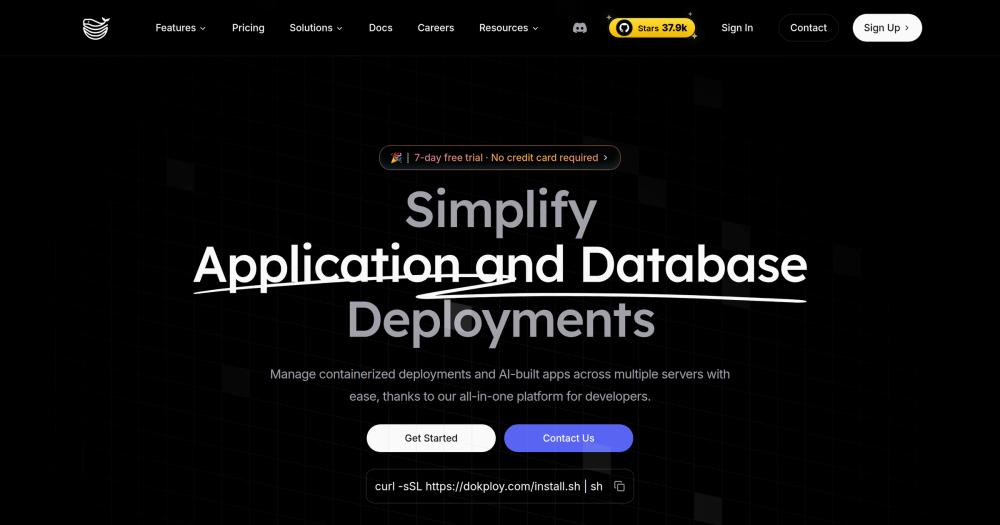
Deploy and manage applications and databases on your own servers using a self-hosted open source PaaS, replacing Heroku, Vercel, and Netlify.

Visit websiteGitHub37.9K starsDeploy on Hostinger
image of Dokploy
TL;DR

Dokploy is a self-hosted, open source PaaS that replaces Heroku, Vercel, and Netlify for developers and teams who want to run their own deployment infrastructure on a VPS. It deploys any application stack (Node.js, Python, Go, PHP, Ruby) and manages databases including PostgreSQL, MySQL, MongoDB, and Redis, with Traefik handling SSL and routing automatically. The core code is Apache-2.0 licensed; enterprise features require a commercial license from Dokploy. Best for teams consolidating multiple cloud deployments onto their own servers to reduce per-service fees.

Read the full breakdownHide the full breakdownWho it is for, how it works, trade-offs, the quick start and the FAQ
who it's for

Who Dokploy is for#

Developers paying per-service fees on Heroku or Render for small production apps

Dokploy installs on a low-cost VPS and manages multiple applications from a single server, eliminating per-dyno or per-service fees. The dashboard handles SSL, routing, and database connections so you keep PaaS convenience without per-service billing.

Skip if:

If you need managed autoscaling, zero-ops incident response, or compliance certifications out of the box, a managed PaaS is the faster path. Dokploy requires active server management.

Teams self-hosting multiple open source tools (Supabase, Cal.com, PocketBase)

The one-click template library deploys tools like Supabase, PocketBase, and Cal.com with pre-configured service definitions. Multi-server support lets you spread workloads across dedicated hosts without managing each server's routing and SSL configuration separately.

Skip if:

If your team has no member with Linux and Docker experience, template deployments are accessible but incident recovery is not. Budget for learning or outside help before relying on this in production.

DevOps engineers managing deployments across multiple client projects

Multi-server support and role-based user management let a single Dokploy instance serve multiple projects with separate access controls. API and CLI access enables automation and integration with existing pipelines, with log forwarding to Datadog or other tools clients already use.

Skip if:

Dokploy is not a CI system. For complex pipeline orchestration with test gates and environment promotion workflows, pair it with a dedicated CI platform like GitHub Actions or GitLab CI.

Startups that want PaaS convenience without recurring cloud billing

For teams building on a tight budget, consolidating applications, databases, and background workers onto one or two VPS instances can reduce monthly infrastructure costs compared to paying separately for each service on a managed platform.

Skip if:

If uptime SLAs or global CDN delivery are requirements, a bare VPS with Dokploy cannot match what Vercel or Cloudflare offer for frontend delivery and edge networking.

the problem

The problem it solves#

Managed PaaS services like Heroku, Vercel, and Render solve the deployment problem but create a new one: costs that grow with every service, database, and team member you add. Running a production application with a database, background workers, and a staging environment means paying for each of those as separate billable resources. Vercel and Netlify add per-seat pricing on top of compute costs for teams.

Beyond cost, these platforms own your deployment configuration. When you want to move to another provider, you rebuild from scratch: different build configurations, different environment variable systems, different routing rules. The infrastructure knowledge your team accumulates is tied to that provider's proprietary tooling, not to transferable skills.

Self-hosting the deployment layer is the alternative, but traditional approaches require building your own CI/CD pipelines, configuring Nginx, managing SSL certificates, and setting up database backups manually, each a separate configuration problem before you can focus on shipping features.

how Dokploy solves it

How it solves it#

Multi-language deployment via Nixpacks, Buildpacks, or Dockerfile

Deploys any application stack (Node.js, PHP, Python, Go, Ruby, and others) using Nixpacks for automatic build detection, Heroku Buildpacks for compatibility with existing configs, or a custom Dockerfile for full control. No vendor-specific config files are required for Nixpacks-detected applications.

Native Docker Compose support

Run complex multi-service applications using standard docker-compose.yml files without translating them to a provider-specific format. Applications that already have a compose config in development can use the same file in production without changes.

Multi-server deployment and Docker Swarm clustering

Deploy applications across multiple remote servers from a single dashboard. Docker Swarm mode enables multi-node scaling for high-availability setups. Add a new server from the UI and deploy to it without SSH-ing into each machine individually.

Integrated database management with automated backups

Creates and manages PostgreSQL, MySQL, MongoDB, MariaDB, libsql, and Redis instances directly from the dashboard without a separate database service subscription. Automated backups ship to an external storage destination of your choice.

Log and metrics forwarding to external observability tools

Ships container logs and host/container metrics to Grafana (Loki, Prometheus/Mimir), Datadog, New Relic, InfluxDB, VictoriaMetrics, Better Stack, Elasticsearch/OpenSearch, Splunk, or AWS CloudWatch. Logs are tagged by project, environment, and application.

One-click open source application templates

Deploys popular open source tools like Supabase, Cal.com, and PocketBase from pre-configured templates with a single click. Templates handle service definitions, volume mounts, and environment variables that would otherwise require manual docker-compose configuration.

strengths · trade-offs

Strengths and trade-offs#

Strengths

  • Apache-2.0 core with full self-hosting rightsThe core codebase is Apache-2.0 licensed, meaning you can self-host it, modify it, and use it for internal commercial workloads without licensing fees. This contrasts with managed PaaS services that charge per-dyno or per-seat for the same deployment capabilities.
  • 37,900+ GitHub stars with active maintenanceLaunched in April 2024, Dokploy accumulated over 37,900 GitHub stars and 3,100 forks, with the repository last updated in October 2026. Active development means reported issues and missing features have a reasonable chance of being addressed in near-term releases.
  • Traefik integration for automatic SSL and routingTraefik handles routing, load balancing, and SSL certificate management automatically when you add a domain to an application. You do not need to configure Nginx, Certbot, or reverse proxy rules manually; the integration manages certificates and can be further customized via the built-in file editor.
  • No vendor lock-in on deployment configurationApplications deploy using Dockerfiles, docker-compose.yml files, or standard Nixpacks and Buildpack configs, all formats that work identically on other platforms. Migrating away from Dokploy does not require rewriting deployment configurations into a proprietary format.

Trade-offs

  • -Enterprise features require a commercial licenseSSO/OIDC, SAML, SCIM, audit logs, custom roles, and license key management are covered by the Dokploy Source Available License 1.0. Production use of these features requires a valid commercial agreement from Dokploy. Development and testing without a subscription are permitted, but redistribution and resale are forbidden.
  • -You own the server uptime, not DokployUnlike Heroku or Render, Dokploy does not manage your server. If the VPS goes down, your deployments go down. You are responsible for server maintenance, OS updates, disk usage monitoring, and incident response. Teams without any ops experience should budget time for this overhead before committing to a full migration.
  • -792 open issues as of October 2026With 792 open issues on GitHub, the project carries a meaningful backlog. Some reported issues involve edge cases in deployment configurations, multi-server setups, and specific database types. Check the issue tracker for issues relevant to your stack before committing to a production migration.
versus alternatives

Dokploy vs alternatives#

Dokploy vs Heroku

Heroku pioneered the "git push to deploy" model for web applications, but it is fully managed and proprietary. Dokploy replicates much of the same workflow on infrastructure you control.

FeatureDokployHeroku
LicenseApache-2.0 (core)Proprietary
Self-hostingYes (requires VPS)No
Deployment methodNixpacks, Buildpacks, DockerfileBuildpacks, Dockerfile
Database managementBuilt-in (PostgreSQL, MySQL, and more)Add-ons (separate billing)
PricingFree core; commercial for enterprise featuresPaid per dyno and resource

Dokploy is the better fit when you want Heroku-compatible Buildpack deployments on your own hardware at VPS cost. Heroku remains worth considering when you need managed infrastructure with guaranteed uptime SLAs or access to its mature add-on marketplace.

Dokploy vs Vercel

Vercel is built for frontend and serverless deployments with edge network delivery as its core feature. Dokploy targets traditional server-based deployments and full-stack applications that need database management and persistent workloads.

FeatureDokployVercel
LicenseApache-2.0 (core)Proprietary
Self-hostingYesNo
Backend and API supportAny containerServerless functions only
Database managementBuilt-inVia integrations
PricingFree core on your serverFree tier; paid per seat and usage

Dokploy handles workloads Vercel cannot: long-running processes, WebSockets, full database servers, and Docker Compose applications. Vercel is the better choice when your primary workload is a Next.js or similar frontend that benefits from edge caching and serverless scaling.

Dokploy vs Railway

Railway is the closest commercial equivalent to Dokploy in feature set: it deploys any containerized application, manages databases, and supports Docker Compose. The primary difference is infrastructure ownership.

FeatureDokployRailway
LicenseApache-2.0 (core)Proprietary
Self-hostingYesNo
PricingFree core on your VPSPaid cloud pricing
Multi-serverYes (Docker Swarm)Managed regions only
ObservabilityExternal log forwardingBuilt-in logs and metrics

Dokploy replaces Railway for teams who want the same deployment model at VPS cost rather than per-resource cloud pricing. Railway is the better choice when you prefer zero infrastructure management, need globally distributed deployments, or want built-in observability without configuring log forwarding.

install · quick start

Quick start#

bash
Self-hosting Dokploy on a Linux VPS uses a single install script that handles Docker setup and initial configuration.
```bash
curl -sSL https://dokploy.com/install.sh | bash
```
tech stack · detected from GitHub

What it's built on#

Languages
GoTypeScript
Frameworks
Next.jsReact
Databases
MariaDBMongoDBMySQLPostgreSQL
Infrastructure
AWSDocker
Cache
Redis
Tooling
esbuild
frequently asked

FAQ#

Is Dokploy free to use?

The core self-hosted version is Apache-2.0 licensed and free to run on your own server. Enterprise features including SSO, SAML, SCIM, audit logs, and custom roles require a commercial license from Dokploy. A managed Dokploy Cloud option is also available for users who prefer not to manage their own infrastructure.

What server do I need to run Dokploy?

Dokploy installs on any Linux VPS with Docker support via a one-line install script. Basic single-server deployments run on a low-spec VPS; multi-server setups with Docker Swarm require more capacity depending on workload. The install script handles Docker setup and initial configuration automatically.

Can Dokploy deploy a Node.js application with a PostgreSQL database?

Yes. Dokploy deploys Node.js applications using Nixpacks for automatic detection, Heroku Buildpacks, or a custom Dockerfile. It creates and manages PostgreSQL instances from the same dashboard. Traefik handles SSL and domain routing automatically, so a standard Node.js and PostgreSQL stack requires no manual reverse proxy configuration.

What databases does Dokploy support?

MySQL, PostgreSQL, MongoDB, MariaDB, libsql, and Redis. All are created and managed from the dashboard with automated backup support to an external storage destination. Databases run as Docker containers on the same server or on separate servers in a multi-server setup.

Does Dokploy support Docker Compose?

Yes. Dokploy has native Docker Compose support, so you can deploy multi-service applications using a standard docker-compose.yml file without translating it to a proprietary format. This makes it straightforward to promote an existing local Docker Compose setup to production.

also worth a look

Similar open-source tools#

Void Cloud

Alternative toVercel

Full-stack Vite toolkit with one-command Cloudflare deployment

  • 507 GitHub stars
  • MITLicence MIT

openship

Alternative toHeroku

Self-hosted deployment platform with built-in CI/CD

  • 14,865 GitHub stars
  • Apache-2.0Licence Apache-2.0

VoidZero

Alternative toVercel

Next-generation unified JavaScript tooling infrastructure

  • 6,409 GitHub stars
  • MITLicence MIT

Coolify

Alternative toVercel

Self-hosted Heroku and Vercel alternative for any app

  • 63,265 GitHub stars
  • Apache-2.0Licence Apache-2.0

Keda

Alternative toKedify

Event-driven Kubernetes autoscaling with 70+ scalers and scale to zero

  • 10,646 GitHub stars
  • Apache-2.0Licence Apache-2.0

Herdr

Alternative toConductor

Agent runtime that keeps terminals alive across machines

  • 44,852 GitHub stars
  • Apache-2.0Licence Apache-2.0
by category

Open source tools in these categories#

86

DevOps & CI/CD

Nvm, Uptime Kuma, Netdata
105

Cloud & Hosting

dify, RuView, rtk
461

Developer Tools

REA (Reverse Engineer Anything), superpowers, Skills for Real Engineers
Hostinger

Run Dokploy on your own server

Self-host Dokploy on a Hostinger VPS.

Deploy on Hostinger

Featured

Inbox Zero

Alternative toSuperhuman

AI email assistant that drafts replies and clears your inbox

  • 12,712 GitHub stars
  • AGPL-3.0Licence AGPL-3.0
  • #Email

rakazo

Alternative toGrok Bot

AI teammates you own: your keys, your model, your machine.

  • 4,904 GitHub stars
  • Apache-2.0Licence Apache-2.0
  • #AI Agents

Omnara

Alternative toCClaude Managed Agents

Open-source agent deployment API. Self-host or use Omnara Cloud.

  • 2,957 GitHub stars
  • Apache-2.0Licence Apache-2.0
  • #AI Agents
Feature your project

New open source projects by email

The projects we add and every new guide. Free, unsubscribe any time.

Find open source alternatives to paid software

/
  • Claude Code to OpenCode
  • Jira to Windshift
  • Notion to AppFlowy
  • Slack to Mattermost
  • Linear to GitLab
  • Wispr Flow to Handy
  • CapCut to Concat
  • Grok Bot to rakazo
  • Superhuman to Inbox Zero
  • Airtable to AITable
  • Muse to OpenClaw
  • GitHub Copilot to Cline
  • Datadog to Netdata
  • Microsoft Teams to Rocket.Chat
  • Pinecone to Qdrant
  • Zapier to n8n
  • Devin AI to OpenHands
  • Firebase to Supabase
  • 1Password to KeePassXC
  • Confluence to Docmost
  • Contentful to Strapi
  • Adobe Premiere Pro to Shotcut
  • ChatGPT to AnythingLLM
  • LangSmith to Langfuse
  • Claude Code to OpenCode
  • Jira to Windshift
  • Notion to AppFlowy
  • Slack to Mattermost
  • Linear to GitLab
  • Wispr Flow to Handy
  • CapCut to Concat
  • Grok Bot to rakazo
  • Superhuman to Inbox Zero
  • Airtable to AITable
  • Muse to OpenClaw
  • GitHub Copilot to Cline
  • Datadog to Netdata
  • Microsoft Teams to Rocket.Chat
  • Pinecone to Qdrant
  • Zapier to n8n
  • Devin AI to OpenHands
  • Firebase to Supabase
  • 1Password to KeePassXC
  • Confluence to Docmost
  • Contentful to Strapi
  • Adobe Premiere Pro to Shotcut
  • ChatGPT to AnythingLLM
  • LangSmith to Langfuse