
Open Source Alternatives
  • Alternatives
  • Categories
    Categories by size882 projects
    • Developer Tools461
    • AI & Machine Learning404
    • Web Development196
    • Business & Productivity191
    • Communication & Collaboration126
    • Security & Monitoring126
    • IT Management123
    • Product & Project Management106
    • Cloud & Hosting105
    • Data & Analytics104
    Browse all 21 categoriesLLMOps & AI Tooling, Design & Creative and 9 more
  • Blog
  • Advertise
SearchNotion, Slack, password manager.../
Submit
Open Source Alternatives
  • Alternatives
    • Developer Tools461
    • AI & Machine Learning404
    • Web Development196
    • Business & Productivity191
    • Communication & Collaboration126
    • Security & Monitoring126
    • Browse all 21 categories
  • Blog
  • Advertise
Submit your project

New open source projects by email

The projects we add and every new guide. Free, unsubscribe any time.

Open Source Alternatives LogoOpen Source Alternatives

Handpicked Open Source Alternatives to Paid Softwares

Product

  • Categories
  • Tag
  • Advertise

Resources

  • Blog
  • Collection
  • Submit

Company

  • Privacy Policy
  • Terms of Service
  • Refund Policy
  • Sitemap

Alternatives

  • Claude Code
  • Jira
  • Notion
  • Slack
  • Linear
  • Wispr Flow
  • All alternatives
© 2026 Open Source Alternatives. All rights reserved.
Open SourceAlternatives
Home/Categories/AI & Machine Learning/OpenResearch
icon of OpenResearch

OpenResearch

Open source alternative to Conductor

  • 7.4K stars
  • MIT
  • Active this week
  • Last commit 1 day ago

Last verified Oct 21, 2026

Run parallel research agents with reproducible experiments on your own machine. MIT licensed, supports Claude Code, Codex, and OpenCode.

Visit websiteGitHub7.4K stars
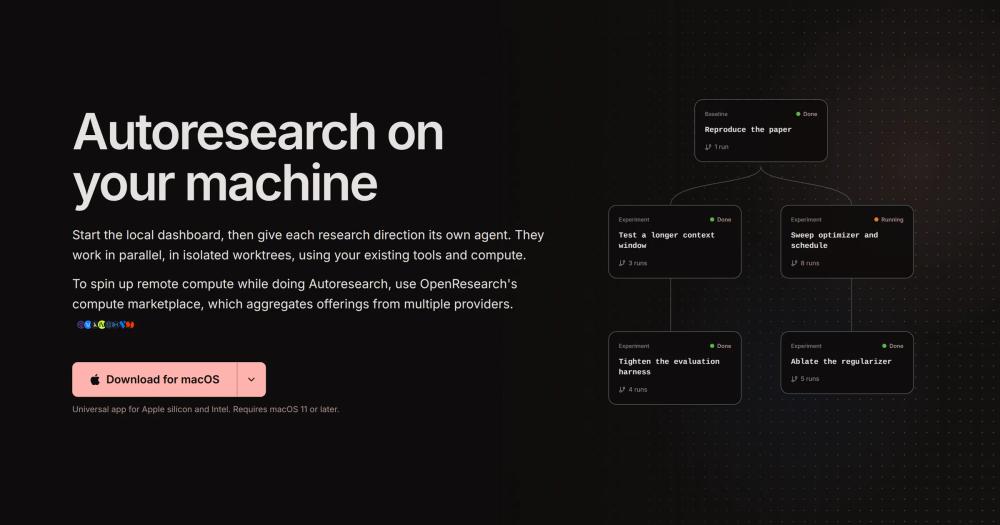
OpenResearch homepage showing parallel research agent runs
TL;DR

OpenResearch is a local-first workspace for running Claude Code, Codex, or OpenCode as research agents in parallel, each in its own isolated git worktree. It replaces manual experiment notebooks and paid managed compute services with a git-native experiment tree that records every run as an immutable commit archive, keeping all data on your machine. MIT licensed, with a one-command CLI install on macOS and Linux. Best for ML researchers and AI engineers who need autonomous multi-agent research pipelines without sending code or experiment data to third-party servers.

Read the full breakdownHide the full breakdownWho it is for, how it works, trade-offs, the quick start and the FAQ
who it's for

Who OpenResearch is for#

ML researchers exploring parallel experimental directions

OpenResearch assigns each hypothesis its own agent session and git worktree, so you can test a longer context window in one branch while ablating a regularizer in another. The experiment tree records every run's exact code state and output, making it possible to reproduce past results or revisit abandoned directions without reconstructing the environment.

Skip if:

Skip if your experiments are primarily data transformations or batch jobs with no agent-driven code changes. OpenResearch is built around coding agents; pure data pipeline work fits standard ML orchestrators better.

AI engineers building autonomous research pipelines

The autoresearch mode runs the full cycle without manual intervention: propose, code, experiment, inspect evidence, and decide what to try next. Multiple agents can explore different directions in parallel on local hardware or remote compute via SSH or cloud job runners.

Skip if:

Skip if you need a shared team dashboard accessible to collaborators without SSH access. OpenResearch's local-first model is designed for individual researchers or small teams working in the same codebase.

PhD students and academic researchers needing reproducible artifacts

Every experiment run is stored as an immutable git commit archive, including code, logs, diffs, and output artifacts. This makes it straightforward to reproduce a specific result for a paper submission or audit trail without reconstructing the exact environment from memory.

Skip if:

Skip if your institution requires a centralized experiment-tracking server that other lab members can access independently. Experiment data stays on your machine by default; sharing requires a shared server or managed compute.

the problem

The problem it solves#

Running multiple AI agent sessions for research is fragmented by default. When agents work in the same directory, they overwrite each other's code changes, and there is no structured record of which code state and agent prompt produced which experimental result. Reproducing a past finding means reconstructing the exact environment from memory.

Cloud experiment-tracking services help with logging but they send your code and model outputs to third-party servers, which creates difficulties for proprietary research, sensitive datasets, or organizations with data residency requirements. Teams that avoid cloud services fall back to manual logs in notebooks or spreadsheets, which scale poorly once experiments multiply across parallel directions.

how OpenResearch solves it

How it solves it#

Parallel agent sessions with isolated git worktrees

Each research direction gets its own agent session and git worktree, so multiple agents modify code simultaneously without conflicts. The experiment tree tracks each branch independently, preserving the exact code state that produced each result.

Git-native experiment tree with immutable run archives

Every experiment run is recorded as an immutable commit archive. You can return to any past run and reproduce it exactly, including the code state, agent logs, and output artifacts. No separate database or tracking server is required.

Autoresearch autonomous loop

In autoresearch mode, OpenResearch runs the full research cycle without manual intervention: it proposes an idea, modifies the code, launches an experiment, inspects the evidence, and decides what to try next. Multiple agents can explore different directions in parallel while the tree preserves their lineage.

Claude Code, Codex, and OpenCode support

OpenResearch works with Claude Code, Codex, and OpenCode as backing agents. The backing agent and model are selected per session, so you can run different agents across parallel experiments. OpenCode also connects to local models via LM Studio, Ollama, or a custom endpoint.

Compute flexibility across local, SSH, and cloud runners

The same committed source snapshot runs locally, over SSH, or on Slurm, Kubernetes, Ray, Hugging Face Jobs, Modal, Tinker, and managed OpenResearch compute. Run the workspace on your laptop while compute runs next to remote GPUs: `orx up --remote user@host`.

Local SQLite store with opt-out telemetry

All projects, conversations, experiments, runs, logs, code, and artifacts stay on your machine in a local SQLite store. Creating a project or launching a run does not publish your code. Official builds send opt-out telemetry tied to a random installation ID, with no code, prompts, file contents, paths, or project identifiers. Disable with `orx telemetry off`.

strengths · trade-offs

Strengths and trade-offs#

Strengths

  • MIT license with no data leaving your machine by defaultThe MIT license means you can run OpenResearch on your own infrastructure with no licensing fees and no restrictions on commercial use. All project data stays on your machine by default. No account is needed for the core local workflow, and creating a project or run does not publish your code.
  • Reproducibility built on git, not a proprietary formatExperiment reproducibility is built on git commit archives rather than a proprietary database. Any developer familiar with git can inspect, replay, or branch from any past run without learning a custom experiment format or running a separate tracking service.
  • Works with existing coding agents and compute infrastructureOpenResearch wraps Claude Code, Codex, or OpenCode as the backing agent and runs on whatever compute you already have: local hardware, SSH, Kubernetes, or cloud job runners including Ray, Modal, and Hugging Face Jobs. No new agent or compute provider is required.
  • Rapid community adoption since June 2026 launchThe repository was created in June 2026, written in Rust, and reached 1,281 stars and 94 forks by September 2026. Active development continues with 11 open issues and regular pushes, the last on September 12, 2026.

Trade-offs

  • -Windows support is still in betaThe macOS and Linux CLI is the primary supported install path. Windows support is available through GitHub releases but is labeled beta and requires Git for Windows installed. Windows users should read the Windows notes in the documentation before deploying.
  • -Remote service has no application-level authenticationWhen running the workspace on a shared host with `orx up --remote user@host`, the remote service binds to loopback but has no application-level authentication. Other users logged into the same host can reach the OpenResearch dashboard. Shared multi-user servers require additional network-level access controls.
  • -Managed compute and organizations require an accountThe core local workflow runs without an account. Managed OpenResearch compute, organizations, and email updates require creating an account at openresearch.sh. Teams needing centralized compute management or collaborative features across machines need to sign up.
versus alternatives

OpenResearch vs alternatives#

OpenResearch vs Weights & Biases

Weights & Biases is the most widely used paid platform for ML experiment tracking and team collaboration. OpenResearch overlaps in experiment tracking but adds agent-driven automation: coding agents (Claude Code, Codex, OpenCode) propose changes, run experiments, and iterate, with each run archived in git automatically rather than logged via instrumented code.

FeatureOpenResearchWeights & Biases
LicenseMITProprietary
DeploymentLocal, SSH, cloud runnersManaged cloud
Agent integrationClaude Code, Codex, OpenCodeNone built-in
Experiment trackingGit commit archivesCloud database
Data stays on machineYes (by default)No

OpenResearch is the better choice when your research workflow centers on coding agents running autonomous experiments. All project data stays on your machine by default, which suits proprietary research, sensitive datasets, or data residency requirements. The MIT license means no per-seat fees for self-hosters.

Weights & Biases is worth considering when you need a shared team dashboard that collaborators can access without SSH, rich visualization tooling for training curves and model metrics, or broad integrations with ML frameworks. Its managed infrastructure removes the server management overhead for distributed teams.

install · quick start

Quick start#

bash
Install the CLI on macOS or Linux, then start the local dashboard.
```bash
curl -LsSf https://openresearch.sh/install.sh | sh
orx up
```
tech stack · detected from GitHub

What it's built on#

Languages
JavaScriptPythonRustTypeScript
Frameworks
React
frequently asked

FAQ#

Is OpenResearch free to use?

Yes. OpenResearch is MIT licensed and free to run on your own machine or infrastructure with no licensing fees. A free account at openresearch.sh is needed only for managed compute and organization features. The core local workspace, CLI, and desktop app work without an account.

Which AI agents does OpenResearch support?

OpenResearch works with Claude Code, Codex, and OpenCode as backing agents. The backing agent and model are selected per session, so you can run different agents across parallel experiments. OpenCode also connects to local models via LM Studio, Ollama, or a custom endpoint for fully offline use.

Does OpenResearch send my code or experiment data to external servers?

No. The local workspace runs on 127.0.0.1 with a local SQLite store. Creating a project or launching a run does not publish your code. Official release builds send opt-out telemetry tied only to a random installation ID, with no code, prompts, file contents, paths, or project identifiers. Telemetry can be disabled with orx telemetry off.

Can OpenResearch run on cloud infrastructure or remote compute?

Yes. The same committed source snapshot runs on Slurm, Kubernetes, Ray, Hugging Face Jobs, Modal, Tinker, and managed OpenResearch compute. You can also point the workspace at a remote SSH host with orx up --remote user@host, accessing the dashboard from your local browser while compute runs remotely. SSH config aliases and custom ports are supported.

What operating systems does OpenResearch support?

macOS (Apple silicon and Intel, macOS 11 or later) is fully supported via the desktop app and CLI. Linux is supported via the CLI. Windows is available through GitHub releases but is labeled beta and requires Git for Windows. The documentation includes Windows-specific notes for beta users.

also worth a look

Similar open-source tools#

paperclip

Featured

Alternative toGrok Bot

Self-hosted AI agent management with org charts and budgets

  • 105,118 GitHub stars
  • MITLicence MIT

Threadlines

Alternative toConductor

Open-source ADE for Claude Code, Codex, and Cursor in one thread

  • 20 GitHub stars
  • MITLicence MIT

Orgtree

Alternative toConductor

Desktop canvas for persistent multi-agent AI teams, Windows-only

  • 168 GitHub stars
  • MITLicence MIT

Herdr

Alternative toConductor

Agent runtime that keeps terminals alive across machines

  • 44,852 GitHub stars
  • Apache-2.0Licence Apache-2.0

5dive

Alternative toConductor

Run a company of AI agents on a server you own.

  • 73 GitHub stars
  • MITLicence MIT

Hypa

Alternative toConductor

Local-first terminal workspace for AI coding agents

  • 212 GitHub stars
  • FSL-1.1-ALv2Licence FSL-1.1-ALv2
by category

Open source tools in these categories#

404

AI & Machine Learning

freeCodeCamp, OpenClaw, REA (Reverse Engineer Anything)
463

Developer Tools

REA (Reverse Engineer Anything), superpowers, Skills for Real Engineers
106

Product & Project Management

agency-agents, freeCodeCamp, Gstack
107

Cloud & Hosting

dify, RuView, rtk

Featured

Omnara

Alternative toCClaude Managed Agents

Open-source agent deployment API. Self-host or use Omnara Cloud.

  • 2,957 GitHub stars
  • Apache-2.0Licence Apache-2.0
  • #AI Agents

Inbox Zero

Alternative toSuperhuman

AI email assistant that drafts replies and clears your inbox

  • 12,712 GitHub stars
  • AGPL-3.0Licence AGPL-3.0
  • #Email

rakazo

Alternative toGrok Bot

AI teammates you own: your keys, your model, your machine.

  • 4,904 GitHub stars
  • Apache-2.0Licence Apache-2.0
  • #AI Agents
Feature your project

New open source projects by email

The projects we add and every new guide. Free, unsubscribe any time.

Find open source alternatives to paid software

/
  • Claude Code to OpenCode
  • Jira to Windshift
  • Notion to AppFlowy
  • Slack to Mattermost
  • Linear to GitLab
  • Wispr Flow to Handy
  • CapCut to Concat
  • Grok Bot to rakazo
  • Superhuman to Inbox Zero
  • Airtable to AITable
  • Muse to OpenClaw
  • GitHub Copilot to Cline
  • Datadog to Netdata
  • Microsoft Teams to Rocket.Chat
  • Pinecone to Qdrant
  • Zapier to n8n
  • Devin AI to OpenHands
  • Firebase to Supabase
  • 1Password to KeePassXC
  • Confluence to Docmost
  • Contentful to Strapi
  • Adobe Premiere Pro to Shotcut
  • ChatGPT to AnythingLLM
  • LangSmith to Langfuse
  • Claude Code to OpenCode
  • Jira to Windshift
  • Notion to AppFlowy
  • Slack to Mattermost
  • Linear to GitLab
  • Wispr Flow to Handy
  • CapCut to Concat
  • Grok Bot to rakazo
  • Superhuman to Inbox Zero
  • Airtable to AITable
  • Muse to OpenClaw
  • GitHub Copilot to Cline
  • Datadog to Netdata
  • Microsoft Teams to Rocket.Chat
  • Pinecone to Qdrant
  • Zapier to n8n
  • Devin AI to OpenHands
  • Firebase to Supabase
  • 1Password to KeePassXC
  • Confluence to Docmost
  • Contentful to Strapi
  • Adobe Premiere Pro to Shotcut
  • ChatGPT to AnythingLLM
  • LangSmith to Langfuse