Open Source Alternatives
  • Alternatives
  • Categories
    Categories by size882 projects
    • Developer Tools461
    • AI & Machine Learning404
    • Web Development196
    • Business & Productivity191
    • Communication & Collaboration126
    • Security & Monitoring126
    • IT Management123
    • Product & Project Management106
    • Cloud & Hosting105
    • Data & Analytics104
    Browse all 21 categoriesLLMOps & AI Tooling, Design & Creative and 9 more
  • Blog
  • Advertise
SearchNotion, Slack, password manager.../
Submit
Open Source Alternatives
  • Alternatives
    • Developer Tools461
    • AI & Machine Learning404
    • Web Development196
    • Business & Productivity191
    • Communication & Collaboration126
    • Security & Monitoring126
    • Browse all 21 categories
  • Blog
  • Advertise
Submit your project

New open source projects by email

The projects we add and every new guide. Free, unsubscribe any time.

Open Source Alternatives LogoOpen Source Alternatives

Handpicked Open Source Alternatives to Paid Softwares

Product

  • Categories
  • Tag
  • Advertise

Resources

  • Blog
  • Collection
  • Submit

Company

  • Privacy Policy
  • Terms of Service
  • Refund Policy
  • Sitemap

Alternatives

  • Claude Code
  • Jira
  • Notion
  • Slack
  • Linear
  • Wispr Flow
  • All alternatives
© 2026 Open Source Alternatives. All rights reserved.
Open SourceAlternatives
Home/Categories/Business & Productivity/Notesnook
icon of Notesnook

Notesnook

Open source alternative to Evernote, Standard Notes and Notion

  • 14.8K stars
  • GPL-3.0
  • Active this week
  • Last commit 2 days ago

Last verified Oct 20, 2026

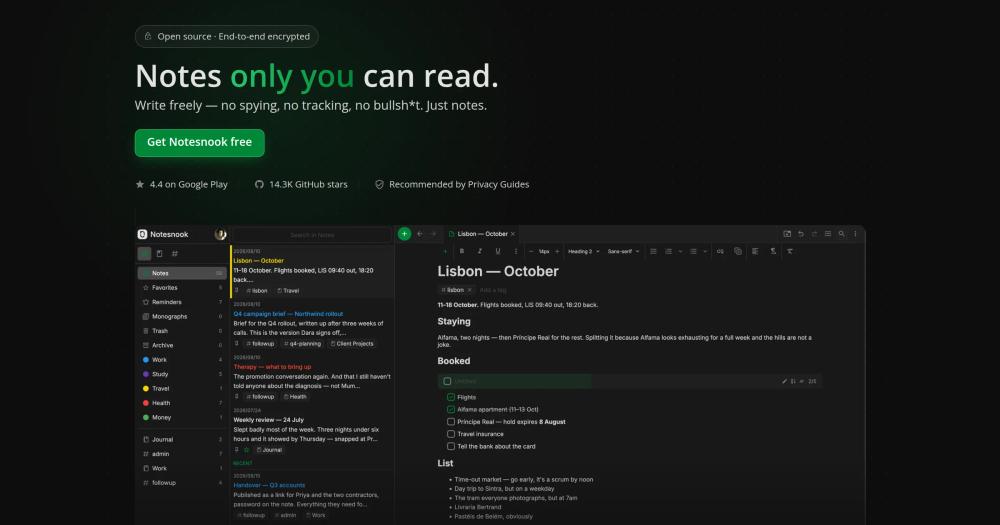
Secure private notes with end-to-end encrypted sync across desktop, mobile, and web.

Visit websiteGitHub14.8K starsDeploy on Hostinger
image of Notesnook
TL;DR

Notesnook is a GPL-3.0 end-to-end encrypted note-taking app with open source clients and a self-hostable sync server. It replaces Evernote, Standard Notes, and Notion for people who need private notes, cross-device sync, and data ownership instead of a closed productivity workspace.

Read the full breakdownHide the full breakdownWho it is for, how it works, trade-offs and the FAQ
who it's for

Who Notesnook is for#

Professionals storing sensitive notes

Notesnook fits lawyers, journalists, clinicians, consultants, and researchers who need notes that remain private across devices.

Skip if:

Skip it if your main need is shared project documentation or a collaborative team wiki.

Privacy-focused users leaving Evernote

Users can move toward a note app where encryption, open source clients, and data ownership are primary design goals.

Skip if:

Use Evernote or Notion if you value broad integrations and workspace features more than cryptographic privacy.

the problem

The problem it solves#

Notes often contain sensitive material: client details, research, legal notes, medical information, credentials, interview notes, and personal journals. If the note service can read the content or lock it behind a proprietary sync system, privacy depends on vendor promises rather than cryptography and portability.\u000A\u000AMany popular note apps also mix note-taking with broad workspace features, which can make privacy, export, and offline reliability harder to reason about. Privacy-focused users need a focused notes app where encryption and ownership are central.

how Notesnook solves it

How it solves it#

End-to-end encrypted notes

Notesnook encrypts note content so the service provider cannot read private notes. This is the key difference from many general productivity workspaces.

Open source client apps

The repository includes open source app code across desktop, web, and mobile surfaces. Users and teams can inspect the privacy-critical parts of the note-taking stack.

Self-hostable sync server

Notesnook supports a self-hosted sync path for users who want control over where encrypted note data is stored. This reduces dependence on a single hosted provider.

strengths · trade-offs

Strengths and trade-offs#

Strengths

  • Privacy is a product boundaryNotesnook puts encryption and private sync at the center instead of treating privacy as an add-on. That makes it a better fit for sensitive personal and professional notes.
  • Focused alternative to workspace bloatNotesnook is designed for notes rather than project management, databases, and team wikis. Users who want private writing and retrieval do not need to adopt a larger workspace system.

Trade-offs

  • -Not a Notion-style team workspaceNotesnook is strongest for private notes. Teams needing relational databases, public docs, project boards, and rich collaborative workspaces should choose a different tool.
  • -Self-hosting adds sync responsibilityRunning the sync server means owning uptime, backups, TLS, and upgrades. Many users will prefer the hosted sync option even if they value open source clients.
versus alternatives

Notesnook vs alternatives#

Notesnook vs Evernote

Notesnook and Evernote both store notes across devices, but Notesnook centers end-to-end encryption and open source clients while Evernote is a proprietary hosted productivity product.

CriterionNotesnookEvernote
LicenseGPL-3.0 repositoryProprietary SaaS
EncryptionEnd-to-end encrypted notesHosted proprietary service model
HostingHosted sync or self-hosted sync serverManaged SaaS
Best fitSensitive private notesBroad hosted note capture and organization

Notesnook is the better choice when privacy and source transparency matter. Evernote is still stronger when users want a mature hosted workflow with broad integrations and minimal setup.

tech stack · detected from GitHub

What it's built on#

Languages
JavaJavaScriptTypeScript
Frameworks
ReactReact Native
Tooling
esbuild
frequently asked

FAQ#

Is Notesnook end-to-end encrypted?

Yes. Notesnook is built around end-to-end encrypted note storage. That means note content is designed to remain unreadable to the service provider.

Can I self-host Notesnook?

Yes. Notesnook provides a self-hostable sync server path. Self-hosting gives more control over where encrypted data is stored, but it also requires operations work.

How does Notesnook compare to Evernote?

Notesnook prioritizes encrypted private notes and open source clients, while Evernote provides a mature hosted productivity product with broad capture and organization features. Choose Notesnook for privacy; choose Evernote for hosted convenience.

Looking for more

Other ways to replace Evernote, Standard Notes and Notion#

AppFlowy

#1 in the Notion guide

Full Notion replacement for small teams

77,613 GitHub stars

AFFiNE

#2 in the Notion guide

Docs, whiteboards, and databases in one workspace

73,684 GitHub stars

Outline

#3 in the Notion guide

Polished team wiki and internal knowledge base

40,988 GitHub stars

Macro Docs

#4 in the Notion guide

Markdown-native docs that agents and teammates edit together

4,782 GitHub stars
All 21 Notion alternatives9 open source Notion alternatives, ranked
by category

Open source tools in these categories#

191

Business & Productivity

OpenClaw, Excalidraw, RustDesk
126

Security & Monitoring

REA (Reverse Engineer Anything), RustDesk, Uptime Kuma
126

Communication & Collaboration

freeCodeCamp, iptv, Excalidraw
Hostinger

Run Notesnook on your own server

Self-host Notesnook on a Hostinger VPS.

Deploy on Hostinger

Featured

Omnara

Alternative toCClaude Managed Agents

Open-source agent deployment API. Self-host or use Omnara Cloud.

  • 2,957 GitHub stars
  • Apache-2.0Licence Apache-2.0
  • #AI Agents

rakazo

Alternative toGrok Bot

AI teammates you own: your keys, your model, your machine.

  • 4,904 GitHub stars
  • Apache-2.0Licence Apache-2.0
  • #AI Agents

Inbox Zero

Alternative toSuperhuman

AI email assistant that drafts replies and clears your inbox

  • 12,712 GitHub stars
  • AGPL-3.0Licence AGPL-3.0
  • #Email
Feature your project

New open source projects by email

The projects we add and every new guide. Free, unsubscribe any time.

Find open source alternatives to paid software

/
  • Claude Code to OpenCode
  • Jira to Windshift
  • Notion to AppFlowy
  • Slack to Mattermost
  • Linear to GitLab
  • Wispr Flow to Handy
  • CapCut to Concat
  • Grok Bot to rakazo
  • Superhuman to Inbox Zero
  • Airtable to AITable
  • Muse to OpenClaw
  • GitHub Copilot to Cline
  • Datadog to Netdata
  • Microsoft Teams to Rocket.Chat
  • Pinecone to Qdrant
  • Zapier to n8n
  • Devin AI to OpenHands
  • Firebase to Supabase
  • 1Password to KeePassXC
  • Confluence to Docmost
  • Contentful to Strapi
  • Adobe Premiere Pro to Shotcut
  • ChatGPT to AnythingLLM
  • LangSmith to Langfuse
  • Claude Code to OpenCode
  • Jira to Windshift
  • Notion to AppFlowy
  • Slack to Mattermost
  • Linear to GitLab
  • Wispr Flow to Handy
  • CapCut to Concat
  • Grok Bot to rakazo
  • Superhuman to Inbox Zero
  • Airtable to AITable
  • Muse to OpenClaw
  • GitHub Copilot to Cline
  • Datadog to Netdata
  • Microsoft Teams to Rocket.Chat
  • Pinecone to Qdrant
  • Zapier to n8n
  • Devin AI to OpenHands
  • Firebase to Supabase
  • 1Password to KeePassXC
  • Confluence to Docmost
  • Contentful to Strapi
  • Adobe Premiere Pro to Shotcut
  • ChatGPT to AnythingLLM
  • LangSmith to Langfuse