Open Source Alternatives
  • Alternatives
  • Categories
    Categories by size881 projects
    • Developer Tools460
    • AI & Machine Learning404
    • Web Development196
    • Business & Productivity191
    • Communication & Collaboration126
    • Security & Monitoring126
    • IT Management123
    • Product & Project Management106
    • Cloud & Hosting104
    • Data & Analytics104
    Browse all 21 categoriesLLMOps & AI Tooling, Design & Creative and 9 more
  • Blog
  • Advertise
SearchNotion, Slack, password manager.../
Submit
Open Source Alternatives
  • Alternatives
    • Developer Tools460
    • AI & Machine Learning404
    • Web Development196
    • Business & Productivity191
    • Communication & Collaboration126
    • Security & Monitoring126
    • Browse all 21 categories
  • Blog
  • Advertise
Submit your project

New open source projects by email

The projects we add and every new guide. Free, unsubscribe any time.

Open Source Alternatives LogoOpen Source Alternatives

Handpicked Open Source Alternatives to Paid Softwares

Product

  • Categories
  • Tag
  • Advertise

Resources

  • Blog
  • Collection
  • Submit

Company

  • Privacy Policy
  • Terms of Service
  • Refund Policy
  • Sitemap

Alternatives

  • Claude Code
  • Jira
  • Notion
  • Slack
  • Linear
  • Wispr Flow
  • All alternatives
© 2026 Open Source Alternatives. All rights reserved.
Open SourceAlternatives
Home/Categories/AI & Machine Learning/MoneyPrinterTurbo
GitHub logo

MoneyPrinterTurbo

Open source alternative to InVideo AI, HeyGen, Pictory and Synthesys

  • 133.4K stars
  • MIT
  • Active this week
  • Last commit 1 day ago

Last verified Oct 20, 2026

Generate HD short videos from any topic or keyword using an automated AI workflow covering script writing, stock footage, voiceover, subtitles, and publishing.

Visit websiteGitHub133.4K stars
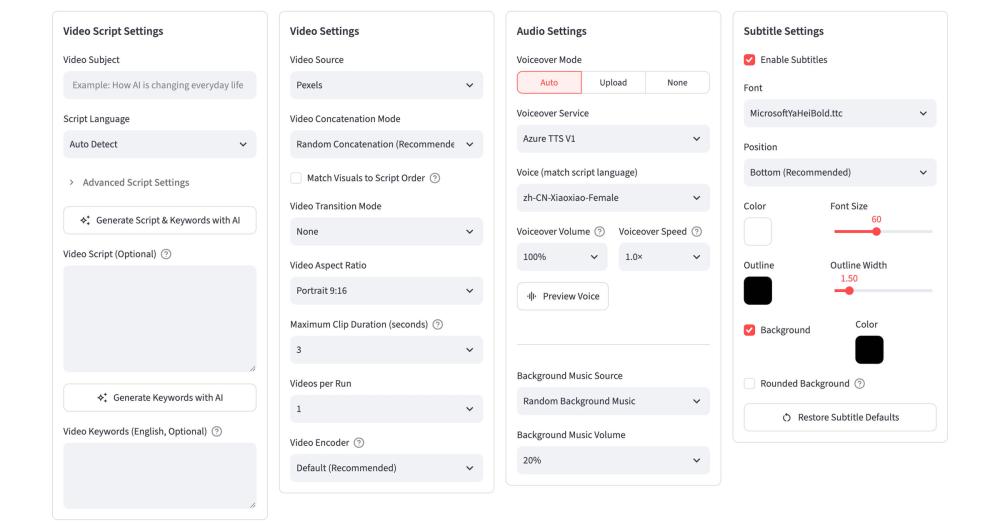
MoneyPrinterTurbo web UI with script, video, audio and subtitle settings
TL;DR

MoneyPrinterTurbo is a Python tool that converts any topic or keyword into a complete HD short video, from AI-written script through voiceover, stock footage, and synchronized subtitles. It replaces paid commercial platforms like HeyGen and InVideo AI by automating the full short-form video production chain on your own infrastructure with an MIT license and no per-video fees. Best for content creators and marketers who need high-volume short-form video production without subscription costs.

Read the full breakdownHide the full breakdownWho it is for, how it works, trade-offs, the quick start and the FAQ
who it's for

Who MoneyPrinterTurbo is for#

Content creators automating short-form social media production

Producers running TikTok, Instagram, or YouTube Shorts channels can input a topic list, run batch generation overnight, and wake up to a set of completed videos ready to review and publish. The one-click publish step to all three platforms removes the manual upload-and-caption workflow entirely.

Skip if:

You need branded video templates, on-screen text animations, or motion graphics. MoneyPrinterTurbo produces narration-over-footage videos without visual effects layers or template-based compositions.

Marketers generating product or educational explainer videos

Marketers can write custom scripts and feed them into MoneyPrinterTurbo for voiceover, footage matching, and subtitle generation without touching a video editing tool. Multi-language output means the same script can produce videos in multiple languages using different TTS voices.

Skip if:

Your videos require on-screen text overlays, lower-thirds, brand logo placement, or precise motion timing. Those production elements are outside the current feature set.

Developers building content automation pipelines

The REST API at port 8080 exposes the full generation pipeline programmatically, making it possible to integrate MoneyPrinterTurbo into a larger content workflow. Topics can be sourced from a database, scripts reviewed via webhook, and completed videos pushed to a CDN automatically.

Skip if:

Your pipeline requires frame-accurate timing, multiple speaker tracks, or complex scene transitions. MoneyPrinterTurbo's output targets short-form social formats, not broadcast or long-form production.

Teams producing multilingual video content at scale

Multi-language script generation combined with multiple TTS voice providers means the same topic can produce videos in different languages in the same batch run. This serves international social media accounts that publish identical topics across multiple markets.

Skip if:

You need human-quality multilingual translation review. LLM-generated scripts and TTS voice output vary in quality across languages; high-stakes multilingual content still benefits from human review before publishing.

the problem

The problem it solves#

Creating short-form video content at scale requires coordinating five distinct production steps: writing a script, sourcing B-roll footage, generating or recording narration, adding synchronized subtitles, and publishing to multiple platforms. Each step is its own tool or expertise, and commercial platforms that bundle these charge per-minute rendering fees or monthly subscriptions that scale up fast with volume.

For teams producing ten, twenty, or a hundred videos per week, the cost and manual effort compound quickly. Waiting on cloud rendering queues adds latency; proprietary platforms own your content pipeline so you cannot customize the script format, subtitle style, or footage sources. Most creators end up patching together multiple paid services with no automation between them.

how MoneyPrinterTurbo solves it

How it solves it#

Automated AI script generation

Generates video scripts from a single topic or keyword using configurable LLM providers including OpenAI, Google Gemini, DeepSeek, Kimi/Moonshot, Azure OpenAI, and a dozen others. Custom scripts are also supported, so you can write your own copy and use MoneyPrinterTurbo only for the media assembly steps.

Multi-provider voiceover synthesis

Supports Edge TTS (free, no API key), Azure TTS V2, SiliconFlow TTS, Google Gemini TTS, ElevenLabs, and Chatterbox with real-time preview in the WebUI. Voices can be selected per language, enabling multi-language video output from the same project.

Subtitle generation with full style control

Generates subtitles via TTS timestamps (fast, no GPU needed) or via local faster-whisper (more accurate sync for complex audio). Font, position, color, size, stroke, and background style are all configurable in the WebUI.

Stock footage sourcing from Pexels, Pixabay, and Coverr

Automatically matches video segments to the script using keyword queries against Pexels, Pixabay, and Coverr, all royalty-free sources. Local footage folders are also supported, so you can pipe in proprietary B-roll alongside public stock assets.

One-click publishing to TikTok, Instagram, and YouTube Shorts

After generation, completed videos can be automatically uploaded to TikTok, Instagram Reels, and YouTube Shorts in one step. Batch generation lets you produce multiple takes from one topic and choose the best before publishing.

Four usage modes: WebUI, API, CLI, and AI Agent

The WebUI runs on Streamlit at localhost:8501. A REST API is exposed at port 8080 with full OpenAPI docs. A CLI mode supports headless batch generation without a browser. An AI Agent mode lets compatible AI coding tools install and run the tool automatically from a published skill document.

strengths · trade-offs

Strengths and trade-offs#

Strengths

  • MIT license with no per-video feesThe entire codebase is MIT licensed, so there are no per-video rendering charges, no monthly subscription, and no usage caps. You pay only for the LLM API calls you make, which are typically cents per video at current provider rates. Unlike HeyGen or Pictory, there is no credit system gating batch output.
  • Broad LLM provider compatibilityWorks with over ten LLM providers including OpenAI, Google Gemini, DeepSeek, Azure OpenAI, Kimi/Moonshot, xAI Grok, MiniMax, and local Ollama instances. Switching providers requires only a config change, so you can route to the cheapest available model without modifying any workflow code.
  • Batch generation for volume productionGenerates multiple video variants from a single topic in one run, letting you review outputs and select the best. This fits content calendars and bulk social media scheduling workflows without manual per-video effort.
  • 106,000+ GitHub stars with active developmentThe repository has over 106,000 stars and 16,000 forks, with the last code push in August 2026. Active development matters for a tool that depends on external LLM and TTS APIs that change frequently; a stale codebase breaks when upstream providers update their interfaces.

Trade-offs

  • -Setup complexity for non-technical usersThe README explicitly notes that deployment has a certain threshold for beginner users. Docker is the easiest path, but configuring LLM provider API keys, TTS credentials, and stock media sources still requires working through several config steps. A hosted version (Reccloud) exists for users who prefer not to self-host.
  • -GPU not required but affects batch performanceBasic video generation runs on CPU, but enabling faster-whisper for accurate subtitles or running large batch jobs is noticeably slower without a GPU. The README recommends at least 4GB VRAM for faster local processing; cloud LLMs and TTS avoid this bottleneck but add API cost.
  • -LLM and TTS API keys required for full functionalityEdge TTS is free and requires no key, but quality LLM script generation via OpenAI, Gemini, or DeepSeek requires paid API credentials from those providers. The tool does not bundle any LLM inference; you supply the API access and absorb those token costs directly.
versus alternatives

MoneyPrinterTurbo vs alternatives#

MoneyPrinterTurbo vs HeyGen

HeyGen is a cloud-based AI video platform focused on avatar-driven presenter videos and AI dubbing. MoneyPrinterTurbo targets a different production model: topic-to-footage short-form video rather than talking-head presentations.

FeatureMoneyPrinterTurboHeyGen
LicenseMIT (self-hosted)Proprietary
Self-hostingYesNo
Video styleFootage and narrationAI avatar presenter
PricingFree (LLM API costs only)$29/month and up
Batch generationYesLimited on lower tiers
Platform publishingTikTok, Instagram, YouTube ShortsManual download

MoneyPrinterTurbo is the better choice when you need high-volume footage-based short videos with no per-video cost. HeyGen is still the better fit when your content format requires a human-like AI presenter on screen, such as explainer videos, product demos, or corporate training materials where a talking head is the expected format.

MoneyPrinterTurbo vs InVideo AI

InVideo AI is a template-based AI video creator designed for social media content. Both tools target short-form video production, but differ significantly in control model and cost structure.

FeatureMoneyPrinterTurboInVideo AI
LicenseMIT (self-hosted)Proprietary
Self-hostingYesNo
LLM providerConfigurable (OpenAI, Gemini, etc.)Proprietary
Stock footagePexels, Pixabay, Coverr, localInVideo library
PricingFree (LLM API costs only)$20/month and up
CustomizationFull pipeline controlTemplate-constrained

MoneyPrinterTurbo gives developers and technically confident creators full control over every layer of the pipeline: script LLM, voice synthesis, footage source, and subtitle style. InVideo AI is the better choice for non-technical users who need a guided, browser-based workflow with ready-made templates and do not want to configure API keys or run a local server.

install · quick start

Quick start#

bash
Self-hosting uses Docker with a pre-built image from GitHub Container Registry.
```bash
git clone https://github.com/harry0703/MoneyPrinterTurbo.git
cd MoneyPrinterTurbo
docker compose -f docker-compose.release.yml up
```
tech stack · detected from GitHub

What it's built on#

Languages
Python
Frameworks
FastAPI
Cache
Redis
Tooling
FFmpeg
frequently asked

FAQ#

Is MoneyPrinterTurbo free to use?

Yes. The tool itself is MIT licensed and free to run on your own hardware. You do need API keys for the LLM provider you choose (OpenAI, Google Gemini, DeepSeek, etc.) and for higher-quality TTS services, which carry their own per-token or per-character costs. Edge TTS is built in and requires no API key. There are no per-video rendering fees from MoneyPrinterTurbo itself.

What video platforms does MoneyPrinterTurbo publish to?

After generating a video, you can automatically publish it to TikTok, Instagram Reels, and YouTube Shorts in one step from the WebUI. This eliminates the manual upload-and-caption workflow for each platform separately.

Do I need a GPU to run MoneyPrinterTurbo?

No. Basic video generation runs entirely on CPU and requires no GPU. A dedicated GPU (4GB+ VRAM recommended) speeds up local faster-whisper transcription for more accurate subtitles and improves batch generation throughput. If you use cloud LLMs and TTS providers, CPU performance is the main bottleneck, not GPU.

Can I use my own video footage instead of stock clips?

Yes. MoneyPrinterTurbo supports local footage folders alongside Pexels, Pixabay, and Coverr. You can point the tool at a folder of your own video clips and it will match them to script segments alongside or instead of public stock sources.

How is MoneyPrinterTurbo different from HeyGen or InVideo AI?

HeyGen and InVideo AI are proprietary cloud platforms with monthly subscription pricing and rendering credit systems. MoneyPrinterTurbo runs on your own infrastructure, uses your chosen LLM provider, and has no per-video fees or platform lock-in. The tradeoff is that setup requires more technical effort than a guided web-based tool, and MoneyPrinterTurbo does not support AI avatar presenters or template-based layouts.

also worth a look

Similar open-source tools#

Openspline

Alternative toHeyGen LiveAvatar

Talking-avatar SDK for voice AI agents, MIT-licensed, Python and Node.

  • 261 GitHub stars
  • MITLicence MIT

OpenCreator

Alternative toHeyGen

Local AI workspace for video, image, voice, and translation

  • 13,637 GitHub stars
  • Apache-2.0Licence Apache-2.0

video-use

Alternative toDescript

Edit videos by chatting with Claude Code, not clicking menus

  • 29,418 GitHub stars
  • MITLicence MIT

stt

Alternative toMacWhisper

Local speech-to-text with multi-format output and GPU acceleration

  • 4,823 GitHub stars
  • GPL-3.0Licence GPL-3.0

YouDub-webui

Alternative toRask AI

Self-hosted AI video dubbing: YouTube to Chinese, Bilibili to English

  • 5,703 GitHub stars
  • Apache-2.0Licence Apache-2.0

pyvideotrans

Alternative toRask AI

Open source video translation with AI dubbing and voice cloning

  • 19,477 GitHub stars
  • GPL-3.0Licence GPL-3.0
by category

Open source tools in these categories#

404

AI & Machine Learning

freeCodeCamp, OpenClaw, REA (Reverse Engineer Anything)
56

Marketing & Growth

agency-agents, MoneyPrinterTurbo, MiroFish

Featured

rakazo

Alternative toGrok Bot

AI teammates you own: your keys, your model, your machine.

  • 4,904 GitHub stars
  • Apache-2.0Licence Apache-2.0
  • #AI Agents

Inbox Zero

Alternative toSuperhuman

AI email assistant that drafts replies and clears your inbox

  • 12,712 GitHub stars
  • AGPL-3.0Licence AGPL-3.0
  • #Email

Omnara

Alternative toCClaude Managed Agents

Open-source agent deployment API. Self-host or use Omnara Cloud.

  • 2,957 GitHub stars
  • Apache-2.0Licence Apache-2.0
  • #AI Agents
Feature your project

New open source projects by email

The projects we add and every new guide. Free, unsubscribe any time.

Find open source alternatives to paid software

/
  • Claude Code to OpenCode
  • Jira to Windshift
  • Notion to AppFlowy
  • Slack to Mattermost
  • Linear to GitLab
  • Wispr Flow to Handy
  • CapCut to Concat
  • Grok Bot to rakazo
  • Superhuman to Inbox Zero
  • Airtable to AITable
  • Muse to OpenClaw
  • GitHub Copilot to Cline
  • Datadog to Netdata
  • Microsoft Teams to Rocket.Chat
  • Pinecone to Qdrant
  • Zapier to n8n
  • Devin AI to OpenHands
  • Firebase to Supabase
  • 1Password to KeePassXC
  • Confluence to Docmost
  • Contentful to Strapi
  • Adobe Premiere Pro to Shotcut
  • ChatGPT to AnythingLLM
  • LangSmith to Langfuse
  • Claude Code to OpenCode
  • Jira to Windshift
  • Notion to AppFlowy
  • Slack to Mattermost
  • Linear to GitLab
  • Wispr Flow to Handy
  • CapCut to Concat
  • Grok Bot to rakazo
  • Superhuman to Inbox Zero
  • Airtable to AITable
  • Muse to OpenClaw
  • GitHub Copilot to Cline
  • Datadog to Netdata
  • Microsoft Teams to Rocket.Chat
  • Pinecone to Qdrant
  • Zapier to n8n
  • Devin AI to OpenHands
  • Firebase to Supabase
  • 1Password to KeePassXC
  • Confluence to Docmost
  • Contentful to Strapi
  • Adobe Premiere Pro to Shotcut
  • ChatGPT to AnythingLLM
  • LangSmith to Langfuse