Open Source Alternatives
  • Alternatives
  • Categories
    Categories by size882 projects
    • Developer Tools461
    • AI & Machine Learning404
    • Web Development196
    • Business & Productivity191
    • Communication & Collaboration126
    • Security & Monitoring126
    • IT Management123
    • Product & Project Management106
    • Cloud & Hosting105
    • Data & Analytics104
    Browse all 21 categoriesLLMOps & AI Tooling, Design & Creative and 9 more
  • Blog
  • Advertise
SearchNotion, Slack, password manager.../
Submit
Open Source Alternatives
  • Alternatives
    • Developer Tools461
    • AI & Machine Learning404
    • Web Development196
    • Business & Productivity191
    • Communication & Collaboration126
    • Security & Monitoring126
    • Browse all 21 categories
  • Blog
  • Advertise
Submit your project

New open source projects by email

The projects we add and every new guide. Free, unsubscribe any time.

Open Source Alternatives LogoOpen Source Alternatives

Handpicked Open Source Alternatives to Paid Softwares

Product

  • Categories
  • Tag
  • Advertise

Resources

  • Blog
  • Collection
  • Submit

Company

  • Privacy Policy
  • Terms of Service
  • Refund Policy
  • Sitemap

Alternatives

  • Claude Code
  • Jira
  • Notion
  • Slack
  • Linear
  • Wispr Flow
  • All alternatives
© 2026 Open Source Alternatives. All rights reserved.
Open SourceAlternatives
Home/Categories/Business & Productivity/Memos
icon of Memos

Memos

Open source alternative to Google Keep, Evernote and Standard Notes

  • 63.9K stars
  • MIT
  • Active this week
  • Last commit 3 days ago

Last verified Oct 20, 2026

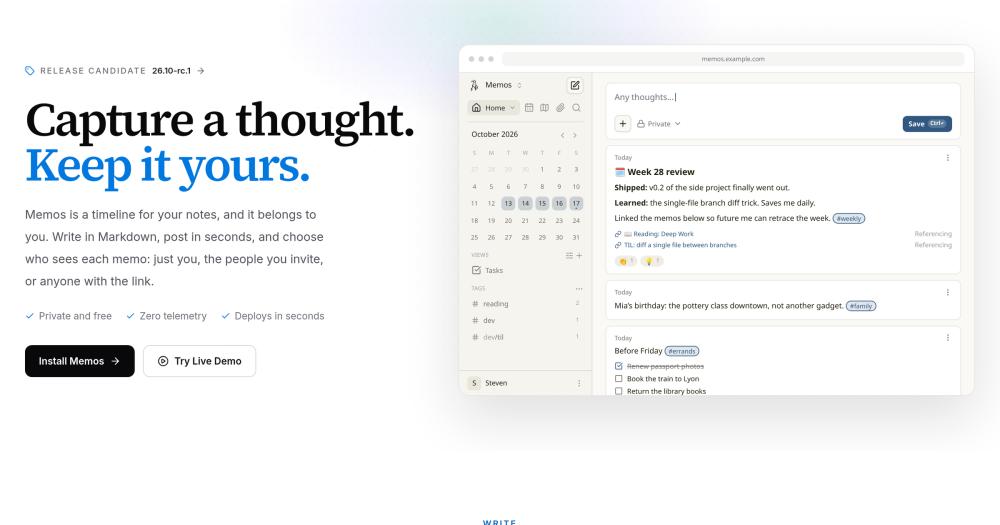
Host a self-contained timeline for quick notes, with per-memo visibility controls, Markdown support, and zero telemetry on a server you control.

Visit websiteGitHub63.9K starsDeploy on Hostinger
image of Memos
TL;DR

Memos is an open source, self-hosted note-taking app with a chronological timeline view. It replaces Evernote, Google Keep, and Notion for users who want full data ownership: new memos are private by default, the software sends zero telemetry, and you host it on your own server with one Docker command. MIT licensed, with SQLite, MySQL, and PostgreSQL storage options. Best for individuals and small teams who want fast, low-friction note capture without a subscription.

Read the full breakdownHide the full breakdownWho it is for, how it works, trade-offs, the quick start and the FAQ
who it's for

Who Memos is for#

Individuals replacing Google Keep or Evernote

If you want fast note capture with a chronological feed, search, and tags, without a subscription or your notes stored on someone else's server, Memos covers that workflow directly. The single-command Docker install takes under a minute.

Skip if:

If you need to share structured documents with a team, assign tasks, or build a linked knowledge base, Memos' single-timeline design will feel limiting.

Developers logging daily work and TIL snippets

The Markdown-first composer and tag system suit developers who log daily work, save TIL snippets, or bookmark code examples. The Web Clipper saves pages as source-linked Markdown directly into the timeline from the browser.

Skip if:

If you need a full second-brain system with bidirectional links and graph views, a dedicated tool like Logseq or Obsidian serves that use case better.

Homelab or NAS owners running a shared note feed

Memos supports multiple user accounts with separate timelines on one instance. SQLite covers single-user setups; PostgreSQL or MySQL is recommended for multi-user installs. A single Docker container handles the full stack.

Skip if:

If your team needs task assignment, project boards, or real-time document collaboration, Memos' scope is deliberately narrower than a full workspace tool.

the problem

The problem it solves#

Most note-taking apps keep your data on their servers, change their pricing unpredictably, and send usage analytics back to their own servers whether you want them to or not. Evernote has raised prices and removed features from its free tier over the years. Notion charges per seat for team features. Google Keep offers no export path, no self-hosting, and no control over data retention.

The larger issue is that notes accumulate trust over time: years of meeting notes, reading highlights, and daily logs become harder to abandon as they grow. When a service changes its pricing or gets acquired, your archive is held hostage. A tool that runs on your own infrastructure, sends no telemetry, and gives you a full export at any time removes that dependency entirely.

how Memos solves it

How it solves it#

Per-memo visibility: private, invite-only, or public

Each memo has its own visibility setting. New memos default to private. You can share a single memo with signed-in users or make it publicly accessible by link without changing the visibility of any other memo in your timeline.

Timeline with calendar and map views

Memos displays entries chronologically. The built-in calendar view shows every day you wrote something and lets you jump to that day's entries. A map view plots memos that include a saved location. There are no folders to navigate.

Markdown writing with inline #tag organization

Memos are written in Markdown, including lists, code blocks, and checklists. Tags are inline with #hashtag syntax. You can save frequently used tag filters as named views for quick access later.

Zero telemetry with full data export

The Memos software sends no usage data or analytics to any external server. Your memos live in the database of the instance you run. You can export your entire archive as a ZIP file at any time.

Web Clipper browser extension and Telegram integration

The Memos Web Clipper for Chrome and Firefox saves pages, selections, and images directly into your Memos instance as source-linked Markdown. A Telegram integration lets you send memos from outside the app without opening a browser.

SQLite, MySQL, and PostgreSQL database support

Memos defaults to SQLite for single-user installs, requiring no separate database setup. MySQL and PostgreSQL are supported for teams running a shared instance or preferring a managed database backend.

strengths · trade-offs

Strengths and trade-offs#

Strengths

  • 63,000+ GitHub stars, actively maintainedWith over 63,000 GitHub stars and a last commit pushed on October 16, 2026, Memos has a large contributor base and regular releases. The project uses calendar versioning (YY.MM.N), with stable Docker tags that follow each release automatically.
  • MIT license with no commercial restrictionsThe MIT license means you can run Memos commercially, fork it, and modify it without restriction. Unlike source-available tools in the note-taking space, there is no hosted-service clause or commercial-use limit.
  • One Docker command to start, no reverse proxy requiredSelf-hosting Memos requires a single docker run command. No Compose file, no reverse proxy, no separate database service for single-user installs. The server starts on port 5230 and stores data in a local folder you specify.
  • Private by default with per-memo sharing controlsEvery new memo is private until you choose otherwise. You share individual memos, not your entire account. This is the opposite of most collaborative note tools that require explicit privacy settings per collection or notebook.

Trade-offs

  • -No block-based editor or structured document pagesMemos is a timeline for short notes, not a page-based editor. If you need nested documents, database views, or wiki-style pages like Notion provides, Memos is not that tool. It is designed for quick capture, not structured knowledge bases.
  • -Self-hosting responsibility falls entirely on youThere is no managed cloud version of Memos; you host it yourself. Backups, upgrades, and server availability are your responsibility. Upgrading from releases before v0.31.0 requires a specific migration step documented in the upgrade guide.
versus alternatives

Memos vs alternatives#

Memos vs Evernote

Both tools capture notes and let you search them later, but they differ on data ownership and pricing. Evernote is a cloud-only service; your notes live on Evernote's servers, and the free tier restricts you to two devices and limits monthly uploads. Memos is self-hosted with MIT licensing and no subscription.

FeatureMemosEvernote
HostingSelf-hostedCloud only
LicenseMITProprietary
PriceFree (hosting costs)Free tier, $14.99+/mo paid
TelemetryZeroCollects usage data
ExportZIP with MarkdownENEX format

Memos is the better choice if data ownership, zero telemetry, and no subscription fee are priorities. Evernote is worth considering if you need OCR on scanned images, email-to-note forwarding, and a polished mobile app without running your own server.

Memos vs Google Keep

Google Keep is a lightweight note app with no folder hierarchy, similar in spirit to Memos. Keep syncs to Google's servers, has no self-hosting option, and integrates with Google Workspace. Memos gives you the same quick-capture experience on infrastructure you control.

FeatureMemosGoogle Keep
HostingSelf-hostedGoogle cloud
LicenseMITProprietary
MarkdownYesNo
ExportZIP archiveGoogle Takeout
TelemetryZeroGoogle analytics

Memos wins on privacy and data ownership. Google Keep wins when you live in Google Workspace and want zero infrastructure to manage.

Memos vs Notion

Notion is a workspace tool with pages, databases, and block editors. Memos is a timeline for quick notes. They overlap on basic capture but serve different needs: Notion is built for structured documents and team collaboration, while Memos prioritizes fast individual capture.

FeatureMemosNotion
HostingSelf-hostedCloud (limited self-host)
LicenseMITProprietary
PriceFree (hosting costs)Free tier, $10+/mo paid
InterfaceChronological timelineBlock editor, databases
Best forQuick notes, privacyStructured docs, wikis

Choose Memos for lightweight private capture on your own server. Choose Notion when you need nested pages, database views, or team collaboration with shared documents.


install · quick start

Quick start#

bash
Self-hosting uses Docker with a local folder for persistent storage.
```bash
docker run -d \
  --name memos \
  -p 5230:5230 \
  -v ~/.memos:/var/opt/memos \
  neosmemo/memos:stable
```
tech stack · detected from GitHub

What it's built on#

Languages
GoTypeScript
Frameworks
React
Databases
SQLite
Infrastructure
Docker
frequently asked

FAQ#

Is Memos free to use?

Yes. Memos is MIT licensed and free to self-host with no license fee. Hosting may still cost money depending on your server or provider. There is no managed cloud version, so self-hosting is the only path to running Memos.

What databases does Memos support?

Memos supports SQLite (the default, no extra setup needed), MySQL, and PostgreSQL. For a single-user install, SQLite is sufficient. Teams sharing an instance typically prefer MySQL or PostgreSQL for concurrent access and managed backups.

Can I export my notes out of Memos?

Yes. Memos lets you export your entire archive as a ZIP file containing your notes in Markdown format, so you can move to another tool without losing your data.

Can I share individual memos publicly while keeping others private?

Yes. Each memo has its own visibility setting: private (the default), visible to signed-in users, or public by link. You control sharing per memo without changing the visibility of any other memo on your timeline.

How does Memos differ from Notion for quick note capture?

Notion is a workspace tool with pages, databases, and block editors. Memos is a timeline for short, fast notes. Memos deploys in one Docker command, sends no telemetry, and has no subscription fee, but it does not replace Notion's document and project management capabilities.

also worth a look

Similar open-source tools#

Notesnook

Alternative toEvernote

End-to-end encrypted open source note-taking, cross-platform

  • 14,803 GitHub stars
  • GPL-3.0Licence GPL-3.0

Reflect Open

Alternative toReflect

Local-first Markdown notes for Mac and iPhone, no account required

  • 1,591 GitHub stars
  • MITLicence MIT

itsnotes

Alternative toGoogle Keep

A self-hosted Google Keep alternative for power users.

  • 36 GitHub stars
  • MITLicence MIT

Joplin

Alternative toEvernote

Open source note-taking app with Markdown and sync support

  • 56,815 GitHub stars

Zettlr

Alternative toScrivener

Open source Markdown editor for researchers and academics

  • 13,794 GitHub stars
  • GPL-3.0Licence GPL-3.0

Standard Notes

Alternative toEvernote

End-to-end encrypted notes with 100+ extensions and themes

  • 6,672 GitHub stars
  • AGPL-3.0Licence AGPL-3.0
by category

Open source tools in these categories#

191

Business & Productivity

OpenClaw, Excalidraw, RustDesk
126

Communication & Collaboration

freeCodeCamp, iptv, Excalidraw
Hostinger

Run Memos on your own server

Self-host Memos on a Hostinger VPS.

Deploy on Hostinger

Featured

Inbox Zero

Alternative toSuperhuman

AI email assistant that drafts replies and clears your inbox

  • 12,712 GitHub stars
  • AGPL-3.0Licence AGPL-3.0
  • #Email

rakazo

Alternative toGrok Bot

AI teammates you own: your keys, your model, your machine.

  • 4,904 GitHub stars
  • Apache-2.0Licence Apache-2.0
  • #AI Agents

Omnara

Alternative toCClaude Managed Agents

Open-source agent deployment API. Self-host or use Omnara Cloud.

  • 2,957 GitHub stars
  • Apache-2.0Licence Apache-2.0
  • #AI Agents
Feature your project

New open source projects by email

The projects we add and every new guide. Free, unsubscribe any time.

Find open source alternatives to paid software

/
  • Claude Code to OpenCode
  • Jira to Windshift
  • Notion to AppFlowy
  • Slack to Mattermost
  • Linear to GitLab
  • Wispr Flow to Handy
  • CapCut to Concat
  • Grok Bot to rakazo
  • Superhuman to Inbox Zero
  • Airtable to AITable
  • Muse to OpenClaw
  • GitHub Copilot to Cline
  • Datadog to Netdata
  • Microsoft Teams to Rocket.Chat
  • Pinecone to Qdrant
  • Zapier to n8n
  • Devin AI to OpenHands
  • Firebase to Supabase
  • 1Password to KeePassXC
  • Confluence to Docmost
  • Contentful to Strapi
  • Adobe Premiere Pro to Shotcut
  • ChatGPT to AnythingLLM
  • LangSmith to Langfuse
  • Claude Code to OpenCode
  • Jira to Windshift
  • Notion to AppFlowy
  • Slack to Mattermost
  • Linear to GitLab
  • Wispr Flow to Handy
  • CapCut to Concat
  • Grok Bot to rakazo
  • Superhuman to Inbox Zero
  • Airtable to AITable
  • Muse to OpenClaw
  • GitHub Copilot to Cline
  • Datadog to Netdata
  • Microsoft Teams to Rocket.Chat
  • Pinecone to Qdrant
  • Zapier to n8n
  • Devin AI to OpenHands
  • Firebase to Supabase
  • 1Password to KeePassXC
  • Confluence to Docmost
  • Contentful to Strapi
  • Adobe Premiere Pro to Shotcut
  • ChatGPT to AnythingLLM
  • LangSmith to Langfuse