Open Source Alternatives
  • Alternatives
  • Categories
    Categories by size882 projects
    • Developer Tools461
    • AI & Machine Learning404
    • Web Development196
    • Business & Productivity191
    • Communication & Collaboration126
    • Security & Monitoring126
    • IT Management123
    • Product & Project Management106
    • Cloud & Hosting105
    • Data & Analytics104
    Browse all 21 categoriesLLMOps & AI Tooling, Design & Creative and 9 more
  • Blog
  • Advertise
SearchNotion, Slack, password manager.../
Submit
Open Source Alternatives
  • Alternatives
    • Developer Tools461
    • AI & Machine Learning404
    • Web Development196
    • Business & Productivity191
    • Communication & Collaboration126
    • Security & Monitoring126
    • Browse all 21 categories
  • Blog
  • Advertise
Submit your project

New open source projects by email

The projects we add and every new guide. Free, unsubscribe any time.

Open Source Alternatives LogoOpen Source Alternatives

Handpicked Open Source Alternatives to Paid Softwares

Product

  • Categories
  • Tag
  • Advertise

Resources

  • Blog
  • Collection
  • Submit

Company

  • Privacy Policy
  • Terms of Service
  • Refund Policy
  • Sitemap

Alternatives

  • Claude Code
  • Jira
  • Notion
  • Slack
  • Linear
  • Wispr Flow
  • All alternatives
© 2026 Open Source Alternatives. All rights reserved.
Open SourceAlternatives
Home/Categories/Business & Productivity/Joplin
icon of Joplin

Joplin

Open source alternative to Evernote, Notion and Microsoft OneNote

  • 56.8K stars
  • Active this week
  • Last commit 3 days ago

Last verified Oct 20, 2026

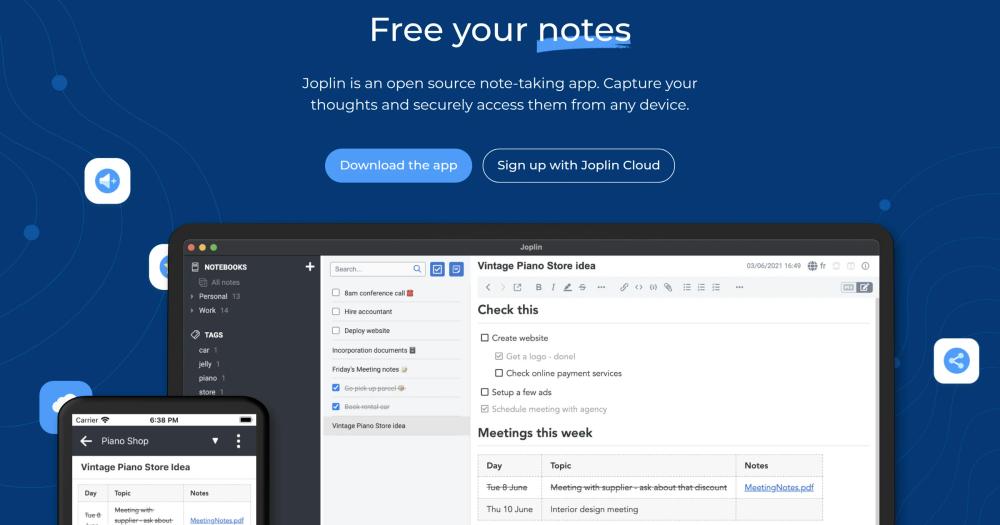
An open-source note-taking application that allows you to capture your thoughts and securely access them from any device.

Visit websiteGitHub56.8K starsDeploy on Hostinger
image of Joplin
TL;DR

Joplin is an AGPL-licensed Evernote alternative for local-first Markdown notes, encrypted sync, and users who want control over storage choices.

Read the full breakdownHide the full breakdownWho it is for, how it works, trade-offs, the quick start and the FAQ
who it's for

Who Joplin is for#

Privacy-focused professionals replacing Evernote

Joplin gives consultants, researchers, and operators a local-first notebook with optional E2EE and multi-device sync. They can keep client notes, research clippings, and task lists searchable without making one hosted account the only copy.

Skip if:

You need browser-only access from unmanaged computers or shared team editing inside the same document.

Developers keeping Markdown notes across devices

Joplin fits developers who want Markdown notes, external editor support, a terminal client, and sync through Nextcloud, S3, WebDAV, or local filesystem targets. It works well for runbooks, snippets, technical journals, and project notes.

Skip if:

Your notes already live cleanly in a Git repo and you do not need mobile apps, clipping, reminders, or encrypted cross-device sync.

Teams sharing selected notebooks through Joplin Cloud

Small teams can use Joplin Cloud to share notes, collaborate on selected content, and publish notes to the web when needed. This is strongest for shared reference material, not full project management.

Skip if:

Your team needs granular workspace permissions, embedded databases, or real-time editing as the main workflow.

Migrators with Evernote or OneNote archives

Joplin is a good fit for users who need to bring over ENEX files, Markdown directories, or supported OneNote exports while keeping a local copy after migration. The import docs make it possible to test one notebook before moving a full archive.

Skip if:

Your archive depends heavily on exact visual formatting, custom fonts, or complex note-to-note links that must survive without manual cleanup.

the problem

The problem it solves#

Hosted note apps can make your notes depend on one vendor account, one sync service, and one export path. That creates real risk when prices change, storage limits shift, or a team needs to leave a hosted workspace without losing notebooks, attachments, tags, and note history. Users also need offline access on laptops and phones, Markdown editing for long-term readability, browser capture for research, and encrypted sync without handing every note to a single platform. Paid tools like Evernote, OneNote, and Notion can work well, but they rarely give users the same mix of local data, open formats, and sync-target choice.

how Joplin solves it

How it solves it#

Offline-first Markdown notes

Joplin keeps notes available on the device first, then syncs changes in the background. Notes use Markdown, support notebooks and tags, and can be edited from the app or an external text editor.

Multiple sync targets

Sync works with Joplin Cloud, Nextcloud, S3, WebDAV, Dropbox, OneDrive, or the local filesystem. The sync layer is designed without a hard dependency on one company, so users can move between targets.

End-to-end encryption across apps

E2EE is supported on all Joplin apps and protects notes, notebooks, tags, and resources so only the data owner can read them. Setup starts on one device, then syncs the master key to the rest.

Migration from legacy note apps

Joplin imports Evernote ENEX exports with notes, resources, tags, and metadata, and it can import Markdown files or directories. The docs also cover OneNote import paths for supported desktop versions.

Web clipper and media notes

Browser extensions for Chrome and Firefox save web pages and screenshots as notes. Notes can also include images, videos, PDFs, audio files, math expressions, diagrams, and mobile photos.

strengths · trade-offs

Strengths and trade-offs#

Strengths

  • Keeps notes independent from one vendorJoplin's sync design avoids a hard dependency on Evernote, Google, Microsoft, or any single storage provider. Users can keep local copies and choose the service that fits their privacy and backup model.
  • Strong path out of Evernote and OneNoteThe importer handles Evernote ENEX files with attachments, tags, and metadata, and the docs include OneNote import workflows. That makes Joplin practical for people leaving older notebook systems instead of starting from an empty workspace.
  • Privacy controls without giving up syncJoplin combines offline access, optional E2EE, and several sync targets. Users can sync across devices while keeping encryption under their own password rather than relying only on the storage provider.
  • Works for GUI and terminal workflowsThe desktop, mobile, and terminal apps cover Windows, macOS, Linux, Android, iOS, FreeBSD, and WSL. Technical users can manage notes from a command-line interface while non-technical users stay in the desktop or mobile apps.

Trade-offs

  • -E2EE setup requires careJoplin's E2EE must be enabled on one device first, then synced to the rest. The docs warn that the master key password cannot be recovered and that the first encrypted sync can take a long time for large note libraries.
  • -Collaboration is not a Notion-style workspaceJoplin Cloud supports sharing notes and collaboration, but Joplin is still primarily a note app rather than a live team workspace. Teams that need databases, kanban boards, and real-time document collaboration may prefer Notion or Microsoft 365.
  • -Complex imports can lose presentation detailsEvernote imports preserve the text and many resources, but color, font size, font face, and some internal links can be imperfect when converted to Markdown. Users with highly formatted notebooks should test a sample export first.
  • -Sync still needs a targetJoplin does not remove sync infrastructure decisions. Users must pick Joplin Cloud, a third-party storage service, a WebDAV or S3 target, Nextcloud, or local filesystem sync and maintain that choice over time.
versus alternatives

Joplin vs alternatives#

Joplin vs Evernote and OneNote

Joplin, Evernote, and OneNote all cover personal notes, notebooks, attachments, and cross-device access, but they make different tradeoffs around control and convenience. Joplin is AGPL-licensed and local-first, with Markdown notes, optional end-to-end encryption, and sync targets that include Joplin Cloud, Nextcloud, S3, WebDAV, Dropbox, OneDrive, and local filesystem storage.

Joplin is the stronger choice when you want a private note library, open formats, and the freedom to move sync data away from one vendor account. It also gives Evernote and OneNote migrators documented import paths for ENEX, Markdown, and supported OneNote exports. Evernote or OneNote can still fit better when a team prioritizes the smoothest hosted collaboration, Microsoft 365 integration, or a fully managed experience where non-technical users never choose or maintain a sync target.

install · quick start

Quick start#

bash
# Linux desktop
wget -O - https://raw.githubusercontent.com/laurent22/joplin/dev/Joplin_install_and_update.sh | bash

# Terminal app
NPM_CONFIG_PREFIX=~/.joplin-bin npm install --loglevel=error -g joplin
sudo ln -s ~/.joplin-bin/bin/joplin /usr/local/bin/joplin
joplin
tech stack · detected from GitHub

What it's built on#

Languages
JavaJavaScriptRustTypeScript
Frameworks
React Native
Databases
SQLite
Runtimes
Node.js
Infrastructure
AWS
frequently asked

FAQ#

Is Joplin open source?

Yes. The Joplin repository is licensed under AGPL-3.0-or-later unless a subdirectory has its own license file, and the official apps are built from that codebase. The logo and icon have separate usage restrictions.

Can Joplin sync without Joplin Cloud?

Yes. Joplin can sync through Nextcloud, S3, WebDAV, Dropbox, OneDrive, the local filesystem, or Joplin Cloud. The sync system is designed so users are not locked into one storage provider.

Does Joplin support end-to-end encryption?

Yes. Joplin supports E2EE on all apps, but users must enable it carefully from one device first and then sync the key to other devices. The encryption password cannot be recovered if it is forgotten.

Can Joplin import Evernote or OneNote notebooks?

Yes. Joplin imports Evernote ENEX files, Markdown files and directories, and documented OneNote export formats. Some formatting details from Evernote, such as font faces and colors, may not survive Markdown conversion.

Which platforms does Joplin support?

Joplin has desktop apps for Windows, macOS, and Linux, mobile apps for Android and iOS, and a terminal app for macOS, Linux, Windows through WSL, and FreeBSD. Browser clippers are available for Chrome and Firefox.

Looking for more

Other ways to replace Evernote, Notion and Microsoft OneNote#

AppFlowy

#1 in the Notion guide

Full Notion replacement for small teams

77,613 GitHub stars

AFFiNE

#2 in the Notion guide

Docs, whiteboards, and databases in one workspace

73,684 GitHub stars

Outline

#3 in the Notion guide

Polished team wiki and internal knowledge base

40,988 GitHub stars

Macro Docs

#4 in the Notion guide

Markdown-native docs that agents and teammates edit together

4,782 GitHub stars
All 21 Notion alternatives9 open source Notion alternatives, ranked
by category

Open source tools in these categories#

191

Business & Productivity

OpenClaw, Excalidraw, RustDesk
123

IT Management

RustDesk, Immich, Stirling PDF
462

Developer Tools

REA (Reverse Engineer Anything), superpowers, Skills for Real Engineers
Hostinger

Run Joplin on your own server

Self-host Joplin on a Hostinger VPS.

Deploy on Hostinger

Featured

Inbox Zero

Alternative toSuperhuman

AI email assistant that drafts replies and clears your inbox

  • 12,712 GitHub stars
  • AGPL-3.0Licence AGPL-3.0
  • #Email

rakazo

Alternative toGrok Bot

AI teammates you own: your keys, your model, your machine.

  • 4,904 GitHub stars
  • Apache-2.0Licence Apache-2.0
  • #AI Agents

Omnara

Alternative toCClaude Managed Agents

Open-source agent deployment API. Self-host or use Omnara Cloud.

  • 2,957 GitHub stars
  • Apache-2.0Licence Apache-2.0
  • #AI Agents
Feature your project

New open source projects by email

The projects we add and every new guide. Free, unsubscribe any time.

Find open source alternatives to paid software

/
  • Claude Code to OpenCode
  • Jira to Windshift
  • Notion to AppFlowy
  • Slack to Mattermost
  • Linear to GitLab
  • Wispr Flow to Handy
  • CapCut to Concat
  • Grok Bot to rakazo
  • Superhuman to Inbox Zero
  • Airtable to AITable
  • Muse to OpenClaw
  • GitHub Copilot to Cline
  • Datadog to Netdata
  • Microsoft Teams to Rocket.Chat
  • Pinecone to Qdrant
  • Zapier to n8n
  • Devin AI to OpenHands
  • Firebase to Supabase
  • 1Password to KeePassXC
  • Confluence to Docmost
  • Contentful to Strapi
  • Adobe Premiere Pro to Shotcut
  • ChatGPT to AnythingLLM
  • LangSmith to Langfuse
  • Claude Code to OpenCode
  • Jira to Windshift
  • Notion to AppFlowy
  • Slack to Mattermost
  • Linear to GitLab
  • Wispr Flow to Handy
  • CapCut to Concat
  • Grok Bot to rakazo
  • Superhuman to Inbox Zero
  • Airtable to AITable
  • Muse to OpenClaw
  • GitHub Copilot to Cline
  • Datadog to Netdata
  • Microsoft Teams to Rocket.Chat
  • Pinecone to Qdrant
  • Zapier to n8n
  • Devin AI to OpenHands
  • Firebase to Supabase
  • 1Password to KeePassXC
  • Confluence to Docmost
  • Contentful to Strapi
  • Adobe Premiere Pro to Shotcut
  • ChatGPT to AnythingLLM
  • LangSmith to Langfuse