Open Source Alternatives
  • Alternatives
  • Categories
    Categories by size882 projects
    • Developer Tools461
    • AI & Machine Learning404
    • Web Development196
    • Business & Productivity191
    • Communication & Collaboration126
    • Security & Monitoring126
    • IT Management123
    • Product & Project Management106
    • Cloud & Hosting105
    • Data & Analytics104
    Browse all 21 categoriesLLMOps & AI Tooling, Design & Creative and 9 more
  • Blog
  • Advertise
SearchNotion, Slack, password manager.../
Submit
Open Source Alternatives
  • Alternatives
    • Developer Tools461
    • AI & Machine Learning404
    • Web Development196
    • Business & Productivity191
    • Communication & Collaboration126
    • Security & Monitoring126
    • Browse all 21 categories
  • Blog
  • Advertise
Submit your project

New open source projects by email

The projects we add and every new guide. Free, unsubscribe any time.

Open Source Alternatives LogoOpen Source Alternatives

Handpicked Open Source Alternatives to Paid Softwares

Product

  • Categories
  • Tag
  • Advertise

Resources

  • Blog
  • Collection
  • Submit

Company

  • Privacy Policy
  • Terms of Service
  • Refund Policy
  • Sitemap

Alternatives

  • Claude Code
  • Jira
  • Notion
  • Slack
  • Linear
  • Wispr Flow
  • All alternatives
© 2026 Open Source Alternatives. All rights reserved.
Open SourceAlternatives
Home/Categories/AI & Machine Learning/Jentic Mini
Jentic Mini logo

Jentic Mini

Open source alternative to Composio

  • 186 stars
  • Apache-2.0
  • Active this week
  • Last commit 1 day ago

Last verified Oct 20, 2026

Secure AI agent API calls with a self-hosted execution layer that searches, brokers, and injects credentials at runtime.

Visit websiteGitHub186 stars
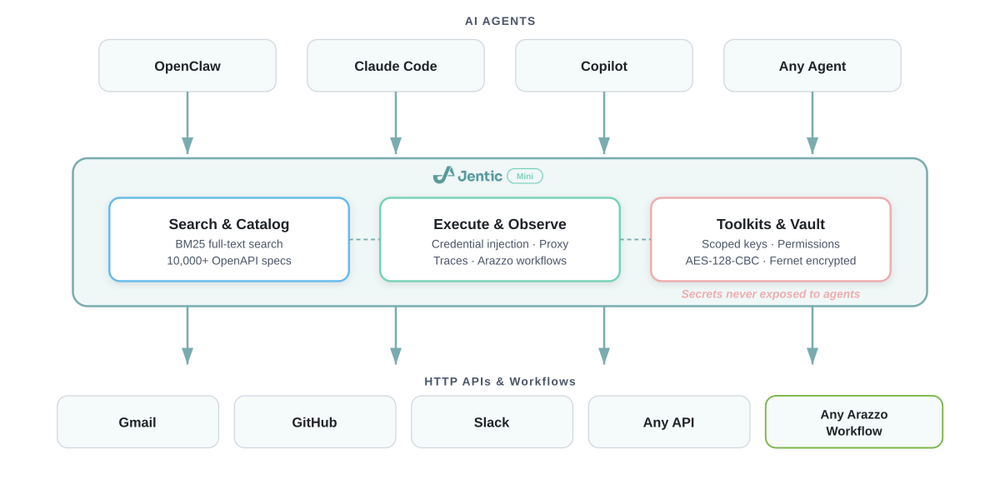
Jentic Mini API execution architecture diagram
TL;DR

Jentic Mini is a self-hosted API execution layer for AI agents that need to call real APIs while reducing direct credential exposure. It can reduce custom API glue code and gives developers a local evaluation path before choosing a hosted integration broker. Apache-2.0 licensed and runnable with Docker.

Read the full breakdownHide the full breakdownWho it is for, how it works, trade-offs, the quick start and the FAQ
who it's for

Who Jentic Mini is for#

Agent developers calling external APIs

Use Jentic Mini when an AI agent needs to search, inspect, and execute operations across multiple APIs while reducing direct handling of raw credentials.

Skip if:

Skip if your agent only calls one internal API through code you already maintain.

Platform teams testing credential boundaries

Jentic Mini is useful for evaluating how toolkit scopes, OAuth registration, and runtime secret injection change the agent security model before a managed rollout.

Skip if:

Skip if you need a production SLA or enterprise credential-vault integrations today.

Researchers evaluating API agent workflows

The built-in connection to OpenAPI and Arazzo catalog data makes it useful for testing how agents discover operations and workflows from structured API definitions.

Skip if:

Skip if you only need a static API catalog and no local execution broker.

the problem

The problem it solves#

AI agents often need to call APIs, but each provider brings its own auth model, operation schema, and credential-handling risk. Teams end up exposing too many tools to the agent, copying credentials into unsafe places, or writing custom request glue for every service.

That gets harder when the agent needs more than one API. Developers need a local broker that can search a catalog, import specs, inject credentials at runtime, and keep the agent away from raw secrets where possible.

how Jentic Mini solves it

How it solves it#

Local API execution broker

Runs a FastAPI service on your infrastructure so agents can search, inspect, and execute API operations through one local API. The standalone Docker command exposes the app on port 8900.

Credential vault

Stores API keys, OAuth tokens, and other secrets in a local vault and injects them during execution. This is designed to reduce direct credential exposure, but the project remains early access and not production-recommended.

Toolkit scoped access

Uses toolkit keys or OAuth registration so agents can receive limited access to selected credentials and policies. Toolkit grants can be revoked without replacing every credential.

Public catalog import

Connects to Jentic's public catalog of OpenAPI specs and Arazzo workflows. Adding credentials for a catalog API imports the relevant specs and workflows into the local registry.

strengths · trade-offs

Strengths and trade-offs#

Strengths

  • Self-hosted evaluation pathJentic Mini can be deployed in your environment with Docker or Docker Compose, which helps teams evaluate credential and trace boundaries before deciding whether to use managed infrastructure.
  • Apache-2.0 application sourceThe product code lives in jentic/jentic-mini under Apache-2.0, which supports commercial use, modification, and redistribution. That is a better OSA fit than the separate CC0 public API catalog alone.
  • Local path before managed scaleThe README describes Mini as API-compatible with hosted and VPC editions. Developers can start locally, then evaluate managed scaling only when the workload needs it.

Trade-offs

  • -Early access maturityThe README says Jentic Mini is early access and not recommended for production use yet. Use it for personal, development, or evaluation environments until the security model has more operating history.
  • -Agent stack fitThe quickest setup path is built around OpenClaw and Jentic's agent workflow. Teams using a different agent framework should expect extra integration work around auth, tool registration, and deployment.
  • -Catalog is separate dataThe local catalog import relies on the separate jentic-public-apis repository. That catalog is useful evidence for API coverage, but it is data and content rather than the application source for this listing.
versus alternatives

Jentic Mini vs alternatives#

Jentic Mini vs hosted Jentic

Jentic Mini is the open source self-hosted execution layer. It gives developers local API search, execution, credential injection, traces, toolkit keys, and catalog import. Hosted Jentic and VPC editions add managed scaling, enterprise security integrations, advanced search, and deeper sandbox capabilities.

Choose Jentic Mini when you want to test agent API execution locally, keep credentials on your own infrastructure, and accept early access maturity. Choose hosted or VPC Jentic when you need managed operations, stronger enterprise controls, or production support.

install · quick start

Quick start#

bash
Self-host Jentic Mini with Docker on a separate host from the agent when possible so the agent process cannot directly read the credential database.

```bash
docker run -d --name jentic-mini -p 8900:8900 -v jentic-mini-data:/app/data jentic/jentic-mini
```

Open the local Jentic Mini setup UI to create the admin account and finish configuration.
tech stack · detected from GitHub

What it's built on#

Languages
GoPythonTypeScript
Frameworks
FastAPIReact
Databases
PostgreSQL
Cache
Redis
Tooling
OpenAPI
frequently asked

FAQ#

Is Jentic Mini open source?

Yes. The Jentic Mini application source is public at github.com/jentic/jentic-mini and the repository reports Apache-2.0 licensing with a root LICENSE file.

Is Jentic Mini the same as hosted Jentic?

No. Jentic Mini is the self-hosted open source implementation. The hosted and VPC editions add managed search, scaling, sandbox, and enterprise credential features.

Does Jentic Mini expose secrets to agents?

Jentic Mini is designed to reduce direct credential exposure by storing credentials locally and injecting them at execution time. Operators still need to deploy and configure it carefully because the project is early access and not recommended for production use.

What role does jentic-public-apis play?

jentic-public-apis is the catalog data source used by Jentic Mini for OpenAPI specs and Arazzo workflows. It should be cited as catalog evidence, not as the application source for the OSA item.

also worth a look

Similar open-source tools#

servers

Alternative toComposio

Open reference servers for connecting AI to external tools and data

  • 91,470 GitHub stars
  • CustomLicence Apache-2.0 and MIT (dual, transitioning)

treg

Alternative toComposio

One token for 2,600+ agent tools across 47 providers

  • 5,904 GitHub stars

jentic-one

Alternative toComposio

Self-hosted API broker that routes agent calls without exposing keys

  • 186 GitHub stars
  • Apache-2.0Licence Apache-2.0

CLI-Anything

Alternative toComposio

Empower AI agents with agent-native CLIs

  • 55,632 GitHub stars
  • Apache-2.0Licence Apache-2.0

GenericAgent

Alternative toSai by Simular

Autonomous agent that evolves skills over time

  • 14,331 GitHub stars
  • MITLicence MIT

Marker

Alternative toUnstructured.io

Convert documents to clean markdown and JSON with open source AI.

  • 40,566 GitHub stars
  • Apache-2.0Licence Apache-2.0
by category

Open source tools in these categories#

404

AI & Machine Learning

freeCodeCamp, OpenClaw, REA (Reverse Engineer Anything)
78

APIs & Integration

n8n, Firecrawl, iptv
101

LLMOps & AI Tooling

Hermes Agent, OpenCode, MarkItDown

Featured

rakazo

Alternative toGrok Bot

AI teammates you own: your keys, your model, your machine.

  • 4,904 GitHub stars
  • Apache-2.0Licence Apache-2.0
  • #AI Agents

Omnara

Alternative toCClaude Managed Agents

Open-source agent deployment API. Self-host or use Omnara Cloud.

  • 2,957 GitHub stars
  • Apache-2.0Licence Apache-2.0
  • #AI Agents

Inbox Zero

Alternative toSuperhuman

AI email assistant that drafts replies and clears your inbox

  • 12,712 GitHub stars
  • AGPL-3.0Licence AGPL-3.0
  • #Email
Feature your project

New open source projects by email

The projects we add and every new guide. Free, unsubscribe any time.

Find open source alternatives to paid software

/
  • Claude Code to OpenCode
  • Jira to Windshift
  • Notion to AppFlowy
  • Slack to Mattermost
  • Linear to GitLab
  • Wispr Flow to Handy
  • CapCut to Concat
  • Grok Bot to rakazo
  • Superhuman to Inbox Zero
  • Airtable to AITable
  • Muse to OpenClaw
  • GitHub Copilot to Cline
  • Datadog to Netdata
  • Microsoft Teams to Rocket.Chat
  • Pinecone to Qdrant
  • Zapier to n8n
  • Devin AI to OpenHands
  • Firebase to Supabase
  • 1Password to KeePassXC
  • Confluence to Docmost
  • Contentful to Strapi
  • Adobe Premiere Pro to Shotcut
  • ChatGPT to AnythingLLM
  • LangSmith to Langfuse
  • Claude Code to OpenCode
  • Jira to Windshift
  • Notion to AppFlowy
  • Slack to Mattermost
  • Linear to GitLab
  • Wispr Flow to Handy
  • CapCut to Concat
  • Grok Bot to rakazo
  • Superhuman to Inbox Zero
  • Airtable to AITable
  • Muse to OpenClaw
  • GitHub Copilot to Cline
  • Datadog to Netdata
  • Microsoft Teams to Rocket.Chat
  • Pinecone to Qdrant
  • Zapier to n8n
  • Devin AI to OpenHands
  • Firebase to Supabase
  • 1Password to KeePassXC
  • Confluence to Docmost
  • Contentful to Strapi
  • Adobe Premiere Pro to Shotcut
  • ChatGPT to AnythingLLM
  • LangSmith to Langfuse