Open Source Alternatives
  • Alternatives
  • Categories
    Categories by size882 projects
    • Developer Tools461
    • AI & Machine Learning404
    • Web Development196
    • Business & Productivity191
    • Communication & Collaboration126
    • Security & Monitoring126
    • IT Management123
    • Product & Project Management106
    • Cloud & Hosting105
    • Data & Analytics104
    Browse all 21 categoriesLLMOps & AI Tooling, Design & Creative and 9 more
  • Blog
  • Advertise
SearchNotion, Slack, password manager.../
Submit
Open Source Alternatives
  • Alternatives
    • Developer Tools461
    • AI & Machine Learning404
    • Web Development196
    • Business & Productivity191
    • Communication & Collaboration126
    • Security & Monitoring126
    • Browse all 21 categories
  • Blog
  • Advertise
Submit your project

New open source projects by email

The projects we add and every new guide. Free, unsubscribe any time.

Open Source Alternatives LogoOpen Source Alternatives

Handpicked Open Source Alternatives to Paid Softwares

Product

  • Categories
  • Tag
  • Advertise

Resources

  • Blog
  • Collection
  • Submit

Company

  • Privacy Policy
  • Terms of Service
  • Refund Policy
  • Sitemap

Alternatives

  • Claude Code
  • Jira
  • Notion
  • Slack
  • Linear
  • Wispr Flow
  • All alternatives
© 2026 Open Source Alternatives. All rights reserved.
Open SourceAlternatives
Home/Categories/AI & Machine Learning/Jean
icon of jean

Jean

Open source alternative to Conductor and Claude Code

  • 1.4K stars
  • Apache-2.0
  • Active this week
  • Last commit 1 day ago

Last verified Oct 20, 2026

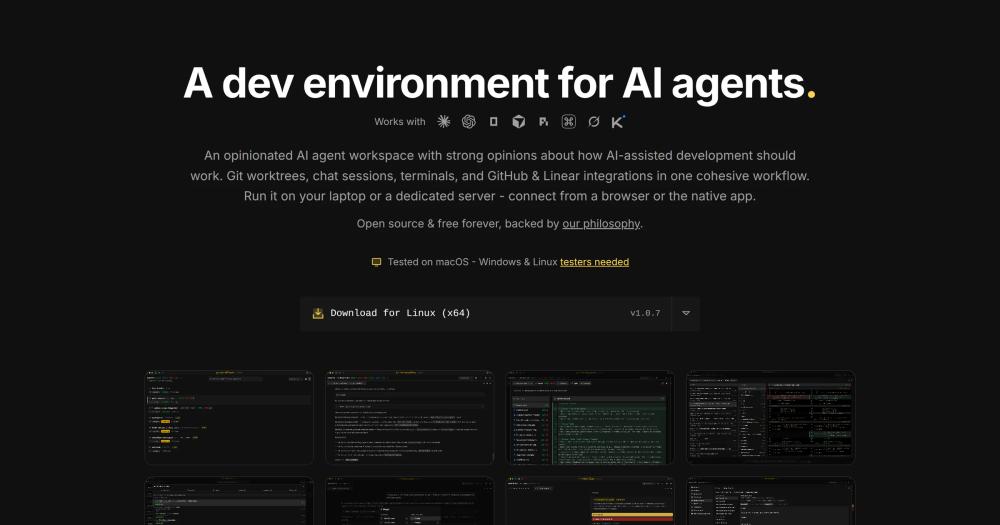
Run AI coding agents like Claude Code, Codex CLI, and OpenCode in parallel across isolated git worktrees, with magic git commands and GitHub integration.

Visit websiteGitHub1.4K stars
image of jean
TL;DR

Jean is a desktop and server dev environment that wraps AI coding agents like Claude Code, Codex CLI, and OpenCode in isolated git worktrees. Rather than replacing Claude Code, Jean gives it a parallel session manager, magic git commands for commits and PR copy, browser-accessible web UI via jean-server, and multi-repo context through Linked Projects. Apache 2.0 licensed, free forever. Best for developers who run CLI coding agents and want parallel worktrees, remote access, or structured git automation.

Read the full breakdownHide the full breakdownWho it is for, how it works, trade-offs, the quick start and the FAQ
who it's for

Who Jean is for#

Developers running multiple Claude Code agents in parallel

When one task is in progress in a worktree with Claude Code and you want a second agent on a different branch, Jean creates and manages the worktrees automatically. You switch between sessions in the UI, review diffs, and merge only what you approve.

Skip if:

You only ever run one agent at a time and a single terminal window covers your workflow.

Developers who need remote access to their agent sessions

With jean-server installed on a Linux machine or Web Access enabled on the desktop app, you can open your Jean workspace in a browser from another device, or connect the native app to a remote instance. The same projects and sessions are available over the network.

Skip if:

You only work locally and never need to access your agent workspace from a second machine.

Teams maintaining multiple related repos

Jean's Linked Projects feature connects your app repo, documentation repo, SDK, and shared libraries into one context. Each agent session sees all linked repos, so agents do not miss CLAUDE.md guidance or docs conventions that live in a sibling repo.

Skip if:

You work in a monorepo where all related code is in one repo and cross-repo context sharing is not an issue.

Developers who want structured git workflows without manual prompting

Magic Git Commands give you one-click access to AI commit messages, PR descriptions, code reviews with tracked findings, release notes, and merge conflict resolution. Each workflow runs on a model and prompt template you can adjust without editing the agent session.

Skip if:

You already have a working CLI-based git workflow and do not need AI help with commit copy or PR generation.

the problem

The problem it solves#

Running an AI coding agent on a real codebase is manageable when you have one agent on one branch. When you want multiple agents working in parallel, things fall apart fast. Agents editing the same files conflict with each other, branch management becomes a manual overhead, and any agent context specific to one repo stays siloed from related repos you also maintain.

Beyond parallelism, repeatable git tasks like writing commit messages, generating PR descriptions, running code reviews, and resolving merge conflicts all require manually crafting prompts from scratch every session. There is no mechanism to encode your preferred workflow, preferred model, or preferred verbosity level into the process.

how Jean solves it

How it solves it#

Isolated Worktrees for Parallel Agents

Every task gets its own git worktree, so running Claude Code, Codex CLI, and OpenCode in parallel produces no branch conflicts or file collisions. You review each worktree separately before merging anything back, and you can archive, restore, or delete workspaces from the Jean UI without touching the shell.

Linked Projects

Connect related repos (your app, docs, SDK, backend) once and every agent session sees the full multi-repo context without copy-pasting files or rebuilding prompts by hand. CLAUDE.md, AGENTS.md, and docs directories from linked repos are visible automatically to every agent you run.

Magic Git Commands

One-click workflows for code review with tracked findings, AI commit messages, PR descriptions, release notes, and merge conflict resolution. Each workflow has an editable prompt template, and you can pick a different model, backend, and reasoning level per command without touching the agent session itself.

Mr. Robot Issue Sweeps (Beta)

Schedules sweeps of your open GitHub issues, creates one Jean worktree per issue, and drafts a focused plan. You control issue count limits, label filters for what gets picked up, and whether it auto-executes approved plans. You can pick separate planning and execution backends and models.

jean-server: Headless Linux Deployment

Run Jean headless on Linux (amd64/arm64) and access the full UI over token-protected HTTP/WebSocket on port 3456. Connect from any browser, or add it as a remote in the native Jean app. Tailscale is the recommended way to expose it privately without opening a port to the public internet.

Token-Reduction Plugins

RTK proxies your CLI tools to cut 60-90% of tool-output tokens across every backend. Caveman trims Claude's replies by approximately 65-75% with terse, technical output. Both install with one click from the Opinionated pane and work across all supported backends without per-session configuration.

strengths · trade-offs

Strengths and trade-offs#

Strengths

  • Apache 2.0 with no paid tiersJean is Apache 2.0 licensed and free forever with no feature gates, usage limits, or paid plans. You bring your own subscription for Claude Code, Codex CLI, or whichever backend you use. Jean adds nothing to that bill.
  • Runs eight AI backends in the same workspace without reconfigurationJean supports Claude CLI, Codex CLI, OpenCode, Cursor CLI, Pi, Command Code, Grok, and Kimi Code in the same project setup. You can switch backends or run several simultaneously without reconfiguring your project or rebuilding your context each time.
  • Remote and browser access without a separate tunneling toolUnlike CLI coding agents that require a local terminal, Jean's web access (enabled in the desktop app settings) or jean-server (headless Linux) lets you reach your agent sessions from any browser on your network, including a phone or tablet, with token authentication on by default.
  • Opinionated defaults with per-workflow overridesJean picks sensible git workflow defaults (worktree isolation, automated merging, structured context loading) so you skip the configuration overhead. Every built-in workflow still has an editable prompt template and per-prompt model and backend controls when you need to tune it.

Trade-offs

  • -macOS is the primary tested platformThe desktop app is tested on macOS. Windows and Linux desktop builds are available from GitHub releases but the maintainers describe them as needing more testing. If you run the desktop on Windows or Linux, expect rougher edges than on macOS.
  • -146 open issues for a repo created in January 2026Jean is actively developed but young. As of September 2026 it carries 146 open GitHub issues, which is typical for a fast-moving early-stage tool. Breaking changes and gaps in edge-case coverage are more likely here than in more established projects.
  • -No bundled AI capabilityJean does not include any AI model. You must bring and maintain your own subscriptions or API keys for Claude Code, Codex CLI, or whatever backend you run. If you want a single self-contained tool that includes the AI, Jean is not that tool.
versus alternatives

Jean vs alternatives#

Jean vs Claude Code

Jean and Claude Code address different layers of AI-assisted development. Claude Code is Anthropic's proprietary CLI coding agent. Jean is an open-source environment that runs Claude Code inside isolated git worktrees. They are not competing choices.

JeanClaude Code
LicenseApache 2.0Proprietary (Anthropic)
RoleDev environment and control surface around agentsThe coding agent itself
Git worktrees per taskManaged for you, with archive and restoreNot its job
Browser and remote accessjean-server or Web Access, token protectedTerminal CLI
AI coding capabilityNone of its own; delegates to Claude Code, Codex and othersDoes the coding work

Claude Code alone is enough when you run one agent at a time in a terminal, on a single project, with no need for parallel worktrees, browser access, or structured git automation. It is simpler to set up and requires no additional tooling.

Jean pays off when you want to run multiple agents simultaneously without branch conflicts, access your agent sessions from a browser or a remote machine, share context across several related repos, or encode repeatable git workflows as customizable prompt templates. All of Jean's features work with Claude Code as the backend, so adopting Jean does not require switching away from Claude Code.

Jean is Apache 2.0 licensed and free with no usage limits. Claude Code is a proprietary commercial CLI from Anthropic, and you need your own Claude Code subscription or API access whether or not you use Jean.

install · quick start

Quick start#

bash
Install the macOS desktop app via Homebrew, or deploy jean-server on Linux using the setup script.

```bash
brew tap coollabsio/jean
brew install --cask jean
```

Linux server install (amd64/arm64):

```bash
curl -fsSL https://raw.githubusercontent.com/coollabsio/jean/main/scripts/install-jean-server.sh | sudo bash
```
tech stack · detected from GitHub

What it's built on#

Languages
RustTypeScript
Frameworks
React
frequently asked

FAQ#

Does Jean replace Claude Code?

No. Jean is the environment and control surface that runs Claude Code (and other CLI agents like Codex CLI and OpenCode) inside isolated git worktrees. Claude Code still does the coding work. Jean handles parallel session management, git operations, and the remote access layer.

Is Jean free to use?

Yes. Jean is Apache 2.0 licensed and free forever with no paid tiers, no feature gates, and no usage limits. You need your own subscription or API access for the underlying AI agents (Claude Code, Codex CLI, etc.), which are separate products. Jean adds no cost on top of those.

Can I run Jean on a server and connect from a browser?

Yes. Install jean-server on Linux (amd64 or arm64) and connect over token-protected HTTP/WebSocket on port 3456 from any browser. The native app also supports remote connections via the title bar server icon. Tailscale is recommended for private access instead of exposing the port to the public internet.

What platforms does Jean support?

The desktop app is tested on macOS. Windows and Linux desktop builds are available from GitHub releases but need more testing per the maintainers. The headless jean-server targets Linux amd64 and arm64 only. Building from source requires Node.js and Rust.

What AI backends does Jean support?

Jean supports Claude CLI, Codex CLI, OpenCode, Cursor CLI, Pi, Command Code, Grok, and Kimi Code. Pi, Command Code, and Kimi Code are currently beta integrations. You bring your own subscription or API access for each backend; Jean does not bundle any AI capabilities.

Looking for more

Other ways to replace Conductor and Claude Code#

paperclip

Featuredfor Conductor

Self-hosted AI agent management with org charts and budgets

105,118 GitHub starsVisit

OpenCode

#1 in the Claude Code guide

Broad provider and model choice in a terminal-first client, MIT-licensed with AGENTS.md instructions

218,637 GitHub stars

oh-my-pi

#2 in the Claude Code guide

Direct Claude configuration inheritance with Anthropic subscription support

36,029 GitHub stars

kilocode

#3 in the Claude Code guide

Documented Claude transcript import with IDE and CLI surfaces

27,673 GitHub stars
All 22 Claude Code alternatives10 open source Claude Code alternatives, ranked
by category

Open source tools in these categories#

404

AI & Machine Learning

freeCodeCamp, OpenClaw, REA (Reverse Engineer Anything)
461

Developer Tools

REA (Reverse Engineer Anything), superpowers, Skills for Real Engineers
106

Product & Project Management

agency-agents, freeCodeCamp, Gstack

Featured

Inbox Zero

Alternative toSuperhuman

AI email assistant that drafts replies and clears your inbox

  • 12,712 GitHub stars
  • AGPL-3.0Licence AGPL-3.0
  • #Email

Omnara

Alternative toCClaude Managed Agents

Open-source agent deployment API. Self-host or use Omnara Cloud.

  • 2,957 GitHub stars
  • Apache-2.0Licence Apache-2.0
  • #AI Agents

rakazo

Alternative toGrok Bot

AI teammates you own: your keys, your model, your machine.

  • 4,904 GitHub stars
  • Apache-2.0Licence Apache-2.0
  • #AI Agents
Feature your project

New open source projects by email

The projects we add and every new guide. Free, unsubscribe any time.

Find open source alternatives to paid software

/
  • Claude Code to OpenCode
  • Jira to Windshift
  • Notion to AppFlowy
  • Slack to Mattermost
  • Linear to GitLab
  • Wispr Flow to Handy
  • CapCut to Concat
  • Grok Bot to rakazo
  • Superhuman to Inbox Zero
  • Airtable to AITable
  • Muse to OpenClaw
  • GitHub Copilot to Cline
  • Datadog to Netdata
  • Microsoft Teams to Rocket.Chat
  • Pinecone to Qdrant
  • Zapier to n8n
  • Devin AI to OpenHands
  • Firebase to Supabase
  • 1Password to KeePassXC
  • Confluence to Docmost
  • Contentful to Strapi
  • Adobe Premiere Pro to Shotcut
  • ChatGPT to AnythingLLM
  • LangSmith to Langfuse
  • Claude Code to OpenCode
  • Jira to Windshift
  • Notion to AppFlowy
  • Slack to Mattermost
  • Linear to GitLab
  • Wispr Flow to Handy
  • CapCut to Concat
  • Grok Bot to rakazo
  • Superhuman to Inbox Zero
  • Airtable to AITable
  • Muse to OpenClaw
  • GitHub Copilot to Cline
  • Datadog to Netdata
  • Microsoft Teams to Rocket.Chat
  • Pinecone to Qdrant
  • Zapier to n8n
  • Devin AI to OpenHands
  • Firebase to Supabase
  • 1Password to KeePassXC
  • Confluence to Docmost
  • Contentful to Strapi
  • Adobe Premiere Pro to Shotcut
  • ChatGPT to AnythingLLM
  • LangSmith to Langfuse