Open Source Alternatives
  • Alternatives
  • Categories
    Categories by size905 projects
    • Developer Tools471
    • AI & Machine Learning408
    • Web Development198
    • Business & Productivity196
    • Security & Monitoring131
    • Communication & Collaboration128
    • IT Management126
    • Cloud & Hosting109
    • Product & Project Management106
    • Data & Analytics105
    Browse all 21 categoriesDesign & Creative, LLMOps & AI Tooling and 9 more
  • Blog
  • Advertise
SearchNotion, Slack, password manager.../
Submit
Open Source Alternatives
  • Alternatives
    • Developer Tools471
    • AI & Machine Learning408
    • Web Development198
    • Business & Productivity196
    • Security & Monitoring131
    • Communication & Collaboration128
    • Browse all 21 categories
  • Blog
  • Advertise
Submit your project

New open source projects by email

The projects we add and every new guide. Free, unsubscribe any time.

Open Source Alternatives LogoOpen Source Alternatives

Handpicked Open Source Alternatives to Paid Softwares

Product

  • Categories
  • Tag
  • Advertise

Resources

  • Blog
  • Collection
  • Submit

Company

  • Privacy Policy
  • Terms of Service
  • Refund Policy
  • Sitemap

Alternatives

  • Claude Code
  • Jira
  • Notion
  • Slack
  • Linear
  • Wispr Flow
  • All alternatives
© 2026 Open Source Alternatives. All rights reserved.
Open SourceAlternatives
Home/Categories/AI & Machine Learning/Voquill
icon of voquill

Voquill

Open source alternative to Wispr Flow, Superwhisper and Dragon Professional

  • 1K stars
  • AGPL-3.0
  • Active this month
  • Last commit 26 days ago

Last verified Oct 21, 2026

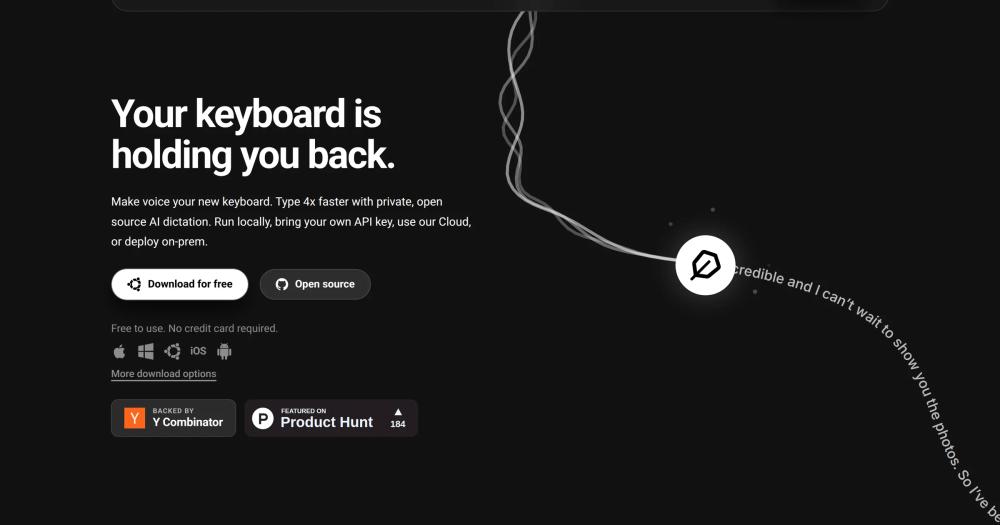
Write four times faster using voice input on macOS, Windows, or Linux, with local Whisper transcription, AI cleanup, and a personal glossary.

Visit websiteGitHub1K stars
image of voquill
TL;DR

Voquill is an open source, cross-platform voice typing app that replaces paid dictation tools like Wispr Flow, Superwhisper, and Dragon Professional. It transcribes your voice into any desktop application using local Whisper or a cloud provider, applies AI cleanup to remove filler words, and maintains a personal glossary for domain-specific terms. Licensed under AGPLv3 and built with Tauri, it runs on macOS, Windows, and Linux with no audio sent to third-party servers when using a local backend. Best for developers, writers, and power users who want full control over their transcription pipeline.

Read the full breakdownHide the full breakdownWho it is for, how it works, trade-offs and the FAQ
who it's for

Who Voquill is for#

Developers dictating documentation and commit messages

Voquill inserts transcribed text directly into code editors without clipboard workarounds. Combined with a technical glossary of function names, library names, and jargon, it reduces the friction of writing inline documentation, commit messages, and README sections by voice.

Skip if:

Your workflow requires voice-to-code completion rather than voice-to-text insertion. Voquill transcribes speech into text; it does not generate code from voice commands or integrate with IDE completion engines.

Writers and knowledge workers reducing typing load

In Polished mode, Voquill's AI cleanup produces clean, punctuated prose from natural speech. The transcription history panel lets you replay and copy any past session, making it a workable first-draft tool for long-form content.

Skip if:

You need real-time transcription integrated with a specific app's native dictation API. Voquill uses a global overlay, which may conflict with apps that handle keyboard input at a low level.

Privacy-focused professionals handling sensitive content

With a local Whisper instance configured, no audio leaves your device. This makes Voquill viable for legal, medical, or financial workflows where sending audio to cloud APIs would conflict with data handling policies.

Skip if:

Your organization requires a vendor-certified, HIPAA-compliant or SOC 2-audited solution. Voquill is open source and self-hosted; compliance certifications are your responsibility to obtain.

the problem

The problem it solves#

Voice dictation tools promise to cut typing time, but most of the good ones are cloud-only and subscription-based. Sending audio to a proprietary server is a non-starter when you work with sensitive content, and there is no way to inspect or modify the transcription pipeline when accuracy problems arise.

The deeper pain is vocabulary drift. Generic speech recognition stumbles on technical jargon, proper nouns, and domain-specific terms. Paid tools like Dragon Professional address this through voice profile training, but the profiles are locked to the vendor's platform. If you switch tools or the vendor changes pricing, your custom vocabulary goes with them. A locally-operated, open-source dictation system where you own the glossary and the backend is the missing option for most technical and professional users.

how Voquill solves it

How it solves it#

System-wide voice input across all apps

Voquill attaches a global hotkey and overlay to intercept voice input on macOS, Windows, and Linux. Text is inserted directly into any focused application, including code editors, terminals, browsers, and messaging apps, without clipboard workarounds.

Local Whisper transcription with GPU acceleration

Run the full Whisper speech recognition model locally, with optional GPU acceleration for faster inference. Point Voquill at any Whisper-compatible endpoint, including one running on your own machine, so audio never leaves your device.

AI filler-word cleanup

After transcription, a configurable AI pass removes filler words, false starts, and repeated phrases. The cleaned text is what gets inserted, not the raw transcript. Toggle Verbatim mode to bypass cleanup when you need the literal speech.

Personal dictionary and replacement rules

Define glossary terms so recurring names, technical abbreviations, and domain-specific phrases transcribe correctly every time. Replacement rules silently rewrite words Whisper consistently mishears, without requiring retraining the model.

Writing styles: Polished, Verbatim, Chat

Switch between Polished, Verbatim, and Chat modes to control how post-processing shapes the output. Polished produces corrected formal prose; Chat keeps the casual rhythm of spoken sentences. Each mode applies a different AI profile after transcription.

Built-in voice AI assistant

A built-in chat interface routes voice conversations to your chosen AI provider, so you can ask questions or compose content without switching apps. Privacy controls match the main transcription setup: local provider means no data leaves the device.

strengths · trade-offs

Strengths and trade-offs#

Strengths

  • Local-first, offline-capable transcriptionUnlike Wispr Flow or Superwhisper, Voquill can run entirely offline by pointing it at a local Whisper instance. No audio is sent to a third party unless you configure a cloud provider. This matters for regulated industries, sensitive content, and low-connectivity environments.
  • Bring your own transcription providerThe Providers panel accepts any API key: OpenAI, local Whisper, or any compatible endpoint. You are not locked into a single inference backend, which means you can balance cost, latency, and privacy per use case without switching applications.
  • Native desktop app on all three major platformsBuilt with Tauri (TypeScript and Rust), Voquill runs as a native desktop app on macOS, Windows, and Linux with auto-updates built in. Most voice dictation tools are macOS-only; Voquill is one of the few open source options that covers all three platforms.
  • Auditable open source codebase under AGPLv3The repository includes the desktop app, mobile app, CLI, documentation site, and enterprise services. You can audit the transcription pipeline, fork it for a specific domain, or contribute directly. Internal and personal use carry no restrictions under AGPLv3.

Trade-offs

  • -AGPLv3 restricts hosted service redistributionAGPLv3 allows you to run Voquill for personal, internal, or commercial team use without restriction. The condition that applies to hosted services: if you modify Voquill and make the modified version available over a network to others, you must publish your changes. Teams building a commercial SaaS product on top of Voquill must comply or negotiate a separate license.
  • -Local Whisper demands capable hardwareRunning Whisper locally for real-time dictation requires meaningful CPU or GPU resources. On machines with less than 8GB RAM or no dedicated GPU, transcription latency may be noticeable during continuous dictation. Cloud provider mode resolves the hardware requirement but reintroduces network dependency and API costs.
  • -Active early-stage project with 60 open issuesWith 60 open GitHub issues and a repository created in September 2025, Voquill is still maturing. Hotkey handling, multi-display setups, and specific Linux window managers may have rough edges. The project is actively maintained, but edge cases that a more established tool would handle silently may surface.
versus alternatives

Voquill vs alternatives#

Voquill vs Wispr Flow

Wispr Flow is a macOS-only proprietary voice dictation app with monthly subscription pricing. Voquill covers the same use case: system-wide AI voice typing with automatic text cleanup. The key differences are platform reach, licensing, and backend control.

FeatureVoquillWispr Flow
LicenseAGPLv3 (open source)Proprietary
PlatformsmacOS, Windows, LinuxmacOS only
Self-hostingYes (local backend)No
Transcription backendLocal Whisper or any providerProprietary cloud
PricingFree (self-hosted)Subscription
Personal glossaryYesYes

Voquill is the better choice when you need cross-platform support, want audio to stay on-device, or need to control the transcription backend. Wispr Flow is a better fit when you want a polished, zero-configuration Mac app and are comfortable with subscription pricing and cloud audio processing.

Voquill vs Superwhisper

Superwhisper is a macOS app that runs Whisper locally, making it a closer architectural match to Voquill. Both use Whisper for transcription and offer local processing. The difference is Superwhisper is a proprietary, paid macOS app; Voquill is open source and cross-platform.

FeatureVoquillSuperwhisper
LicenseAGPLv3 (open source)Proprietary
PlatformsmacOS, Windows, LinuxmacOS only
Source code accessYesNo
PricingFreePaid

For macOS users who want Whisper-based local transcription with the least friction, Superwhisper's native experience may be smoother. For users on Windows or Linux, or anyone who wants to inspect or extend the transcription pipeline, Voquill is the only open source option in this category.

Voquill vs Dragon Professional

Dragon Professional (by Nuance/Microsoft) is the dominant enterprise voice dictation product, with decades of accuracy tuning and deep Microsoft 365 integration. It is Windows-focused, requires a significant per-seat license, and does not support self-hosting.

FeatureVoquillDragon Professional
LicenseAGPLv3 (open source)Proprietary, per-seat
PlatformsmacOS, Windows, LinuxWindows
Transcription engineWhisper (local or cloud)Proprietary
Enterprise integrationsNone built-inMicrosoft 365, EHR systems
PricingFreeHigh per-seat cost

Dragon Professional wins on raw accuracy for specialized domains (medical, legal) where it has been trained for decades, and on enterprise integration depth. Voquill is the better choice for individuals and teams who want a free, auditable, cross-platform option and can tune accuracy through Whisper model selection and a personal glossary.

tech stack · detected from GitHub

What it's built on#

Languages
DartJavaScriptKotlinPythonRustSwiftTypeScript
Frameworks
React
frequently asked

FAQ#

Is Voquill free to use?

Yes. Voquill is open source under AGPLv3 and free to download, run, and modify for personal or internal use. If you run a modified version as a hosted service for others, you must publish the source changes under AGPLv3. There is no paid cloud tier; if you use a cloud transcription provider like OpenAI, their API costs apply separately.

Does Voquill work on Windows and Linux?

Yes. Voquill runs on macOS, Windows, and Linux. It is built with Tauri, which compiles to a native desktop app on all three platforms. Most competing voice dictation tools are macOS-only, so Linux and Windows support is a notable differentiator for technical users on those platforms.

Can Voquill transcribe without an internet connection?

Yes, if you configure a local Whisper instance. Voquill lets you point its transcription engine at any Whisper-compatible endpoint running on your own machine. With a local backend configured, no audio is sent over the network. Cloud provider mode, such as OpenAI, requires an internet connection and incurs API costs.

How does Voquill compare to Wispr Flow?

Both tools provide system-wide AI voice dictation with post-processing cleanup. Wispr Flow is a proprietary macOS app with a subscription model; Voquill is open source, cross-platform (macOS, Windows, Linux), and free to self-host. Voquill adds local-first transcription and full glossary control. Wispr Flow offers a more polished, zero-configuration onboarding experience and requires no infrastructure decisions.

What does the AGPLv3 license allow for self-hosters?

AGPLv3 allows you to run, use, and modify Voquill for any personal, internal, or commercial team purpose without restriction. The key condition: if you deploy a modified version of Voquill as a network-accessible service for users outside your organization, you must publish your modified source code under AGPLv3. Internal self-hosting for your own team is fully permitted with no source disclosure requirement.

Looking for more

Other ways to replace Wispr Flow, Superwhisper and Dragon Professional#

Handy

#1 in the Wispr Flow guide

Cross-platform offline dictation on Windows, macOS, and Linux, with the largest community of the eight

34,209 GitHub stars

VoiceInk

#2 in the Wispr Flow guide

Apple Silicon Mac dictation with local AI enhancement and no subscription

6,862 GitHub stars

FluidVoice

#3 in the Wispr Flow guide

macOS 15+ dictation with live transcription preview and optional on-device AI cleanup

12,327 GitHub stars

OpenWhispr

#4 in the Wispr Flow guide

Cross-platform dictation with documented meeting transcription, live diarization, and optional cloud processing

9,640 GitHub stars
All 11 Wispr Flow alternatives8 open source Wispr Flow alternatives, ranked
by category

Open source tools in these categories#

407

AI & Machine Learning

freeCodeCamp, OpenClaw, REA (Reverse Engineer Anything)
128

Communication & Collaboration

iptv, freeCodeCamp, Excalidraw
195

Business & Productivity

OpenClaw, Excalidraw, RustDesk

Featured

rakazo

Alternative toGrok Bot

AI teammates you own: your keys, your model, your machine.

  • 4,904 GitHub stars
  • Apache-2.0Licence Apache-2.0
  • #AI Agents

Inbox Zero

Alternative toSuperhuman

AI email assistant that drafts replies and clears your inbox

  • 12,712 GitHub stars
  • AGPL-3.0Licence AGPL-3.0
  • #Email

Omnara

Alternative toCClaude Managed Agents

Open-source agent deployment API. Self-host or use Omnara Cloud.

  • 2,957 GitHub stars
  • Apache-2.0Licence Apache-2.0
  • #AI Agents
Feature your project

New open source projects by email

The projects we add and every new guide. Free, unsubscribe any time.

Find open source alternatives to paid software

/
  • Claude Code to OpenCode
  • Jira to Windshift
  • Notion to AppFlowy
  • Slack to Mattermost
  • Linear to GitLab
  • Wispr Flow to Handy
  • CapCut to Concat
  • Grok Bot to rakazo
  • Superhuman to Inbox Zero
  • Airtable to AITable
  • Muse to OpenClaw
  • GitHub Copilot to Cline
  • Datadog to Netdata
  • Microsoft Teams to Rocket.Chat
  • Confluence to Docmost
  • Pinecone to Qdrant
  • Zapier to n8n
  • Devin AI to OpenHands
  • Firebase to Supabase
  • 1Password to KeePassXC
  • Contentful to Strapi
  • Adobe Premiere Pro to Shotcut
  • ChatGPT to AnythingLLM
  • LangSmith to Langfuse
  • Claude Code to OpenCode
  • Jira to Windshift
  • Notion to AppFlowy
  • Slack to Mattermost
  • Linear to GitLab
  • Wispr Flow to Handy
  • CapCut to Concat
  • Grok Bot to rakazo
  • Superhuman to Inbox Zero
  • Airtable to AITable
  • Muse to OpenClaw
  • GitHub Copilot to Cline
  • Datadog to Netdata
  • Microsoft Teams to Rocket.Chat
  • Confluence to Docmost
  • Pinecone to Qdrant
  • Zapier to n8n
  • Devin AI to OpenHands
  • Firebase to Supabase
  • 1Password to KeePassXC
  • Contentful to Strapi
  • Adobe Premiere Pro to Shotcut
  • ChatGPT to AnythingLLM
  • LangSmith to Langfuse