Open Source Alternatives
  • Alternatives
  • Categories
    Categories by size882 projects
    • Developer Tools461
    • AI & Machine Learning404
    • Web Development196
    • Business & Productivity191
    • Communication & Collaboration126
    • Security & Monitoring126
    • IT Management123
    • Product & Project Management106
    • Cloud & Hosting105
    • Data & Analytics104
    Browse all 21 categoriesLLMOps & AI Tooling, Design & Creative and 9 more
  • Blog
  • Advertise
SearchNotion, Slack, password manager.../
Submit
Open Source Alternatives
  • Alternatives
    • Developer Tools461
    • AI & Machine Learning404
    • Web Development196
    • Business & Productivity191
    • Communication & Collaboration126
    • Security & Monitoring126
    • Browse all 21 categories
  • Blog
  • Advertise
Submit your project

New open source projects by email

The projects we add and every new guide. Free, unsubscribe any time.

Open Source Alternatives LogoOpen Source Alternatives

Handpicked Open Source Alternatives to Paid Softwares

Product

  • Categories
  • Tag
  • Advertise

Resources

  • Blog
  • Collection
  • Submit

Company

  • Privacy Policy
  • Terms of Service
  • Refund Policy
  • Sitemap

Alternatives

  • Claude Code
  • Jira
  • Notion
  • Slack
  • Linear
  • Wispr Flow
  • All alternatives
© 2026 Open Source Alternatives. All rights reserved.
Open SourceAlternatives
Home/Categories/AI & Machine Learning/OpenWhispr
icon of openwhispr

OpenWhispr

Open source alternative to Wispr Flow, Superwhisper, Dragon Professional and AI Dictation

  • 9.6K stars
  • MIT
  • Active this week
  • Last commit 1 day ago

Last verified Oct 20, 2026

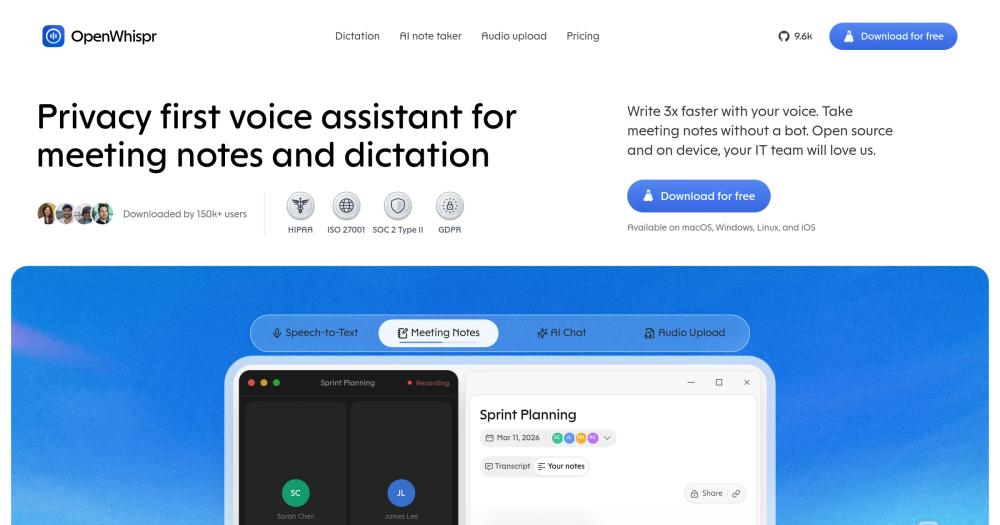
Transform speech into text in any app using local Whisper or Parakeet models. MIT-licensed voice-to-text for macOS, Windows, and Linux, with offline mode.

Visit websiteGitHub9.6K stars
image of openwhispr
TL;DR

OpenWhispr is a local-first voice dictation app that converts speech to text in any application on macOS, Windows, and Linux. It replaces paid commercial tools like Wispr Flow, Superwhisper, and Dragon Professional with a free, MIT-licensed alternative that runs Whisper or NVIDIA Parakeet on your own hardware. For local transcription, your audio never leaves your device. Best for developers, writers, and teams with privacy requirements who want to cut typing time by dictating at up to 150 words per minute.

Read the full breakdownHide the full breakdownWho it is for, how it works, trade-offs, the quick start and the FAQ
who it's for

Who OpenWhispr is for#

Developers dictating into AI coding tools and terminals

Developers who use Claude Code, Cursor, or ChatGPT for extended sessions can dictate queries, prompts, and follow-ups instead of typing. OpenWhispr's global hotkey works in any text field, including terminal windows and IDE chat panels. The AI agent mode lets you send voice commands directly to a connected model with a single hotkey, bypassing copy-paste entirely.

Skip if:

Your primary bottleneck is not typing speed but thinking speed. Dictation helps with transcript-heavy or prompt-heavy workflows; it adds friction to short, precise commands where typing is faster than forming a complete spoken sentence.

Knowledge workers and writers with heavy note-taking needs

Writers, journalists, researchers, and managers who capture large volumes of spoken content can use OpenWhispr's notes feature with folder organization, semantic search, AI-powered cleanup, and meeting transcription with speaker labels. The custom dictionary learns from corrections, so domain-specific names, medical terms, or technical jargon are recognized accurately over time.

Skip if:

You need real-time collaborative editing on notes with non-technical teammates. OpenWhispr team spaces require signed-in accounts, and collaborative editing is not a documented feature of the current notes module.

Teams in healthcare, legal, or finance with audio privacy requirements

Healthcare providers, legal teams, and financial firms that need to document sensitive conversations can run OpenWhispr entirely on local hardware, with no audio leaving the device. The HIPAA compliance documentation and SOC 2 Type II certification support enterprise security review processes. The enterprise tier adds organization-wide policy enforcement, SSO, and SCIM provisioning.

Skip if:

Your organization requires a managed, vendor-supported SLA with guaranteed uptime and formal incident response. OpenWhispr is open source software without a commercial support contract.

Cross-platform teams replacing macOS-only or Windows-only paid tools

Teams that previously used Wispr Flow (macOS-only), Superwhisper (macOS-only), or Dragon Professional (Windows, high per-license cost) can move to OpenWhispr and cover macOS, Windows, and Linux with a single tool. The BYOK model for cloud providers means no per-seat subscription fee for cloud transcription; teams pay only for the API tokens they consume.

Skip if:

Your team relies on Dragon Professional's established macro and command library. OpenWhispr has no macro system and offers no migration path for Dragon command profiles built up over years of customization.

the problem

The problem it solves#

Every major voice dictation tool at the professional tier is closed, expensive, or both. Wispr Flow and Superwhisper route your audio through proprietary cloud infrastructure to transcribe it. Dragon Professional costs hundreds of dollars per license, runs only on Windows, and has a closed architecture that prevents integration with modern AI workflows. Meanwhile, open source dictation options have historically trailed on accuracy and ease of use, leaving privacy-conscious teams with no practical path forward.

The specific pain is twofold: audio privacy and cost. Teams in healthcare, legal, and finance handle sensitive material that should not pass through third-party servers. Developers who want to dictate into code editors, terminal windows, or AI chat interfaces need a tool that works across apps without requiring a proprietary integration. Existing cloud dictation tools charge monthly fees that compound at scale, and their offline modes are limited or absent.

how OpenWhispr solves it

How it solves it#

Global hotkey dictation into any app

Press a configurable hotkey from any application and speak; OpenWhispr pastes the transcribed text directly at your cursor. A dedicated translation hotkey lets you dictate in one language and paste the output in another. The app works in any text field at the OS input level, so no switching to a separate dictation window is required.

Local model transcription with GPU acceleration

Run transcription entirely on your own hardware using Whisper (Tiny, Base, Small, Medium, or Turbo variants) or NVIDIA Parakeet. Models range from 75 MB to 1.6 GB and run GPU-accelerated via Metal (Apple Silicon), CUDA (NVIDIA), or Vulkan (AMD and Intel). No audio reaches external servers in local mode. You can also bring your own API keys for cloud providers including OpenAI, Anthropic, Google, and Groq.

Meeting transcription with speaker labels

OpenWhispr auto-detects Zoom, Teams, and FaceTime calls and records them with live speaker diarization and voice fingerprint recognition, running on-device with no cloud required. Transcripts sync with Google, Microsoft, or Apple Calendar so meeting metadata is attached automatically. On Intel Macs, speaker identification is unavailable due to ONNX Runtime dropping x86_64 binary support in version 1.24; meetings still transcribe normally.

AI agent with voice commands

A dedicated voice agent hotkey sends your dictation directly to an AI model as a command, supporting GPT-5, Claude, Gemini, Groq, Tinfoil, OpenRouter, or local models. You can edit highlighted text in place by voice, or attach a screenshot of your current screen as context. No wake word is needed; a single hotkey triggers the full voice-to-command pipeline.

Notes, team spaces, and sharing

Create, organize, and search notes with folder structure, semantic search, cloud sync, and AI-powered actions. Share notes on the web with link-only, domain-restricted, or invite-only visibility. Team spaces support role-based access, invitations, and server-enforced membership. These features are free for signed-in users.

Audio import, public API, and MCP integration

Drag in existing audio or video files, batch-upload multiple recordings, or paste a YouTube or audio URL to transcribe them with optional speaker detection. The MCP server and public API let you manage notes and transcriptions programmatically, connecting OpenWhispr to your AI assistant or automation workflow without manual copy-paste steps.

strengths · trade-offs

Strengths and trade-offs#

Strengths

  • Auditable privacy with independent compliance certificationWhen using a local model, your audio is transcribed on your hardware and nothing is sent to OpenWhispr or any third party. The product holds HIPAA compliance, SOC 2 Type II certification, and ISO 27001 certification. The MIT-licensed codebase is publicly auditable at any time on GitHub. For teams that need documented proof of data handling, this is the only open source option in the dictation category with independent third-party certification.
  • Cross-platform with native GPU acceleration on all major hardwareOpenWhispr runs on macOS (Apple Silicon and Intel), Windows, and Linux, and uses the platform's native GPU acceleration path for local transcription: Metal on Apple Silicon, CUDA on NVIDIA, and Vulkan on AMD and Intel. Most paid dictation tools are macOS-only or Windows-only. A single cross-platform app reduces the overhead of managing separate tools across a mixed team.
  • Works in every app without app-specific integrationsOpenWhispr pastes transcribed text directly at the cursor using OS-level input, so it works in any text field: Claude, Cursor, ChatGPT, Slack, Google Docs, Gmail, VS Code terminals, or browser address bars. Paid tools in this category often rely on app-specific integrations that limit where dictation actually works in practice.
  • Active maintenance with over 5,000 GitHub starsThe repository reached over 5,000 stars within roughly 14 months of its June 2025 creation and has 214 contributors. The last push was on August 15, 2026, indicating active maintenance. For a dictation tool, active development matters because operating system updates frequently break audio capture and accessibility APIs, and a stale project quickly becomes unusable.

Trade-offs

  • -269 open issues; edge configurations may need troubleshootingWith 269 open GitHub issues, OpenWhispr is actively used but not fully stabilized. Users on uncommon Linux distributions or less common audio hardware may hit unresolved bugs. The high issue count relative to the project's age reflects fast adoption rather than neglect, but teams expecting a polished, zero-friction install should be prepared to troubleshoot.
  • -Intel Mac feature gap for speaker identificationOn Intel Macs, live speaker identification and voice fingerprinting are unavailable because ONNX Runtime stopped shipping macOS x86_64 binaries in version 1.24. Meeting transcription still works normally, but speaker labels and semantic search fall back to keyword matching. Teams running Intel Macs as a standard configuration lose a core meeting feature.
  • -No macro or command libraryOpenWhispr does not have a macro system or command library equivalent to Dragon Professional's. Dragon users who have invested years building custom voice commands, application macros, or hands-free navigation workflows cannot migrate those configurations to OpenWhispr. The AI agent mode covers some of this ground, but it requires a live AI model connection and does not replicate Dragon's offline command execution.
versus alternatives

OpenWhispr vs alternatives#

OpenWhispr vs Wispr Flow

Wispr Flow is the closest feature parallel to OpenWhispr: both offer a global hotkey, AI-assisted cleanup, and dictation into any app. The fundamental difference is architecture. Wispr Flow is macOS-only, closed source, and routes all audio through its own servers. OpenWhispr runs on macOS, Windows, and Linux, is MIT licensed, and can transcribe entirely on-device.

FeatureOpenWhisprWispr Flow
LicenseMIT (open source)Proprietary
PlatformsmacOS, Windows, LinuxmacOS only
Local transcriptionYes (Whisper, Parakeet)No
Cloud transcriptionBYOKProprietary cloud
AI agent modeYesYes
PriceFree (self-hosted)Paid subscription

Wispr Flow is worth considering if you are macOS-only, prefer a polished managed product with no model management, and do not have data privacy requirements that prevent cloud audio processing. OpenWhispr is the better choice when you need Windows or Linux support, want your audio to stay on-device, or want to avoid a monthly subscription.

OpenWhispr vs Dragon Professional

Dragon Professional is the long-established enterprise standard for voice dictation, with deep Windows integration, a macro system, and decades of accuracy refinement. It is Windows-only, costs hundreds of dollars per license, and cannot be self-hosted or audited.

FeatureOpenWhisprDragon Professional
LicenseMIT (open source)Proprietary
PlatformsmacOS, Windows, LinuxWindows only
Local transcriptionYes (Whisper, Parakeet)Yes (on-device engine)
Macro and command libraryNoYes
PriceFree~$500+ per license
Custom vocabularyYes (auto-learns)Yes (deep training)

Dragon Professional is still the better choice for users with an established Dragon command and macro library, or for Windows-only organizations in regulated industries that require a vendor-supported product with a commercial SLA. OpenWhispr is the better choice for cross-platform teams, developers integrating dictation with AI tools, and anyone who needs open source auditability for compliance documentation.

install · quick start

Quick start#

bash
Install from source using Node.js 24 and npm to run a development build.
```bash
git clone https://github.com/OpenWhispr/openwhispr.git
cd openwhispr
npm install
npm run dev
```
tech stack · detected from GitHub

What it's built on#

Languages
CJavaScriptSwiftTypeScript
Frameworks
React
Infrastructure
AWS
frequently asked

FAQ#

Is OpenWhispr free to use?

Yes. OpenWhispr is MIT licensed and free to download and run. Local model transcription is entirely free: download a Whisper or NVIDIA Parakeet model and run it on your own hardware with no ongoing cost. Cloud transcription uses your own API keys (BYOK) and you pay the provider directly at their standard rates. OpenWhispr itself charges nothing for either mode.

Does OpenWhispr send my voice to the cloud?

Not by default when using a local model. In local mode, transcription runs on your hardware using Whisper or NVIDIA Parakeet; the audio never leaves your device. When you opt into cloud processing, your audio goes to the provider you selected (OpenAI, Anthropic, Google, or Groq) for transcription and is not retained by OpenWhispr. The product website states 0% data retention for cloud mode.

What platforms and apps does OpenWhispr work with?

OpenWhispr runs on macOS (Apple Silicon and Intel), Windows, and Linux. Because it pastes text at the OS cursor level, it works in any application that accepts text input: Claude, Cursor, ChatGPT, Slack, Google Docs, Gmail, VS Code, browser address bars, and others. It does not require app-specific integrations to function.

How accurate is OpenWhispr compared to paid dictation tools?

Accuracy depends on the model you run. Whisper Turbo (1.6 GB) is the most accurate local option; community users report near-instant transcription that handles mid-sentence rephrasing cleanly. Cloud mode using OpenAI, Anthropic, or Groq providers typically matches paid proprietary tools on accuracy. Dragon Professional has a strong reputation for accuracy after personalized training, which OpenWhispr does not replicate out of the box; the custom dictionary feature lets it learn your vocabulary from corrections over time.

Can I build from source or contribute to OpenWhispr?

Yes. The repo is at github.com/OpenWhispr/openwhispr under the MIT license. Building from source requires Node.js 24 or later (git clone, then npm install and npm run dev). The project has 214 contributors as of mid-2026. Full setup guides, platform-specific instructions, and the contributing guide are at docs.openwhispr.com.

Looking for more

Other ways to replace Wispr Flow, Superwhisper, Dragon Professional and AI Dictation#

Handy

#1 in the Wispr Flow guide

Cross-platform offline dictation on Windows, macOS, and Linux, with the largest community of the eight

34,209 GitHub stars

VoiceInk

#2 in the Wispr Flow guide

Apple Silicon Mac dictation with local AI enhancement and no subscription

6,862 GitHub stars

FluidVoice

#3 in the Wispr Flow guide

macOS 15+ dictation with live transcription preview and optional on-device AI cleanup

12,327 GitHub stars

openless

#5 in the Wispr Flow guide

AI-polished text at the cursor with bring-your-own credentials, Android support, and local ASR on macOS

3,912 GitHub stars
All 11 Wispr Flow alternatives8 open source Wispr Flow alternatives, ranked
by category

Open source tools in these categories#

404

AI & Machine Learning

freeCodeCamp, OpenClaw, REA (Reverse Engineer Anything)
126

Communication & Collaboration

iptv, freeCodeCamp, Excalidraw
106

Product & Project Management

agency-agents, freeCodeCamp, Gstack

Featured

Inbox Zero

Alternative toSuperhuman

AI email assistant that drafts replies and clears your inbox

  • 12,712 GitHub stars
  • AGPL-3.0Licence AGPL-3.0
  • #Email

Omnara

Alternative toCClaude Managed Agents

Open-source agent deployment API. Self-host or use Omnara Cloud.

  • 2,957 GitHub stars
  • Apache-2.0Licence Apache-2.0
  • #AI Agents

rakazo

Alternative toGrok Bot

AI teammates you own: your keys, your model, your machine.

  • 4,904 GitHub stars
  • Apache-2.0Licence Apache-2.0
  • #AI Agents
Feature your project

New open source projects by email

The projects we add and every new guide. Free, unsubscribe any time.

Find open source alternatives to paid software

/
  • Claude Code to OpenCode
  • Jira to Windshift
  • Notion to AppFlowy
  • Slack to Mattermost
  • Linear to GitLab
  • Wispr Flow to Handy
  • CapCut to Concat
  • Grok Bot to rakazo
  • Superhuman to Inbox Zero
  • Airtable to AITable
  • Muse to OpenClaw
  • GitHub Copilot to Cline
  • Datadog to Netdata
  • Microsoft Teams to Rocket.Chat
  • Pinecone to Qdrant
  • Zapier to n8n
  • Devin AI to OpenHands
  • Firebase to Supabase
  • 1Password to KeePassXC
  • Confluence to Docmost
  • Contentful to Strapi
  • Adobe Premiere Pro to Shotcut
  • ChatGPT to AnythingLLM
  • LangSmith to Langfuse
  • Claude Code to OpenCode
  • Jira to Windshift
  • Notion to AppFlowy
  • Slack to Mattermost
  • Linear to GitLab
  • Wispr Flow to Handy
  • CapCut to Concat
  • Grok Bot to rakazo
  • Superhuman to Inbox Zero
  • Airtable to AITable
  • Muse to OpenClaw
  • GitHub Copilot to Cline
  • Datadog to Netdata
  • Microsoft Teams to Rocket.Chat
  • Pinecone to Qdrant
  • Zapier to n8n
  • Devin AI to OpenHands
  • Firebase to Supabase
  • 1Password to KeePassXC
  • Confluence to Docmost
  • Contentful to Strapi
  • Adobe Premiere Pro to Shotcut
  • ChatGPT to AnythingLLM
  • LangSmith to Langfuse