uv vs Anaconda
Both uv and Anaconda manage Python environments, but they address the problem from opposite ends. Anaconda is a full Python distribution designed to give data scientists a complete, batteries-included environment out of the box. uv is a lightweight package manager that starts with nothing and installs only what the project explicitly declares from PyPI.
| Feature | uv | Anaconda |
|---|
| License | Apache-2.0 or MIT | Commercial distribution |
| Package source | PyPI | conda-forge, Anaconda channels |
| Python management | Yes | Yes (via conda) |
| Universal lockfile | Yes (uv.lock) | No |
| Install method | Single curl or pip command | Full distribution installer |
| Platform | macOS, Linux, Windows | macOS, Linux, Windows |
| Disk usage | Global deduplication cache | Full distribution with pre-bundled packages |
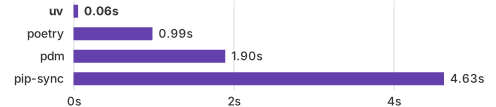
uv is the better choice when your stack is on PyPI, you want fast CI installs, and you prefer declaring dependencies explicitly. The uv add and uv sync workflow starts with an empty environment and adds only what the project needs, committing a reproducible lockfile. Install times run 10-100x faster than pip on benchmarks, making uv particularly valuable in CI pipelines where cold installs happen on every run.
Anaconda remains the right choice when your workflow depends on conda-only packages: compiled scientific libraries on conda-forge, CUDA toolkit management, or R package integration. These packages are not available through uv's PyPI resolver. Data scientists whose requirements are entirely on PyPI may find uv a faster replacement; those with conda-only dependencies will still need conda.