Open Source Alternatives
  • Alternatives
  • Categories
    Categories by size882 projects
    • Developer Tools461
    • AI & Machine Learning404
    • Web Development196
    • Business & Productivity191
    • Communication & Collaboration126
    • Security & Monitoring126
    • IT Management123
    • Product & Project Management106
    • Cloud & Hosting105
    • Data & Analytics104
    Browse all 21 categoriesLLMOps & AI Tooling, Design & Creative and 9 more
  • Blog
  • Advertise
SearchNotion, Slack, password manager.../
Submit
Open Source Alternatives
  • Alternatives
    • Developer Tools461
    • AI & Machine Learning404
    • Web Development196
    • Business & Productivity191
    • Communication & Collaboration126
    • Security & Monitoring126
    • Browse all 21 categories
  • Blog
  • Advertise
Submit your project

New open source projects by email

The projects we add and every new guide. Free, unsubscribe any time.

Open Source Alternatives LogoOpen Source Alternatives

Handpicked Open Source Alternatives to Paid Softwares

Product

  • Categories
  • Tag
  • Advertise

Resources

  • Blog
  • Collection
  • Submit

Company

  • Privacy Policy
  • Terms of Service
  • Refund Policy
  • Sitemap

Alternatives

  • Claude Code
  • Jira
  • Notion
  • Slack
  • Linear
  • Wispr Flow
  • All alternatives
© 2026 Open Source Alternatives. All rights reserved.
Open SourceAlternatives
Home/Categories/AI & Machine Learning/SpeakoFlow
icon of SpeakoFlow

SpeakoFlow

Open source alternative to Wispr Flow, Superwhisper, BlabbyAI, Dragon Professional Individual and Typeless

  • 344 stars
  • MIT
  • Active this week
  • Last commit 1 day ago

Last verified Oct 20, 2026

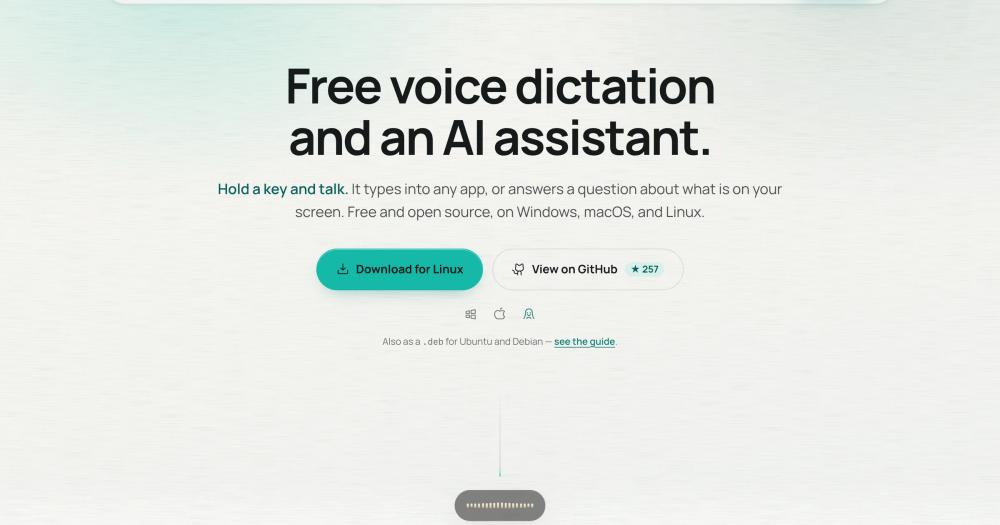
Run voice dictation and an AI assistant offline on Windows, macOS, and Linux. MIT licensed with no word caps, no account, and no subscription fee.

Visit websiteGitHub344 stars
image of SpeakoFlow
TL;DR

SpeakoFlow is a free, MIT-licensed voice dictation tool and AI assistant for Windows, macOS, and Linux that transcribes locally with no word caps or subscriptions. It replaces paid tools like Wispr Flow and Superwhisper, which cap free usage and route audio through the cloud. Voice stays on your device, the assistant runs on any local or cloud model you choose, and no account is required to start.

Read the full breakdownHide the full breakdownWho it is for, how it works, trade-offs, the quick start and the FAQ
who it's for

Who SpeakoFlow is for#

Writers who dictate into any app across a full workday

SpeakoFlow installs as a system-level hotkey listener and types into any focused window: email clients, editors, browsers, terminals. At 150+ words per minute via dictation versus 45 words per minute typing, the throughput advantage is material for anyone producing long-form text regularly. The AI cleanup step removes filler and fixes grammar so dictated drafts go straight to the editing phase.

Skip if:

If you dictate only occasionally (a few minutes per day), the setup complexity relative to a browser-based dictation tool may not be worth it.

Linux users with no viable paid dictation alternative

Wispr Flow and Superwhisper do not run on Linux. SpeakoFlow is the only cross-platform voice dictation tool in this category with an AI assistant layer. It ships as an AUR package, a .deb for Debian and Ubuntu 24.04+, and an AppImage for any other distribution. The Tauri-based architecture runs natively on Linux without a compatibility layer.

Skip if:

GNOME/Wayland users: the recording overlay runs under XWayland automatically and stays functional, but native Wayland layer shell is not supported. Use `SPEAKOFLOW_ALLOW_WAYLAND=1` if you want native Wayland behavior and accept that the overlay may not always stay on top.

Users who cannot let voice audio leave their device

All transcription in SpeakoFlow runs locally on your machine using whisper.cpp or Parakeet. There is no opt-in required: offline transcription is the default and the only path. The assistant can also run on a fully local model via the built-in engine or Ollama, meaning zero outbound traffic is possible for the full dictation and writing workflow.

Skip if:

If you need cloud-backed streaming transcription to a remote server or a shared team transcription service, SpeakoFlow's local-first design works against that use case.

Developers running local LLMs who want voice input

SpeakoFlow accepts GGUF and Whisper .bin models from wherever they already live on disk, with no copying required. You can point it at an Ollama or LM Studio server, or supply any OpenAI-compatible API key for the assistant. If you already manage a local model stack, SpeakoFlow adds a voice input layer on top of what you have.

Skip if:

If you need a programmatic API (webhook, REST endpoint, or stream output), SpeakoFlow has no API surface. It is a desktop GUI application, not a voice transcription service.

the problem

The problem it solves#

Most desktop voice dictation tools on the market are closed source and subscription-based. Wispr Flow caps free users at 2,000 words per week and charges $15/month beyond that, with transcription running in the cloud. Superwhisper requires a $8.49/month or $249.99 lifetime payment for its Pro tier. Typeless allows 8,000 words per week free but charges $30/month after. All three are closed source and none run on Linux.

Beyond cost, the core problem is control. When transcription runs in the cloud, your voice data leaves your machine with every utterance. When a product is closed source, you cannot inspect what it does with that data. And when a vendor updates pricing, changes limits, or discontinues a product, there is no recourse.

For users who dictate heavily across a full workday, subscription word caps create real friction: writing emails, drafting documents, or narrating code notes all hit the ceiling quickly.

how SpeakoFlow solves it

How it solves it#

Local transcription with no word caps

SpeakoFlow runs whisper.cpp or Parakeet entirely on your GPU or CPU with Silero VAD for voice detection. Transcription never touches the cloud, and there is no word cap or usage limit of any kind. You can dictate for a full workday without hitting a wall.

Generate with Flow: voice-triggered writing

Say "Hey Flow" at the start of a dictation and SpeakoFlow treats the rest as an instruction rather than plain text. Ask it to reply to a message, draft an email, or write a prompt, and it pastes the finished result at your cursor. The trigger phrase is renameable and works in any app that accepts text.

Screen vision for context-aware answers

The built-in assistant can capture a screenshot of your screen when you ask a question that needs visual context: a terminal error, a document in your browser, or a chart in a spreadsheet. Capture happens only when you request it, and nothing is stored locally beyond a small thumbnail.

AI cleanup with SpeakoFlow Mini

SpeakoFlow Mini is a 795 MB on-device model trained specifically for dictation cleanup. It strips filler words, fixes grammar and punctuation, and handles spoken edits like "new paragraph" or "scratch that" correctly. Four built-in tones (Professional, Friendly, Concise, or custom) let you shape the output without a second pass.

Bring any model for the assistant

The floating assistant panel runs on a built-in llama.cpp engine, Ollama or LM Studio via a local server, or any OpenAI-compatible cloud provider with your own API key. If you already have a GGUF or Whisper .bin file on disk, SpeakoFlow picks it up in place without copying or moving the file.

Cross-platform with platform-native installers

SpeakoFlow ships as a .exe installer for Windows, a .dmg for macOS (Apple Silicon and Intel separately), an AUR package for Arch Linux, a .deb for Debian and Ubuntu 24.04+, and an AppImage for other distributions. All Linux releases include x86_64 and ARM64 builds.

strengths · trade-offs

Strengths and trade-offs#

Strengths

  • Linux support where paid alternatives have noneWispr Flow and Superwhisper have no Linux builds. SpeakoFlow is the only tool in its category that runs on Windows, macOS, and Linux with full feature parity including the AI assistant and screen vision.
  • MIT license with no account or telemetryThe entire codebase is MIT licensed. No account is required to start, and there is no telemetry. Personal memory and web search are off by default. You can inspect every network call the app makes by reading the source.
  • Voice transcription stays on your deviceTranscription runs on whisper.cpp or Parakeet locally, with GPU acceleration on Apple Silicon and compatible NVIDIA cards. Your voice audio never leaves your machine during dictation. This is a categorical difference from cloud-based tools like Wispr Flow, where audio travels to a server.
  • Adds an AI assistant layer on top of Handy's dictation coreSpeakoFlow builds on the Handy open source dictation engine and adds the floating assistant panel, screen vision, spoken answers, personal memory, and profiles. If you already use Handy for dictation and want a screen-aware AI layer on top, SpeakoFlow is the natural extension.

Trade-offs

  • -macOS requires a one-time Terminal command per versionBecause the app is not Apple-signed yet (signing costs $99/year, which this project does not yet have), macOS blocks the first launch. You must run `xattr -dr com.apple.quarantine /Applications/SpeakoFlow.app` once per version installed. This is a known macOS restriction for unsigned apps, not a security issue with the app itself.
  • -Intel Mac transcription is CPU-only and slowerThe GPU acceleration backend targets Apple Silicon. The Intel Mac build (available from v1.3.0) runs transcription on the CPU, which is slower than the Apple Silicon build. For heavy dictation workloads on older Intel MacBooks, transcription latency will be noticeably higher.
  • -AI cleanup model is English onlySpeakoFlow Mini, the on-device cleanup model, handles English only. Translation from other languages to English is supported via Whisper, but if you dictate in another language and want cleanup applied to that language, you must use an external local or cloud model instead of the built-in one.
  • -Early project created June 2026The repo launched in June 2026 and has 146 stars and 5 open issues. It is actively maintained (last push August 2026), but it has not yet accumulated the community integrations, third-party tutorials, or long-term maintenance track record of more established tools in this category.
versus alternatives

SpeakoFlow vs alternatives#

SpeakoFlow vs Wispr Flow

SpeakoFlow and Wispr Flow both target professionals who want to dictate text into any desktop app. The key differences are where transcription happens, what it costs, and which platforms are supported.

FeatureSpeakoFlowWispr Flow
LicenseMITProprietary
TranscriptionOn-device (whisper.cpp)Cloud
Free tierUnlimited2,000 words/week
Paid planFree forever$15/month
LinuxYesNo
AI assistantYes (screen-aware)No

SpeakoFlow wins on privacy, cost, and Linux support. Because transcription runs locally, your voice audio never leaves your device. There are no word caps: you can dictate for an entire workday without hitting a limit. SpeakoFlow also includes a screen-aware AI assistant that Wispr Flow does not offer.

Wispr Flow is the better choice if you want a polished, Apple Developer-signed Mac app that requires no Terminal commands on first launch and has broader third-party integration support. For mainstream macOS users who do not need Linux or on-device privacy guarantees, Wispr Flow remains a competitive option.

SpeakoFlow vs Superwhisper

Superwhisper is a closed-source dictation tool for macOS and Windows with a Pro plan at $8.49/month or $249.99 as a lifetime license. SpeakoFlow is MIT licensed, free, and adds Linux support and a screen-aware assistant.

FeatureSpeakoFlowSuperwhisper
LicenseMITProprietary
LinuxYesNo
PriceFree$8.49/month or $249.99 lifetime
AI assistantYes (screen-aware)No
TranscriptionOn-deviceOn-device

Both tools run transcription on the device, so the privacy profile for dictation is similar. Superwhisper is more established with a signed Mac app and broader macOS ecosystem polish. SpeakoFlow adds Linux and a screen-aware assistant that Superwhisper does not have.

Superwhisper is the better fit for macOS users who want a signed, polished app and are comfortable with the lifetime price, particularly if the assistant panel is not a priority. SpeakoFlow is the better fit for Linux users, anyone who wants to inspect the source, and users who want dictation plus an AI assistant without a subscription.

install · quick start

Quick start#

bash
SpeakoFlow ships binary installers for Windows and macOS; on Linux, install via a package for your distribution.
```bash
yay -S speakoflow-bin
sudo apt install ./SpeakoFlow_*_amd64.deb
```
tech stack · detected from GitHub

What it's built on#

Languages
JavaScriptPythonRustTypeScript
Frameworks
React
frequently asked

FAQ#

Is SpeakoFlow really free, or does it have a paid tier?

SpeakoFlow is completely free to download and use under the MIT license. There is no paid tier, no subscription, and no account required. The MIT license also means you can fork and modify it without restriction.

Does SpeakoFlow work on Linux?

Yes. SpeakoFlow ships as an AUR package for Arch Linux, a .deb for Debian and Ubuntu 24.04+, and an AppImage for any other distribution. All Linux packages are available for x86_64 and ARM64. On GNOME/Wayland, the recording overlay runs under XWayland automatically so it stays functional.

Does it need an internet connection or an API key?

No. Transcription runs on your machine using whisper.cpp or Parakeet with no internet connection. For the AI assistant, you can use the built-in local model with no API key. Cloud providers are optional: you can plug in your own OpenAI-compatible key if you prefer a cloud model for the assistant.

How does SpeakoFlow compare to Wispr Flow?

Wispr Flow is closed source, transcribes in the cloud, and caps its free tier at 2,000 words per week with a $15/month subscription beyond that. SpeakoFlow is MIT licensed, transcribes on your machine with no word cap, runs on Linux (which Wispr Flow does not), and adds a screen-aware assistant. The tradeoff is that Wispr Flow is more polished for mainstream Mac users with a signed app and no Terminal commands required on first launch.

What language does the AI cleanup model support?

SpeakoFlow Mini, the built-in cleanup model, supports English only. The Whisper transcription layer supports many languages for dictation and for translation to English. For cleanup in languages other than English, you need to connect an external local or cloud model in Settings.

Looking for more

Other ways to replace Wispr Flow, Superwhisper, BlabbyAI, Dragon Professional Individual and Typeless#

Handy

#1 in the Wispr Flow guide

Cross-platform offline dictation on Windows, macOS, and Linux, with the largest community of the eight

34,209 GitHub stars

VoiceInk

#2 in the Wispr Flow guide

Apple Silicon Mac dictation with local AI enhancement and no subscription

6,862 GitHub stars

FluidVoice

#3 in the Wispr Flow guide

macOS 15+ dictation with live transcription preview and optional on-device AI cleanup

12,327 GitHub stars

OpenWhispr

#4 in the Wispr Flow guide

Cross-platform dictation with documented meeting transcription, live diarization, and optional cloud processing

9,640 GitHub stars
All 11 Wispr Flow alternatives8 open source Wispr Flow alternatives, ranked
by category

Open source tools in these categories#

404

AI & Machine Learning

freeCodeCamp, OpenClaw, REA (Reverse Engineer Anything)
126

Communication & Collaboration

iptv, freeCodeCamp, Excalidraw

Featured

Omnara

Alternative toCClaude Managed Agents

Open-source agent deployment API. Self-host or use Omnara Cloud.

  • 2,957 GitHub stars
  • Apache-2.0Licence Apache-2.0
  • #AI Agents

rakazo

Alternative toGrok Bot

AI teammates you own: your keys, your model, your machine.

  • 4,904 GitHub stars
  • Apache-2.0Licence Apache-2.0
  • #AI Agents

Inbox Zero

Alternative toSuperhuman

AI email assistant that drafts replies and clears your inbox

  • 12,712 GitHub stars
  • AGPL-3.0Licence AGPL-3.0
  • #Email
Feature your project

New open source projects by email

The projects we add and every new guide. Free, unsubscribe any time.

Find open source alternatives to paid software

/
  • Claude Code to OpenCode
  • Jira to Windshift
  • Notion to AppFlowy
  • Slack to Mattermost
  • Linear to GitLab
  • Wispr Flow to Handy
  • CapCut to Concat
  • Grok Bot to rakazo
  • Superhuman to Inbox Zero
  • Airtable to AITable
  • Muse to OpenClaw
  • GitHub Copilot to Cline
  • Datadog to Netdata
  • Microsoft Teams to Rocket.Chat
  • Pinecone to Qdrant
  • Zapier to n8n
  • Devin AI to OpenHands
  • Firebase to Supabase
  • 1Password to KeePassXC
  • Confluence to Docmost
  • Contentful to Strapi
  • Adobe Premiere Pro to Shotcut
  • ChatGPT to AnythingLLM
  • LangSmith to Langfuse
  • Claude Code to OpenCode
  • Jira to Windshift
  • Notion to AppFlowy
  • Slack to Mattermost
  • Linear to GitLab
  • Wispr Flow to Handy
  • CapCut to Concat
  • Grok Bot to rakazo
  • Superhuman to Inbox Zero
  • Airtable to AITable
  • Muse to OpenClaw
  • GitHub Copilot to Cline
  • Datadog to Netdata
  • Microsoft Teams to Rocket.Chat
  • Pinecone to Qdrant
  • Zapier to n8n
  • Devin AI to OpenHands
  • Firebase to Supabase
  • 1Password to KeePassXC
  • Confluence to Docmost
  • Contentful to Strapi
  • Adobe Premiere Pro to Shotcut
  • ChatGPT to AnythingLLM
  • LangSmith to Langfuse