Open Source Alternatives
  • Alternatives
  • Categories
    Categories by size881 projects
    • Developer Tools460
    • AI & Machine Learning404
    • Web Development196
    • Business & Productivity191
    • Communication & Collaboration126
    • Security & Monitoring126
    • IT Management123
    • Product & Project Management106
    • Cloud & Hosting104
    • Data & Analytics104
    Browse all 21 categoriesLLMOps & AI Tooling, Design & Creative and 9 more
  • Blog
  • Advertise
SearchNotion, Slack, password manager.../
Submit
Open Source Alternatives
  • Alternatives
    • Developer Tools460
    • AI & Machine Learning404
    • Web Development196
    • Business & Productivity191
    • Communication & Collaboration126
    • Security & Monitoring126
    • Browse all 21 categories
  • Blog
  • Advertise
Submit your project

New open source projects by email

The projects we add and every new guide. Free, unsubscribe any time.

Open Source Alternatives LogoOpen Source Alternatives

Handpicked Open Source Alternatives to Paid Softwares

Product

  • Categories
  • Tag
  • Advertise

Resources

  • Blog
  • Collection
  • Submit

Company

  • Privacy Policy
  • Terms of Service
  • Refund Policy
  • Sitemap

Alternatives

  • Claude Code
  • Jira
  • Notion
  • Slack
  • Linear
  • Wispr Flow
  • All alternatives
© 2026 Open Source Alternatives. All rights reserved.
Open SourceAlternatives
Home/Categories/Developer Tools/REA (Reverse Engineer Anything)
icon of REA

REA (Reverse Engineer Anything)

Open source alternative to RevEng.AI and Binary Ninja Sidekick

  • 345.9K stars
  • MIT
  • Active this week
  • Last commit 1 day ago

Last verified Oct 20, 2026

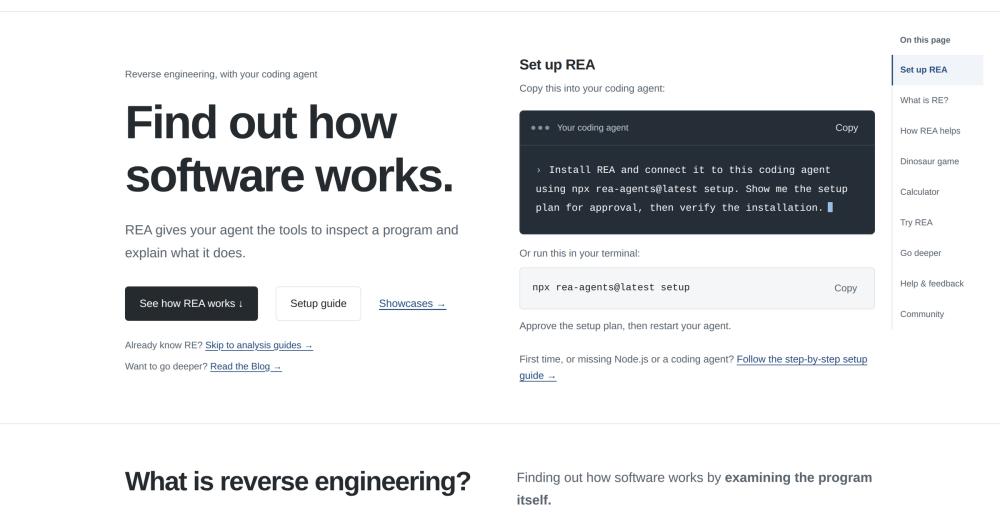
Analyze any binary, Electron app, or .NET assembly with AI agent tools; connects Hopper, Ghidra, or IDA Pro to Claude, Cursor, and other coding agents.

Visit websiteGitHub345.9K stars
image of Rea
TL;DR

REA (Reverse Engineer Anything) REA is an MCP server that connects AI coding agents to reverse engineering engines for native binaries, JavaScript and Electron apps, .NET assemblies, Android APKs, and firmware. It replaces manual decompiler workflows and paid cloud RE services like RevEng.AI or Binary Ninja Sidekick by running analysis locally through Hopper, Ghidra, or IDA Pro. MIT licensed. Best for security researchers, CTF competitors, and developers who need to understand how shipped software works without sending binaries to an external service.

Read the full breakdownHide the full breakdownWho it is for, how it works, trade-offs, the quick start and the FAQ
who it's for

Who REA (Reverse Engineer Anything) is for#

Security researchers investigating shipped binaries

REA connects Ghidra or Hopper to Claude Code or Cursor so a researcher can ask the agent to locate a function, explain its behavior, and annotate it in natural language. Evidence files record the findings with their provenance for later reference or team sharing.

Skip if:

If your analysis workflow lives entirely in a GUI disassembler and you have no need to involve a coding agent, REA adds little beyond what the disassembler already provides.

Developers understanding competitor features

The investigation model (decompile, understand, recreate) targets the specific workflow of understanding how a feature works in a shipped app and building a version for your own project. REA handles JavaScript and Electron apps without any external engine, so the barrier to starting is low.

Skip if:

If the app you are investigating is open source or exposes a public API that covers the feature you need, direct reading or API use is simpler than reverse engineering.

CTF competitors working binary challenges

REA's GitHub topics include 'ctf' and its tool catalog covers operations most relevant to capture-the-flag binary challenges: decompilation, function inspection, memory region analysis, and string extraction. The agent handles traversal while the competitor focuses on the problem.

Skip if:

Time-constrained CTF formats where setup overhead matters may be better served by running CLI tools directly rather than configuring agent integration.

Firmware and embedded systems analysts

Firmware region inspection and explicit extraction use Binwalk and Unblob on Linux. REA structures the output with inline evidence, which helps document findings without manually correlating tool outputs across multiple runs.

Skip if:

Requires a separately installed Binwalk and Unblob on a supported Linux host. Windows firmware analysis is not supported.

the problem

The problem it solves#

Reverse engineering shipped software is slow and fragmented. A developer who wants to understand how a feature works in a competitor's app must open a decompiler, read pseudocode, take notes, and then relay those findings to a language model in a separate window. The back-and-forth between tool and chat adds friction to every investigation.

Commercial AI-assisted RE services exist, but they come with trade-offs that rule them out for many workflows: binaries go to an external server, costs scale with usage, and the analysis pipeline is opaque. Proprietary binaries, regulated software, and anything under NDA cannot realistically be sent off-premises for analysis. Teams that face these constraints currently either skip AI assistance or maintain fragile manual extraction scripts.

how REA (Reverse Engineer Anything) solves it

How it solves it#

MCP integration with major coding agents

Registers with Claude Code, Cursor, Codex, Gemini CLI, Windsurf, GitHub Copilot CLI, VS Code, and others through a single `npx rea-agents setup` command. Setup shows its exact path changes before applying them and backs up existing configuration before modifying it.

Static JavaScript and Electron analysis without execution

Analyzes JavaScript application directories and ASAR packages without executing the application, without Hopper, and without Ghidra. A single `rea analyze /path/to/app.asar --json` returns the recovered dependency graph, inline evidence, limitations, and unknowns.

Native binary analysis via Hopper, Ghidra, or IDA Pro

Connects an existing Hopper or Ghidra installation to your agent. Ghidra 12.1.4 with a 64-bit JDK 21 exposes inventory, function, memory, and load-image inspection, plus atomic function annotation edits on Linux and macOS. IDA Pro integrates through an existing mrexodia/ida-pro-mcp registration.

Android APK analysis without an emulator

Runs static APK analysis through a separately supplied headless JADX JAR and Java, with no emulator required and no APK execution. Covers structure, class hierarchy, and code paths from the decompiled output.

Snapshot-based result reuse

Saves successful analysis results to a snapshot file keyed by target bytes, operation, parameters, analysis tool, and settings. Later queries that match exactly are answered from the snapshot without relaunching the analysis engine, saving time on repeated investigations.

Evidence-included conclusions

Every analysis result includes the evidence and limitations behind each conclusion. The `rea compare` command validates and diffs two Evidence bundles; `rea evidence-export` produces a canonical JSON for archiving or sharing findings without the original binary.

strengths · trade-offs

Strengths and trade-offs#

Strengths

  • Binaries stay on your machineAll analysis runs locally. You do not send binaries to a cloud service to get AI-assisted results. This matters for proprietary software, anything under NDA, or regulated applications where off-premises analysis is not allowed.
  • MIT license with no per-analysis feesThe MIT license means you can run REA commercially, fork it, and modify it without restriction. Unlike paid services like RevEng.AI, there is no per-analysis billing or subscription gate between you and your investigation.
  • Bring your own analysis engineIf you already use Hopper, Ghidra, or IDA Pro, REA connects to your existing installation. It does not require a specific proprietary disassembler and does not lock you into a single vendor's analysis output.
  • Works inside the agent you already useREA installs into Claude Code, Cursor, Codex, Gemini CLI, Windsurf, VS Code, GitHub Copilot CLI, and others. No separate reverse engineering IDE is needed; investigation happens inside your existing coding workflow.

Trade-offs

  • -Native analysis requires a separate disassemblerDeep binary analysis needs Hopper (paid, with a demo mode), Ghidra 12.1.4 with a 64-bit JDK 21, or IDA Pro. REA does not include a built-in disassembler. If you do not already have one of these tools installed, you need to acquire and configure it before native analysis is available.
  • -Platform support excludes most Windows workflowsFull support covers macOS 12+ and a narrow set of Linux distributions (Ubuntu 24.04+, Fedora 41+, 64-bit Arch Linux). Windows Ghidra support is experimental, limited to x86-64 PE binaries on local NTFS. Historical source import reports `unsupported_host` on Windows entirely.
  • -Node.js 22 or newer is requiredREA requires Node.js 22.x (>=22.19), 24.x (>=24.11), or 26+. Older Node.js versions are not supported. This is a non-trivial prerequisite for security teams or enterprises that pin their runtime environments.
versus alternatives

REA (Reverse Engineer Anything) vs alternatives#

REA vs RevEng.AI

RevEng.AI is a cloud-based reverse engineering service that analyzes binaries through a managed API. REA is a local MCP server that connects your coding agent to analysis engines running on your own machine.

FeatureREARevEng.AI
LicenseMITProprietary
DeploymentLocal, binaries stay on your machineCloud API, binaries uploaded to the service
PricingFreePaid subscription
Analysis engineHopper, Ghidra, or IDA ProManaged backend
Agent integrationMCP (13+ coding agents)REST API

REA is the better choice when binaries cannot leave your environment: proprietary software, anything under NDA, regulated applications, or internal tooling where sending binaries off-premises raises security or legal concerns. RevEng.AI is worth considering when you want a fully managed service with no local setup and no need to install or configure a disassembler.

REA vs Binary Ninja Sidekick

Binary Ninja Sidekick is the AI assistant built into Binary Ninja, a commercial disassembler with paid licensing. REA is an open source MCP layer that works across Hopper, Ghidra, and IDA Pro and surfaces results inside the coding agents you already use.

FeatureREABinary Ninja Sidekick
LicenseMITProprietary (requires Binary Ninja)
Analysis engineHopper, Ghidra, IDA ProBinary Ninja (required)
Agent integrationClaude Code, Cursor, Codex, and 10+ othersBinary Ninja native interface
CostFreeRequires Binary Ninja license
Local analysisYesYes

REA is worth choosing if you already use Ghidra or IDA Pro, or if you want reverse engineering results surfaced inside Claude Code or Cursor rather than inside a dedicated disassembler window. Binary Ninja Sidekick is the better choice when you are already a Binary Ninja user and want AI assistance directly in that environment without changing your existing workflow.

install · quick start

Quick start#

bash
Install REA with npm to connect it to your coding agents and analysis tools.

```bash
npx rea-agents setup
```
tech stack · detected from GitHub

What it's built on#

Languages
JavaJavaScriptPythonTypeScript
frequently asked

FAQ#

Does REA require a paid disassembler to analyze native binaries?

Hopper has a paid license but supports a demo mode with vendor-defined limits, which REA can use for analysis. Ghidra is free and open source. IDA Pro is a paid commercial tool. For JavaScript, Electron, and ASAR analysis, REA needs no disassembler at all and only requires Node.js.

Which AI coding agents does REA support?

REA supports Claude Code, Claude Desktop, Codex, Cursor, Gemini CLI, Windsurf, Devin, OpenCode, Antigravity, GitHub Copilot CLI, Command Code, and VS Code. Other agents with MCP support can use a manual MCP configuration. Existing REA registrations are selected by default during setup; other detected agents stay unselected until you choose them.

Does REA send binaries to an external server?

No. REA analyzes binaries locally on your machine. The MCP server runs locally, and analysis results never leave your host unless you export them yourself. This makes REA usable with proprietary software, NDA-bound binaries, and regulated applications.

What is the difference between REA and Binary Ninja Sidekick?

Binary Ninja Sidekick is an AI assistant embedded in Binary Ninja, a paid commercial disassembler. REA is MIT-licensed and works with multiple analysis engines (Hopper, Ghidra, IDA Pro) through the coding agents you already use, rather than inside a dedicated disassembler GUI. REA does not include a built-in disassembler.

Can REA analyze Android APKs?

Yes, through a separately supplied headless JADX JAR and Java. REA does not require an emulator or execute the APK. Coverage includes class hierarchy and decompiled code paths. See the Android analysis documentation in the repository for setup details and supported operations.

also worth a look

Similar open-source tools#

reverse-skill

Alternative toRevEng.AI

AI skill router for reverse engineering and penetration testing

  • 42,784 GitHub stars
  • MITLicence MIT

iFixAi

Alternative toZenity

Self-hosted AI agent auditing across 60 trust and safety inspections.

  • 30,695 GitHub stars
  • Apache-2.0Licence Apache-2.0

Bifrost

Alternative toPortkey

Open-source AI gateway with 23+ providers, failover, and MCP support.

  • 8,975 GitHub stars
  • Apache-2.0Licence Apache-2.0

Pulse

InSecurity & Monitoring

Read-only Windows diagnostics with a local AI assistant.

  • 368 GitHub stars
  • MITLicence MIT

OpenShell

Alternative toE2B

Sandboxed runtime for autonomous AI agents, open source by NVIDIA

  • 16,848 GitHub stars
  • Apache-2.0Licence Apache-2.0

ASC

Alternative toJEB Decompiler

Zero-overhead Android decompiler for mobile security researchers

  • 2,510 GitHub stars
  • Apache-2.0Licence Apache-2.0
by category

Open source tools in these categories#

460

Developer Tools

REA (Reverse Engineer Anything), superpowers, Skills for Real Engineers
404

AI & Machine Learning

freeCodeCamp, OpenClaw, REA (Reverse Engineer Anything)
126

Security & Monitoring

RustDesk, REA (Reverse Engineer Anything), Uptime Kuma

Featured

Omnara

Alternative toCClaude Managed Agents

Open-source agent deployment API. Self-host or use Omnara Cloud.

  • 2,957 GitHub stars
  • Apache-2.0Licence Apache-2.0
  • #AI Agents

rakazo

Alternative toGrok Bot

AI teammates you own: your keys, your model, your machine.

  • 4,904 GitHub stars
  • Apache-2.0Licence Apache-2.0
  • #AI Agents

Inbox Zero

Alternative toSuperhuman

AI email assistant that drafts replies and clears your inbox

  • 12,712 GitHub stars
  • AGPL-3.0Licence AGPL-3.0
  • #Email
Feature your project

New open source projects by email

The projects we add and every new guide. Free, unsubscribe any time.

Find open source alternatives to paid software

/
  • Claude Code to OpenCode
  • Jira to Windshift
  • Notion to AppFlowy
  • Slack to Mattermost
  • Linear to GitLab
  • Wispr Flow to Handy
  • CapCut to Concat
  • Grok Bot to rakazo
  • Superhuman to Inbox Zero
  • Airtable to AITable
  • Muse to OpenClaw
  • GitHub Copilot to Cline
  • Datadog to Netdata
  • Microsoft Teams to Rocket.Chat
  • Pinecone to Qdrant
  • Zapier to n8n
  • Devin AI to OpenHands
  • Firebase to Supabase
  • 1Password to KeePassXC
  • Confluence to Docmost
  • Contentful to Strapi
  • Adobe Premiere Pro to Shotcut
  • ChatGPT to AnythingLLM
  • LangSmith to Langfuse
  • Claude Code to OpenCode
  • Jira to Windshift
  • Notion to AppFlowy
  • Slack to Mattermost
  • Linear to GitLab
  • Wispr Flow to Handy
  • CapCut to Concat
  • Grok Bot to rakazo
  • Superhuman to Inbox Zero
  • Airtable to AITable
  • Muse to OpenClaw
  • GitHub Copilot to Cline
  • Datadog to Netdata
  • Microsoft Teams to Rocket.Chat
  • Pinecone to Qdrant
  • Zapier to n8n
  • Devin AI to OpenHands
  • Firebase to Supabase
  • 1Password to KeePassXC
  • Confluence to Docmost
  • Contentful to Strapi
  • Adobe Premiere Pro to Shotcut
  • ChatGPT to AnythingLLM
  • LangSmith to Langfuse