

Open Source Alternatives
  • Alternatives
  • Categories
    Categories by size882 projects
    • Developer Tools461
    • AI & Machine Learning404
    • Web Development196
    • Business & Productivity191
    • Communication & Collaboration126
    • Security & Monitoring126
    • IT Management123
    • Product & Project Management106
    • Cloud & Hosting105
    • Data & Analytics104
    Browse all 21 categoriesLLMOps & AI Tooling, Design & Creative and 9 more
  • Blog
  • Advertise
SearchNotion, Slack, password manager.../
Submit
Open Source Alternatives
  • Alternatives
    • Developer Tools461
    • AI & Machine Learning404
    • Web Development196
    • Business & Productivity191
    • Communication & Collaboration126
    • Security & Monitoring126
    • Browse all 21 categories
  • Blog
  • Advertise
Submit your project

New open source projects by email

The projects we add and every new guide. Free, unsubscribe any time.

Open Source Alternatives LogoOpen Source Alternatives

Handpicked Open Source Alternatives to Paid Softwares

Product

  • Categories
  • Tag
  • Advertise

Resources

  • Blog
  • Collection
  • Submit

Company

  • Privacy Policy
  • Terms of Service
  • Refund Policy
  • Sitemap

Alternatives

  • Claude Code
  • Jira
  • Notion
  • Slack
  • Linear
  • Wispr Flow
  • All alternatives
© 2026 Open Source Alternatives. All rights reserved.
Open SourceAlternatives
Home/Categories/AI & Machine Learning/OpenYak
icon of OpenYak

OpenYak

Open source alternative to Kimi Work, Zapier Central, Glean Assistant and Lindy AI

  • 693 stars
  • Apache-2.0
  • Active recently
  • Last commit 47 days ago

Last verified Oct 19, 2026

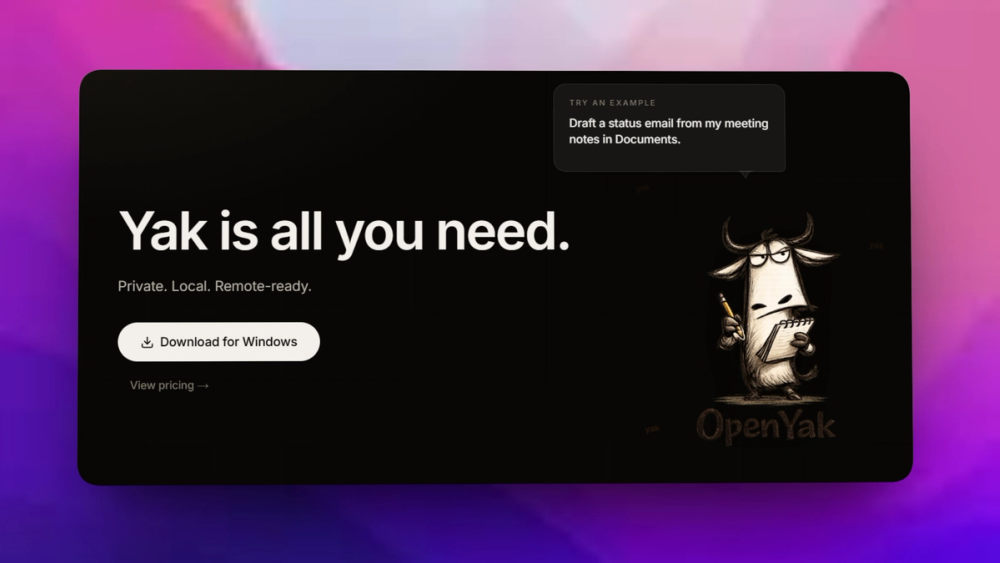
Run a local-first desktop AI agent for files, tools, long threads, local models, and bring-your-own provider keys.

Visit websiteGitHub693 starsDeploy on Hostinger
image of OpenYak
TL;DR

OpenYak is a local-first desktop AI agent for working with files, tools, long threads, local models, and bring-your-own provider keys. It replaces hosted AI workspaces for users who want agent workflows on their own computer without an OpenYak account or telemetry. MIT licensed.

Read the full breakdownHide the full breakdownWho it is for, how it works, trade-offs and the FAQ
who it's for

Who OpenYak is for#

Knowledge workers handling sensitive files

OpenYak fits users who want AI help with local documents while keeping workflow state on their own device.

Skip if:

Your organization requires all AI workflows to run through a centrally managed SaaS admin console.

Developers comparing local and cloud models

The local model and BYOK paths make it useful for testing which tasks can stay local and which need a hosted model.

Skip if:

You do not want to manage model runtimes, provider keys, or desktop agent permissions.

the problem

The problem it solves#

Hosted AI assistants are convenient, but they often pull files, conversations, memory, and workflow state into a vendor account. That creates privacy, billing, and portability concerns for users who want AI help on sensitive local work.

Desktop agent workflows need more than a chat box. Users want to attach documents, keep context across long tasks, choose local or cloud models, and produce reusable artifacts without turning every task into a cloud workspace.

how OpenYak solves it

How it solves it#

Local-first desktop runtime

OpenYak keeps files, conversations, memory, generated artifacts, tool permissions, and workflow state on the user's device.

Local or BYOK model choice

OpenYak supports local models through Rapid-MLX or Ollama and direct BYOK calls to providers such as OpenRouter, OpenAI, Anthropic, and Google.

File-centered agent workflows

OpenYak supports DOCX, XLSX, PPTX, PDFs, CSVs, and local project context, then can generate briefs, tables, plans, and reusable artifacts.

strengths · trade-offs

Strengths and trade-offs#

Strengths

  • No account or telemetry requirementOpenYak states that it requires no OpenYak account and includes no telemetry, which is a strong differentiator against hosted AI workspaces.
  • Model boundary controlOpenYak requires no OpenYak account and includes no telemetry, which is a strong differentiator against hosted AI workspaces.

Trade-offs

  • -Local setup shifts responsibility to the userLocal-first workflows improve control but require users to manage desktop app updates, local model performance, provider keys, and file permissions.
tech stack · detected from GitHub

What it's built on#

Languages
JavaScriptRustTypeScript
Frameworks
React
frequently asked

FAQ#

Does OpenYak require an account?

No. OpenYak does not require an OpenYak account.

Can OpenYak use local models?

Yes. OpenYak supports local models through Rapid-MLX or Ollama, plus BYOK access to cloud providers.

What files can OpenYak work with?

OpenYak supports DOCX, XLSX, PPTX, PDFs, CSVs, and local project context as inputs for agent workflows.

also worth a look

Similar open-source tools#

rakazo

Featured

Alternative toGrok Bot

AI teammates you own: your keys, your model, your machine.

  • 4,904 GitHub stars
  • Apache-2.0Licence Apache-2.0

OpenClaw

Featured

Alternative toMuse

Self-hosted AI assistant for WhatsApp, Telegram, and more

  • 392,969 GitHub stars
  • MITLicence MIT

Hermes Agent

Featured

Alternative toGrok Bot

Self-hosted AI agent: persistent memory, multi-channel chat, model choice.

  • 255,514 GitHub stars
  • MITLicence MIT

OpenBot

Alternative toGrok Bot

AI coworkers you can trust with real work

  • 6,875 GitHub stars
  • MITLicence MIT

OpenCompany

Alternative toMicrosoft Copilot Studio

Self-hosted AI agent canvas for every business function

  • 1,017 GitHub stars
  • MITLicence MIT

headlong

Alternative toCClaude Managed Agents

Bash microharness for agents that think continuously

  • 1,222 GitHub stars
  • Apache-2.0Licence Apache-2.0
by category

Open source tools in these categories#

404

AI & Machine Learning

freeCodeCamp, OpenClaw, REA (Reverse Engineer Anything)
101

LLMOps & AI Tooling

Hermes Agent, OpenCode, MarkItDown
191

Business & Productivity

OpenClaw, Excalidraw, RustDesk
Hostinger

Run OpenYak on your own server

Self-host OpenYak on a Hostinger VPS.

Deploy on Hostinger

Featured

Inbox Zero

Alternative toSuperhuman

AI email assistant that drafts replies and clears your inbox

  • 12,712 GitHub stars
  • AGPL-3.0Licence AGPL-3.0
  • #Email

Omnara

Alternative toCClaude Managed Agents

Open-source agent deployment API. Self-host or use Omnara Cloud.

  • 2,957 GitHub stars
  • Apache-2.0Licence Apache-2.0
  • #AI Agents

rakazo

Alternative toGrok Bot

AI teammates you own: your keys, your model, your machine.

  • 4,904 GitHub stars
  • Apache-2.0Licence Apache-2.0
  • #AI Agents
Feature your project

New open source projects by email

The projects we add and every new guide. Free, unsubscribe any time.

Find open source alternatives to paid software

/
  • Claude Code to OpenCode
  • Jira to Windshift
  • Notion to AppFlowy
  • Slack to Mattermost
  • Linear to GitLab
  • Wispr Flow to Handy
  • CapCut to Concat
  • Grok Bot to rakazo
  • Superhuman to Inbox Zero
  • Airtable to AITable
  • Muse to OpenClaw
  • GitHub Copilot to Cline
  • Datadog to Netdata
  • Microsoft Teams to Rocket.Chat
  • Pinecone to Qdrant
  • Zapier to n8n
  • Devin AI to OpenHands
  • Firebase to Supabase
  • 1Password to KeePassXC
  • Confluence to Docmost
  • Contentful to Strapi
  • Adobe Premiere Pro to Shotcut
  • ChatGPT to AnythingLLM
  • LangSmith to Langfuse
  • Claude Code to OpenCode
  • Jira to Windshift
  • Notion to AppFlowy
  • Slack to Mattermost
  • Linear to GitLab
  • Wispr Flow to Handy
  • CapCut to Concat
  • Grok Bot to rakazo
  • Superhuman to Inbox Zero
  • Airtable to AITable
  • Muse to OpenClaw
  • GitHub Copilot to Cline
  • Datadog to Netdata
  • Microsoft Teams to Rocket.Chat
  • Pinecone to Qdrant
  • Zapier to n8n
  • Devin AI to OpenHands
  • Firebase to Supabase
  • 1Password to KeePassXC
  • Confluence to Docmost
  • Contentful to Strapi
  • Adobe Premiere Pro to Shotcut
  • ChatGPT to AnythingLLM
  • LangSmith to Langfuse