Open Source Alternatives
  • Alternatives
  • Categories
    Categories by size882 projects
    • Developer Tools461
    • AI & Machine Learning404
    • Web Development196
    • Business & Productivity191
    • Communication & Collaboration126
    • Security & Monitoring126
    • IT Management123
    • Product & Project Management106
    • Cloud & Hosting105
    • Data & Analytics104
    Browse all 21 categoriesLLMOps & AI Tooling, Design & Creative and 9 more
  • Blog
  • Advertise
SearchNotion, Slack, password manager.../
Submit
Open Source Alternatives
  • Alternatives
    • Developer Tools461
    • AI & Machine Learning404
    • Web Development196
    • Business & Productivity191
    • Communication & Collaboration126
    • Security & Monitoring126
    • Browse all 21 categories
  • Blog
  • Advertise
Submit your project

New open source projects by email

The projects we add and every new guide. Free, unsubscribe any time.

Open Source Alternatives LogoOpen Source Alternatives

Handpicked Open Source Alternatives to Paid Softwares

Product

  • Categories
  • Tag
  • Advertise

Resources

  • Blog
  • Collection
  • Submit

Company

  • Privacy Policy
  • Terms of Service
  • Refund Policy
  • Sitemap

Alternatives

  • Claude Code
  • Jira
  • Notion
  • Slack
  • Linear
  • Wispr Flow
  • All alternatives
© 2026 Open Source Alternatives. All rights reserved.
Open SourceAlternatives
Home/Categories/Design & Creative/InvokeAI
icon of InvokeAI

InvokeAI

Open source alternative to Midjourney, Leonardo AI and DreamStudio

  • 28.8K stars
  • Apache-2.0
  • Active this week
  • Last commit today

Last verified Oct 22, 2026

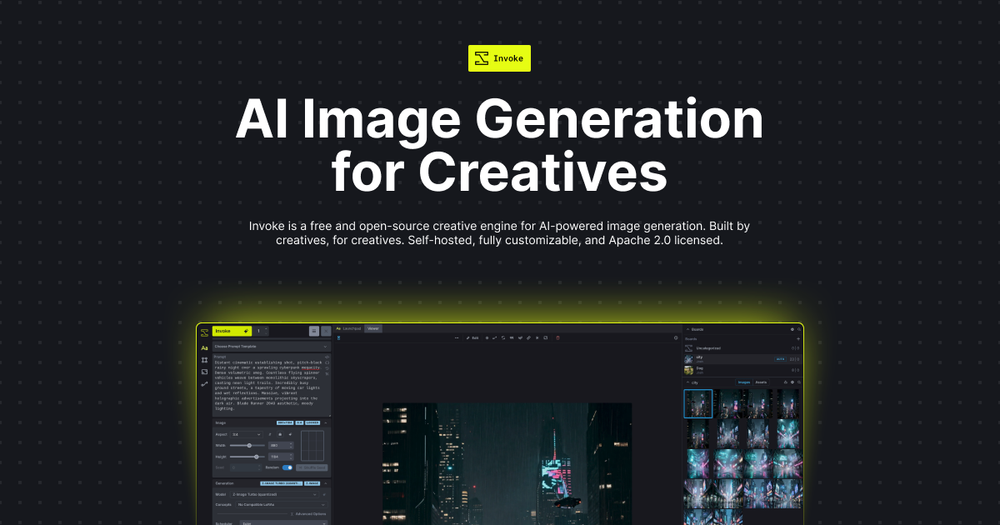
Generate AI images on your own hardware using InvokeAI's canvas editor, node workflows, and support for Flux, SDXL, and other Stable Diffusion models.

Visit websiteGitHub28.8K starsDeploy on Hostinger
image of InvokeAI
TL;DR

InvokeAI is a self-hosted creative engine for Stable Diffusion and Flux model image generation, replacing cloud services like Midjourney and DreamStudio with a tool you run on your own GPU. It pairs a layer-based canvas for compositing and inpainting with a visual node editor for repeatable pipelines, plus a Model Manager that handles LoRAs, ControlNets, and checkpoints without manual file placement. Licensed under Apache 2.0, it runs on Windows, macOS (Apple Silicon only), and Linux. Best for artists and studios who need complete control over generation parameters, model selection, and output privacy.

Read the full breakdownHide the full breakdownWho it is for, how it works, trade-offs and the FAQ
who it's for

Who InvokeAI is for#

Digital artists building multi-layer compositions

InvokeAI's canvas lets you combine AI generations, photography, and hand-painted elements on independent layers. Inpainting and outpainting extend or refine sections without regenerating the full image. Artists who work with reference photos or composite multiple subjects get more precise control than a text-only interface provides.

Skip if:

Your workflow is primarily text-to-image with minimal post-processing. For simple prompt-to-output work, a cloud service like DreamStudio provides faster iteration with no local setup required.

Creative studios running high-volume generation sessions

Without per-image billing, studios can generate thousands of variations per session for concept art, style exploration, or client presentations. Batch generation and gallery management with stored metadata make it practical to trace specific settings that produced a useful result.

Skip if:

Your team generates a modest number of images per month and prefers managed infrastructure. At low volume, a Midjourney subscription is simpler to manage than self-hosted hardware and model maintenance.

Technical users building custom generation pipelines

The node editor supports multi-step pipelines. You can chain generation, ControlNet passes, upscaling, and LoRA application in a repeatable graph. Specific parameters can be exposed to a shared UI for non-technical collaborators while the pipeline logic stays intact. This level of automation is not available on cloud services without building against a paid API.

Skip if:

You need a quick setup with no pipeline configuration. The node editor has a learning curve; for straightforward generation without custom workflows, the standard canvas is sufficient and less complex.

Professionals requiring image data privacy

InvokeAI runs entirely offline after model download. Prompts, generation settings, and output images never leave your machine. For commercial work on unreleased products, medical illustrations, or content involving privacy-sensitive subjects, local generation removes the data exposure question entirely.

Skip if:

Your use case has no privacy requirements and you prefer managed infrastructure. Cloud services handle model updates and GPU costs without local hardware investment.

the problem

The problem it solves#

AI image generation tools with professional-grade output, like Midjourney and DreamStudio, are cloud-only services. Every image costs credits or a monthly subscription, your prompts go to a third-party server, and the generation pipeline is fixed: you cannot swap models, adjust sampling parameters beyond what the UI exposes, or build custom multi-step workflows without using their API.

For artists and studios who generate hundreds of images per project, the per-credit model becomes expensive quickly. For anyone working with sensitive subjects (unreleased product mockups, private character designs, commercial illustrations), sending prompts and images to a third-party platform creates a data exposure question. And for technical users who need custom generation pipelines, ControlNet conditioning, or their own fine-tuned models, cloud services offer no self-hosting path.

how InvokeAI solves it

How it solves it#

Layer-based Canvas Editor

The Unified Canvas combines inpainting, outpainting, and compositing on independent layers. Each layer can be manipulated separately, letting you build complex scenes by combining AI-generated elements, photography, and sketches. Brush, paint, and draw tools are built in, so you can guide generations without switching to a separate application.

Node-based Workflow Builder

A fully visual node editor lets you design generation pipelines by connecting operations in a graph, rather than writing code. Pipelines are shareable and reusable. You can expose specific parameters as custom UI controls so collaborators adjust settings without editing the underlying graph.

Model Manager and Broad Architecture Support

InvokeAI ships with out-of-the-box support for Flux.1, SDXL, SD 3.5 Medium and Large, SD 1.5, and many other architectures. The Model Manager handles checkpoints, LoRAs, Textual Inversions, and ControlNets from one interface, so you can switch between model families without manual file placement.

ControlNet Composition Control

ControlNet support accepts depth maps, edge detections, and pose guides as conditioning inputs, so generations conform to a specific composition rather than following prompt text alone. Useful for maintaining character poses, product angles, or scene layouts across multiple generations.

Fully Local with No Data Transmission

InvokeAI runs on your own hardware with no network calls during generation. Prompts, model weights, and output images never leave your machine. For commercial work or sensitive subject matter, there is no data retention policy to review because no data leaves your system.

strengths · trade-offs

Strengths and trade-offs#

Strengths

  • Apache 2.0 license permits commercial useApache 2.0 means you can use InvokeAI commercially, modify the source, and include it in proprietary workflows without licensing fees or restrictions. The GitHub README notes the license is commercially friendly. There is no per-seat fee, usage cap, or requirement to share modifications with any third party.
  • No per-image billing after hardware setupRunning InvokeAI on your own GPU has no per-generation charge. Cloud services like Midjourney and DreamStudio bill by credits or monthly subscription tier, with limits on concurrent fast generations. For studios running batch sessions or iterating through dozens of variations, local compute removes the billing ceiling entirely.
  • Actively maintained with fast model coverageThe repository saw a commit as recently as October 2026, with support for Flux.2 Dev, Flux.2 Klein 4B and 9B, Ideogram 4, and other recent model releases. New architectures are added directly to InvokeAI's model library rather than waiting for a cloud provider to expose them through their interface.
  • Full generation pipeline controlInvokeAI exposes the full generation stack. You control sampler settings, ControlNet conditioning, LoRA weights, and custom node chains. Midjourney's interface controls style and aspect ratio; InvokeAI's node editor supports custom preprocessing, intermediate refinement passes, and multi-model chains that no cloud service UI exposes.

Trade-offs

  • -GPU required on all platformsInvokeAI requires a qualified GPU to run. On Windows and Linux, that means NVIDIA or AMD hardware. On macOS, only Apple Silicon (M-series) is supported; Intel Macs are not. There is no CPU fallback for production workloads, so machines without a qualifying GPU cannot run InvokeAI at all.
  • -More setup than cloud alternativesMidjourney and DreamStudio work from a browser with no local install. InvokeAI requires downloading the Launcher, installing dependencies, and managing model files locally. First-time users also need to download multi-gigabyte model weights before generating anything. The setup is launcher-assisted and documented, but it is not zero-effort.
  • -Commercial backing changed after platform shutdownThe original Invoke.ai hosted platform shut down when the founding team joined Adobe. Stewardship of the open-source project passed to core maintainers Lincoln Stein and Blessedcoolant. The project remains actively developed, but users who relied on the hosted service no longer have that option, and the project runs without the original commercial team.
versus alternatives

InvokeAI vs alternatives#

InvokeAI vs Midjourney

Both tools generate AI images from text prompts, but they use opposite deployment models. Midjourney is a cloud service with no self-hosting option; InvokeAI runs entirely on your own hardware under an Apache 2.0 license.

FeatureInvokeAIMidjourney
LicenseApache 2.0Proprietary
Self-hostingYesNo
Per-image costNone (own hardware)Credits or subscription
Canvas editorYes, with layersNo
Node workflowsYesNo
Data privacyFull local executionPrompts stored on servers
Model choiceFlux, SDXL, SD 3.5+Fixed Midjourney model

Midjourney produces visually polished outputs with minimal prompting and no hardware requirement. It is the better choice when your team has no GPU, when you want high-quality results without local setup, or when generation volume is low enough that subscription costs are reasonable. InvokeAI is the better choice when you need data privacy, the ability to swap models, a compositing canvas, or repeatable node pipelines.

InvokeAI vs Leonardo AI

Leonardo AI is a cloud-based image generation service that supports Flux and SDXL model variants, overlapping with InvokeAI's model library. The key difference is access model: Leonardo AI mediates model access through its API and subscription tiers, while InvokeAI gives you direct access to the same model families without a per-image charge or API intermediary.

InvokeAI vs DreamStudio

DreamStudio is Stability AI's cloud interface for Stable Diffusion models and charges credits per image. For users primarily using SDXL or SD 3.5 on qualifying hardware, InvokeAI provides the same model family with no per-image cost and a more complete editor (canvas, ControlNet, node workflows) than DreamStudio's generation interface. DreamStudio is still the better choice when you want Stable Diffusion models without local GPU setup.


tech stack · detected from GitHub

What it's built on#

Languages
JavaScriptPythonTypeScript
Frameworks
React
frequently asked

FAQ#

Is InvokeAI free to use commercially?

Yes. InvokeAI is licensed under Apache 2.0, which permits commercial use, modification, and redistribution without restriction. You can use it for client work, incorporate it into commercial workflows, and modify the source code. The only costs are your own hardware and electricity.

What GPU do I need to run InvokeAI?

On Windows and Linux, InvokeAI requires an NVIDIA or AMD GPU. On macOS, it requires Apple Silicon (M-series); Intel Macs are not supported. GPU requirements vary by model: SDXL needs more VRAM than SD 1.5, and Flux and SD 3.5 models need more still. The official documentation covers specific requirements for each model family.

How does InvokeAI compare to Midjourney?

Midjourney is a cloud service with subscription pricing, no model access, and no self-hosting option. InvokeAI runs on your own hardware with full model access, no per-image cost, and complete privacy. Midjourney's prompt interface is simpler and requires no hardware; InvokeAI requires a GPU and installation but gives you canvas compositing, node workflows, and model choice that Midjourney does not expose.

What models does InvokeAI support?

InvokeAI supports Flux.1 Dev, Flux.1 Schnell, Flux.1 Kontext, SDXL, SD 3.5 Medium and Large, SD 1.5, SD 2.0, Flux.2 Dev, Flux.2 Klein 4B and 9B, Ideogram 4, and many others. The Model Manager handles checkpoints, LoRAs, Textual Inversions, and ControlNets across all supported families from one interface.

Can I run InvokeAI without local hardware?

Yes. InvokeAI can be run on hosted GPU services including AI Badgr, RunPod, and Railway, removing the local hardware requirement. The Invoke.ai cloud-hosted platform was shut down when the founding team joined Adobe, so that specific service no longer exists. Third-party GPU hosting remains a supported path via the community.

also worth a look

Similar open-source tools#

ComfyUI

Alternative toHiggsfield AI

Node-based interface for visual AI content creation

  • 140,576 GitHub stars
  • GPL-3.0Licence GPL-3.0

God's Eye View

Featured

Alternative toFFlightradar24

Real-time global intelligence on a 3D globe

  • 58,501 GitHub stars
  • CustomLicence MIT with third-party data restrictions

superCMO-skills

Alternative toAdCreative.ai

AI agent skills for UGC videos, ad videos, and product photos

  • 138 GitHub stars
  • Apache-2.0Licence Apache-2.0

Openfilm

Alternative toRemotion

AI video agent for coding agents; films are local web folders.

  • 1,850 GitHub stars
  • MITLicence MIT

Jasna

Alternative toUniFab Video Enhancer

GPU-accelerated mosaic detection and restoration for video and images

  • 3,365 GitHub stars
  • AGPL-3.0Licence AGPL-3.0

SOMA

Alternative toZoo.dev

Parametric 3D modeling via CLI agent: describe, generate, iterate.

  • 162 GitHub stars
  • GPL-3.0Licence GPL-3.0
by category

Open source tools in these categories#

97

Design & Creative

ComfyUI, Excalidraw, Godot Engine
404

AI & Machine Learning

freeCodeCamp, OpenClaw, REA (Reverse Engineer Anything)
Hostinger

Run InvokeAI on your own server

Self-host InvokeAI on a Hostinger VPS.

Deploy on Hostinger

Featured

Omnara

Alternative toCClaude Managed Agents

Open-source agent deployment API. Self-host or use Omnara Cloud.

  • 2,957 GitHub stars
  • Apache-2.0Licence Apache-2.0
  • #AI Agents

rakazo

Alternative toGrok Bot

AI teammates you own: your keys, your model, your machine.

  • 4,904 GitHub stars
  • Apache-2.0Licence Apache-2.0
  • #AI Agents

Inbox Zero

Alternative toSuperhuman

AI email assistant that drafts replies and clears your inbox

  • 12,712 GitHub stars
  • AGPL-3.0Licence AGPL-3.0
  • #Email
Feature your project

New open source projects by email

The projects we add and every new guide. Free, unsubscribe any time.

Find open source alternatives to paid software

/
  • Claude Code to OpenCode
  • Jira to Windshift
  • Notion to AppFlowy
  • Slack to Mattermost
  • Linear to GitLab
  • Wispr Flow to Handy
  • CapCut to Concat
  • Grok Bot to rakazo
  • Superhuman to Inbox Zero
  • Airtable to AITable
  • Muse to OpenClaw
  • GitHub Copilot to Cline
  • Datadog to Netdata
  • Microsoft Teams to Rocket.Chat
  • Pinecone to Qdrant
  • Zapier to n8n
  • Devin AI to OpenHands
  • Firebase to Supabase
  • 1Password to KeePassXC
  • Confluence to Docmost
  • Contentful to Strapi
  • Adobe Premiere Pro to Shotcut
  • ChatGPT to AnythingLLM
  • LangSmith to Langfuse
  • Claude Code to OpenCode
  • Jira to Windshift
  • Notion to AppFlowy
  • Slack to Mattermost
  • Linear to GitLab
  • Wispr Flow to Handy
  • CapCut to Concat
  • Grok Bot to rakazo
  • Superhuman to Inbox Zero
  • Airtable to AITable
  • Muse to OpenClaw
  • GitHub Copilot to Cline
  • Datadog to Netdata
  • Microsoft Teams to Rocket.Chat
  • Pinecone to Qdrant
  • Zapier to n8n
  • Devin AI to OpenHands
  • Firebase to Supabase
  • 1Password to KeePassXC
  • Confluence to Docmost
  • Contentful to Strapi
  • Adobe Premiere Pro to Shotcut
  • ChatGPT to AnythingLLM
  • LangSmith to Langfuse