Open Source Alternatives
  • Alternatives
  • Categories
    Categories by size882 projects
    • Developer Tools461
    • AI & Machine Learning404
    • Web Development196
    • Business & Productivity191
    • Communication & Collaboration126
    • Security & Monitoring126
    • IT Management123
    • Product & Project Management106
    • Cloud & Hosting105
    • Data & Analytics104
    Browse all 21 categoriesLLMOps & AI Tooling, Design & Creative and 9 more
  • Blog
  • Advertise
SearchNotion, Slack, password manager.../
Submit
Open Source Alternatives
  • Alternatives
    • Developer Tools461
    • AI & Machine Learning404
    • Web Development196
    • Business & Productivity191
    • Communication & Collaboration126
    • Security & Monitoring126
    • Browse all 21 categories
  • Blog
  • Advertise
Submit your project

New open source projects by email

The projects we add and every new guide. Free, unsubscribe any time.

Open Source Alternatives LogoOpen Source Alternatives

Handpicked Open Source Alternatives to Paid Softwares

Product

  • Categories
  • Tag
  • Advertise

Resources

  • Blog
  • Collection
  • Submit

Company

  • Privacy Policy
  • Terms of Service
  • Refund Policy
  • Sitemap

Alternatives

  • Claude Code
  • Jira
  • Notion
  • Slack
  • Linear
  • Wispr Flow
  • All alternatives
© 2026 Open Source Alternatives. All rights reserved.
Open SourceAlternatives
Home/Categories/IT Management/Home Assistant
icon of Home Assistant

Home Assistant

Open source alternative to Samsung SmartThings, Apple HomeKit and Google Home

  • 91.6K stars
  • Apache-2.0
  • Active this week
  • Last commit 1 day ago

Last verified Oct 20, 2026

Manage local smart home automations, dashboards, and device integrations from hardware you control.

Visit websiteGitHub91.6K stars1-click deploy on Hostinger
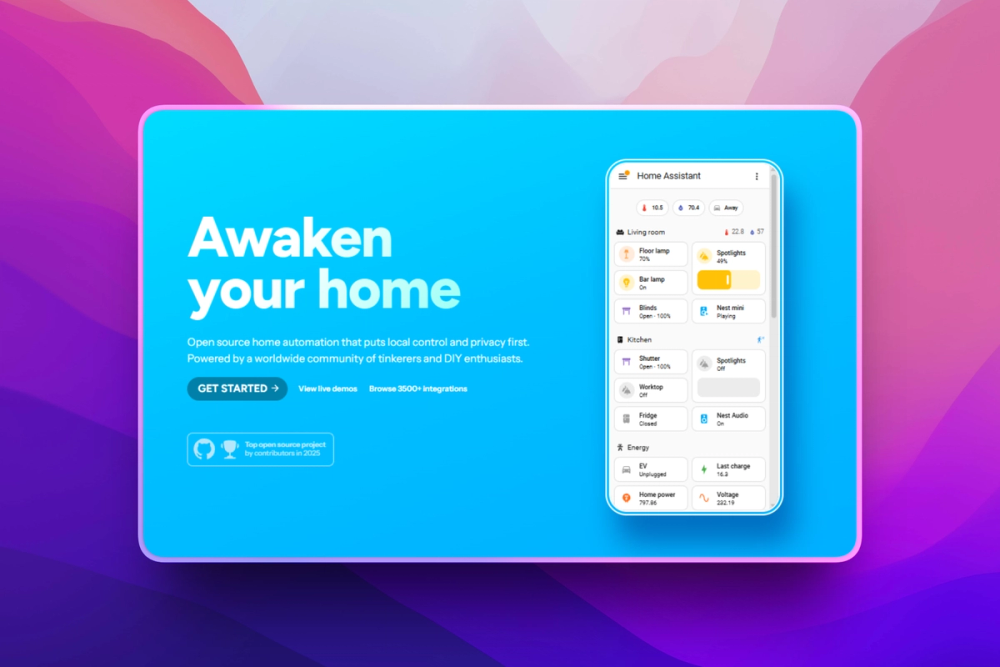
image of Home Assistant
TL;DR

Home Assistant is an Apache-2.0 home automation hub for people who want local control, privacy, and broad smart device coverage on their own hardware. It replaces cloud-centered smart home systems like SmartThings for users who would rather run automations, dashboards, voice control, and device integrations from a Raspberry Pi, mini PC, VM, or Docker host. Best for technical homeowners who want one local control plane for mixed-brand devices.

Read the full breakdownHide the full breakdownWho it is for, how it works, trade-offs, the quick start and the FAQ
who it's for

Who Home Assistant is for#

Homeowners replacing cloud smart home apps

Home Assistant fits users who want lights, sensors, climate, locks, cameras, and energy data controlled from one local hub instead of several vendor accounts.

Skip if:

You only use one vendor ecosystem and prefer a simple phone app over local server ownership.

DIY smart home builders with mixed devices

Home Assistant is useful when a home combines mixed protocols, consumer ecosystems, cameras, media devices, climate controls, sensors, and energy devices that need one automation layer.

Skip if:

Your devices are unsupported, cloud-locked, or already handled by a hub that meets every requirement.

Privacy-focused households

Home Assistant works for families who want device state, presence, voice, and automation data processed at home where possible, with cloud use limited to integrations that need it.

Skip if:

You need every device feature to work through a vendor cloud app with no local maintenance.

Tinkerers building advanced automations

Home Assistant gives technical users UI automations, YAML, templates, scripts, scenes, custom dashboards, and voice experiments for routines that consumer hubs cannot model cleanly.

Skip if:

You do not want to debug automation logic, read integration docs, or maintain a local controller.

the problem

The problem it solves#

Smart homes get fragile when devices, routines, and dashboards are split across separate vendor apps, cloud services, and account-specific integrations. A routine as simple as turning on a light at sunset can become harder to trust when an internet link is down, a device maker changes an API, or one ecosystem cannot cleanly coordinate another device.

The deeper problem is ownership. Many consumer smart home apps are easy to start with, but they leave the homeowner with less control over where automation logic, dashboards, voice flows, and device data live. That works for simple rooms, but it becomes painful when a home mixes sensors, locks, climate devices, energy monitors, cameras, media devices, and services from many brands.

how Home Assistant solves it

How it solves it#

Local-first smart home control

Home Assistant runs on hardware you control and processes smart home data locally when device integrations allow it. Local storage is the default posture, with cloud fallback reserved for devices or services that do not expose a local control path.

Over 1000 brand integrations

Home Assistant works with over 1000 brands and automatically scans the local network for known devices after setup. The integrations directory includes device, service, voice, energy, utility, camera, climate, sensor, and automation categories.

Automation engine for real home routines

Home Assistant automations can react to device states, time, presence, sun events, conditions, templates, scripts, and scenes. Most routines can be built in the UI, while YAML gives advanced users deeper control.

Custom dashboards for every device type

Home Assistant dashboards let users build mobile and desktop control views with cards for lights, locks, thermostats, media, calendars, maps, energy data, weather, sensors, and custom markdown.

Assist voice control

Home Assistant includes Assist, a voice assistant built on an open voice foundation. Users can run local voice setups, mobile voice control, wake words, and custom sentences depending on their hardware and privacy goals.

Energy and companion app support

Home Assistant includes home energy management for monitoring usage and solar production, plus official companion apps for iOS, Android, Wear OS, and Apple Watch presence and notifications.

strengths · trade-offs

Strengths and trade-offs#

Strengths

  • Clear privacy advantage over cloud-first hubsHome Assistant keeps device data local when possible and stores it on your hardware, which gives it a stronger privacy posture than smart home apps built around vendor-hosted accounts.
  • Broad mixed-brand compatibilityHome Assistant spans consumer ecosystems, local network devices, Zigbee, Z-Wave, Matter, energy monitors, media devices, cameras, and developer services. That makes it a strong fit for homes that outgrow one vendor app.
  • Apache-2.0 codebase with active releasesThe Home Assistant Core repository is Apache-2.0 licensed and has a long-running public release history. Teams and advanced users can inspect the Python code, contribute integrations, and run the software under an open license.
  • Multiple deployment pathsHome Assistant can run through Home Assistant OS on a Raspberry Pi, mini PC, or VM, and the official Linux docs also provide a Docker-based Home Assistant Container path for users who manage their own host.
  • Strong UI plus advanced configurationMost setup can happen through the UI, while advanced users still have access to YAML, templates, scripts, custom cards, and developer documentation when they need more control.

Trade-offs

  • -You own the server workHome Assistant gives you local control, but you also manage hardware, backups, updates, network access, and device troubleshooting. A managed consumer app is easier if you only need a few mainstream devices.
  • -Install type mattersChoose the install type carefully. Home Assistant OS is the best fit for most users because it includes Supervisor and apps. Home Assistant Container is useful for Docker admins, but it does not include apps and expects you to manage the host yourself.
  • -Device quality varies by integrationHome Assistant supports many brands, but each integration depends on what the device or service exposes. Some devices still need a vendor cloud, and advanced behavior may require checking integration docs before you buy.
  • -More control means more decisionsDashboards, automations, voice pipelines, add-ons, and integrations are highly configurable. That flexibility is the point, but households that want a fixed phone-app experience may find the setup process too involved.
versus alternatives

Home Assistant vs alternatives#

Home Assistant vs SmartThings

Home Assistant and SmartThings both coordinate smart home devices and automations, but they make different ownership tradeoffs. Home Assistant runs on your hardware and prioritizes local control. SmartThings Rules can run locally on a hub when every involved device feature and service supports local execution; otherwise, those Rules run in the SmartThings Cloud.

CriteriaHome AssistantSmartThings
Software modelApache-2.0 core repositorySamsung-managed smart home service
Hosting modelRuns on your Raspberry Pi, mini PC, VM, or Docker hostUses the SmartThings app, SmartThings Cloud, and supported hubs
Local automationLocal-first when device integrations support itLocal on a hub when possible, cloud-run when required features or services lack local execution
Device strategyBroad mixed-brand integrations and advanced configurationApp-led setup for supported SmartThings devices and services

Home Assistant is the better fit when privacy, local execution, custom dashboards, and mixed-brand device control matter more than hands-off setup. SmartThings is still worth considering when you want a simpler Samsung-managed app experience, already own compatible SmartThings hardware, and do not want to maintain a local server.

install · quick start

Quick start#

bash
docker run -d \
  --name homeassistant \
  --privileged \
  --restart=unless-stopped \
  -e TZ=MY_TIME_ZONE \
  -v /PATH_TO_YOUR_CONFIG:/config \
  -v /run/dbus:/run/dbus:ro \
  --network=host \
  ghcr.io/home-assistant/home-assistant:stable
tech stack · detected from GitHub

What it's built on#

Languages
Python
Messaging
MQTT
frequently asked

FAQ#

Is Home Assistant free and open source?

Yes. Home Assistant Core is Apache-2.0 licensed, and the repository is public at home-assistant/core. You can run it on your own hardware under the open source license, though optional hardware, cloud access, and hosted services may cost extra.

Can Home Assistant run without the cloud?

Yes. Home Assistant runs locally on hardware you control and keeps data local when possible. Some device integrations still need a vendor cloud because the device maker does not expose a local control path.

What is the best way to install Home Assistant?

Choose Home Assistant OS for most installs because it includes the Supervisor and apps. Use Home Assistant Container when you are a Docker admin who wants to manage your own host and does not need the built-in apps path.

Does Home Assistant work with SmartThings devices?

Home Assistant has a SmartThings integration, and many Zigbee, Z-Wave, Matter, Wi-Fi, and cloud devices can also connect through their own integrations. The best path depends on whether the device exposes local control or only works through a vendor account.

Who should avoid Home Assistant?

Avoid Home Assistant if you want a fully managed smart home app with no server, backups, updates, or troubleshooting. It is strongest for users who accept some setup work in exchange for local control and broader automation depth.

also worth a look

Similar open-source tools#

willow

Alternative toGoogle Home

Self-hosted Amazon Echo alternative for $50 ESP32 hardware

  • 3,127 GitHub stars
  • Apache-2.0Licence Apache-2.0

Homeio

Alternative toUnraid

Browser desktop for your self-hosted home server

  • 90 GitHub stars
  • AGPL-3.0Licence AGPL-3.0

Pulse

InSecurity & Monitoring

Read-only Windows diagnostics with a local AI assistant.

  • 368 GitHub stars
  • MITLicence MIT

Xray-core

Alternative toAstrill VPN

Open source proxy core with XTLS, VLESS, and REALITY protocols

  • 42,209 GitHub stars
  • MPL-2.0Licence MPL-2.0

Vela

Alternative toGoogle Maps

OpenStreetMap and Google data, no account, no Play Services

  • 2,060 GitHub stars
  • GPL-3.0Licence GPL-3.0

Esp32 C3 Adblock

Alternative toNextDNS

Pi-hole-style DNS ad-blocker on a $2 ESP32-C3 board

  • 3,299 GitHub stars
  • MITLicence MIT
by category

Open source tools in these categories#

123

IT Management

RustDesk, Immich, Stirling PDF
126

Security & Monitoring

REA (Reverse Engineer Anything), RustDesk, Uptime Kuma
Hostinger

Run Home Assistant on your own server

Hostinger sets Home Assistant up as a one-click app on a VPS.

Deploy on Hostinger

Featured

Omnara

Alternative toCClaude Managed Agents

Open-source agent deployment API. Self-host or use Omnara Cloud.

  • 2,957 GitHub stars
  • Apache-2.0Licence Apache-2.0
  • #AI Agents

rakazo

Alternative toGrok Bot

AI teammates you own: your keys, your model, your machine.

  • 4,904 GitHub stars
  • Apache-2.0Licence Apache-2.0
  • #AI Agents

Inbox Zero

Alternative toSuperhuman

AI email assistant that drafts replies and clears your inbox

  • 12,712 GitHub stars
  • AGPL-3.0Licence AGPL-3.0
  • #Email
Feature your project

New open source projects by email

The projects we add and every new guide. Free, unsubscribe any time.

Find open source alternatives to paid software

/
  • Claude Code to OpenCode
  • Jira to Windshift
  • Notion to AppFlowy
  • Slack to Mattermost
  • Linear to GitLab
  • Wispr Flow to Handy
  • CapCut to Concat
  • Grok Bot to rakazo
  • Superhuman to Inbox Zero
  • Airtable to AITable
  • Muse to OpenClaw
  • GitHub Copilot to Cline
  • Datadog to Netdata
  • Microsoft Teams to Rocket.Chat
  • Pinecone to Qdrant
  • Zapier to n8n
  • Devin AI to OpenHands
  • Firebase to Supabase
  • 1Password to KeePassXC
  • Confluence to Docmost
  • Contentful to Strapi
  • Adobe Premiere Pro to Shotcut
  • ChatGPT to AnythingLLM
  • LangSmith to Langfuse
  • Claude Code to OpenCode
  • Jira to Windshift
  • Notion to AppFlowy
  • Slack to Mattermost
  • Linear to GitLab
  • Wispr Flow to Handy
  • CapCut to Concat
  • Grok Bot to rakazo
  • Superhuman to Inbox Zero
  • Airtable to AITable
  • Muse to OpenClaw
  • GitHub Copilot to Cline
  • Datadog to Netdata
  • Microsoft Teams to Rocket.Chat
  • Pinecone to Qdrant
  • Zapier to n8n
  • Devin AI to OpenHands
  • Firebase to Supabase
  • 1Password to KeePassXC
  • Confluence to Docmost
  • Contentful to Strapi
  • Adobe Premiere Pro to Shotcut
  • ChatGPT to AnythingLLM
  • LangSmith to Langfuse