
Open Source Alternatives
  • Alternatives
  • Categories
    Categories by size897 projects
    • Developer Tools464
    • AI & Machine Learning405
    • Web Development196
    • Business & Productivity195
    • Security & Monitoring130
    • Communication & Collaboration128
    • IT Management125
    • Cloud & Hosting108
    • Product & Project Management106
    • Data & Analytics104
    Browse all 21 categoriesDesign & Creative, LLMOps & AI Tooling and 9 more
  • Blog
  • Advertise
SearchNotion, Slack, password manager.../
Submit
Open Source Alternatives
  • Alternatives
    • Developer Tools464
    • AI & Machine Learning405
    • Web Development196
    • Business & Productivity195
    • Security & Monitoring130
    • Communication & Collaboration128
    • Browse all 21 categories
  • Blog
  • Advertise
Submit your project

New open source projects by email

The projects we add and every new guide. Free, unsubscribe any time.

Open Source Alternatives LogoOpen Source Alternatives

Handpicked Open Source Alternatives to Paid Softwares

Product

  • Categories
  • Tag
  • Advertise

Resources

  • Blog
  • Collection
  • Submit

Company

  • Privacy Policy
  • Terms of Service
  • Refund Policy
  • Sitemap

Alternatives

  • Claude Code
  • Jira
  • Notion
  • Slack
  • Linear
  • Wispr Flow
  • All alternatives
© 2026 Open Source Alternatives. All rights reserved.
Open SourceAlternatives
Home/Categories/IT Management/GSmartControl
icon of GSmartControl

GSmartControl

Open source alternative to Hard Disk Sentinel, DriveDx, HD Tune Pro and SMART Utility

  • 766 stars
  • GPL-3.0
  • Active this week
  • Last commit 7 days ago

Last verified Oct 22, 2026

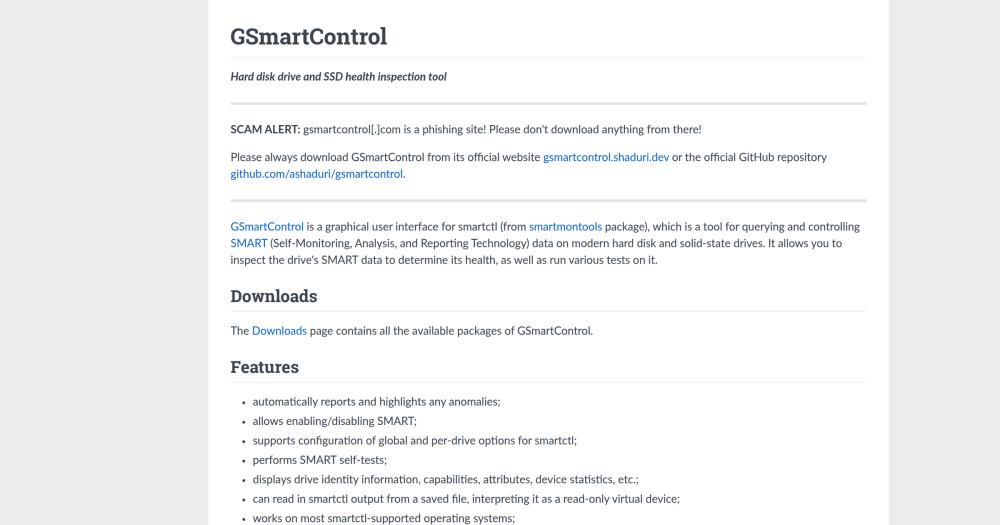
Monitor hard drive and SSD health with a GUI for smartctl; inspect SMART data and run diagnostic tests across Linux, Windows, macOS, and FreeBSD.

Visit websiteGitHub766 starsDeploy on Hostinger
Image for GSmartControl
TL;DR

GSmartControl is a graphical interface for smartctl that lets you inspect SMART health data and run diagnostic tests on HDDs, SSDs, and NVMe drives without learning command-line flags. It replaces paid tools like Hard Disk Sentinel and DriveDx for reading SMART attributes, spotting anomalies, and running self-tests. Licensed under GPL-3.0, it installs on Linux, Windows, macOS, FreeBSD, and other BSD-style systems at no cost. Best for sysadmins and IT teams who need a cross-platform drive health tool without a licensing budget.

Read the full breakdownHide the full breakdownWho it is for, how it works, trade-offs and the FAQ
who it's for

Who GSmartControl is for#

Sysadmins running proactive drive health checks

GSmartControl lets you run a SMART self-test and inspect SMART attributes on each drive in a server or NAS without opening a terminal session on each machine. The automated anomaly highlighting shortens the time to identify pre-failure conditions before a drive fails in production.

Skip if:

If you need centralized monitoring of drive health across a large fleet, GSmartControl's single-machine desktop model is not the right fit. Purpose-built SMART collection agents with a central dashboard are better suited for that scale.

IT technicians diagnosing suspected drive failures

The drive identity view, attribute table, and self-test runner give a technician everything needed to assess whether a drive is healthy, degraded, or failing in one interface. Saved smartctl output files from another machine or a failed system can be loaded as a read-only virtual device for offline review.

Skip if:

If the drive sits behind a RAID controller that blocks SMART command pass-through, GSmartControl cannot read individual drive data. Check the project's Supported Hardware page for your controller model before relying on it for RAID diagnostics.

Home users monitoring personal drive longevity

GSmartControl runs on Windows, macOS, and Linux with no command-line knowledge required to interpret results. Anomaly highlights and self-test results give visibility into drive wear before a failure causes data loss, which is especially useful on older HDDs or drives nearing their rated write endurance.

Skip if:

Users who only need a basic pass/fail health indicator and are already comfortable with their OS's built-in disk utility may not need GSmartControl's depth. Its value is in reading and interpreting the full SMART attribute set, not just surfacing a top-level status.

the problem

The problem it solves#

Tracking drive health with smartctl alone means memorizing a command-line interface and interpreting dozens of vendor-specific SMART attributes without built-in guidance on which thresholds signal a problem. Raw smartctl output varies by drive model and firmware, and distinguishing a failing attribute from a normal quirk requires either deep experience or careful cross-referencing with manufacturer specifications.

For IT teams and home users running multiple drives, this pain compounds across every inspection: running tests on each disk and comparing results across models is tedious without tooling that aggregates and highlights deviations automatically.

how GSmartControl solves it

How it solves it#

Automated anomaly highlighting

GSmartControl automatically flags SMART attributes outside normal thresholds, so you do not need to know which raw values indicate a failing drive. Anomalous readings appear visually distinct in the attribute list without any manual cross-referencing against drive specifications.

SMART self-test runner

Performs SMART self-tests through a guided interface. Test progress and results are displayed in the application without needing to issue separate smartctl commands or parse terminal output.

SATA, PATA, and NVMe drive support

Reads drives on Linux, Windows, macOS, FreeBSD, and other BSD-style systems. Supports SATA, PATA, and NVMe drives as well as drives behind some USB bridges and RAID controllers, covering the hardware range found in desktops, servers, and NAS units.

Drive identity and statistics view

Displays drive identity information, capability flags, attribute tables, and device statistics in organized tabs. The data that smartctl surfaces across multiple command invocations is consolidated into a single interface, making it easier to compare readings across drives.

Smartctl output file reader

Can import a saved smartctl output file and treat it as a read-only virtual device. This is useful for reviewing drive data captured from a remote machine, a failed system, or an earlier snapshot without needing the physical drive attached.

Global and per-drive smartctl options

Allows configuring global smartctl parameters and overriding them on a per-drive basis. This covers cases where specific drives or controller types need non-default flags to report correctly, matching the flexibility of direct smartctl invocation.

strengths · trade-offs

Strengths and trade-offs#

Strengths

  • GPL-3.0 with no licensing costGSmartControl is GPL-3.0 licensed and free to install on any number of machines. Hard Disk Sentinel and DriveDx are paid products; GSmartControl covers the same core SMART inspection and self-test workflow at no cost.
  • Cross-platform from a single installRuns on Linux, Windows, macOS, FreeBSD, and other BSD-style systems. GSmartControl covers all major desktop environments, which matters for mixed-OS shops and sysadmins who move between systems.
  • Active long-running projectThe codebase dates to 2008 per the project copyright, the GitHub repository was last pushed in October 2026, and the current release is v2.0.2. Hardware coverage includes NVMe storage alongside legacy SATA and PATA drives.
  • No cloud or network dependencyOperates entirely locally. No drive data is sent to a remote server and no internet connection is required to inspect a drive or read its SMART attributes. All analysis runs on the machine where the drives are installed.

Trade-offs

  • -Desktop application only; no remote monitoringGSmartControl is a local desktop GUI. It has no web interface and no agent-based remote monitoring capability. Teams that need centralized drive health visibility across many machines from a single dashboard require a different tool.
  • -RAID controller pass-through is not guaranteedVisibility behind RAID controllers depends on whether the controller passes SMART commands through to individual drives. Some controllers block pass-through entirely, preventing GSmartControl from reading individual disk data. The project's Supported Hardware page documents known working configurations.
  • -Hardware support bounded by smartmontoolsGSmartControl is a GUI layer over smartctl from the smartmontools package. Drives with unusual firmware or controllers not yet in the smartmontools device database may not report correctly. Keeping smartmontools updated is the main path to broader hardware coverage.
versus alternatives

GSmartControl vs alternatives#

GSmartControl vs Hard Disk Sentinel

Hard Disk Sentinel is a paid product in the same drive health monitoring category. GSmartControl covers the same core monitoring and self-test workflow under GPL-3.0 licensing at no cost, and runs on Linux, Windows, macOS, FreeBSD, and other BSD-style systems.

FeatureGSmartControlHard Disk Sentinel
CostFreePaid product

GSmartControl is the better fit when zero-cost licensing, GPL-3.0 openness, or cross-platform coverage including macOS and BSD variants is a priority.

GSmartControl vs DriveDx

DriveDx is a paid product in the same drive health monitoring category. GSmartControl covers the same SMART inspection and self-test workflow under GPL-3.0 at no cost, with support for Linux, Windows, macOS, and FreeBSD.

FeatureGSmartControlDriveDx
CostFreePaid product

GSmartControl is the stronger fit when budget, open licensing, or cross-platform coverage are priorities.

tech stack · detected from GitHub

What it's built on#

Languages
C++
frequently asked

FAQ#

Is GSmartControl free to use?

Yes. GSmartControl is licensed under GPL-3.0 and free to download, install, and run on any number of machines. There is no paid tier, subscription, or per-device fee. The source code is available on GitHub under the same license.

Which operating systems does GSmartControl support?

GSmartControl supports Linux, Windows, macOS, FreeBSD, and other BSD-style operating systems. The Downloads page at gsmartcontrol.shaduri.dev contains all the available packages of GSmartControl.

What is the difference between GSmartControl and smartctl?

Smartctl is a command-line tool from the smartmontools package that queries and controls SMART data on drives. GSmartControl is a graphical frontend for smartctl that presents the same data in a point-and-click interface, highlights anomalous attributes automatically, and guides you through running self-tests without writing command-line flags. Both rely on the same underlying smartmontools hardware support.

Does GSmartControl work with NVMe drives?

Yes. GSmartControl supports NVMe drives alongside SATA and PATA drives. It also works with some drives connected via USB bridges and behind RAID controllers, depending on whether the controller allows SMART command pass-through. The project's Supported Hardware page documents known working configurations.

Where should I download GSmartControl?

Download only from the official website at gsmartcontrol.shaduri.dev or the official GitHub repository at github.com/ashaduri/gsmartcontrol. The domain gsmartcontrol.com is a phishing site unaffiliated with the project. Do not download from it or trust anything hosted there.

also worth a look

Similar open-source tools#

BleachBit

Alternative toCCleaner

Open source disk cleaner and privacy tool for Windows and Linux.

  • 7,207 GitHub stars
  • GPL-3.0Licence GPL-3.0

Homeio

Alternative toUnraid

Browser desktop for your self-hosted home server

  • 90 GitHub stars
  • AGPL-3.0Licence AGPL-3.0

Pulse

InSecurity & Monitoring

Read-only Windows diagnostics with a local AI assistant.

  • 368 GitHub stars
  • MITLicence MIT

Xray-core

Alternative toAstrill VPN

Open source proxy core with XTLS, VLESS, and REALITY protocols

  • 42,209 GitHub stars
  • MPL-2.0Licence MPL-2.0

Vela

Alternative toGoogle Maps

OpenStreetMap and Google data, no account, no Play Services

  • 2,108 GitHub stars
  • GPL-3.0Licence GPL-3.0

Esp32 C3 Adblock

Alternative toNextDNS

Pi-hole-style DNS ad-blocker on a $2 ESP32-C3 board

  • 3,299 GitHub stars
  • MITLicence MIT
by category

Open source tools in these categories#

125

IT Management

RustDesk, Immich, Stirling PDF
130

Security & Monitoring

REA (Reverse Engineer Anything), RustDesk, Uptime Kuma
Hostinger

Run GSmartControl on your own server

Self-host GSmartControl on a Hostinger VPS.

Deploy on Hostinger

Featured

Inbox Zero

Alternative toSuperhuman

AI email assistant that drafts replies and clears your inbox

  • 12,712 GitHub stars
  • AGPL-3.0Licence AGPL-3.0
  • #Email

rakazo

Alternative toGrok Bot

AI teammates you own: your keys, your model, your machine.

  • 4,904 GitHub stars
  • Apache-2.0Licence Apache-2.0
  • #AI Agents

Omnara

Alternative toCClaude Managed Agents

Open-source agent deployment API. Self-host or use Omnara Cloud.

  • 2,957 GitHub stars
  • Apache-2.0Licence Apache-2.0
  • #AI Agents
Feature your project

New open source projects by email

The projects we add and every new guide. Free, unsubscribe any time.

Find open source alternatives to paid software

/
  • Claude Code to OpenCode
  • Jira to Windshift
  • Notion to AppFlowy
  • Slack to Mattermost
  • Linear to GitLab
  • Wispr Flow to Handy
  • CapCut to Concat
  • Grok Bot to rakazo
  • Superhuman to Inbox Zero
  • Airtable to AITable
  • Muse to OpenClaw
  • GitHub Copilot to Cline
  • Datadog to Netdata
  • Microsoft Teams to Rocket.Chat
  • Confluence to Docmost
  • Pinecone to Qdrant
  • Zapier to n8n
  • Devin AI to OpenHands
  • Firebase to Supabase
  • 1Password to KeePassXC
  • Contentful to Strapi
  • Adobe Premiere Pro to Shotcut
  • ChatGPT to AnythingLLM
  • LangSmith to Langfuse
  • Claude Code to OpenCode
  • Jira to Windshift
  • Notion to AppFlowy
  • Slack to Mattermost
  • Linear to GitLab
  • Wispr Flow to Handy
  • CapCut to Concat
  • Grok Bot to rakazo
  • Superhuman to Inbox Zero
  • Airtable to AITable
  • Muse to OpenClaw
  • GitHub Copilot to Cline
  • Datadog to Netdata
  • Microsoft Teams to Rocket.Chat
  • Confluence to Docmost
  • Pinecone to Qdrant
  • Zapier to n8n
  • Devin AI to OpenHands
  • Firebase to Supabase
  • 1Password to KeePassXC
  • Contentful to Strapi
  • Adobe Premiere Pro to Shotcut
  • ChatGPT to AnythingLLM
  • LangSmith to Langfuse