Open Source Alternatives
  • Alternatives
  • Categories
    Categories by size882 projects
    • Developer Tools461
    • AI & Machine Learning404
    • Web Development196
    • Business & Productivity191
    • Communication & Collaboration126
    • Security & Monitoring126
    • IT Management123
    • Product & Project Management106
    • Cloud & Hosting105
    • Data & Analytics104
    Browse all 21 categoriesLLMOps & AI Tooling, Design & Creative and 9 more
  • Blog
  • Advertise
SearchNotion, Slack, password manager.../
Submit
Open Source Alternatives
  • Alternatives
    • Developer Tools461
    • AI & Machine Learning404
    • Web Development196
    • Business & Productivity191
    • Communication & Collaboration126
    • Security & Monitoring126
    • Browse all 21 categories
  • Blog
  • Advertise
Submit your project

New open source projects by email

The projects we add and every new guide. Free, unsubscribe any time.

Open Source Alternatives LogoOpen Source Alternatives

Handpicked Open Source Alternatives to Paid Softwares

Product

  • Categories
  • Tag
  • Advertise

Resources

  • Blog
  • Collection
  • Submit

Company

  • Privacy Policy
  • Terms of Service
  • Refund Policy
  • Sitemap

Alternatives

  • Claude Code
  • Jira
  • Notion
  • Slack
  • Linear
  • Wispr Flow
  • All alternatives
© 2026 Open Source Alternatives. All rights reserved.
Open SourceAlternatives
Home/Categories/Design & Creative/Flameshot
icon of Flameshot

Flameshot

Open source alternative to Snagit, CleanShot X and Droplr

  • 31.3K stars
  • GPL-3.0
  • Active this week
  • Last commit 5 days ago

Last verified Oct 20, 2026

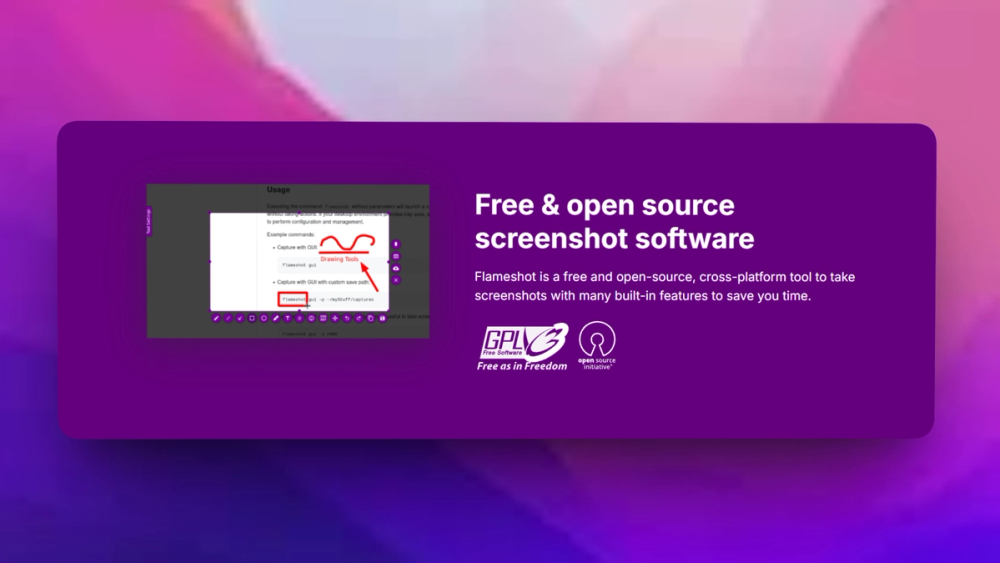
Flameshot is a powerful open-source screenshot tool with extensive features for efficient image capturing and editing.

Visit websiteGitHub31.3K stars
image of Flameshot
TL;DR

Flameshot is a desktop screenshot and annotation tool for teams that need fast visual bug reports, UI notes, and support screenshots. It covers the core capture and markup workflow people often buy Snagit for, while keeping screenshots on the user's machine instead of routing them through a hosted account. GPL-3.0 licensing makes it a fit for Linux-heavy teams that want an inspectable desktop utility.

Read the full breakdownHide the full breakdownWho it is for, how it works, trade-offs and the FAQ
who it's for

Who Flameshot is for#

Developers documenting UI bugs

Use Flameshot when engineers need to mark exact UI defects, blur sensitive fields, and paste annotated screenshots into GitHub, Linear, Jira, or chat.

Skip if:

Skip it if the team needs a managed screenshot library with role-based access and review workflows.

Designers and support teams sharing quick feedback

Use Flameshot for fast annotated screenshots where speed and privacy matter more than polished video capture or cloud collaboration.

Skip if:

Skip it if your workflow depends on vendor-hosted templates, screen recordings, or formal training docs.

the problem

The problem it solves#

Visual feedback breaks down when screenshots require a paid desktop suite, a browser extension, or a hosted annotation service. Developers need to blur secrets, point at exact pixels, and attach annotated captures to issues without adding another vendor account to the workflow. Support and QA teams face the same problem when every bug report needs a clear image but the toolchain is split across capture, markup, and upload steps.

The risk is not just cost. Screenshots often contain customer data, staging URLs, feature flags, or credentials. A local annotation workflow reduces the chance that sensitive captures pass through a third-party cloud just to add arrows and labels.

how Flameshot solves it

How it solves it#

Interactive capture and markup

Capture a region, window, or full screen and annotate it immediately with arrows, text, boxes, blur, highlights, and freehand drawing. That keeps bug reports and design notes in one desktop workflow instead of bouncing through separate image editors.

Configurable save and copy flow

Send captures to the clipboard, save them locally, or route them through the upload flow your team already uses. The workflow fits issue trackers and chat tools because the image stays under the user's control until they decide where it goes.

Command-line friendly capture

Flameshot includes CLI options for teams that script repeat captures, bind custom shortcuts, or standardize desktop setups across Linux workstations. That matters for QA and documentation workflows where repeatability beats a one-off screenshot button.

strengths · trade-offs

Strengths and trade-offs#

Strengths

  • Local-first screenshot handlingUnlike Snagit-style hosted workflows, Flameshot can keep capture and annotation local until the user exports the image. That is useful when screenshots include private dashboards, unreleased UI, customer names, or internal system paths.
  • GPL-3.0 desktop utilityThe GPL-3.0 license gives teams source access and redistribution rights under a clear copyleft model. Linux teams can audit the desktop utility, package it through their usual channels, and avoid per-seat screenshot licensing.

Trade-offs

  • -Desktop utility, not a team repositoryFlameshot handles capture and annotation well, but it does not replace Snagit's training assets, asset library, or vendor-managed collaboration features. Teams still need their own storage, issue tracker, or documentation workflow for long-term sharing.
versus alternatives

Flameshot vs alternatives#

Flameshot vs Snagit

Flameshot is the better fit when the requirement is local screenshot capture, quick annotation, blur, and export from a developer or support desktop. Snagit remains stronger when a team needs vendor-managed training assets, polished screen recording, templates, and centralized content workflows. Choose Flameshot for private, local markup; choose Snagit when managed documentation production matters more than open source control.

tech stack · detected from GitHub

What it's built on#

Languages
C++
frequently asked

FAQ#

What does Flameshot replace?

Flameshot can replace the basic screenshot capture and annotation parts of Snagit or CleanShot X. It is strongest for local image markup, not for managed asset libraries, screen recording, or vendor-hosted training workflows.

Is Flameshot self-hosted?

Flameshot is not a server product. You install it as a desktop app and run capture and annotation locally on the user's machine, which gives teams local control over screenshot handling.

What license does Flameshot use?

Flameshot uses GPL-3.0. That license supports source access and redistribution, with copyleft obligations if you distribute modified versions.

also worth a look

Similar open-source tools#

Screenshots

Alternative toCleanShot X

macOS screenshot and recorder, no cloud, no account, MIT licensed

  • 2 GitHub stars
  • MITLicence MIT

Capso

Alternative toCleanShot X

Free open-source screenshot and recorder for macOS

  • 1,443 GitHub stars
  • Apache-2.0Licence Apache-2.0

Kap

Alternative toCleanShot X

Open source screen recorder for macOS with web tech

  • 19,373 GitHub stars
  • MITLicence MIT

ShareX

Alternative toSnagit

Screenshot and record with 80+ upload destinations on Windows

  • 40,240 GitHub stars
  • GPL-3.0Licence GPL-3.0

PDF4QT

Alternative toAdobe Acrobat

Open source PDF editor and viewer for Windows and Linux

  • 1,503 GitHub stars
  • MITLicence MIT

LiVES

Alternative toResolume

Live video editing and VJ performance tool for GNU/Linux

  • 102 GitHub stars
  • GPL-3.0Licence GPL-3.0
by category

Open source tools in these categories#

98

Design & Creative

ComfyUI, Excalidraw, Godot Engine
191

Business & Productivity

OpenClaw, Excalidraw, RustDesk
463

Developer Tools

REA (Reverse Engineer Anything), superpowers, Skills for Real Engineers

Featured

Inbox Zero

Alternative toSuperhuman

AI email assistant that drafts replies and clears your inbox

  • 12,712 GitHub stars
  • AGPL-3.0Licence AGPL-3.0
  • #Email

rakazo

Alternative toGrok Bot

AI teammates you own: your keys, your model, your machine.

  • 4,904 GitHub stars
  • Apache-2.0Licence Apache-2.0
  • #AI Agents

Omnara

Alternative toCClaude Managed Agents

Open-source agent deployment API. Self-host or use Omnara Cloud.

  • 2,957 GitHub stars
  • Apache-2.0Licence Apache-2.0
  • #AI Agents
Feature your project

New open source projects by email

The projects we add and every new guide. Free, unsubscribe any time.

Find open source alternatives to paid software

/
  • Claude Code to OpenCode
  • Jira to Windshift
  • Notion to AppFlowy
  • Slack to Mattermost
  • Linear to GitLab
  • Wispr Flow to Handy
  • CapCut to Concat
  • Grok Bot to rakazo
  • Superhuman to Inbox Zero
  • Airtable to AITable
  • Muse to OpenClaw
  • GitHub Copilot to Cline
  • Datadog to Netdata
  • Microsoft Teams to Rocket.Chat
  • Pinecone to Qdrant
  • Zapier to n8n
  • Devin AI to OpenHands
  • Firebase to Supabase
  • 1Password to KeePassXC
  • Confluence to Docmost
  • Contentful to Strapi
  • Adobe Premiere Pro to Shotcut
  • ChatGPT to AnythingLLM
  • LangSmith to Langfuse
  • Claude Code to OpenCode
  • Jira to Windshift
  • Notion to AppFlowy
  • Slack to Mattermost
  • Linear to GitLab
  • Wispr Flow to Handy
  • CapCut to Concat
  • Grok Bot to rakazo
  • Superhuman to Inbox Zero
  • Airtable to AITable
  • Muse to OpenClaw
  • GitHub Copilot to Cline
  • Datadog to Netdata
  • Microsoft Teams to Rocket.Chat
  • Pinecone to Qdrant
  • Zapier to n8n
  • Devin AI to OpenHands
  • Firebase to Supabase
  • 1Password to KeePassXC
  • Confluence to Docmost
  • Contentful to Strapi
  • Adobe Premiere Pro to Shotcut
  • ChatGPT to AnythingLLM
  • LangSmith to Langfuse