Open Source Alternatives
  • Alternatives
  • Categories
    Categories by size882 projects
    • Developer Tools461
    • AI & Machine Learning404
    • Web Development196
    • Business & Productivity191
    • Communication & Collaboration126
    • Security & Monitoring126
    • IT Management123
    • Product & Project Management106
    • Cloud & Hosting105
    • Data & Analytics104
    Browse all 21 categoriesLLMOps & AI Tooling, Design & Creative and 9 more
  • Blog
  • Advertise
SearchNotion, Slack, password manager.../
Submit
Open Source Alternatives
  • Alternatives
    • Developer Tools461
    • AI & Machine Learning404
    • Web Development196
    • Business & Productivity191
    • Communication & Collaboration126
    • Security & Monitoring126
    • Browse all 21 categories
  • Blog
  • Advertise
Submit your project

New open source projects by email

The projects we add and every new guide. Free, unsubscribe any time.

Open Source Alternatives LogoOpen Source Alternatives

Handpicked Open Source Alternatives to Paid Softwares

Product

  • Categories
  • Tag
  • Advertise

Resources

  • Blog
  • Collection
  • Submit

Company

  • Privacy Policy
  • Terms of Service
  • Refund Policy
  • Sitemap

Alternatives

  • Claude Code
  • Jira
  • Notion
  • Slack
  • Linear
  • Wispr Flow
  • All alternatives
© 2026 Open Source Alternatives. All rights reserved.
Open SourceAlternatives
Home/Categories/Developer Tools/diagrams.net
icon of diagrams.net

diagrams.net

Open source alternative to Lucidchart and EdrawMax

  • 8.9K stars
  • Apache-2.0
  • Active this week
  • Last commit 4 days ago

Last verified Oct 20, 2026

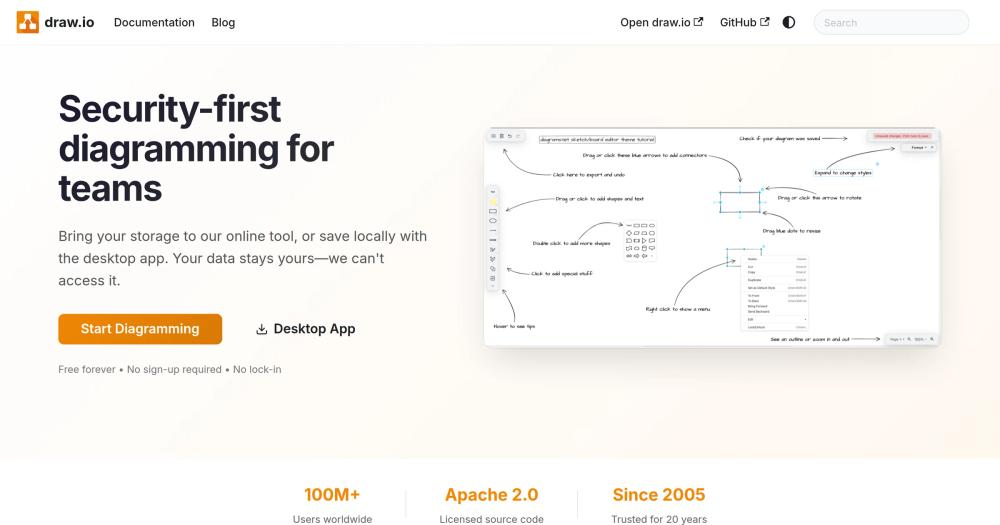
Create technical diagrams, flowcharts, and architecture maps in a browser or desktop app without vendor lock-in.

Visit websiteGitHub8.9K starsDeploy on Hostinger
image of diagrams.net
TL;DR

diagrams.net is an Apache-2.0 diagramming tool for flowcharts, architecture diagrams, UML, ERDs, and technical documentation without forcing files into a proprietary workspace. It is best for engineering, architecture, and documentation teams that want portable diagrams they can store locally, in Git, or in their own cloud storage.

Read the full breakdownHide the full breakdownWho it is for, how it works, trade-offs and the FAQ
who it's for

Who diagrams.net is for#

Architecture and infrastructure diagrams

Use diagrams.net to document services, networks, cloud resources, deployment flows, and system boundaries in files that engineering teams can review and version.

Skip if:

Skip it if your team mainly needs freeform ideation boards with facilitation features.

Process and documentation diagrams

Create flowcharts, BPMN diagrams, ERDs, and support diagrams for runbooks, onboarding docs, product specs, and incident reviews.

Skip if:

Skip it if your diagrams must live exclusively inside a paid collaboration suite.

the problem

The problem it solves#

Technical diagrams often become long-lived documentation artifacts, but many hosted diagramming tools keep them inside paid workspaces and proprietary collaboration systems. That creates friction when teams need offline access, repository-based documentation, data residency control, or a low-cost way for many contributors to view and edit diagrams. diagrams.net solves this by treating diagrams as portable files and supporting browser, desktop, and self-hosted workflows, so teams can place architecture maps and process diagrams beside the systems they describe.

how diagrams.net solves it

How it solves it#

Portable diagram files

Store diagrams as local files, Git-tracked assets, or documents in your own cloud storage instead of locking them inside a vendor workspace.

Technical diagram libraries

Use shape libraries and templates for flowcharts, UML, BPMN, entity-relationship diagrams, network maps, cloud architecture, and process documentation.

Browser, desktop, and self-hosted modes

Run diagrams.net in the browser, use the desktop app offline, or host it internally for teams with network, privacy, or data residency requirements.

strengths · trade-offs

Strengths and trade-offs#

Strengths

  • Best fit for engineering documentationdiagrams.net is strongest when diagrams need to sit beside code, runbooks, design docs, or architecture decisions and remain editable over time.
  • Low-friction adoptionTeams can start with the hosted editor, move files into Git or cloud storage, and later self-host without changing the diagram format.

Trade-offs

  • -Less workshop-oriented than Mirodiagrams.net supports collaboration through integrations, but it is not built around sticky-note workshops, facilitation timers, or broad product-discovery canvases.
versus alternatives

diagrams.net vs alternatives#

diagrams.net (formerly draw.io) is an open source diagramming tool and self-hosted alternative to Lucidchart, Microsoft Visio, and Miro for creating technical diagrams, flowcharts, and architecture maps.

vs Lucidchart: Lucidchart is a cloud-based SaaS tool with per-user monthly pricing and diagrams stored on Lucid's servers. diagrams.net stores files locally or in your own cloud storage (Google Drive, OneDrive, GitHub), with no per-seat fees and no data-residency concerns. Lucidchart has richer real-time multi-user collaboration and a polished UX, but diagrams.net covers the full range of technical diagram types, including UML, ERDs, BPMN, and network maps, at zero licensing cost.

vs Microsoft Visio: Visio requires a Microsoft 365 subscription and is Windows-centric, with files in a proprietary .vsdx format. diagrams.net is cross-platform, runs in any browser or as an offline desktop app, and stores diagrams as XML that remains readable without proprietary software. For teams outside the Microsoft ecosystem or those needing portable, vendor-neutral files, diagrams.net is the natural replacement.

vs Miro: Miro is an online whiteboard platform built for brainstorming, design sprints, and visual collaboration, with diagramming as one feature among many. It charges per editor and requires a persistent internet connection. diagrams.net is purpose-built for structured technical diagrams and can run offline or be self-hosted for air-gapped environments, making it the better fit for engineering and architecture documentation workflows.


tech stack · detected from GitHub

What it's built on#

Languages
JavaJavaScript
frequently asked

FAQ#

Is diagrams.net open source?

Yes. The main draw.io repository is public on GitHub under the Apache-2.0 license, which allows commercial use, modification, and distribution under the license terms.

Can diagrams.net be self-hosted?

Yes. Teams can self-host diagrams.net for internal use, and individuals can use the desktop app for offline diagramming without sending files to a hosted workspace.

What paid tools does diagrams.net replace?

diagrams.net is most often compared with Lucidchart, Microsoft Visio, EdrawMax, and Miro when teams need technical diagrams without per-seat pricing or proprietary file storage.

also worth a look

Similar open-source tools#

diagram-design

Alternative toNapkin AI

Editorial diagrams for Claude Code, no Figma or Mermaid required

  • 58,900 GitHub stars
  • MITLicence MIT

OpenFlowKit

Alternative toEraser.io

Local-first AI diagramming tool for developers and builders

  • 897 GitHub stars
  • MITLicence MIT

ChartDB

Alternative toSqlDBM

Free open source database diagram editor and visualizer

  • 23,011 GitHub stars
  • AGPL-3.0Licence AGPL-3.0

Excalidraw

Alternative toMiro

Open source whiteboard for hand-drawn style diagrams

  • 134,025 GitHub stars
  • MITLicence MIT

Openfilm

Alternative toRemotion

AI video agent for coding agents; films are local web folders.

  • 1,850 GitHub stars
  • MITLicence MIT

SOMA

Alternative toZoo.dev

Parametric 3D modeling via CLI agent: describe, generate, iterate.

  • 162 GitHub stars
  • GPL-3.0Licence GPL-3.0
by category

Open source tools in these categories#

461

Developer Tools

REA (Reverse Engineer Anything), superpowers, Skills for Real Engineers
97

Design & Creative

ComfyUI, Excalidraw, Godot Engine
Hostinger

Run diagrams.net on your own server

Self-host diagrams.net on a Hostinger VPS.

Deploy on Hostinger

Featured

rakazo

Alternative toGrok Bot

AI teammates you own: your keys, your model, your machine.

  • 4,904 GitHub stars
  • Apache-2.0Licence Apache-2.0
  • #AI Agents

Inbox Zero

Alternative toSuperhuman

AI email assistant that drafts replies and clears your inbox

  • 12,712 GitHub stars
  • AGPL-3.0Licence AGPL-3.0
  • #Email

Omnara

Alternative toCClaude Managed Agents

Open-source agent deployment API. Self-host or use Omnara Cloud.

  • 2,957 GitHub stars
  • Apache-2.0Licence Apache-2.0
  • #AI Agents
Feature your project

New open source projects by email

The projects we add and every new guide. Free, unsubscribe any time.

Find open source alternatives to paid software

/
  • Claude Code to OpenCode
  • Jira to Windshift
  • Notion to AppFlowy
  • Slack to Mattermost
  • Linear to GitLab
  • Wispr Flow to Handy
  • CapCut to Concat
  • Grok Bot to rakazo
  • Superhuman to Inbox Zero
  • Airtable to AITable
  • Muse to OpenClaw
  • GitHub Copilot to Cline
  • Datadog to Netdata
  • Microsoft Teams to Rocket.Chat
  • Pinecone to Qdrant
  • Zapier to n8n
  • Devin AI to OpenHands
  • Firebase to Supabase
  • 1Password to KeePassXC
  • Confluence to Docmost
  • Contentful to Strapi
  • Adobe Premiere Pro to Shotcut
  • ChatGPT to AnythingLLM
  • LangSmith to Langfuse
  • Claude Code to OpenCode
  • Jira to Windshift
  • Notion to AppFlowy
  • Slack to Mattermost
  • Linear to GitLab
  • Wispr Flow to Handy
  • CapCut to Concat
  • Grok Bot to rakazo
  • Superhuman to Inbox Zero
  • Airtable to AITable
  • Muse to OpenClaw
  • GitHub Copilot to Cline
  • Datadog to Netdata
  • Microsoft Teams to Rocket.Chat
  • Pinecone to Qdrant
  • Zapier to n8n
  • Devin AI to OpenHands
  • Firebase to Supabase
  • 1Password to KeePassXC
  • Confluence to Docmost
  • Contentful to Strapi
  • Adobe Premiere Pro to Shotcut
  • ChatGPT to AnythingLLM
  • LangSmith to Langfuse