Open Source Alternatives
  • Alternatives
  • Categories
    Categories by size882 projects
    • Developer Tools461
    • AI & Machine Learning404
    • Web Development196
    • Business & Productivity191
    • Communication & Collaboration126
    • Security & Monitoring126
    • IT Management123
    • Product & Project Management106
    • Cloud & Hosting105
    • Data & Analytics104
    Browse all 21 categoriesLLMOps & AI Tooling, Design & Creative and 9 more
  • Blog
  • Advertise
SearchNotion, Slack, password manager.../
Submit
Open Source Alternatives
  • Alternatives
    • Developer Tools461
    • AI & Machine Learning404
    • Web Development196
    • Business & Productivity191
    • Communication & Collaboration126
    • Security & Monitoring126
    • Browse all 21 categories
  • Blog
  • Advertise
Submit your project

New open source projects by email

The projects we add and every new guide. Free, unsubscribe any time.

Open Source Alternatives LogoOpen Source Alternatives

Handpicked Open Source Alternatives to Paid Softwares

Product

  • Categories
  • Tag
  • Advertise

Resources

  • Blog
  • Collection
  • Submit

Company

  • Privacy Policy
  • Terms of Service
  • Refund Policy
  • Sitemap

Alternatives

  • Claude Code
  • Jira
  • Notion
  • Slack
  • Linear
  • Wispr Flow
  • All alternatives
© 2026 Open Source Alternatives. All rights reserved.
Open SourceAlternatives
Home/Categories/Developer Tools/Cleanyourtv
icon of Cleanyourtv

Cleanyourtv

Open source alternative to ATV Launcher Pro and Projectivy Launcher

  • 5.4K stars
  • MIT License
  • Active this week
  • Last commit 2 days ago

Last verified Oct 20, 2026

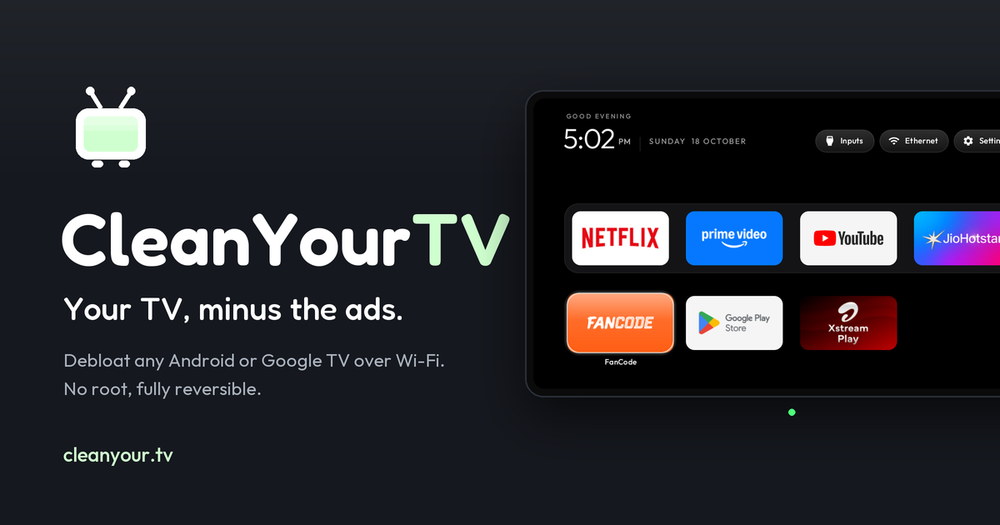
Transform any Android TV or Google TV by removing bloatware over Wi-Fi and installing a clean Apple TV-style launcher. No root, fully reversible.

Visit websiteGitHub5.4K stars
image of Cleanyourtv
TL;DR

Cleanyourtv strips manufacturer bloatware from Android TV and Google TV sets over Wi-Fi, then installs a lightweight Apple TV-style home screen. It uses pm disable-user through ADB to disable ad services, telemetry, and sponsored rows without uninstalling anything, leaving a one-command restore path. MIT licensed, with community-tested debloat lists for 66 TV models across 25 brands; the launcher is 300 KB installed and targets sets with 1 GB of RAM.

Read the full breakdownHide the full breakdownWho it is for, how it works, trade-offs, the quick start and the FAQ
who it's for

Who Cleanyourtv is for#

Android TV owners with ad-heavy stock launchers

Xiaomi, TCL, and similar sets show sponsored rows before installed apps load. CleanYourTV disables the OEM ad and telemetry packages using a community-tested list for the specific model, then installs the custom launcher. The process takes about fifteen minutes on a supported model.

Skip if:

Skip if your TV already runs a clean launcher such as NVIDIA Shield, where there are no OEM ad rows to remove and the stock interface is already uncluttered.

Privacy-conscious households blocking outbound telemetry

The debloat step targets telemetry packages that report viewing data back to the manufacturer. Owners who monitor their home network can verify the effect by watching DNS queries before and after the debloat run. The launcher itself makes no network requests after installation.

Skip if:

Skip if the TV is on an isolated network segment with telemetry already blocked at the router. CleanYourTV adds device-level disabling on top, but network-level blocking alone may be sufficient for your needs.

Developers building on or forking the launcher

The launcher source is plain Java with AndroidX RecyclerView, no Compose. The module card spec in `docs/specs/card.md` lets any TV app declare its own tile. The themes system in `themes/` shows how to change layout, colour, and wallpaper without a rebuild.

Skip if:

Skip if you need Compose-based UI or OEM-specific APIs. The launcher targets 1 GB devices, which limits some animation techniques available on higher-end hardware.

Households with multiple sets of the same Android TV model

If you have two or more TCL or Xiaomi sets on the same model line, the same debloat list and theme config apply to all of them. The TV_HOST environment variable is the only value to change between runs.

Skip if:

Skip if your sets are different brands or firmware versions. Debloat lists are model-specific; applying a Xiaomi list to a Sony TV will likely break core TV functions.

the problem

The problem it solves#

Modern Android TV and Google TV home screens are designed to generate ad revenue before they serve the viewer. Sponsored content rows appear above installed apps, telemetry packages report viewing data to the manufacturer, and preloaded apps occupy the launcher grid without any supported path to remove them. On sets from Xiaomi, TCL, and other Android TV manufacturers, the home screen itself is a monetized product. Paid placements can appear before the user reaches Netflix, and no setting removes them.

The ADB debug bridge is the only standard escape route, but it requires hours of forum research to use safely on a specific model. Package names differ between firmware versions, some services are interdependent, and disabling the wrong package can break core functions like HDMI switching or voice input. Without a model-specific list and a known-good procedure, the practical options were buying a premium streaming device or accepting the stock experience.

how Cleanyourtv solves it

How it solves it#

Wi-Fi ADB debloat, no root or cable

Connects to the TV over the local network using the ADB debug bridge built into Android TV. Enable USB debugging in Developer Options, allow the computer once, and the tool handles device discovery and authentication. No physical cable, no root, and no hardware modification is required.

Non-destructive package disabling

Uses `pm disable-user` to disable bloatware rather than uninstalling it. All disabled packages stay on the device in a suspended state. The bundled restore script re-enables every package in reverse order, returning the TV to its factory launcher in one step. Nothing is permanently deleted.

Apple TV-style launcher, 300 KB installed

A native Android TV app (`com.gathin.tvhome`) written in plain Java with AndroidX RecyclerView. Targets sets with 1 GB of RAM and avoids blur effects, video playback, network requests, and background services. The dock sits where Apple TV places it; a top shelf names the focused app over an ambient glow in the app's artwork colour.

66 community-tested TV models across 25 brands

The `examples/` folder holds one debloat list per tested model from contributors. Brands include TCL (14 lists), Xiaomi (14), Sony (9), Philips (4), and Hisense (3), plus Amazon Fire TV Stick, NVIDIA Shield, and Chromecast with Google TV. A model not in the list can still be debloated using the AI-guided discovery flow that identifies packages on the specific TV.

Themes and module cards

Themes set background colour, wallpaper, dock order, and column count via a JSON file pushed over ADB without a rebuild. Three themes ship in `themes/`. Module cards let any installed TV app declare its own tile in the grid; the launcher prompts the user once per app and remembers the answer tied to the app's signing key.

Python tooling for manual operation

Every step the assistant automates can be run by hand. `tools/tv.py` is a pure-Python ADB client that probes the TV, runs shell commands, and pushes files. `tools/disable.sh` and `restore.sh` apply and undo a debloat list. PowerShell equivalents ship for Windows users with Android Studio installed.

strengths · trade-offs

Strengths and trade-offs#

Strengths

  • Fully reversible, no permanent changesThe debloat step uses disable-user rather than uninstall, so the restore script can re-enable every package. The launcher install script checks which launcher owns Home before switching and rolls back automatically if the handoff fails. The TV stays in a state the manufacturer's factory reset can also undo.
  • Works on sets with 1 GB of RAMThe launcher APK is about 300 KB installed and avoids blur effects, video playback, and background services. This keeps it usable on budget Android TV hardware like the Xiaomi MiTV-ASTP1 and TCL 40S5400A, where heavier launchers cause lag or memory pressure on 1 GB devices.
  • MIT license, no account, no cloud componentThe code is MIT licensed, allowing free use, modification, distribution, and commercial use. No sign-up is required to run it, no data leaves the local network, and the launcher makes no network requests after installation. The ADB session is local only.
  • Community coverage across 66 tested TV modelsContributors have submitted debloat lists and build notes for 66 specific models, including rare regional variants like the AiPro2K (Changhong AI PONT) and the RCA AI PONT SA. Each list is tested by the person who submitted it. A TV not in the list can be catalogued through the contribution flow so the next person with that model skips the discovery step.

Trade-offs

  • -Requires Developer Options and ADB access on the TVYou must enable Developer Options by pressing OK on the Build number seven times in the TV settings, then turn on USB debugging or Network ADB. A few China-market TCL sets ship with Developer Options hidden by firmware. The tool cannot work on those sets.
  • -Building the launcher needs JDK 17 and Android SDK 34Compiling the launcher APK from source requires JDK 17 and Android SDK platform 34. On macOS that is a brew install of two packages; on Linux the install script expects a standard Android SDK path. Owners who only want the debloat step can skip the build entirely by using a community list.
  • -Fire TV gets debloat only, no launcher replacementAmazon's Fire OS does not allow a third-party launcher to own the Home screen. The debloat lists for Fire TV Stick and Toshiba Fire TV work, but the CleanYourTV launcher cannot replace the stock Fire TV interface.
  • -Very new project, created October 2026The repository was created on 17 October 2026 and had 38 open issues at the time of writing. The core debloat flow and launcher are functional and tested across 66 models, but edge cases and firmware-specific bugs are still being reported and addressed by contributors.
versus alternatives

Cleanyourtv vs alternatives#

CleanYourTV vs ATV Launcher Pro

ATV Launcher Pro is a paid Android TV replacement launcher that lets you rearrange apps and customise the home screen grid. CleanYourTV addresses a different problem: the bloatware running under the launcher.

FeatureCleanYourTVATV Launcher Pro
LicenseMITProprietary
Debloat stepYesNo
Launcher replacementYesYes
Fire TV supportDebloat onlyYes (launcher)
PriceFreePaid one-time

CleanYourTV is the better choice when the primary concern is ad rows, telemetry, and manufacturer services running in the background. Its debloat step targets the packages generating OEM ad revenue, which a launcher-only replacement cannot address. The custom launcher it installs is 300 KB and built for sets with 1 GB of RAM.

ATV Launcher Pro is worth considering when the TV is already clean and the goal is purely cosmetic rearrangement. It works on Fire TV where CleanYourTV's launcher cannot, and the sideload path is simpler for users who prefer not to run Python tools.

CleanYourTV vs Stock OEM Launchers

The stock launcher on a Xiaomi or TCL set is not a neutral interface. It displays paid content rows, collects viewing data for the manufacturer, and loads ad services at boot. There is no OEM-supported path to remove these without replacing the launcher and disabling the responsible packages.

FeatureCleanYourTVXiaomi/TCL Stock
Ad rowsRemovedPresent
Manufacturer telemetryDisabledActive
Third-party launcherYesNo
ReversibleYesN/A

CleanYourTV is the practical path to reclaiming the home screen on Android TV hardware where the OEM treats the launcher as an advertising surface. For the 66 tested models, the debloat lists remove OEM ad and tracking packages while leaving core TV functions intact.

install · quick start

Quick start#

bash
Setup requires Python 3 on a computer connected to the same Wi-Fi network as the TV.
```bash
git clone https://github.com/Gathin23/cleanyourtv
python3 -m venv tools/venv && tools/venv/bin/pip install -r tools/requirements.txt
export TV_HOST=192.168.1.50
tools/venv/bin/python -I tools/tv.py --probe
tools/disable.sh examples/xiaomi-mi-tv-4a/debloat.txt
TV_HOST=192.168.1.50 launcher/build-and-install.sh
```
tech stack · detected from GitHub

What it's built on#

Languages
JavaPython
frequently asked

FAQ#

Does CleanYourTV require rooting the TV?

No. It uses the ADB debug bridge, which is available in Developer Options on every Android TV and Google TV device. No root, no bootloader unlock, and no hardware modification is needed. Enabling USB debugging in the TV settings is the only prerequisite.

Which TV models does CleanYourTV support?

The examples/ folder contains tested debloat lists for 66 specific Android TV and Google TV models across 25 brands, including TCL, Xiaomi, Sony, Philips, Hisense, and Chromecast with Google TV. Amazon Fire TV Stick and Toshiba Fire TV are supported for the debloat step only. A model not in the list can still be debloated using the AI-guided discovery flow, and you can contribute the resulting list so the next person with that model skips discovery.

Can I undo the changes if something breaks?

Yes. The debloat step uses pm disable-user rather than uninstall, so the restore script re-enables every package in reverse order in one command. The launcher install script rolls back automatically if the Home handoff fails. The TV's factory reset undoes everything CleanYourTV changed.

Does the custom launcher work on Fire TV?

No. Amazon's Fire OS does not let a third-party launcher take over the Home screen. The debloat lists for Fire TV Stick and Toshiba Fire TV are included and work for removing bloatware, but the CleanYourTV launcher cannot be installed as the default Home on Fire OS.

What does the MIT license allow for the launcher code?

MIT allows free use, modification, distribution, sublicensing, and commercial use of the code. The only requirement is keeping the copyright and permission notice. The bundled Outfit font is separately licensed under SIL OFL 1.1, which also permits free use and distribution.

also worth a look

Similar open-source tools#

rakazo

Featured

Alternative toGrok Bot

AI teammates you own: your keys, your model, your machine.

  • 4,904 GitHub stars
  • Apache-2.0Licence Apache-2.0

Mole

Alternative toCleanMyMac X

Mac cleaner, app uninstaller, disk analyzer, and system monitor

  • 72,205 GitHub stars
  • GPL-3.0Licence GPL-3.0

Plexo

Alternative toInternet Download Manager

Parallel-download manager combining multiple network connections

  • 4,835 GitHub stars
  • MITLicence MIT

AutoCua

Alternative toOpenAI Operator

Computer-use agent: desktop, browser, terminal, and iOS automation.

  • 191 GitHub stars
  • MITLicence MIT

Windows

Alternative toMagnet

Free window manager: snap by shortcut or drag-to-edge, no internet.

  • 2 GitHub stars
  • MITLicence MIT

Voice Assistant

Alternative toSuperwhisper

Voice interface for Claude Code with local Whisper and spoken answers

  • 2 GitHub stars
  • MITLicence MIT
by category

Open source tools in these categories#

461

Developer Tools

REA (Reverse Engineer Anything), superpowers, Skills for Real Engineers
191

Business & Productivity

OpenClaw, Excalidraw, RustDesk

Featured

rakazo

Alternative toGrok Bot

AI teammates you own: your keys, your model, your machine.

  • 4,904 GitHub stars
  • Apache-2.0Licence Apache-2.0
  • #AI Agents

Inbox Zero

Alternative toSuperhuman

AI email assistant that drafts replies and clears your inbox

  • 12,712 GitHub stars
  • AGPL-3.0Licence AGPL-3.0
  • #Email

Omnara

Alternative toCClaude Managed Agents

Open-source agent deployment API. Self-host or use Omnara Cloud.

  • 2,957 GitHub stars
  • Apache-2.0Licence Apache-2.0
  • #AI Agents
Feature your project

New open source projects by email

The projects we add and every new guide. Free, unsubscribe any time.

Find open source alternatives to paid software

/
  • Claude Code to OpenCode
  • Jira to Windshift
  • Notion to AppFlowy
  • Slack to Mattermost
  • Linear to GitLab
  • Wispr Flow to Handy
  • CapCut to Concat
  • Grok Bot to rakazo
  • Superhuman to Inbox Zero
  • Airtable to AITable
  • Muse to OpenClaw
  • GitHub Copilot to Cline
  • Datadog to Netdata
  • Microsoft Teams to Rocket.Chat
  • Pinecone to Qdrant
  • Zapier to n8n
  • Devin AI to OpenHands
  • Firebase to Supabase
  • 1Password to KeePassXC
  • Confluence to Docmost
  • Contentful to Strapi
  • Adobe Premiere Pro to Shotcut
  • ChatGPT to AnythingLLM
  • LangSmith to Langfuse
  • Claude Code to OpenCode
  • Jira to Windshift
  • Notion to AppFlowy
  • Slack to Mattermost
  • Linear to GitLab
  • Wispr Flow to Handy
  • CapCut to Concat
  • Grok Bot to rakazo
  • Superhuman to Inbox Zero
  • Airtable to AITable
  • Muse to OpenClaw
  • GitHub Copilot to Cline
  • Datadog to Netdata
  • Microsoft Teams to Rocket.Chat
  • Pinecone to Qdrant
  • Zapier to n8n
  • Devin AI to OpenHands
  • Firebase to Supabase
  • 1Password to KeePassXC
  • Confluence to Docmost
  • Contentful to Strapi
  • Adobe Premiere Pro to Shotcut
  • ChatGPT to AnythingLLM
  • LangSmith to Langfuse