Open Source Alternatives
  • Alternatives
  • Categories
    Categories by size881 projects
    • Developer Tools460
    • AI & Machine Learning404
    • Web Development196
    • Business & Productivity191
    • Communication & Collaboration126
    • Security & Monitoring126
    • IT Management123
    • Product & Project Management106
    • Cloud & Hosting104
    • Data & Analytics104
    Browse all 21 categoriesLLMOps & AI Tooling, Design & Creative and 9 more
  • Blog
  • Advertise
SearchNotion, Slack, password manager.../
Submit
Open Source Alternatives
  • Alternatives
    • Developer Tools460
    • AI & Machine Learning404
    • Web Development196
    • Business & Productivity191
    • Communication & Collaboration126
    • Security & Monitoring126
    • Browse all 21 categories
  • Blog
  • Advertise
Submit your project

New open source projects by email

The projects we add and every new guide. Free, unsubscribe any time.

Open Source Alternatives LogoOpen Source Alternatives

Handpicked Open Source Alternatives to Paid Softwares

Product

  • Categories
  • Tag
  • Advertise

Resources

  • Blog
  • Collection
  • Submit

Company

  • Privacy Policy
  • Terms of Service
  • Refund Policy
  • Sitemap

Alternatives

  • Claude Code
  • Jira
  • Notion
  • Slack
  • Linear
  • Wispr Flow
  • All alternatives
© 2026 Open Source Alternatives. All rights reserved.
Open SourceAlternatives
Home/Categories/Web Development/browser-use
icon of browser-use

browser-use

Open source alternative to Skyvern, ChatGPT Atlas, Claude in Chrome, MultiOn and Champ AI

  • 118.7K stars
  • MIT
  • Active this week
  • Last commit 2 days ago

Last verified Oct 20, 2026

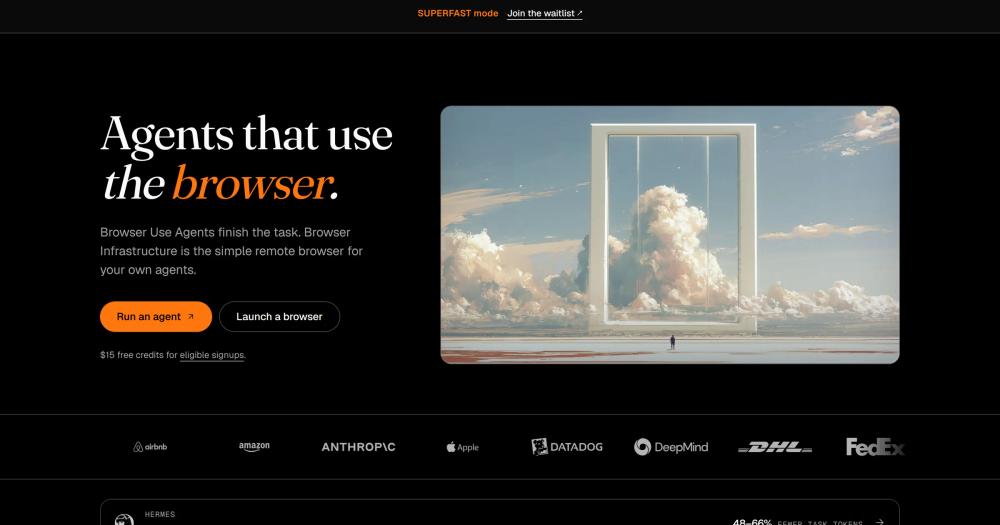
Automate browser tasks with AI agents. MIT-licensed Python library that lets any LLM click, fill forms, and extract data from live websites.

Visit websiteGitHub118.7K stars
image of browser-use
TL;DR

browser-use is a Python library and AI agent framework that gives any LLM the ability to control a real web browser: clicking, typing, navigating, and extracting data from live sites. It replaces paid browser automation services like Skyvern and MultiOn with a self-hosted, MIT-licensed alternative that works with GPT, Claude, Gemini, or the team's own optimized models. Install via pip and point it at any LLM API key; for production scale, the optional Browser Use Cloud adds managed browsers with captcha bypass and proxy rotation at $0.02 per browser hour. Best for Python developers and automation engineers building agents that need reliable web interaction without hardcoded selectors or per-page fees.

Read the full breakdownHide the full breakdownWho it is for, how it works, trade-offs, the quick start and the FAQ
who it's for

Who browser-use is for#

Python developers building autonomous AI agents

Browser-use gives your agent real browser access with a single pip install. Use it to build agents that research topics, fill forms, extract competitor pricing, or complete multi-step checkout flows. The LLM sees the live page state and reasons about it, so the agent handles DOM changes without selector maintenance.

Skip if:

Your automation target exposes a structured API or RSS feed. When the site provides machine-readable data directly, calling the API is faster and more reliable than browser automation.

Automation engineers running scheduled web tasks

Pair browser-use with a scheduler to run recurring web tasks: monitoring page changes, extracting data into spreadsheets, or submitting periodic forms. The cloud scripting option lets you save a task as a rerunnable script that fetches live data even when the target site updates its layout.

Skip if:

You need millisecond-latency data or high-frequency monitoring. Browser automation adds seconds per page load; for feeds with official APIs or financial data streams, direct API access is faster.

Product teams embedding browser agents into their own software

The Python library's Tools API lets you add custom functions the agent calls alongside its browser controls, so you can embed browser-use inside a larger application. The cloud API supports webhooks and structured output, making it straightforward to trigger browser tasks from your backend and receive results in your data pipeline.

Skip if:

Your product is not Python-based and you need deep library-level embedding. Teams on Node.js or Go would interact via the cloud REST API rather than importing the library directly, which adds an HTTP boundary.

the problem

The problem it solves#

Traditional browser automation is a maintenance burden. Playwright and Selenium scripts depend on CSS selectors and XPath expressions that break every time a site updates its layout. Keeping selectors current across dozens of sites is a constant engineering cost, and even well-maintained scripts fail silently when a site restructures its checkout flow, moves a button, or adds a popup. The problem worsens at scale: running many browser sessions in parallel is memory-intensive, Chrome consumes gigabytes per worker, and rotating proxies or solving CAPTCHAs requires a separate infrastructure layer.

Paid browser automation services exist precisely for this complexity, but they charge per-page or per-task fees that become significant above toy volumes, and they introduce vendor dependency into a critical automation layer. Teams that want reliable, cost-controlled browser automation at scale have historically had to choose between fragile DIY scripts or expensive managed APIs.

how browser-use solves it

How it solves it#

LLM-native browser control

Any LLM can operate the browser: GPT, Claude, Gemini, or browser-use's own optimized bu-* models. The agent interprets page state visually and reasons about what to click or type, replacing selector-based scripting with goal-based instruction. You describe the task; the agent figures out the steps.

Python library with pip install

Install with a single `pip install browser-use` command (Python 3.11+ required). Integrates with LangChain's chat model interface, so it works with any LLM provider you have already connected. The library is MIT licensed and runs on your own machine or server with no cloud dependency.

Custom tools and extensibility

Extend the agent with Python functions decorated as tools. The Tools API accepts any callable and exposes it to the agent alongside the browser controls, letting you connect your agent to internal APIs, databases, or external services without leaving the automation loop.

Open source library with optional managed cloud

The MIT-licensed library runs on your own infrastructure at no license cost. For production workloads needing captcha solving, proxy rotation, and scalable browser infrastructure, Browser Use Cloud provides managed browsers at $0.02 per browser hour with full API, SDK, and webhook support.

MCP server and developer API

The cloud platform exposes a REST API (v4), SDK, OpenAPI spec, webhooks, and an MCP server from a single integration point. For Claude Code, Cursor, and similar agents, browser-use can be installed as a skill that registers an MCP connection to the browser directly on your local machine.

strengths · trade-offs

Strengths and trade-offs#

Strengths

  • Top-ranked web agent on the Odysseys benchmarkBrowser-use holds the #1 position on the Odysseys leaderboard with an 87.4% average across 200 long-horizon web tasks, ahead of computer-use agents from OpenAI, Anthropic, Google, and Microsoft. The benchmark and harness repos are open source, making the methodology auditable.
  • MIT license with no per-page feesThe self-hosted library is MIT licensed: fork it, modify it, or ship it commercially with no licensing fees. Unlike paid browser automation APIs that charge per-page or per-task, your infrastructure costs are the only variable once you have an LLM key.
  • Works with any LLM providerChatBrowserUse accepts provider-prefixed model IDs (anthropic/claude-sonnet-4-6, openai/gpt-5.5, google/gemini-3-pro), so you are not locked into one AI provider. You can switch models for cost or performance without rewriting your agent code.
  • One of the top 100 GitHub repositories in the worldWith 110,000+ stars and 46 million downloads per month, browser-use has a large active community contributing to the codebase. The project's open benchmark repo makes community-contributed testing and methodology improvements possible.

Trade-offs

  • -Chrome memory consumption in self-hosted productionHeadless Chrome is memory-intensive: each concurrent agent requires a dedicated browser process. Running many agents in parallel on a self-hosted server can hit memory limits quickly, and managing session lifecycle, cleanup, and proxy rotation requires additional infrastructure work. The project documentation recommends Browser Use Cloud for production-scale parallel execution.
  • -No built-in captcha solving or stealth fingerprintingThe self-hosted library does not include proxy rotation or advanced browser fingerprinting by default. Sites with aggressive bot detection will block or flag requests. CAPTCHA solving requires pairing the open source agent with a remote stealth browser such as Browser Use Cloud, which introduces a cloud dependency for automation that touches protected sites.
  • -Python 3.11+ requiredThe library requires Python 3.11 or newer. Projects running Python 3.9 or 3.10 need to upgrade their environment before integrating browser-use, which may require auditing other dependencies for Python version compatibility.
versus alternatives

browser-use vs alternatives#

browser-use vs Skyvern

Skyvern is a commercial AI browser automation service that uses AI to navigate web pages and complete tasks from natural language instructions. The key difference is deployment: Skyvern runs as a fully managed service with no self-hosted option, while browser-use is MIT licensed and runs on your own infrastructure.

Featurebrowser-useSkyvern
LicenseMITProprietary
Self-hostingYesNo
LLM choiceAny providerPlatform-managed
Cloud option$0.02/browser hourManaged service pricing

browser-use is the stronger choice for teams that need data control, want to select their own LLM, or face high task volumes where per-task pricing compounds. Skyvern is worth considering when your team prefers a fully managed service with no browser infrastructure to operate.

browser-use vs MultiOn

MultiOn is a commercial AI agent service built for completing browser tasks on behalf of users. It operates as a standalone service rather than a developer library, making it better suited for consumer-facing task delegation than for programmatic automation embedded in software.

Featurebrowser-useMultiOn
LicenseMITProprietary
Self-hostingYesNo
Integration modelPython library, REST APIManaged agent service
LLM choiceAny providerPlatform-managed

For product teams embedding browser automation into their own software, browser-use's Python library with its Tools API and MIT license offers control that a proprietary managed service cannot match. MultiOn suits consumer use cases where end users delegate individual tasks to an AI agent rather than building programmatic automation into a product.

install · quick start

Quick start#

bash
Install browser-use with pip into a Python 3.11+ environment, then configure your LLM API key in a .env file before running your first agent.
```bash
pip install browser-use
```
tech stack · detected from GitHub

What it's built on#

Languages
Python
Infrastructure
AWS
Tooling
Playwright
frequently asked

FAQ#

Is browser-use free to use?

Yes, the Python library is MIT licensed and free to run on your own infrastructure. You supply your own LLM API key (OpenAI, Anthropic, Google, or others). The optional Browser Use Cloud has a free tier with 10 agent tasks per month and 3 concurrent sessions, with paid plans starting at $29 per month for 25 concurrent sessions.

Does browser-use work with any LLM, or only GPT?

It works with any LLM that implements LangChain's chat model interface, including GPT, Claude, Gemini, and locally-run models via Ollama. The team also maintains optimized bu-* models designed specifically for browser automation tasks, available through the ChatBrowserUse interface with a Browser Use API key.

Can I self-host browser-use for production workloads?

The library runs on any server with Python 3.11+ and Chrome installed. For production, the README notes that Chrome is memory-intensive: each concurrent agent needs a dedicated browser process, so parallel workloads require planning around memory. For high-concurrency production use, Browser Use Cloud handles browser infrastructure, proxy rotation, and captcha solving, starting at $0.02 per browser hour.

How does browser-use handle sites with login or CAPTCHAs?

For authentication, the library supports reusing existing Chrome profiles with saved session cookies, so you can stay logged in between runs. CAPTCHA solving requires stealth browsers with proxy rotation, which the open source library does not include by default. Browser Use Cloud provides stealth browser infrastructure designed to bypass common bot detection.

What is the difference between the CLI and the Python library?

The CLI is for one-off tasks through an existing agent (Claude Code, Cursor, Codex) that wants to delegate a browser task. The Python library is for developers building software: running tasks on a schedule, embedding browser automation in a product, or building custom agents with fine-grained control. If you are writing code rather than issuing one-off commands, use the library.

also worth a look

Similar open-source tools#

servers

Alternative toComposio

Open reference servers for connecting AI to external tools and data

  • 91,470 GitHub stars
  • CustomLicence Apache-2.0 and MIT (dual, transitioning)

FckSignups

InCustomer Support

Open-source tools that work instantly, no signup required

  • 4,511 GitHub stars
  • GPL-3.0Licence GPL-3.0

Omnara

Featured

Alternative toCClaude Managed Agents

Open-source agent deployment API. Self-host or use Omnara Cloud.

  • 2,957 GitHub stars
  • Apache-2.0Licence Apache-2.0

Agent Reach

Featured

Alternative toFirecrawl

Give any AI agent internet access, free and local

  • 100,165 GitHub stars
  • MITLicence MIT

Openspline

Alternative toHeyGen LiveAvatar

Talking-avatar SDK for voice AI agents, MIT-licensed, Python and Node.

  • 261 GitHub stars
  • MITLicence MIT

Marker

Alternative toUnstructured.io

Convert documents to clean markdown and JSON with open source AI.

  • 40,566 GitHub stars
  • Apache-2.0Licence Apache-2.0
by category

Open source tools in these categories#

196

Web Development

freeCodeCamp, superpowers, Skills for Real Engineers
404

AI & Machine Learning

OpenClaw, freeCodeCamp, REA (Reverse Engineer Anything)
460

Developer Tools

REA (Reverse Engineer Anything), superpowers, Skills for Real Engineers
78

APIs & Integration

n8n, Firecrawl, iptv

Featured

Omnara

Alternative toCClaude Managed Agents

Open-source agent deployment API. Self-host or use Omnara Cloud.

  • 2,957 GitHub stars
  • Apache-2.0Licence Apache-2.0
  • #AI Agents

Inbox Zero

Alternative toSuperhuman

AI email assistant that drafts replies and clears your inbox

  • 12,712 GitHub stars
  • AGPL-3.0Licence AGPL-3.0
  • #Email

rakazo

Alternative toGrok Bot

AI teammates you own: your keys, your model, your machine.

  • 4,904 GitHub stars
  • Apache-2.0Licence Apache-2.0
  • #AI Agents
Feature your project

New open source projects by email

The projects we add and every new guide. Free, unsubscribe any time.

Find open source alternatives to paid software

/
  • Claude Code to OpenCode
  • Jira to Windshift
  • Notion to AppFlowy
  • Slack to Mattermost
  • Linear to GitLab
  • Wispr Flow to Handy
  • CapCut to Concat
  • Grok Bot to rakazo
  • Superhuman to Inbox Zero
  • Airtable to AITable
  • Muse to OpenClaw
  • GitHub Copilot to Cline
  • Datadog to Netdata
  • Microsoft Teams to Rocket.Chat
  • Pinecone to Qdrant
  • Zapier to n8n
  • Devin AI to OpenHands
  • Firebase to Supabase
  • 1Password to KeePassXC
  • Confluence to Docmost
  • Contentful to Strapi
  • Adobe Premiere Pro to Shotcut
  • ChatGPT to AnythingLLM
  • LangSmith to Langfuse
  • Claude Code to OpenCode
  • Jira to Windshift
  • Notion to AppFlowy
  • Slack to Mattermost
  • Linear to GitLab
  • Wispr Flow to Handy
  • CapCut to Concat
  • Grok Bot to rakazo
  • Superhuman to Inbox Zero
  • Airtable to AITable
  • Muse to OpenClaw
  • GitHub Copilot to Cline
  • Datadog to Netdata
  • Microsoft Teams to Rocket.Chat
  • Pinecone to Qdrant
  • Zapier to n8n
  • Devin AI to OpenHands
  • Firebase to Supabase
  • 1Password to KeePassXC
  • Confluence to Docmost
  • Contentful to Strapi
  • Adobe Premiere Pro to Shotcut
  • ChatGPT to AnythingLLM
  • LangSmith to Langfuse