
Open Source Alternatives
  • Alternatives
  • Categories
    Categories by size882 projects
    • Developer Tools461
    • AI & Machine Learning404
    • Web Development196
    • Business & Productivity191
    • Communication & Collaboration126
    • Security & Monitoring126
    • IT Management123
    • Product & Project Management106
    • Cloud & Hosting105
    • Data & Analytics104
    Browse all 21 categoriesLLMOps & AI Tooling, Design & Creative and 9 more
  • Blog
  • Advertise
SearchNotion, Slack, password manager.../
Submit
Open Source Alternatives
  • Alternatives
    • Developer Tools461
    • AI & Machine Learning404
    • Web Development196
    • Business & Productivity191
    • Communication & Collaboration126
    • Security & Monitoring126
    • Browse all 21 categories
  • Blog
  • Advertise
Submit your project

New open source projects by email

The projects we add and every new guide. Free, unsubscribe any time.

Open Source Alternatives LogoOpen Source Alternatives

Handpicked Open Source Alternatives to Paid Softwares

Product

  • Categories
  • Tag
  • Advertise

Resources

  • Blog
  • Collection
  • Submit

Company

  • Privacy Policy
  • Terms of Service
  • Refund Policy
  • Sitemap

Alternatives

  • Claude Code
  • Jira
  • Notion
  • Slack
  • Linear
  • Wispr Flow
  • All alternatives
© 2026 Open Source Alternatives. All rights reserved.
Open SourceAlternatives
Home/Categories/Web Development/Ycode
icon of Ycode

Ycode

Open source alternative to Webflow, Wix and Squarespace

  • 331 stars
  • MIT
  • Active this week
  • Last commit 2 days ago

Last verified Oct 20, 2026

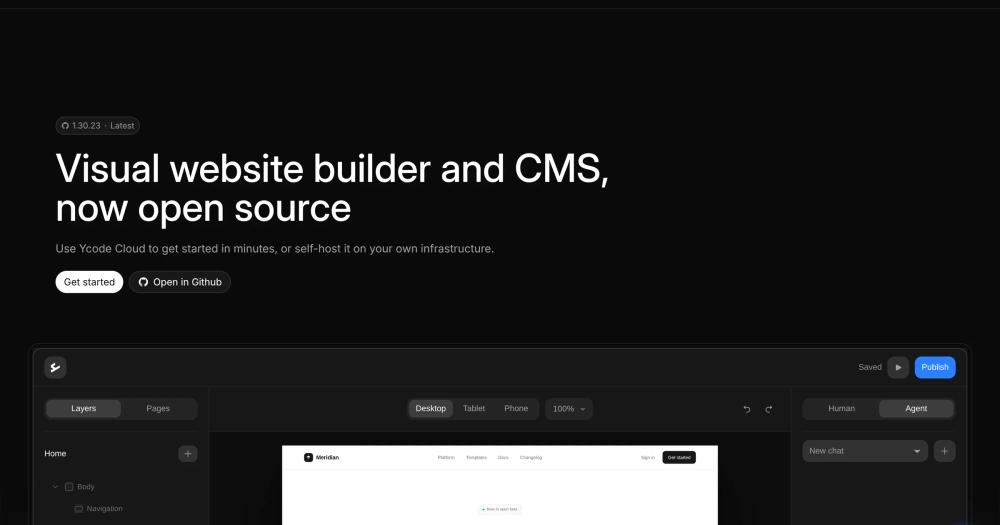
Build visual websites and CMS-backed pages with open source code, self-hosting, or managed Ycode Cloud.

Visit websiteGitHub331 starsDeploy on Hostinger
image of Ycode
TL;DR

Ycode is an open source visual website builder and CMS for creating sites without writing code. It replaces hosted no-code builders for teams that want visual editing with a self-hosted path and cloud option. MIT licensed.

Read the full breakdownHide the full breakdownWho it is for, how it works, trade-offs and the FAQ
who it's for

Who Ycode is for#

Marketing teams wanting visual site control

Ycode fits teams that need non-developers to edit pages while developers retain a path to inspect and self-host the platform.

Skip if:

You need a simple static site generator with no database or hosted dependencies.

Agencies building client sites

The visual builder and CMS combination can help agencies create editable sites without committing each client to a closed hosted builder.

Skip if:

Your clients require a fully managed vendor with support, templates, and hosting included.

the problem

The problem it solves#

No-code website builders are convenient until teams need ownership, export control, or custom workflows outside a hosted platform. Designers and marketers want visual editing, while developers want a codebase and deployment model they can inspect.

The hard balance is keeping the builder approachable without hiding every operational detail. A self-hosted visual CMS needs clear setup requirements and realistic infrastructure expectations.

how Ycode solves it

How it solves it#

Visual website builder

Ycode lets users create and manage websites without writing code, making it a fit for marketing and content teams.

CMS built into the builder

The README describes Ycode as both a visual website builder and CMS, so content management is part of the product rather than a separate add-on.

Self-hosted and cloud options

Ycode is available as a self-hosted open source project or as a managed cloud service, giving teams a choice between control and convenience.

strengths · trade-offs

Strengths and trade-offs#

Strengths

  • Visual editing with source controlYcode is strongest for teams that want a Webflow-like visual workflow but still value access to an open source project.
  • Clear self-hosting prerequisitesThe README names GitHub, Supabase, and Vercel as self-hosting requirements, which helps teams assess the deployment path before trying it.

Trade-offs

  • -Self-hosting depends on external servicesYcode's open source setup requires accounts with GitHub, Supabase, and Vercel. Teams wanting a single-server install should evaluate that architecture carefully.
tech stack · detected from GitHub

What it's built on#

Languages
TypeScript
Frameworks
Next.jsReact
Databases
PostgreSQL
Infrastructure
AWS
frequently asked

FAQ#

Is Ycode open source?

Yes. The README describes Ycode as available as a self-hosted open source project, and GitHub reports MIT licensing.

Can Ycode be used without coding?

Yes. Ycode is a visual website builder and CMS designed for creating and managing websites without writing code.

What accounts are needed to self-host Ycode?

The README says self-hosting requires GitHub, Supabase, and Vercel accounts.

also worth a look

Similar open-source tools#

WordPress

Alternative toWix

Open source CMS with a block editor, 60,000+ plugins, and 40% market share.

  • 21,485 GitHub stars
  • GPL-2.0Licence GPL-2.0

GrapesJS

Alternative toUnlayer

Build drag-and-drop page editors inside your own stack.

  • 26,319 GitHub stars
  • BSD-2-ClauseLicence BSD-2-Clause

Webstudio

Alternative toWebflow

Open source website builder with visual design and CMS

  • 9,093 GitHub stars
  • AGPL-3.0Licence AGPL-3.0

Grav

Alternative toWordPress.com

Flat-file CMS for fast, self-hosted websites.

  • 15,689 GitHub stars
  • MITLicence MIT

VvvebJs

Alternative toUnlayer

Open source drag-and-drop page builder for Bootstrap 5 sites

  • 8,694 GitHub stars
  • Apache-2.0Licence Apache-2.0

Silex

Alternative toWebflow

Open source website builder for designers with visual editing and CMS.

  • 3,012 GitHub stars
  • AGPL-3.0Licence AGPL-3.0
by category

Open source tools in these categories#

196

Web Development

freeCodeCamp, superpowers, Skills for Real Engineers
35

No-Code & Low-Code

n8n, dify, Langflow
191

Business & Productivity

OpenClaw, Excalidraw, RustDesk
Hostinger

Run Ycode on your own server

Self-host Ycode on a Hostinger VPS.

Deploy on Hostinger

Featured

rakazo

Alternative toGrok Bot

AI teammates you own: your keys, your model, your machine.

  • 4,904 GitHub stars
  • Apache-2.0Licence Apache-2.0
  • #AI Agents

Inbox Zero

Alternative toSuperhuman

AI email assistant that drafts replies and clears your inbox

  • 12,712 GitHub stars
  • AGPL-3.0Licence AGPL-3.0
  • #Email

Omnara

Alternative toCClaude Managed Agents

Open-source agent deployment API. Self-host or use Omnara Cloud.

  • 2,957 GitHub stars
  • Apache-2.0Licence Apache-2.0
  • #AI Agents
Feature your project

New open source projects by email

The projects we add and every new guide. Free, unsubscribe any time.

Find open source alternatives to paid software

/
  • Claude Code to OpenCode
  • Jira to Windshift
  • Notion to AppFlowy
  • Slack to Mattermost
  • Linear to GitLab
  • Wispr Flow to Handy
  • CapCut to Concat
  • Grok Bot to rakazo
  • Superhuman to Inbox Zero
  • Airtable to AITable
  • Muse to OpenClaw
  • GitHub Copilot to Cline
  • Datadog to Netdata
  • Microsoft Teams to Rocket.Chat
  • Pinecone to Qdrant
  • Zapier to n8n
  • Devin AI to OpenHands
  • Firebase to Supabase
  • 1Password to KeePassXC
  • Confluence to Docmost
  • Contentful to Strapi
  • Adobe Premiere Pro to Shotcut
  • ChatGPT to AnythingLLM
  • LangSmith to Langfuse
  • Claude Code to OpenCode
  • Jira to Windshift
  • Notion to AppFlowy
  • Slack to Mattermost
  • Linear to GitLab
  • Wispr Flow to Handy
  • CapCut to Concat
  • Grok Bot to rakazo
  • Superhuman to Inbox Zero
  • Airtable to AITable
  • Muse to OpenClaw
  • GitHub Copilot to Cline
  • Datadog to Netdata
  • Microsoft Teams to Rocket.Chat
  • Pinecone to Qdrant
  • Zapier to n8n
  • Devin AI to OpenHands
  • Firebase to Supabase
  • 1Password to KeePassXC
  • Confluence to Docmost
  • Contentful to Strapi
  • Adobe Premiere Pro to Shotcut
  • ChatGPT to AnythingLLM
  • LangSmith to Langfuse