
Open Source Alternatives
  • Alternatives
  • Categories
    Categories by size881 projects
    • Developer Tools460
    • AI & Machine Learning404
    • Web Development196
    • Business & Productivity191
    • Communication & Collaboration126
    • Security & Monitoring126
    • IT Management123
    • Product & Project Management106
    • Cloud & Hosting104
    • Data & Analytics104
    Browse all 21 categoriesLLMOps & AI Tooling, Design & Creative and 9 more
  • Blog
  • Advertise
SearchNotion, Slack, password manager.../
Submit
Open Source Alternatives
  • Alternatives
    • Developer Tools460
    • AI & Machine Learning404
    • Web Development196
    • Business & Productivity191
    • Communication & Collaboration126
    • Security & Monitoring126
    • Browse all 21 categories
  • Blog
  • Advertise
Submit your project

New open source projects by email

The projects we add and every new guide. Free, unsubscribe any time.

Open Source Alternatives LogoOpen Source Alternatives

Handpicked Open Source Alternatives to Paid Softwares

Product

  • Categories
  • Tag
  • Advertise

Resources

  • Blog
  • Collection
  • Submit

Company

  • Privacy Policy
  • Terms of Service
  • Refund Policy
  • Sitemap

Alternatives

  • Claude Code
  • Jira
  • Notion
  • Slack
  • Linear
  • Wispr Flow
  • All alternatives
© 2026 Open Source Alternatives. All rights reserved.
Open SourceAlternatives
Home/Categories/Developer Tools/orca
icon of orca

orca

Open source alternative to Conductor, Cursor, GitHub Copilot and Devin AI

  • 99.4K stars
  • MIT
  • Active this week
  • Last commit 1 day ago

Last verified Oct 20, 2026

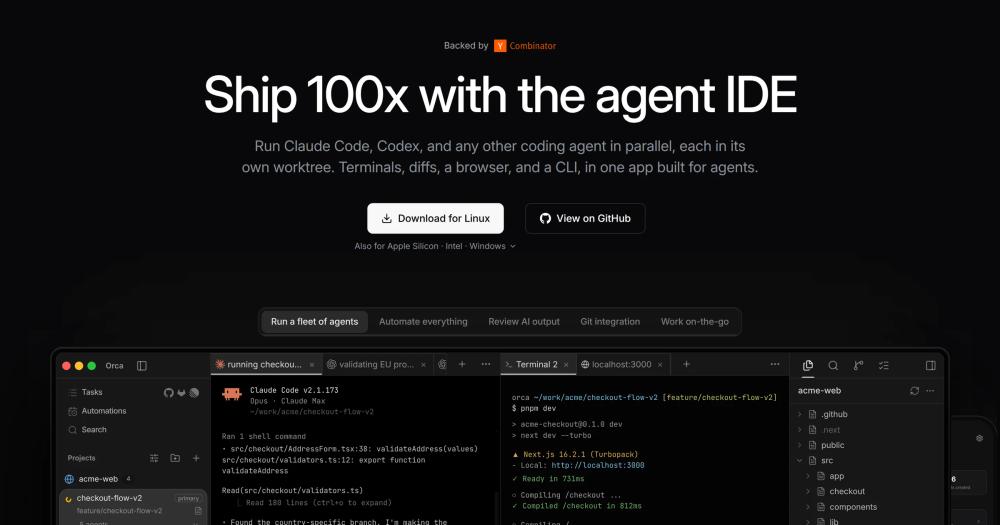
Orchestrate parallel coding agents across isolated worktrees. MIT licensed, desktop-first, and built for Claude Code, Codex, OpenCode, and similar CLIs.

Visit websiteGitHub99.4K stars
image of orca
TL;DR

orca Orchestrate parallel coding agents across isolated worktrees. MIT licensed, desktop-first, and built for Claude Code, Codex, OpenCode, and similar CLIs. Orca is best for developers and technical leads who already use coding-agent CLIs and need a desktop control plane for parallel work. It fits teams that want stronger workflow organization without moving every agent interaction into one proprietary model vendor.

Read the full breakdownHide the full breakdownWho it is for, how it works, trade-offs, the quick start and the FAQ
who it's for

Who orca is for#

Best fit

Orca is best for developers and technical leads who already use coding-agent CLIs and need a desktop control plane for parallel work. It fits teams that want stronger workflow organization without moving every agent interaction into one proprietary model vendor.

Consider alternatives when

Use it when you routinely run several agents or worktrees at once. A simpler editor or terminal is enough if you only ask one agent for small local changes.

the problem

The problem it solves#

AI coding agents are useful, but running several of them in the same checkout creates branch conflicts, lost context, and hard-to-review changes. Developers end up juggling terminals, worktrees, issue tabs, and pull requests while trying to remember which agent did what.

That workflow creates infrastructure overhead for teams adopting coding agents seriously. A normal IDE can edit files, but it usually does not treat agent sessions, worktrees, GitHub tasks, and remote machines as one operating surface.

how orca solves it

How it solves it#

Worktree isolation keeps parallel agent tasks

Worktree isolation keeps parallel agent tasks from overwriting each other's files.

Multi-agent terminals let developers compare different

Multi-agent terminals let developers compare different CLIs and models in one workspace.

Built-in source control helps review generated

Built-in source control helps review generated diffs before they become commits or PRs.

GitHub and Linear context keeps issue

GitHub and Linear context keeps issue work close to the agent session that produced it.

Remote and mobile support make long-running

Remote and mobile support make long-running agent tasks easier to monitor.

strengths · trade-offs

Strengths and trade-offs#

Strengths

  • Orca is an agent development environmentOrca is an agent development environment for running CLI agents side by side across isolated git worktrees.
  • The repository is MIT licensed, shipsThe repository is MIT licensed, ships desktop builds for macOS, Windows, and Linux, and includes support for agents such as Claude Code, Codex, Grok, Gemini, OpenCode, and related CLI tools.
  • This approach belongs in Developer ToolsThis approach belongs in Developer Tools because it manages the workspace around AI agents rather than acting as a model provider.

Trade-offs

  • -When to choose another pathUse it when you routinely run several agents or worktrees at once. A simpler editor or terminal is enough if you only ask one agent for small local changes.
versus alternatives

orca vs alternatives#

Unlike Cursor's proprietary IDE, Orca is focused on orchestrating fleets of CLI agents across separate worktrees and repositories. Compared to paid commercial tools in this category, Orca is better for developers coordinating multiple autonomous coding runs.

install · quick start

Quick start#

text
Install Orca on macOS with Homebrew when you want the desktop agent orchestrator managed as a cask.
brew install --cask stablyai/orca/orca
tech stack · detected from GitHub

What it's built on#

Languages
JavaScriptTypeScript
Frameworks
Next.jsReact
Tooling
esbuild
frequently asked

FAQ#

What is orca best for?

Orca is best for developers and technical leads who already use coding-agent CLIs and need a desktop control plane for parallel work. It fits teams that want stronger workflow organization without moving every agent interaction into one proprietary model vendor.

How does orca compare to paid tools?

Unlike Cursor's proprietary IDE, Orca is focused on orchestrating fleets of CLI agents across separate worktrees and repositories. Compared to paid commercial tools in this category, Orca is better for developers coordinating multiple autonomous coding runs.

How do I install orca?

Install Orca on macOS with Homebrew when you want the desktop agent orchestrator managed as a cask. brew install --cask stablyai/orca/orca

also worth a look

Similar open-source tools#

prime-agent

Alternative toDevin AI

Automate coding workflows with a self-improving agent

  • 22,206 GitHub stars
  • MITLicence MIT

Flue Framework

Alternative toCClaude Managed Agents

Build powerful, autonomous agents with TypeScript.

  • 8,500 GitHub stars
  • Apache-2.0Licence Apache-2.0

Parallel Code

Alternative toConductor

Run AI coding agents in parallel, each in its own worktree

  • 1,056 GitHub stars
  • MITLicence MIT

Threadlines

Alternative toConductor

Open-source ADE for Claude Code, Codex, and Cursor in one thread

  • 20 GitHub stars
  • MITLicence MIT

monocode

Alternative toConductor

One desktop UI for all your AI coding agents.

  • 3,177 GitHub stars
  • MITLicence MIT

Superlearn

Alternative toNotebookLM

Interactive study boards for any topic, no new subscription needed

  • 123 GitHub stars
  • MITLicence MIT
by category

Open source tools in these categories#

460

Developer Tools

REA (Reverse Engineer Anything), superpowers, Skills for Real Engineers
404

AI & Machine Learning

freeCodeCamp, OpenClaw, REA (Reverse Engineer Anything)
196

Web Development

superpowers, freeCodeCamp, Skills for Real Engineers

Featured

rakazo

Alternative toGrok Bot

AI teammates you own: your keys, your model, your machine.

  • 4,904 GitHub stars
  • Apache-2.0Licence Apache-2.0
  • #AI Agents

Inbox Zero

Alternative toSuperhuman

AI email assistant that drafts replies and clears your inbox

  • 12,712 GitHub stars
  • AGPL-3.0Licence AGPL-3.0
  • #Email

Omnara

Alternative toCClaude Managed Agents

Open-source agent deployment API. Self-host or use Omnara Cloud.

  • 2,957 GitHub stars
  • Apache-2.0Licence Apache-2.0
  • #AI Agents
Feature your project

New open source projects by email

The projects we add and every new guide. Free, unsubscribe any time.

Find open source alternatives to paid software

/
  • Claude Code to OpenCode
  • Jira to Windshift
  • Notion to AppFlowy
  • Slack to Mattermost
  • Linear to GitLab
  • Wispr Flow to Handy
  • CapCut to Concat
  • Grok Bot to rakazo
  • Superhuman to Inbox Zero
  • Airtable to AITable
  • Muse to OpenClaw
  • GitHub Copilot to Cline
  • Datadog to Netdata
  • Microsoft Teams to Rocket.Chat
  • Pinecone to Qdrant
  • Zapier to n8n
  • Devin AI to OpenHands
  • Firebase to Supabase
  • 1Password to KeePassXC
  • Confluence to Docmost
  • Contentful to Strapi
  • Adobe Premiere Pro to Shotcut
  • ChatGPT to AnythingLLM
  • LangSmith to Langfuse
  • Claude Code to OpenCode
  • Jira to Windshift
  • Notion to AppFlowy
  • Slack to Mattermost
  • Linear to GitLab
  • Wispr Flow to Handy
  • CapCut to Concat
  • Grok Bot to rakazo
  • Superhuman to Inbox Zero
  • Airtable to AITable
  • Muse to OpenClaw
  • GitHub Copilot to Cline
  • Datadog to Netdata
  • Microsoft Teams to Rocket.Chat
  • Pinecone to Qdrant
  • Zapier to n8n
  • Devin AI to OpenHands
  • Firebase to Supabase
  • 1Password to KeePassXC
  • Confluence to Docmost
  • Contentful to Strapi
  • Adobe Premiere Pro to Shotcut
  • ChatGPT to AnythingLLM
  • LangSmith to Langfuse