
Teams giving staff a private AI chat workspace
Open WebUI wraps local or compatible models in a browser UI.
Skip if:
your team already accepts a managed AI workspace and does not need self-hosting.

Open source alternative to TypingMind, Cloudiax Managed LLM, Allganize AI and Tyk AI Studio
Last verified
Run a self-hosted AI chat workspace with Ollama, RAG, multi-model support, and team controls through a ChatGPT-like web UI.
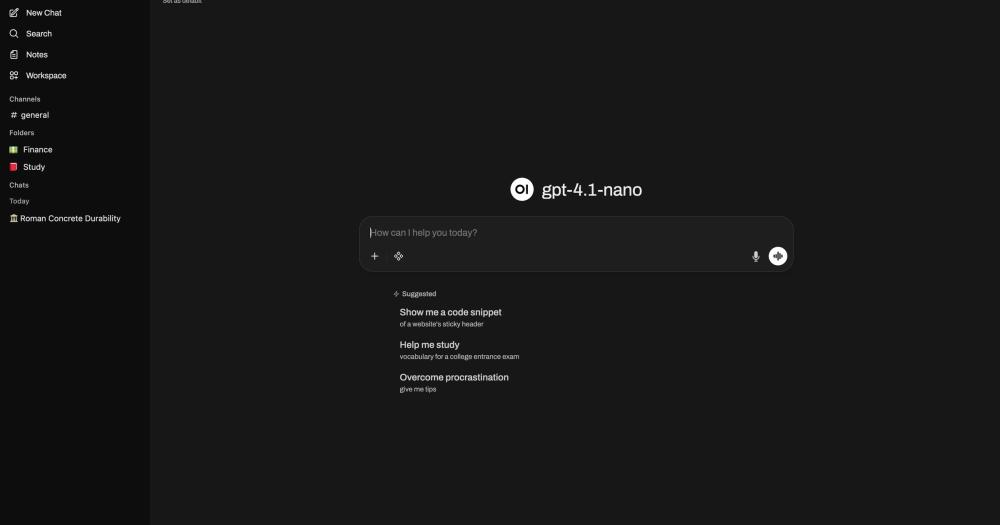
Open WebUI wraps local or compatible models in a browser UI.
your team already accepts a managed AI workspace and does not need self-hosting.
the UI can switch between Ollama and OpenAI-compatible endpoints.
you need only a command-line model runner.
document chat and plugin support help turn model access into a usable workflow.
you need enterprise governance before any pilot.
Teams adopting local models often end up with a gap between model runners and real users. Ollama or an OpenAI-compatible endpoint can serve models, but non-technical teammates still need chat history, file context, permissions, RAG, and a usable browser interface.
Hosted AI workspaces solve the interface problem by moving conversations, documents, and admin controls into a vendor account. That tradeoff is hard to accept when prompts include customer data, internal docs, or regulated information.
Connects to Ollama and OpenAI-compatible APIs, including local and cloud-based model providers.
Docker quick start runs the UI on port 3000 with persistent backend data stored in a named volume.
Built-in RAG support helps users chat with local documents and knowledge sources.
Plugins, tool calling, task models, and Python function support extend chat workflows beyond plain prompts.
Responsive web UI and PWA support make the same instance usable from desktop and mobile browsers.
Use the official Docker image for a single-node self-hosted install. This command publishes the UI on port 3000 and stores backend data in a named volume.

```bash
docker run -d -p 3000:8080 --add-host=host.docker.internal:host-gateway -v open-webui:/app/backend/data --name open-webui --restart always ghcr.io/open-webui/open-webui:main
```No. Open WebUI works with Ollama and OpenAI-compatible APIs, so you can connect local or cloud-based model providers. Ollama is common because it makes local model serving simple.
Yes, Open WebUI is designed for self-hosted and offline operation when paired with local models. Any cloud model provider you connect will still require network access.
Docker is the recommended path for most users. The official quick start runs the container, exposes the UI on port 3000, and stores persistent data in a Docker volume.


Alternative toFlightradar24
Real-time global intelligence on a 3D globe

Alternative to Grok Bot
Self-hosted AI agent: persistent memory, multi-channel chat, model choice.

Alternative to Together AI
High-throughput LLM inference server with OpenAI-compatible API

Alternative to OpenAI API
Self-hosted AI runtime: any model, any modality, any hardware.

Phase-guarded workflow layer for AI coding agents, with eval built in
Run Open WebUI on your own server
Hostinger sets Open WebUI up as a one-click app on a VPS.
Deploy on HostingerFeatured

Alternative toGrok Bot
AI teammates you own: your keys, your model, your machine.

Alternative to Superhuman
AI email assistant that drafts replies and clears your inbox

Alternative toClaude Managed Agents
Open-source agent deployment API. Self-host or use Omnara Cloud.
The projects we add and every new guide. Free, unsubscribe any time.
 Claude Code to
  OpenCode
 Jira to
  Windshift
 Notion to
  AppFlowy
 Slack to
  Mattermost
 Linear to
  GitLab
 Wispr Flow to
  Handy
Handy CapCut to
  Concat
 Grok Bot to
  rakazo
 Superhuman to
  Inbox Zero
 Airtable to
  AITable
 Muse to
  OpenClaw
 GitHub Copilot to
  Cline
Cline Datadog to
  Netdata
 Microsoft Teams to
  Rocket.Chat
 Pinecone to
  Qdrant
 Zapier to
  n8n
n8n Devin AI to
  OpenHands
 Firebase to
  Supabase
 1Password to
  KeePassXCConfluence to
  Docmost
 Contentful to
  Strapi
 Adobe Premiere Pro to
  Shotcut
 ChatGPT to
  AnythingLLM
 LangSmith to
  Langfuse


