Open Source Alternatives
  • Alternatives
  • Categories
    Categories by size882 projects
    • Developer Tools461
    • AI & Machine Learning404
    • Web Development196
    • Business & Productivity191
    • Communication & Collaboration126
    • Security & Monitoring126
    • IT Management123
    • Product & Project Management106
    • Cloud & Hosting105
    • Data & Analytics104
    Browse all 21 categoriesLLMOps & AI Tooling, Design & Creative and 9 more
  • Blog
  • Advertise
SearchNotion, Slack, password manager.../
Submit
Open Source Alternatives
  • Alternatives
    • Developer Tools461
    • AI & Machine Learning404
    • Web Development196
    • Business & Productivity191
    • Communication & Collaboration126
    • Security & Monitoring126
    • Browse all 21 categories
  • Blog
  • Advertise
Submit your project

New open source projects by email

The projects we add and every new guide. Free, unsubscribe any time.

Open Source Alternatives LogoOpen Source Alternatives

Handpicked Open Source Alternatives to Paid Softwares

Product

  • Categories
  • Tag
  • Advertise

Resources

  • Blog
  • Collection
  • Submit

Company

  • Privacy Policy
  • Terms of Service
  • Refund Policy
  • Sitemap

Alternatives

  • Claude Code
  • Jira
  • Notion
  • Slack
  • Linear
  • Wispr Flow
  • All alternatives
© 2026 Open Source Alternatives. All rights reserved.
Open SourceAlternatives
Home/Categories/No-Code & Low-Code/NocoDB
icon of NocoDB

NocoDB

Open source alternative to Airtable, Retool, Softr, Forest Admin, AppSheet and monday.com

  • 65.3K stars
  • Active this week
  • Last commit 1 day ago

Last verified Oct 20, 2026

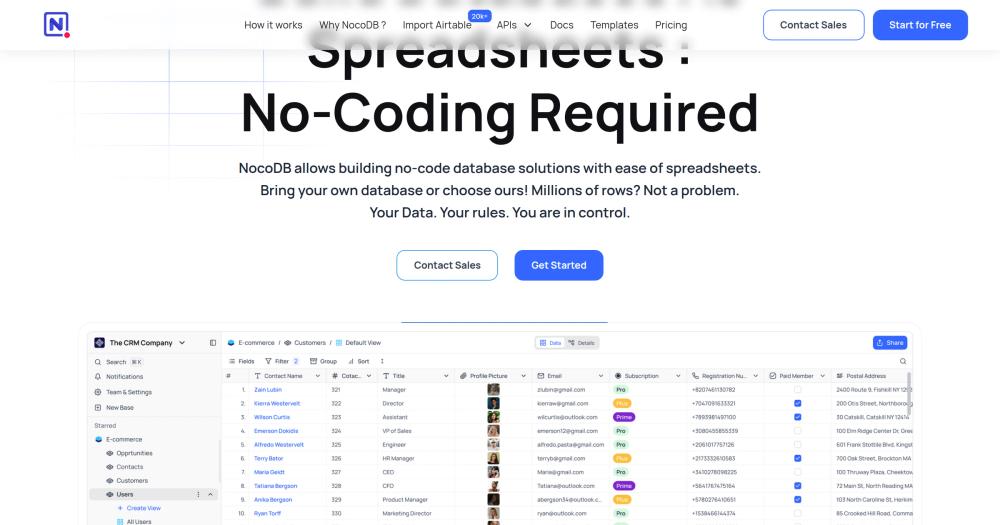
Build no-code database apps on any Postgres, MySQL, or SQLite with a spreadsheet interface. Grid, kanban, gallery, form, and calendar views included.

Visit websiteGitHub65.3K stars1-click deploy on Hostinger
image of NocoDB
TL;DR

NocoDB connects to any Postgres, MySQL, or SQLite database and generates a no-code spreadsheet interface on top of it, with grid, kanban, gallery, form, and calendar views. It replaces Airtable and similar paid hosted database tools for teams that want to keep data in their own infrastructure. The project is licensed under the Sustainable Use License: free for internal self-hosting, but offering it as a managed service to third parties may require a commercial license. Self-hosting runs on a single Docker command. Best for ops, product, and data teams that already manage relational databases.

Read the full breakdownHide the full breakdownWho it is for, how it works, trade-offs, the quick start and the FAQ
who it's for

Who NocoDB is for#

Ops and data teams managing internal databases

If your team tracks inventory, vendors, customer records, or any operational data in Postgres or MySQL, NocoDB adds a non-technical editing interface without rebuilding the backend. Non-technical teammates can update records, apply filters, and export views without filing tickets to engineering. Role-based permissions keep each person limited to what they need to see or change.

Skip if:

Skip if your data is not already in a relational database. NocoDB requires an existing Postgres, MySQL, or SQLite database to connect to. If you need to create a brand-new data store from scratch, a hosted tool or simple spreadsheet is faster to start with.

Agencies building client-facing data portals

NocoDB can share a specific view publicly via a password-protected link, letting clients browse or submit data through a form view without needing a NocoDB login. The form view generates a shareable URL that writes records directly to your database. This is useful for client intake forms, status portals, or any scenario where clients need read or write access to a subset of your data.

Skip if:

Review the Sustainable Use License before using NocoDB for client-hosted or white-labeled deployments. Offering it as a managed service to clients may require a commercial license from NocoDB.

Product teams that need non-SQL access to production data

NocoDB gives product managers, operations leads, and customer success teams read or edit access to live database records through a familiar spreadsheet interface. Role-based permissions let you give each team member exactly the access they need, from view-only to full edit, without granting SQL database credentials to non-technical staff.

Skip if:

Skip if your production database is locked down for compliance reasons and the additional attack surface of a web UI connected directly to it is a concern. Evaluate NocoDB's access control model against your security requirements before connecting a production database.

the problem

The problem it solves#

Most teams manage data in two places at once: developers interact with the actual database using SQL, while everyone else works from exports, spreadsheets, or bespoke admin panels that someone on the engineering team built months ago and now barely maintains.

The spreadsheet exports go stale. The admin panel lacks filtering. When a non-technical teammate needs to update a record, they file a ticket. When someone wants a custom view, it takes a sprint. The data lives in a properly structured Postgres or MySQL database, but the cost of accessing it without SQL knowledge is either a full engineering project or a paid hosted tool that migrates your data into a closed format behind per-seat pricing.

how NocoDB solves it

How it solves it#

Five database view types on the same data

Switch between grid, kanban, gallery, form, and calendar views without duplicating data. Grid is the default and works like a spreadsheet; kanban organizes records by a field value; gallery shows records as visual cards; form view generates a shareable URL for data entry; and calendar view plots records on a date or date-time field. Multiple views per table can be created and locked for read-only sharing.

Bring-your-own-database connectivity

Connect NocoDB to an existing Postgres or MySQL database instead of migrating data to a proprietary format. NocoDB reads your actual schema, builds a no-code interface from it, and writes changes back to your database in real time. SQLite is also supported for local or lightweight deployments. Your data never leaves your infrastructure and remains queryable directly via SQL independent of NocoDB.

Auto-generated REST API and SDK

When you connect a database or create tables, NocoDB automatically generates a versioned REST API for every table with full CRUD operations, filtering, sorting, and pagination. The current API is v3; v2 is available but will be deprecated. A JavaScript and TypeScript SDK is also provided. Your team gets both a visual interface and a programmatic API from the same source of truth without writing API code.

Workflow automations via App Store

NocoDB's App Store integrations let you trigger notifications and sync data when records change. Supported channels include Slack, Discord, and Mattermost for chat; AWS SES, SMTP, and MailerSend for email; and AWS S3, Google Cloud Storage, and Minio for file storage. Webhooks let you push record events to any external service, enabling custom automation pipelines outside the built-in integrations.

Role-based access control per view and base

Define access levels per workspace, base, or view. Collaborators can be assigned viewer, commenter, editor, or owner roles, limiting what each person can read or modify. Specific views can be locked so they are read-only for all users, or shared publicly via a password-protected link without requiring a NocoDB account. This enables controlled data access for clients, stakeholders, or read-only reviewers.

Import from Airtable, CSV, and Excel

Import existing tables directly from Airtable exports, CSV files, or Excel spreadsheets. This covers the most common migration paths for teams moving away from Airtable or spreadsheet-based workflows, and populates an existing NocoDB table or creates a new one from the imported structure. The Airtable import path is documented specifically, targeting teams switching from that platform.

strengths · trade-offs

Strengths and trade-offs#

Strengths

  • Your data stays in your own databaseUnlike Airtable, monday.com, and other proprietary platforms that store data in their own systems, NocoDB mounts on top of your existing Postgres, MySQL, or SQLite. Your data is never locked into a vendor format, and you can query it directly with SQL when needed, independently of NocoDB. This matters for compliance, data portability, and teams that already have database infrastructure.
  • Handles millions of rows without an enterprise planNocoDB handles millions of rows in a single table, a threshold where Airtable bases cap at 50,000 rows on most plans. The product website reports customers managing millions of rows without contacting sales for a higher tier. Performance scales with the underlying database, so adding hardware or upgrading Postgres handles growth without a forced plan change or a sales conversation.
  • 64,000+ GitHub stars and 35,000+ organizationsWith over 64,000 GitHub stars and more than 35,000 organizations using it, NocoDB has broad community validation. Docker pulls exceed 20 million. This adoption level indicates active long-term development, a growing ecosystem of community guides, and reduced risk of abandonment for teams building internal tools on top of it.
  • One-command Docker install with auto-configured production stackThe standard self-hosting path is a single Docker run command. For production, the auto-install script automatically provisions PostgreSQL, Redis, Traefik, and SSL with only a domain name as input. This is significantly simpler than comparable no-code tools that require Kubernetes or manual multi-service orchestration, and the script re-runs cleanly to upgrade NocoDB to the latest version.

Trade-offs

  • -Sustainable Use License: not OSI-approved open sourceNocoDB's master branch is licensed under the Sustainable Use License, a fair-code license that permits free internal self-hosting but restricts offering NocoDB as a managed service to third parties without a commercial license agreement. This is the same license family as n8n. Teams that need a permissively licensed (MIT or Apache 2.0) database UI tool will need to look elsewhere; teams self-hosting for internal use are not affected by this restriction.
  • -Production self-hosting requires ongoing operational overheadRunning NocoDB in production means managing a Postgres database, configuring backups, handling upgrades, and monitoring uptime. The auto-install script simplifies initial setup, but ongoing maintenance falls on your team. Organizations without dedicated infrastructure staff may find the operational burden meaningful compared to a fully managed SaaS tool where the vendor handles reliability.
  • -No native iOS or Android applicationNocoDB's interface is responsive and usable on mobile browsers, but there is no dedicated iOS or Android application. The product website describes this as a responsive view rather than a native app. Teams whose members frequently work from phones or tablets may find the mobile browser experience less convenient than the native mobile apps offered by Airtable or monday.com.
versus alternatives

NocoDB vs alternatives#

NocoDB vs Airtable

Both NocoDB and Airtable give non-technical teams a spreadsheet-style interface for structured data, but they start from opposite assumptions about where your data lives. Airtable is a cloud-hosted proprietary platform that stores your records in Airtable's own infrastructure; NocoDB connects to a Postgres, MySQL, or SQLite database you already own and control.

FeatureNocoDBAirtable
LicenseSustainable Use LicenseProprietary
Self-hostingYes (Docker)No
Pricing modelFree self-hosted; commercial license for SaaS useFree tier; paid plans per user per month
Data storageYour own Postgres, MySQL, or SQLiteAirtable proprietary cloud
Row limit per baseMillions of rows50,000 rows on most paid plans
Auto-generated APIYes (REST v3)Yes (proprietary REST)

NocoDB is the better choice when your data already lives in a relational database, when row volume exceeds Airtable's plan limits, or when keeping data in your own infrastructure is a compliance or cost requirement. It also avoids per-seat pricing, which makes it more predictable for growing teams.

Airtable remains the stronger choice when your team needs a fully managed, zero-infrastructure experience, when you rely on Airtable's native app integrations and marketplace, or when non-technical users need to create new data structures from scratch without any server management. The Sustainable Use License also means NocoDB cannot be offered as a managed database service to clients without a commercial arrangement, so agencies evaluating NocoDB for client deployments should review licensing terms before committing.

NocoDB vs monday.com

monday.com is a work management platform, not a database tool, but teams often use it to manage structured records that would be more naturally expressed in a relational table. NocoDB does not replicate monday.com's project-management workflows such as task dependencies, timeline views, or work-item automations, but it is a more direct fit for teams whose monday.com usage is primarily tracking rows of structured data.

FeatureNocoDBmonday.com
LicenseSustainable Use LicenseProprietary
Self-hostingYesNo
Pricing modelFree self-hostedPer user per month
Primary useDatabase UI on existing databasesWork management
REST APIAuto-generatedYes (proprietary)

Teams that use monday.com mostly for inventory tracking, CRM data, or event lists will find NocoDB a more direct and cost-effective path. Teams whose workflows depend on monday.com's task dependencies, approvals, and dashboards oriented around work items will find NocoDB too database-centric for those needs.

install · quick start

Quick start#

bash
Self-hosting uses Docker and mounts a local data directory on port 8080.
```bash
docker run -d --name noco -v "$(pwd)"/nocodb:/usr/app/data/ -p 8080:8080 nocodb/nocodb:latest
```
tech stack · detected from GitHub

What it's built on#

Languages
JavaScriptTypeScript
Frameworks
ExpressNuxt
Databases
MySQLPostgreSQLSQLite
Search
Typesense
frequently asked

FAQ#

Is NocoDB open source?

NocoDB is source-available but not open source under the OSI definition. The master branch is licensed under the Sustainable Use License, which permits free internal self-hosting but restricts using NocoDB to offer a managed database service to third parties without a commercial license. This is the same license family used by n8n. The source code is publicly available on GitHub, but redistribution and commercial hosting rights are limited by the license terms.

Can I self-host NocoDB for free?

Yes. Self-hosting NocoDB on your own server or cloud instance is free under the Sustainable Use License for internal use. The quickest path is a single Docker command that runs NocoDB with SQLite as the backend in under five minutes. For production, the auto-install script provisions Postgres, Redis, and SSL automatically. The license restriction applies only to offering NocoDB as a managed service to third parties, not to internal self-hosting.

Does NocoDB work with my existing Postgres or MySQL database?

Yes. NocoDB connects directly to an existing Postgres or MySQL database and reads its schema to build a no-code interface from it. You do not need to migrate data into NocoDB's format. SQLite is also supported for simpler local deployments. Changes made through the NocoDB interface write back to your actual database tables in real time, and your database remains directly queryable via SQL independently of NocoDB.

How does NocoDB compare to Airtable?

NocoDB and Airtable offer similar spreadsheet-style interfaces for structured data, but differ fundamentally on where your data lives. Airtable stores your data in Airtable's proprietary cloud; NocoDB connects to your own Postgres, MySQL, or SQLite database and leaves the data there. NocoDB also handles millions of rows per table, while Airtable caps most plans at 50,000 rows per base. The tradeoff is operational: Airtable is fully managed with no setup required, while NocoDB requires self-hosting and ongoing maintenance.

Can I offer NocoDB as a service to clients or third parties?

Offering NocoDB as a managed hosted service to third parties falls outside the free-use rights of the Sustainable Use License and may require a commercial license from NocoDB. Internal self-hosting for your own team or organization is permitted without a commercial agreement. If your use case involves providing NocoDB as a hosted product to clients or end users, contact NocoDB directly about their commercial licensing options before building on it.

Looking for more

Other ways to replace Airtable, Retool, Softr, Forest Admin, AppSheet and monday.com#

AITable

#1 in the Airtable guide

Direct Airtable replacement for teams migrating grid databases

15,639 GitHub stars

Budibase

#2 in the Airtable guide

Build internal apps and forms on structured data

28,334 GitHub stars

ToolJet

#3 in the Airtable guide

Build internal tools with 50+ data source connectors

41,110 GitHub stars

Appsmith

#4 in the Airtable guide

Git-versioned internal tools for engineering teams

41,095 GitHub stars
All 8 Airtable alternatives7 open source Airtable alternatives, ranked
by category

Open source tools in these categories#

35

No-Code & Low-Code

n8n, dify, Langflow
61

Databases & Storage

Immich, Supabase, Redis
106

Product & Project Management

freeCodeCamp, agency-agents, Gstack
Hostinger

Run NocoDB on your own server

Hostinger sets NocoDB up as a one-click app on a VPS.

Deploy on Hostinger

Featured

Omnara

Alternative toCClaude Managed Agents

Open-source agent deployment API. Self-host or use Omnara Cloud.

  • 2,957 GitHub stars
  • Apache-2.0Licence Apache-2.0
  • #AI Agents

Inbox Zero

Alternative toSuperhuman

AI email assistant that drafts replies and clears your inbox

  • 12,712 GitHub stars
  • AGPL-3.0Licence AGPL-3.0
  • #Email

rakazo

Alternative toGrok Bot

AI teammates you own: your keys, your model, your machine.

  • 4,904 GitHub stars
  • Apache-2.0Licence Apache-2.0
  • #AI Agents
Feature your project

New open source projects by email

The projects we add and every new guide. Free, unsubscribe any time.

Find open source alternatives to paid software

/
  • Claude Code to OpenCode
  • Jira to Windshift
  • Notion to AppFlowy
  • Slack to Mattermost
  • Linear to GitLab
  • Wispr Flow to Handy
  • CapCut to Concat
  • Grok Bot to rakazo
  • Superhuman to Inbox Zero
  • Airtable to AITable
  • Muse to OpenClaw
  • GitHub Copilot to Cline
  • Datadog to Netdata
  • Microsoft Teams to Rocket.Chat
  • Pinecone to Qdrant
  • Zapier to n8n
  • Devin AI to OpenHands
  • Firebase to Supabase
  • 1Password to KeePassXC
  • Confluence to Docmost
  • Contentful to Strapi
  • Adobe Premiere Pro to Shotcut
  • ChatGPT to AnythingLLM
  • LangSmith to Langfuse
  • Claude Code to OpenCode
  • Jira to Windshift
  • Notion to AppFlowy
  • Slack to Mattermost
  • Linear to GitLab
  • Wispr Flow to Handy
  • CapCut to Concat
  • Grok Bot to rakazo
  • Superhuman to Inbox Zero
  • Airtable to AITable
  • Muse to OpenClaw
  • GitHub Copilot to Cline
  • Datadog to Netdata
  • Microsoft Teams to Rocket.Chat
  • Pinecone to Qdrant
  • Zapier to n8n
  • Devin AI to OpenHands
  • Firebase to Supabase
  • 1Password to KeePassXC
  • Confluence to Docmost
  • Contentful to Strapi
  • Adobe Premiere Pro to Shotcut
  • ChatGPT to AnythingLLM
  • LangSmith to Langfuse