Open Source Alternatives
  • Alternatives
  • Categories
    Categories by size882 projects
    • Developer Tools461
    • AI & Machine Learning404
    • Web Development196
    • Business & Productivity191
    • Communication & Collaboration126
    • Security & Monitoring126
    • IT Management123
    • Product & Project Management106
    • Cloud & Hosting105
    • Data & Analytics104
    Browse all 21 categoriesLLMOps & AI Tooling, Design & Creative and 9 more
  • Blog
  • Advertise
SearchNotion, Slack, password manager.../
Submit
Open Source Alternatives
  • Alternatives
    • Developer Tools461
    • AI & Machine Learning404
    • Web Development196
    • Business & Productivity191
    • Communication & Collaboration126
    • Security & Monitoring126
    • Browse all 21 categories
  • Blog
  • Advertise
Submit your project

New open source projects by email

The projects we add and every new guide. Free, unsubscribe any time.

Open Source Alternatives LogoOpen Source Alternatives

Handpicked Open Source Alternatives to Paid Softwares

Product

  • Categories
  • Tag
  • Advertise

Resources

  • Blog
  • Collection
  • Submit

Company

  • Privacy Policy
  • Terms of Service
  • Refund Policy
  • Sitemap

Alternatives

  • Claude Code
  • Jira
  • Notion
  • Slack
  • Linear
  • Wispr Flow
  • All alternatives
© 2026 Open Source Alternatives. All rights reserved.
Open SourceAlternatives
Home/Categories/AI & Machine Learning/FunClip
icon of FunClip

FunClip

Open source alternative to Descript, WayinVideo, Taption, Exemplary AI, Tinrec and Trint

  • 6.4K stars
  • MIT
  • Active this month
  • Last commit 14 days ago

Last verified Oct 20, 2026

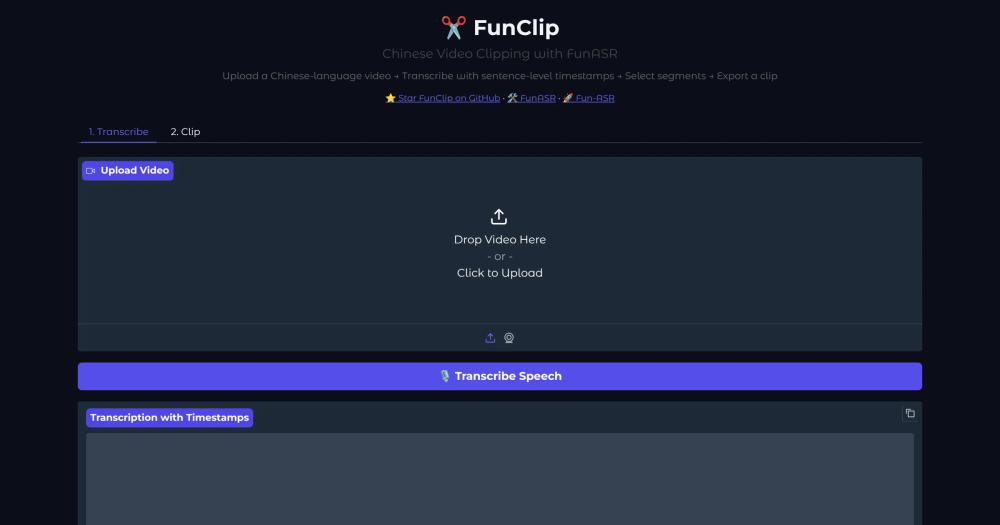
Generate accurate video clips by selecting text or speakers from local AI transcripts, with SRT subtitle output and MIT-licensed self-hosting.

Visit websiteGitHub6.4K stars
image of FunClip
TL;DR

FunClip is a local, MIT-licensed video transcription and clipping tool that uses the FunASR Paraformer speech recognition models to produce timestamped transcripts, then lets you select text segments or speakers to clip. It replaces paid cloud transcription services like Trint and Taption, running entirely on your own machine via a Gradio web UI with no per-minute billing. Best for developers, researchers, and content creators processing Chinese or multilingual video who want local control over their transcription pipeline.

Read the full breakdownHide the full breakdownWho it is for, how it works, trade-offs, the quick start and the FAQ
who it's for

Who FunClip is for#

Content creators clipping Chinese-language video highlights

Upload a long interview, conference talk, or podcast episode, run ASR, then select the specific sentences you want to keep. FunClip generates the clipped video and its SRT file in one step, without needing a separate editing tool for basic cuts.

Skip if:

If your source video is primarily English and you need the highest possible ASR accuracy, a Whisper-based tool may produce better transcripts for the clipping step.

Researchers and journalists handling sensitive footage

All processing runs locally with no external API calls for the core ASR and clipping workflow. Footage from interviews, legal proceedings, or proprietary corporate content stays on your machine throughout the entire process.

Skip if:

Skip FunClip if you need cloud collaboration on transcripts, where multiple editors review and annotate the same video remotely in a shared workspace.

Developers building multilingual video processing pipelines

FunClip's command-line interface supports scripted recognition and clipping as separate stages, making it composable with other Python tooling. The Gradio service can also run on a dedicated server and be accessed via browser over a LAN using the listen flag.

Skip if:

If you need real-time streaming transcription rather than file-based batch processing, FunClip is not designed for that use case.

Teams using LLM-driven video summarization

FunClip passes the full SRT subtitle file to a connected LLM (Qwen, GPT, or MiniMax M2.7) and uses the model's output to automatically select and clip the most relevant segments. This eliminates manual segment selection for long recordings where you want an AI-generated highlight reel.

Skip if:

LLM-assisted clipping requires an API key for the chosen LLM provider. If you need a fully offline pipeline with no external API calls, use standard transcript-based clipping instead.

the problem

The problem it solves#

Cloud transcription and clipping tools bill by the minute and require uploading footage to third-party servers. For teams handling confidential interviews, research sessions, or sensitive video content, that data exposure is a real problem. Services like Trint and Taption charge subscription fees that compound quickly for anyone transcribing more than a few hours per month.

Manual clipping without transcription is slow: you watch the video, mark in and out points, export, and repeat for every segment. When the footage is in a language with limited tooling, or when you need to clip a specific speaker rather than a specific time range, the problem gets worse. Most paid tools offer no speaker-based clipping at all.

how FunClip solves it

How it solves it#

FunASR Paraformer Speech Recognition

Uses Alibaba's Paraformer-Large model, one of the highest-accuracy open-source Chinese ASR models with over 13 million downloads on Modelscope. Produces sentence-level timestamps that feed directly into the clipping workflow, so the text you select maps precisely to the video segment.

Speaker Diarization and Speaker-Based Clipping

Integrates the CAM++ speaker recognition model to identify individual speakers in the video. Once the transcript is labeled by speaker ID, you can clip all segments from a specific speaker (for example, 'spk0') or combine multiple speakers into a single export.

LLM-Assisted Smart Clipping

Connects to large language models including the Qwen and GPT series and MiniMax M2.7 to automatically select the most relevant segments from the transcript. You provide a prompt; FunClip passes the SRT subtitles to the LLM, which returns timestamps for the clip. The 'AI Clip' button applies those timestamps directly.

SRT Subtitle Generation

Automatically generates two SRT files on each clip: the full-video subtitle file and a targeted subtitle file for the clipped segment. Optional ffmpeg and ImageMagick dependencies let you burn subtitles directly into the exported video.

Multilingual and Multi-Model Support

Supports Chinese (default Paraformer), English (Paraformer English model), and multilingual audio including Japanese and 7 Chinese dialect groups via Fun-ASR-Nano. SenseVoice adds emotion recognition and audio event detection on top of standard speech-to-text output.

Hotword Customization

Uses SeACo-Paraformer to accept user-specified hotwords during ASR, which improves accuracy on entity names, brand names, and technical terms that general models frequently misrecognize. Hotwords are set before recognition and apply to the full transcript.

strengths · trade-offs

Strengths and trade-offs#

Strengths

  • Fully local processing with no data uploadVideo files are processed entirely on the local machine. No footage is sent to external servers, which matters for interviews, research footage, or any content that cannot leave a controlled environment. Unlike Trint or Taption, there is no cloud storage dependency and no account required.
  • MIT license with no usage restrictionsThe source code is MIT licensed, meaning you can run it commercially, modify it, and integrate it into larger pipelines without licensing fees. The bundled Paraformer-Large and CAM++ model weights use Apache 2.0; check the applicable model page before redistribution.
  • Active development with versioned releasesVersion 2.1.1 shipped in August 2026, with code pushed as recently as August 3, 2026. The 2.1.0 release introduced a formal versioned release track with checksum-protected archives for stable rollbacks. The project has 6,141 stars and 736 forks on GitHub.
  • Text-based and speaker-based clipping in one toolMost transcription tools let you select time ranges. FunClip lets you select by the actual recognized text or by speaker ID, which is faster for long interviews or multi-speaker recordings where you want a specific person's segments without scrubbing through timecode.

Trade-offs

  • -Local machine must handle ASR model inferenceRunning Paraformer-Large locally requires enough CPU or GPU memory to load a full ASR model. Lightweight edge machines will be slow. Fun-ASR-Nano is available for smaller hardware but does not provide character-level timestamps, which limits precise text-based clipping.
  • -Python environment setup requiredInstallation requires cloning the repository, installing Python dependencies from requirements.txt, and optionally installing ffmpeg and ImageMagick for subtitle burn-in. There is no one-click installer or Docker image in the official instructions. Users unfamiliar with Python environments will need to follow the setup steps carefully.
  • -Primary ASR strength is Chinese, not EnglishThe default Paraformer-Large model is trained for Chinese ASR. English is supported via a separate model flag and Fun-ASR-Nano extends to Japanese and dialect groups, but English accuracy does not match specialized English ASR models like Whisper large-v3 for non-Chinese content.
versus alternatives

FunClip vs alternatives#

FunClip vs Trint

Trint is a cloud-based transcription and collaborative editing platform. FunClip is a local, open-source alternative that runs entirely on your own hardware with no footage upload.

FeatureFunClipTrint
LicenseMITProprietary
HostingSelf-hosted, localCloud only
PricingFree (self-hosted)Subscription
Chinese ASRParaformer-Large (high accuracy)General multilingual
Speaker diarizationYes (CAM++ model)Yes
LLM-assisted clippingYesNo
Offline processingYesNo

FunClip is the stronger choice when your footage cannot leave your own machine, when you process significant volumes of Chinese-language video, or when per-minute cloud billing is a concern. Trint is worth considering when you need collaborative editing where multiple team members review and annotate transcripts in a shared browser-based workspace with a polished editor and no local setup.

FunClip vs Taption

Taption is a cloud transcription service with Chinese language support and video subtitle tools. FunClip runs locally and covers the same core workflow: speech-to-text, subtitle generation, and segment selection.

FeatureFunClipTaption
LicenseMITProprietary
HostingSelf-hostedCloud
PricingFreeSubscription
Offline processingYesNo
Hotword customizationYes (SeACo-Paraformer)Limited
LLM clippingYesNo

FunClip's offline processing and hotword customization are advantages over Taption for users handling sensitive content or needing to tune ASR accuracy for specific domain vocabulary. Taption offers a more polished collaborative editing experience and requires no local setup, which suits teams that prefer a managed browser tool.

FunClip vs Exemplary AI

Exemplary AI is an AI-powered video processing service with transcription, clipping, and content repurposing features. FunClip focuses narrowly on transcription-driven clipping with speaker diarization.

FeatureFunClipExemplary AI
LicenseMITProprietary
HostingSelf-hostedCloud
PricingFreeSubscription
Speaker-based clippingYesLimited
Data stays localYesNo
Content repurposingNoYes

Exemplary AI offers broader content repurposing features beyond clipping, such as generating clips for multiple social formats in one step. FunClip is the better choice when local data control is the priority or when you specifically need speaker-based segment selection rather than format-based repurposing.

install · quick start

Quick start#

bash
Install FunClip by cloning the repository and installing Python dependencies.
```bash
git clone https://github.com/modelscope/FunClip.git
cd FunClip
pip install -r ./requirements.txt
python funclip/launch.py
```
tech stack · detected from GitHub

What it's built on#

Languages
Python
frequently asked

FAQ#

Is FunClip free to use?

Yes. FunClip's source code is MIT licensed and free to run on your own hardware. There are no per-minute fees or subscription tiers. Model weights (Paraformer-Large, SeACo-Paraformer, CAM++) are available under Apache 2.0. Running it locally costs only your own compute.

Does FunClip work with English video?

Yes, with caveats. Pass -l en to load the Paraformer English model, or use Fun-ASR-Nano for multilingual input including English, Japanese, and Chinese dialect groups. For text-based clipping specifically, use Paraformer rather than Fun-ASR-Nano, since the current Nano checkpoint does not provide reliable character-level timestamps.

Can I run FunClip on a server and access it remotely?

Yes. Start the Gradio service with --listen to bind all network interfaces for LAN access. Add --share to create a public Gradio tunnel for access from outside the local network. Without the share flag, the service stays private to your local network.

What video file formats does FunClip support?

FunClip processes video files through ffmpeg, which handles most common formats including MP4, MKV, MOV, and AVI. The core transcription step works on the audio extracted from the video file. Subtitle burn-in into the output video requires both ffmpeg and ImageMagick.

How does FunClip compare to Whisper-based transcription tools?

FunClip uses the FunASR Paraformer models rather than Whisper. Paraformer-Large is one of the highest-accuracy Chinese ASR models available, with over 13 million downloads on Modelscope. It also integrates speaker diarization and hotword customization that Whisper does not provide natively. Whisper generally performs better on English and many non-Chinese languages.

also worth a look

Similar open-source tools#

KathaCut

Alternative toKKalakar

Offline AI captions and timeline editor for Malayalam creators

  • 8 GitHub stars
  • GPL-3.0Licence GPL-3.0

video-use

Alternative toDescript

Edit videos by chatting with Claude Code, not clicking menus

  • 29,418 GitHub stars
  • MITLicence MIT

VoiceStudio

Alternative toElevenLabs

Voice cloning, dubbing, and transcription that runs fully offline

  • 78,615 GitHub stars
  • AGPL-3.0Licence AGPL-3.0

whishper

Alternative toHappy Scribe

Local speech-to-text transcription and subtitling with a web UI

  • 3,093 GitHub stars
  • AGPL-3.0Licence AGPL-3.0

FckSignups

InCustomer Support

Open-source tools that work instantly, no signup required

  • 4,511 GitHub stars
  • GPL-3.0Licence GPL-3.0

Vela

Alternative toGoogle Maps

OpenStreetMap and Google data, no account, no Play Services

  • 2,060 GitHub stars
  • GPL-3.0Licence GPL-3.0
by category

Open source tools in these categories#

404

AI & Machine Learning

freeCodeCamp, OpenClaw, REA (Reverse Engineer Anything)
196

Web Development

superpowers, freeCodeCamp, Skills for Real Engineers
35

No-Code & Low-Code

n8n, dify, Langflow
126

Communication & Collaboration

iptv, freeCodeCamp, Excalidraw

Featured

Inbox Zero

Alternative toSuperhuman

AI email assistant that drafts replies and clears your inbox

  • 12,712 GitHub stars
  • AGPL-3.0Licence AGPL-3.0
  • #Email

rakazo

Alternative toGrok Bot

AI teammates you own: your keys, your model, your machine.

  • 4,904 GitHub stars
  • Apache-2.0Licence Apache-2.0
  • #AI Agents

Omnara

Alternative toCClaude Managed Agents

Open-source agent deployment API. Self-host or use Omnara Cloud.

  • 2,957 GitHub stars
  • Apache-2.0Licence Apache-2.0
  • #AI Agents
Feature your project

New open source projects by email

The projects we add and every new guide. Free, unsubscribe any time.

Find open source alternatives to paid software

/
  • Claude Code to OpenCode
  • Jira to Windshift
  • Notion to AppFlowy
  • Slack to Mattermost
  • Linear to GitLab
  • Wispr Flow to Handy
  • CapCut to Concat
  • Grok Bot to rakazo
  • Superhuman to Inbox Zero
  • Airtable to AITable
  • Muse to OpenClaw
  • GitHub Copilot to Cline
  • Datadog to Netdata
  • Microsoft Teams to Rocket.Chat
  • Pinecone to Qdrant
  • Zapier to n8n
  • Devin AI to OpenHands
  • Firebase to Supabase
  • 1Password to KeePassXC
  • Confluence to Docmost
  • Contentful to Strapi
  • Adobe Premiere Pro to Shotcut
  • ChatGPT to AnythingLLM
  • LangSmith to Langfuse
  • Claude Code to OpenCode
  • Jira to Windshift
  • Notion to AppFlowy
  • Slack to Mattermost
  • Linear to GitLab
  • Wispr Flow to Handy
  • CapCut to Concat
  • Grok Bot to rakazo
  • Superhuman to Inbox Zero
  • Airtable to AITable
  • Muse to OpenClaw
  • GitHub Copilot to Cline
  • Datadog to Netdata
  • Microsoft Teams to Rocket.Chat
  • Pinecone to Qdrant
  • Zapier to n8n
  • Devin AI to OpenHands
  • Firebase to Supabase
  • 1Password to KeePassXC
  • Confluence to Docmost
  • Contentful to Strapi
  • Adobe Premiere Pro to Shotcut
  • ChatGPT to AnythingLLM
  • LangSmith to Langfuse