Open Source Alternatives
  • Alternatives
  • Categories
    Categories by size882 projects
    • Developer Tools461
    • AI & Machine Learning404
    • Web Development196
    • Business & Productivity191
    • Communication & Collaboration126
    • Security & Monitoring126
    • IT Management123
    • Product & Project Management106
    • Cloud & Hosting105
    • Data & Analytics104
    Browse all 21 categoriesLLMOps & AI Tooling, Design & Creative and 9 more
  • Blog
  • Advertise
SearchNotion, Slack, password manager.../
Submit
Open Source Alternatives
  • Alternatives
    • Developer Tools461
    • AI & Machine Learning404
    • Web Development196
    • Business & Productivity191
    • Communication & Collaboration126
    • Security & Monitoring126
    • Browse all 21 categories
  • Blog
  • Advertise
Submit your project

New open source projects by email

The projects we add and every new guide. Free, unsubscribe any time.

Open Source Alternatives LogoOpen Source Alternatives

Handpicked Open Source Alternatives to Paid Softwares

Product

  • Categories
  • Tag
  • Advertise

Resources

  • Blog
  • Collection
  • Submit

Company

  • Privacy Policy
  • Terms of Service
  • Refund Policy
  • Sitemap

Alternatives

  • Claude Code
  • Jira
  • Notion
  • Slack
  • Linear
  • Wispr Flow
  • All alternatives
© 2026 Open Source Alternatives. All rights reserved.
Open SourceAlternatives
Home/Categories/AI & Machine Learning/Agent Cache Web
icon of Agent Cache Web

Agent Cache Web

Open source alternative to Context7

  • 11 stars
  • MIT
  • Active this week
  • Last commit 5 days ago

Last verified Oct 20, 2026

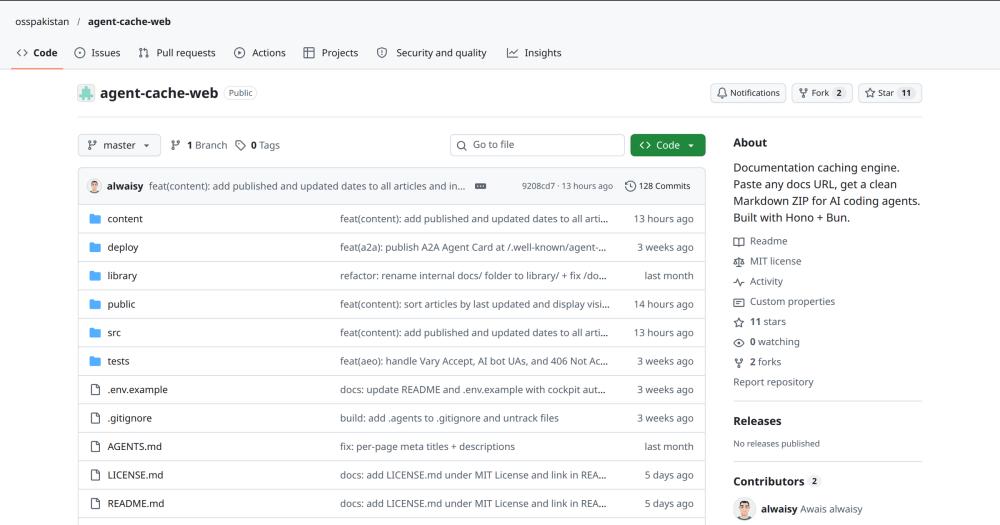
Convert any documentation URL into a Markdown ZIP bundle for AI coding agents, with automated page discovery and structured extraction.

Visit websiteGitHub11 starsDeploy on Hostinger
image of Agent Cache Web
TL;DR

Agent Cache Web Agent Cache converts any documentation URL into a structured Markdown ZIP bundle for AI coding agents. It probes docs sites for llms.txt, sitemaps, and navigation data, crawls discovered pages, and packages the output with an INDEX.md, a page hierarchy map, and agent-oriented metadata. MIT licensed and self-hosted, it replaces paid AI context services and custom scraper scripts for teams building coding agents that need offline, version-stable documentation bundles.

Read the full breakdownHide the full breakdownWho it is for, how it works, trade-offs, the quick start and the FAQ
who it's for

Who Agent Cache Web is for#

AI developers building coding agents

Developers building LLM-powered coding assistants or code-generation workflows need documentation for the libraries and APIs the agent writes against. Agent Cache bundles any docs site into local Markdown files the agent can load at runtime, without writing a custom scraper or maintaining a documentation mirror.

Skip if:

The documentation you need is already available as a pre-built llms.txt or direct Markdown download from the source. In that case, extraction adds no value and you can point the agent at the source file directly.

Developer-tooling teams automating documentation sync

Teams building internal developer platforms or IDEs with embedded documentation features can use Agent Cache's JSON API to programmatically create and retrieve documentation bundles. The /api/jobs endpoint and the published OpenAPI specification support scripted integration into CI pipelines and documentation sync workflows.

Skip if:

The documentation you need is behind authentication or on sites that block automated requests. Agent Cache's extraction is best effort and does not handle authenticated sessions.

Open source contributors exploring LLM context tooling

Developers evaluating how to provide accurate context to LLMs for coding tasks can self-host Agent Cache to inspect and modify the full extraction pipeline. The MIT license permits forks and modifications. The cockpit dashboard provides visibility into extraction success rates and strategy choices per job.

Skip if:

You need a managed service with support guarantees or an SLA. Agent Cache is a self-hosted tool with no hosted tier and no stated support policy.

the problem

The problem it solves#

AI coding agents need accurate documentation to write correct code for the libraries and APIs they use. The pain is that documentation lives on the web: paginated across dozens of pages, often rendered by JavaScript, and updated without notice. Handing an agent a docs URL is not useful; the agent needs the content as a set of readable files.

Fetching and converting documentation pages manually is slow and the result is stale within days. Commercial context services charge per call or per token to convert web pages for AI context, which adds up quickly for teams running many agents against varied documentation sources. Teams without a commercial contract patch together scrapers and ad-hoc scripts that break when sites update their navigation or move to JavaScript rendering.

how Agent Cache Web solves it

How it solves it#

URL probe and page discovery

Agent Cache starts each extraction by probing the submitted URL for llms.txt, llms-full.txt, raw Markdown endpoints, GitHub source links, and sitemaps. It reads platform-specific navigation data where supported, then falls back to parsing HTML navigation and links. The discovered page count reflects pages found in the navigation tree, not a fixed catalog.

Multi-strategy Markdown conversion

When a docs site provides Markdown at source, Agent Cache uses it. Otherwise it fetches HTML, strips navigation bars, headers, and footers, and converts the main content to Markdown. Code blocks and links are preserved where the source exposes them. Each converted page includes its title, source URL, and section in front matter.

Structured ZIP bundle output

Completed extractions produce a ZIP with a numbered folder structure that matches the source site's navigation hierarchy. The bundle includes INDEX.md, _map.json, meta.yaml, and numbered section folders with page files. Section and page names are stable across re-extractions of the same source, making them safe to reference from agent configuration files.

Live extraction streaming and job logs

Each extraction job streams phase, log, and page-progress events via Server-Sent Events at /dingdong/{job-id}/stream. Events are saved to object storage so recorded output can be replayed after the original request ends. A raw text log is available at /dingdong/{job-id}/raw-log. If a job fails, the UI shows a readable explanation with technical error details.

Admin cockpit dashboard

The password-gated /cockpit dashboard shows total crawl jobs, pipeline success rates, cached archive volumes, feedback submissions, and live visitor metrics. A separate analytics view provides real-time visitor tracking with client-type detection for human visitors, AI agents, and bots. The jobs view lists paginated crawl records with strategies, page counts, and ZIP sizes.

JSON API with OpenAPI specification

Agent Cache exposes JSON endpoints for creating jobs, listing completed jobs, reading job status, retrieving navigation trees, and probing URLs. The full API contract is published at /openapi.json. A POST to /api/jobs with a URL body starts an extraction and returns links to the job status, event stream, tree, and ZIP download.

strengths · trade-offs

Strengths and trade-offs#

Strengths

  • MIT licensed with full self-hostingThe MIT license allows running Agent Cache on your own infrastructure for any purpose, including internal team and commercial use, with no per-call fees. Bundles are stored in your own Cloudflare R2 bucket and your own database, not on a third-party server. The pipeline is open for modification and redistribution.
  • Handles modern documentation signals nativelyThe extraction engine checks for llms.txt and llms-full.txt before falling back to HTML conversion. Documentation sites that have already prepared machine-readable formats get fast, accurate extraction. When a GitHub edit link is present on a page, Agent Cache fetches the raw Markdown directly instead of converting HTML.
  • Public docs library with bundle reuseEvery completed extraction is visible in the public docs library at /docs, grouped by source domain with the newest version shown first. Teams can share bundle links without setting up a separate file server. The library surfaces previously completed extractions so repeated requests for the same docs domain can reuse existing bundles.

Trade-offs

  • -Cloudflare R2 is a hard dependencyAgent Cache stores job logs, Markdown files, and ZIP archives in a Cloudflare R2 bucket. There is no local-filesystem-only mode. You need a Cloudflare account, an R2 bucket, and an access key and secret before the server can complete any extraction job. Self-hosters who want to avoid external vendor dependencies have no alternative storage backend.
  • -Extraction is best effort on blocked sitesThe README states that a site that blocks requests or hides its navigation from plain HTTP can produce an incomplete bundle or fail before crawling starts. Agent Cache does not run a headless browser, so JavaScript-rendered navigation is not accessible. The page count shown for a job is discovered pages, not a guarantee that every page has full content.
  • -Very early project with limited communityAgent Cache was created in September 2026 and has 11 stars and 2 forks as of October 2026. The architecture documents note that design decisions in the reference files may differ from the current implementation. Teams adopting it for production workflows should expect configuration and API changes with no stated stability policy.
versus alternatives

Agent Cache Web vs alternatives#

Agent Cache vs Firecrawl

Both tools convert web pages to Markdown, but they serve different workflows. Firecrawl is a general-purpose web scraping and crawling API; Agent Cache is purpose-built for documentation bundling for AI coding agents.

FeatureAgent CacheFirecrawl
LicenseMITMIT (self-hosted)
Self-hostingYesYes
Output formatStructured ZIP with INDEX.md and metadataJSON or Markdown per page
Docs-specific signalsllms.txt, sitemap, nav-tree parsingNot specialized
Storage dependencyCloudflare R2 requiredPostgreSQL and Redis required
Cloud APINonePaid cloud tier available

Agent Cache is the better choice when you need a complete, organized documentation bundle rather than raw page output. Its navigation-tree extraction, structured ZIP format, and metadata files are purpose-built for handing documentation to an AI coding agent. Firecrawl's strength is breadth: it handles more site types including complex JavaScript SPAs and has mature client SDKs in multiple languages. If your need is general-purpose crawling rather than documentation bundling, Firecrawl is the more proven tool.

Agent Cache vs Context7

Context7 is a managed MCP server that provides library documentation to coding agents on demand; Agent Cache is a self-hosted extraction tool that creates local documentation bundles.

FeatureAgent CacheContext7
DeploymentSelf-hostedManaged service
LicenseMITProprietary
Documentation coverageAny URL you submitPre-indexed library catalog
Offline accessYes, via local ZIPNo
CostFree (self-hosted)Paid API

Context7 requires no infrastructure and is optimized for MCP-compatible coding agents. Agent Cache requires running your own server but lets you bundle documentation from any URL, including sources Context7 does not index, at a version you control. For teams that need documentation from sources outside Context7's catalog, or who want version-locked bundles that do not change between agent runs, Agent Cache fills that gap.

install · quick start

Quick start#

bash
Self-hosting starts by cloning the repository and installing dependencies; configure Cloudflare R2 credentials and a Tavily API key in .env before starting the server.
```bash
git clone https://github.com/osspakistan/agent-cache-web
bun install
bun run start
```
tech stack · detected from GitHub

What it's built on#

Languages
JavaScriptTypeScript
Infrastructure
AWS
frequently asked

FAQ#

Can I self-host Agent Cache?

Yes. Agent Cache is MIT licensed and built for self-hosting. You need Bun, a Cloudflare R2 bucket for artifact storage, and a SQLite database (or Turso for a remote database). Configure the required environment variables in .env and run bun run start. Docker and Caddy configuration files are provided in the deploy/ directory.

What external services does Agent Cache require?

Cloudflare R2 is required for storing logs, Markdown files, and ZIP archives. A Tavily API key is needed for the docs resolver. OpenRouter is optional; without it, bundle metadata uses a local fallback based on product name and page titles. Set ADMIN_PASSWORD to secure the /cockpit dashboard.

Does Agent Cache work with JavaScript-rendered documentation sites?

Agent Cache requests HTML directly and does not run a headless browser. Sites that expose content in plain HTTP responses, provide llms.txt, or link to Markdown sources on GitHub extract well. Sites that require JavaScript execution to render their navigation may produce incomplete bundles or fail before crawling starts.

What happens when a documentation page fails to extract?

The crawler records a note in that page's Markdown file and continues with the remaining pages. The discovered page count for a job is not a guarantee that every page has full content. The job record retains its status, selected strategy, page count, ZIP size, and timestamps for later review.

Are extracted documentation bundles visible to the public?

Completed extraction jobs are listed in the public docs library at /docs, grouped by source domain. If your deployment is publicly accessible, any user can browse completed bundles. For private documentation workflows, restrict the /docs and /cockpit routes at the infrastructure level before exposing the server.

also worth a look

Similar open-source tools#

Hermes Agent

Featured

Alternative toGrok Bot

Self-hosted AI agent: persistent memory, multi-channel chat, model choice.

  • 255,514 GitHub stars
  • MITLicence MIT

Vllm

Alternative toTogether AI

High-throughput LLM inference server with OpenAI-compatible API

  • 94,441 GitHub stars
  • Apache-2.0Licence Apache-2.0

LocalAI

Alternative toOpenAI API

Self-hosted AI runtime: any model, any modality, any hardware.

  • 49,798 GitHub stars
  • MITLicence MIT

Comet

InAI & Machine Learning

Phase-guarded workflow layer for AI coding agents, with eval built in

  • 3,206 GitHub stars
  • MITLicence MIT

Orgtree

Alternative toConductor

Desktop canvas for persistent multi-agent AI teams, Windows-only

  • 168 GitHub stars
  • MITLicence MIT

iFixAi

Alternative toZenity

Self-hosted AI agent auditing across 60 trust and safety inspections.

  • 30,695 GitHub stars
  • Apache-2.0Licence Apache-2.0
by category

Open source tools in these categories#

404

AI & Machine Learning

freeCodeCamp, OpenClaw, REA (Reverse Engineer Anything)
461

Developer Tools

REA (Reverse Engineer Anything), superpowers, Skills for Real Engineers
101

LLMOps & AI Tooling

Hermes Agent, OpenCode, MarkItDown
Hostinger

Run Agent Cache Web on your own server

Self-host Agent Cache Web on a Hostinger VPS.

Deploy on Hostinger

Featured

Omnara

Alternative toCClaude Managed Agents

Open-source agent deployment API. Self-host or use Omnara Cloud.

  • 2,957 GitHub stars
  • Apache-2.0Licence Apache-2.0
  • #AI Agents

rakazo

Alternative toGrok Bot

AI teammates you own: your keys, your model, your machine.

  • 4,904 GitHub stars
  • Apache-2.0Licence Apache-2.0
  • #AI Agents

Inbox Zero

Alternative toSuperhuman

AI email assistant that drafts replies and clears your inbox

  • 12,712 GitHub stars
  • AGPL-3.0Licence AGPL-3.0
  • #Email
Feature your project

New open source projects by email

The projects we add and every new guide. Free, unsubscribe any time.

Find open source alternatives to paid software

/
  • Claude Code to OpenCode
  • Jira to Windshift
  • Notion to AppFlowy
  • Slack to Mattermost
  • Linear to GitLab
  • Wispr Flow to Handy
  • CapCut to Concat
  • Grok Bot to rakazo
  • Superhuman to Inbox Zero
  • Airtable to AITable
  • Muse to OpenClaw
  • GitHub Copilot to Cline
  • Datadog to Netdata
  • Microsoft Teams to Rocket.Chat
  • Pinecone to Qdrant
  • Zapier to n8n
  • Devin AI to OpenHands
  • Firebase to Supabase
  • 1Password to KeePassXC
  • Confluence to Docmost
  • Contentful to Strapi
  • Adobe Premiere Pro to Shotcut
  • ChatGPT to AnythingLLM
  • LangSmith to Langfuse
  • Claude Code to OpenCode
  • Jira to Windshift
  • Notion to AppFlowy
  • Slack to Mattermost
  • Linear to GitLab
  • Wispr Flow to Handy
  • CapCut to Concat
  • Grok Bot to rakazo
  • Superhuman to Inbox Zero
  • Airtable to AITable
  • Muse to OpenClaw
  • GitHub Copilot to Cline
  • Datadog to Netdata
  • Microsoft Teams to Rocket.Chat
  • Pinecone to Qdrant
  • Zapier to n8n
  • Devin AI to OpenHands
  • Firebase to Supabase
  • 1Password to KeePassXC
  • Confluence to Docmost
  • Contentful to Strapi
  • Adobe Premiere Pro to Shotcut
  • ChatGPT to AnythingLLM
  • LangSmith to Langfuse